
imdinu/apple-mail-mcp
БесплатноНе проверенFast MCP server for Apple Mail — 87x faster email fetching via batch JXA and FTS5 search index for ~2ms body search. 6 tools: list accounts/mailboxes, get email

Описание
Fast MCP server for Apple Mail — 87x faster email fetching via batch JXA and FTS5 search index for ~2ms body search. 6 tools: list accounts/mailboxes, get emails with filters, full-text search across all scopes, and attachment extraction.
README

Python 3.11+ License: GPL v3 macOS MCP Code style: ruff CI
The only Apple Mail MCP server with full-coverage body search — reliable on large mailboxes where AppleScript-based servers timeout. 8 tools for reading, searching, and extracting email content.
Read the docs for the full guide.
Quick Start
pipx install apple-mail-mcp
Add to your MCP client:
{
  "mcpServers": {
    "mail": {
      "command": "apple-mail-mcp"
    }
  }
}
Build the Search Index (Recommended)
# Requires Full Disk Access for Terminal
# System Settings → Privacy & Security → Full Disk Access → Add Terminal

apple-mail-mcp index --verbose
Configure (Optional)
apple-mail-mcp init # writes ~/.apple-mail-mcp/config.toml
Writes a commented config file you can edit to set defaults like your
primary account or mailbox. Every key has a matching APPLE_MAIL_* env
var if you prefer environment-based config. See
Configuration
for the full schema and precedence rules.
Tools
| Tool | Purpose |
|---|---|
list_accounts() |
List email accounts |
list_mailboxes(account?) |
List mailboxes |
get_emails(filter?, limit?) |
Get emails — all, unread, flagged, today, last_7_days |
get_email(message_id) |
Get single email with full content + attachments |
search(query, scope?, before?, after?, highlight?) |
Search — all, subject, sender, body, attachments |
get_email_links(message_id) |
Extract links from an email |
get_email_attachment(message_id, filename) |
Extract attachment content |
get_attachment(message_id, filename) |
Deprecated — use get_email_attachment() |
Performance
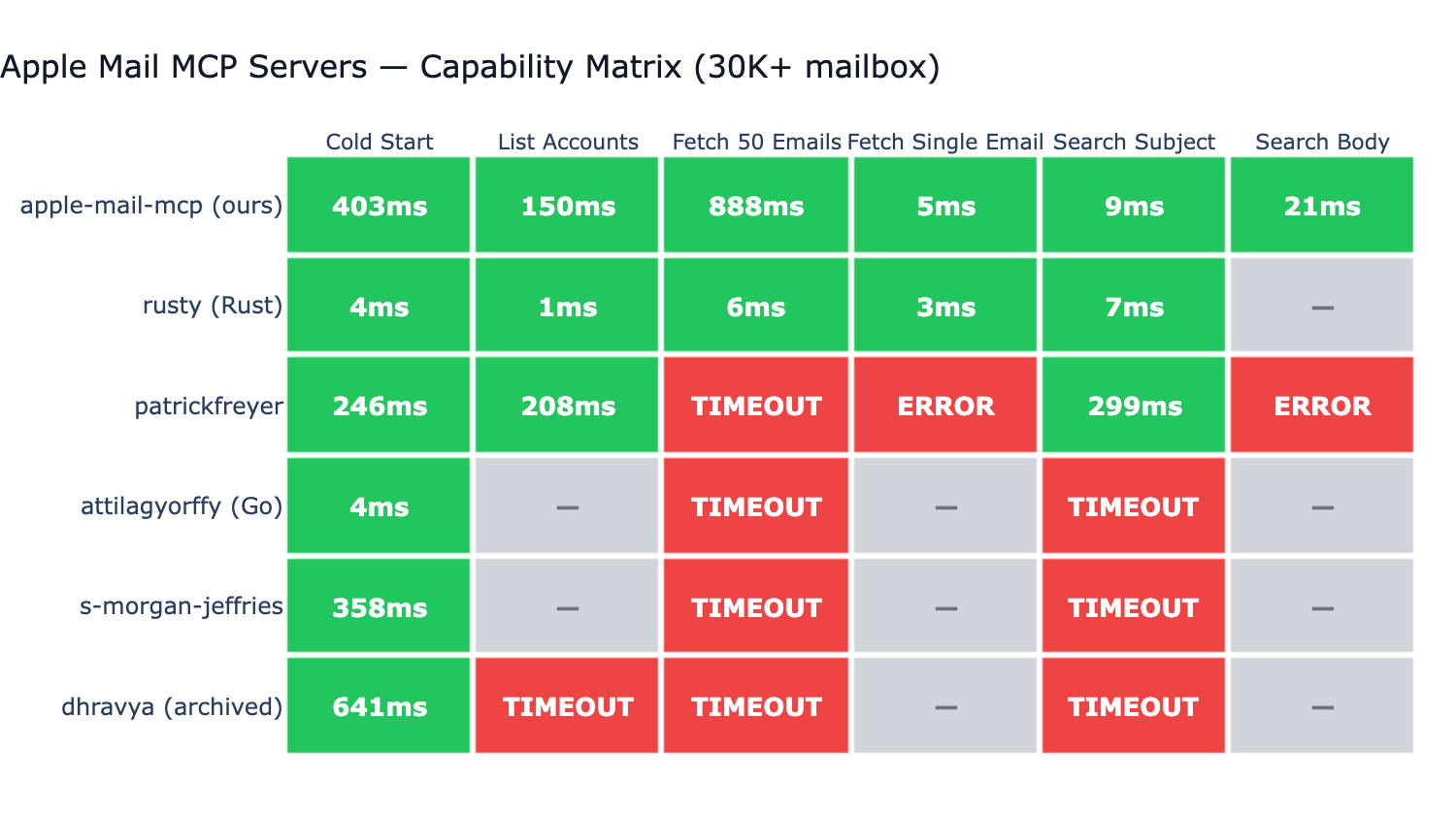
Tested against 6 other Apple Mail MCP servers on a real ~73K-message mailbox:
- Only server with full-coverage body search. Most competitors don't support body search at all; the one that does (BastianZim) live-scans only the 5000 most recent messages — silent miss on anything older. Our FTS5 index covers the entire mailbox.
- ~3ms single email fetch via disk-first
.emlxreading (no JXA round-trip). - ~1ms
list_accountsand ~5ms 50-email listing via direct Envelope-Index SQLite reads (0.4+) — same path BastianZim/rusty/pl-lyfx use, with JXA as the correctness fallback. - ~7ms subject search via FTS5 — competitive with native Rust on the same operation.
- Reliable across all 6 benchmarked operations on a 73K mailbox; AppleScript-based servers timeout, throw syntax errors, or skip operations they don't support.
Configuration
Apple Mail MCP works out of the box. To customize defaults, run
apple-mail-mcp init to generate a config.toml template — or use
the matching APPLE_MAIL_* environment variables. See the
Configuration docs
for the full schema and the CLI > env > file > default precedence.
Per-client env overrides via the MCP client's launch config also work:
{
  "mcpServers": {
    "mail": {
      "command": "apple-mail-mcp",
      "args": ["--watch"],
      "env": {
        "APPLE_MAIL_DEFAULT_ACCOUNT": "Work"
      }
    }
  }
}
CLI Usage
All tools are also available as standalone CLI commands (no MCP server needed):
apple-mail-mcp search "quarterly report" --scope subject
apple-mail-mcp search "invoice" --after 2026-01-01 --limit 10
apple-mail-mcp read 12345
apple-mail-mcp emails --filter unread --limit 10
apple-mail-mcp accounts
apple-mail-mcp mailboxes --account Work
apple-mail-mcp extract 12345 invoice.pdf
All commands output JSON. Generate a Claude Code skill for CLI-based access:
apple-mail-mcp integrate claude > ~/.claude/skills/apple-mail.md
Development
git clone https://github.com/imdinu/apple-mail-mcp
cd apple-mail-mcp
uv sync
uv run ruff check src/
uv run pytest
License
GPL-3.0-or-later
Установка imdinu/apple-mail-mcp
У этого сервера нет опубликованного пакета — он собирается из исходников. Открой репозиторий и следуй инструкции в README.
▸ github.com/imdinu/apple-mail-mcpFAQ
imdinu/apple-mail-mcp MCP бесплатный?
Да, imdinu/apple-mail-mcp MCP бесплатный — установка в пару кликов через Unyly без оплаты.
Нужен ли API-ключ для imdinu/apple-mail-mcp?
Нет, imdinu/apple-mail-mcp работает без API-ключей и переменных окружения.
imdinu/apple-mail-mcp — hosted или self-hosted?
Self-hosted: сервер запускается локально на твоей машине командой из раздела установки.
Как установить imdinu/apple-mail-mcp в Claude Desktop, Claude Code или Cursor?
Открой imdinu/apple-mail-mcp на unyly.org, выбери вкладку своего клиента (Claude Desktop, Claude Code, Cursor) и нажми Install — конфиг сгенерируется автоматически, без правки JSON.
Похожие MCP
Gmail
Read, send and search emails from Claude
 автор: Google
Slack
Send, search and summarize Slack messages
 автор: Slack
Runbear
No-code MCP client for team chat platforms, such as Slack, Microsoft Teams, and Discord.
Discord Server
A community discord server dedicated to MCP by [Frank Fiegel](https://github.com/punkpeye)
Compare imdinu/apple-mail-mcp with
Не уверен что выбрать?
Найди свой стек за 60 секунд
Автор?
Embed-бейдж для README
Похожее
Все в категории communication