
Jakubs Tools
БесплатноНе проверенMCP server for infrastructure discovery and remote management, enabling SSH command execution, file transfer, log tailing, and machine/service inventory with a

Описание
MCP server for infrastructure discovery and remote management, enabling SSH command execution, file transfer, log tailing, and machine/service inventory with a companion web dashboard.
README
MCP server + web dashboard for infrastructure discovery and remote management. Exposes tools to AI agents via the Model Context Protocol for SSH command execution, file transfer, log tailing, and machine/service inventory. A companion web UI provides a browser-based dashboard for the same data.
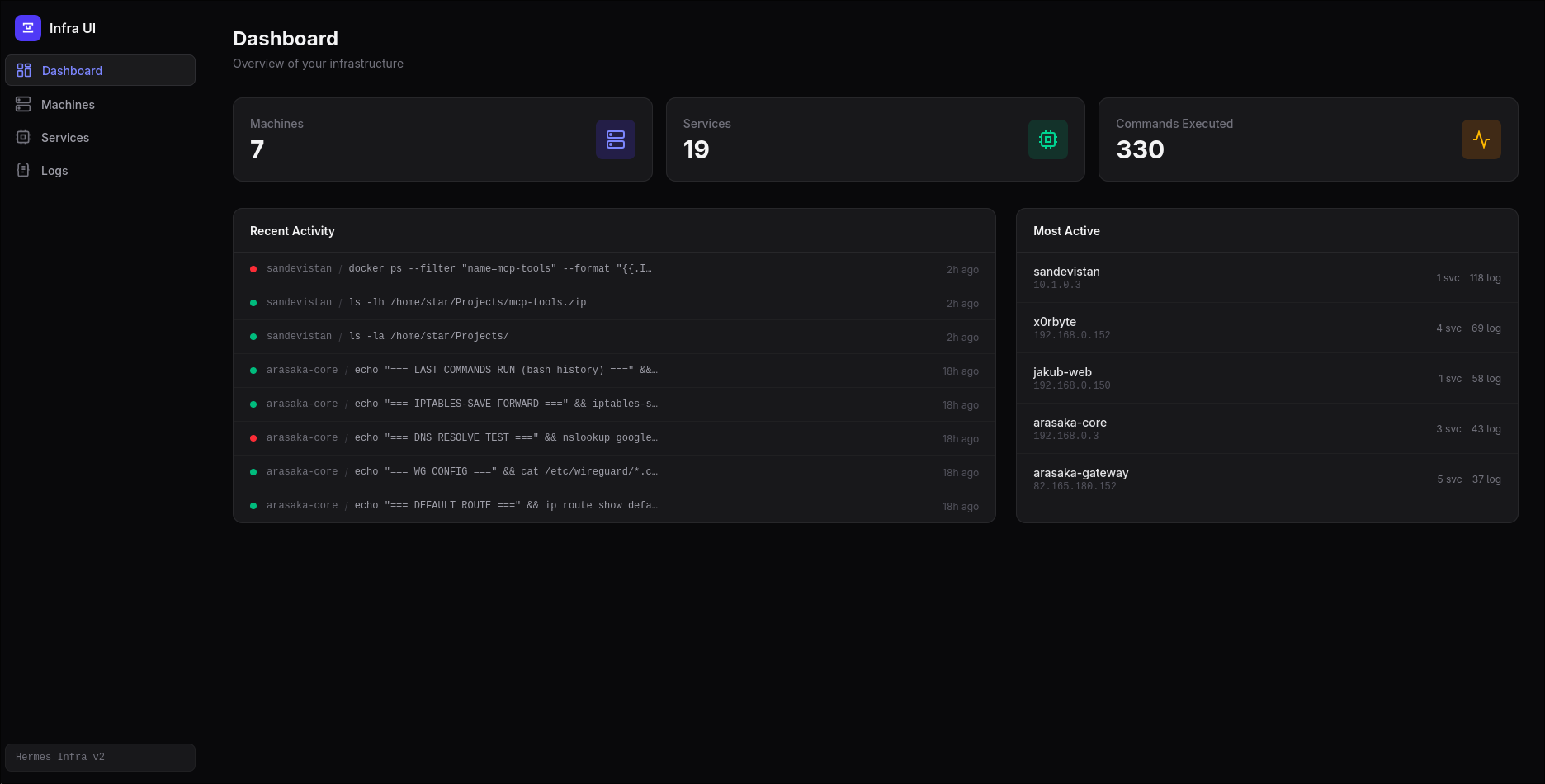
All components — the MCP server, REST API, and dashboard — share a single SQLite database. Machines and services registered in the web UI are immediately available to the MCP tools, and commands the agent executes appear in the dashboard's activity feed.
Docker
docker compose up -d
# → Dashboard: http://localhost:8082
The database is persisted in ./data on the host. Configure your MCP client:
{
  "mcpServers": {
    "jakubs-mcp-tools": {
      "command": "docker",
      "args": ["compose", "run", "--rm", "mcp"]
    }
  }
}
Running Without Docker
# Clone and install
git clone <repo-url>
cd mcp-tools
cp .env.example .env
npm install

# Build
npm run build

# Start the dashboard + API
npm run dev:all
# → UI:  http://localhost:8081
# → API: http://localhost:8082

# Run the MCP server directly
npm run dev
Configuration
| Variable | Default | Description |
|---|---|---|
DB_PATH |
./infra.db |
Path to the SQLite database file |
SSH_TIMEOUT |
10000 |
SSH connection timeout in milliseconds |
ALLOWLIST_ENABLED |
true |
Set to false to allow any SSH command without restriction |
ALLOWED_COMMANDS |
(built-in list) | Comma-separated allowed command prefixes (overrides defaults) |
Features
MCP Tools (for AI agents)
| Tool | Description |
|---|---|
get_all_machines |
List all machines and their microservices |
get_machine_by_id |
Look up a specific machine by ID |
add_machine |
Register a new machine (hostname, IP, SSH key) |
add_service |
Register a microservice on a machine |
execute_ssh |
Execute a command on a remote machine via SSH |
scp_file |
Upload/download files via SFTP |
tail_logs |
Tail the last N lines of a remote log file |
- Command allowlisting — SSH commands are validated against a configurable allowlist. Set
ALLOWLIST_ENABLED=falsein.envto allow any command without restriction. - Audit trail — every SSH command and SCP transfer is logged with exit code, output, and timestamp.
- Key-based auth — all SSH connections use registered private keys (no passwords).
Web Dashboard
- Dashboard — aggregate stats, recent activity feed, most-active machines
- Machines — table with search, pagination, CRUD modal (hostname, OS, IP, SSH user)
- Services — table with search, machine filter, pagination, CRUD modal (name, URL, port, type, notes)
- Logs — full audit trail with search, machine/status filters, detail view with command output
- Dark theme, responsive (mobile sidebar drawer)
CLI Usage
Each module can be run standalone for testing:
# Query machines
node dist/get_machines.js --all
node dist/get_machines.js --id 1

# Execute a command
node dist/execute_ssh.js --id 1 --cmd "docker ps"

# Transfer a file
node dist/scp.js -i 1 -d to -r /tmp/out.txt -l ./local.txt

# Tail logs
node dist/tail_logs.js -i 1 -p /var/log/syslog -n 100

# Add a machine
node dist/add_entries.js add-machine --hostname web-01 --ip 10.0.0.1 --username root --key ~/.ssh/id_rsa

# Add a service
node dist/add_entries.js add-service --machine-id 1 --name nginx --port 80 --type "Web hosting"
npm Scripts
| Script | Description |
|---|---|
build |
Compile TypeScript (MCP server + API) |
start |
Run the MCP server |
dev |
Build + run MCP server |
dev:ui |
Vite dev server for the dashboard |
dev:api |
Node.js API server (port 8082) |
dev:all |
Run UI + API concurrently |
build:ui |
Production build of the dashboard |
preview:ui |
Preview production dashboard build |
License
MIT
Установка Jakubs Tools
У этого сервера нет опубликованного пакета — он собирается из исходников. Открой репозиторий и следуй инструкции в README.
▸ github.com/Jakub2841/jakubs-mcp-toolsFAQ
Jakubs Tools MCP бесплатный?
Да, Jakubs Tools MCP бесплатный — установка в пару кликов через Unyly без оплаты.
Нужен ли API-ключ для Jakubs Tools?
Нет, Jakubs Tools работает без API-ключей и переменных окружения.
Jakubs Tools — hosted или self-hosted?
Self-hosted: сервер запускается локально на твоей машине командой из раздела установки.
Как установить Jakubs Tools в Claude Desktop, Claude Code или Cursor?
Открой Jakubs Tools на unyly.org, выбери вкладку своего клиента (Claude Desktop, Claude Code, Cursor) и нажми Install — конфиг сгенерируется автоматически, без правки JSON.
Похожие MCP
GitHub
PRs, issues, code search, CI status
 автор: GitHub
Filesystem
Secure file operations with configurable access controls.
Memory
Knowledge graph-based persistent memory system.
Template MCP Server
A CLI tool to create a new Model Context Protocol server project with TypeScript support, dual transport options, and an extensible structure
 автор: mcpdotdirect
Compare Jakubs Tools with
Не уверен что выбрать?
Найди свой стек за 60 секунд
Автор?
Embed-бейдж для README
Похожее
Все в категории development