
Keystone Server
БесплатноНе проверенEnables construction professionals to query project documents with conflict-aware RAG, detect contradictions, and trace change impacts through any MCP client.

Описание
Enables construction professionals to query project documents with conflict-aware RAG, detect contradictions, and trace change impacts through any MCP client.
README
🏛️ Keystone
AEC Project & Document Intelligence Platform
Construction documents constantly contradict each other — one spec says 30 MPa concrete, a drawing says 25. Keystone is the lighttable that catches it. It reads across every spec, drawing, and RFI to surface contradictions other tools hide, and maps the blast radius of every revision before it reaches the site.
TypeScript · Next.js 14 · tRPC · Prisma · PostgreSQL + pgvector · Tailwind · Docker · MCP
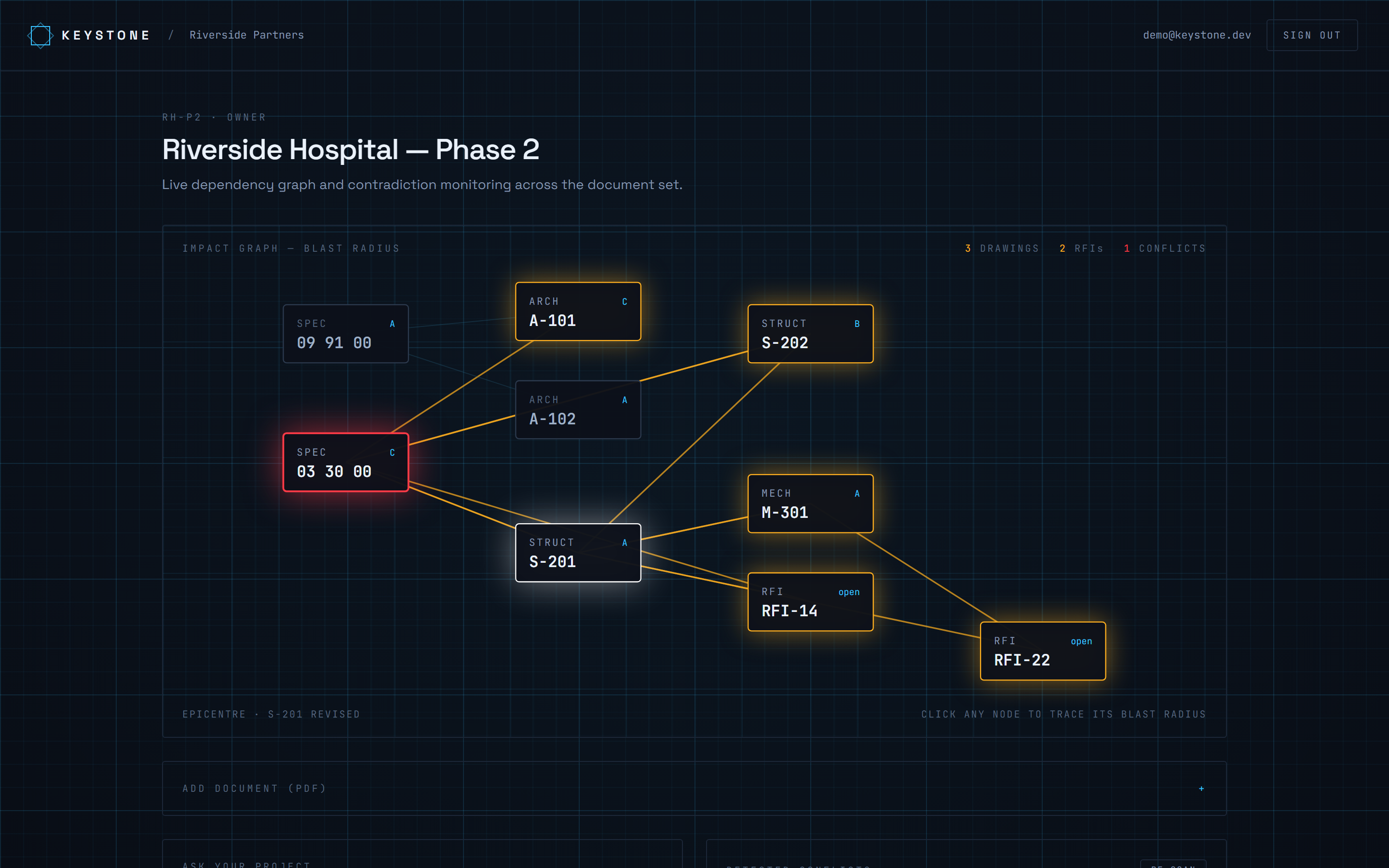
The impact graph: revise a document and the blast radius propagates outward — affected drawings and RFIs in amber, the contradiction in red.
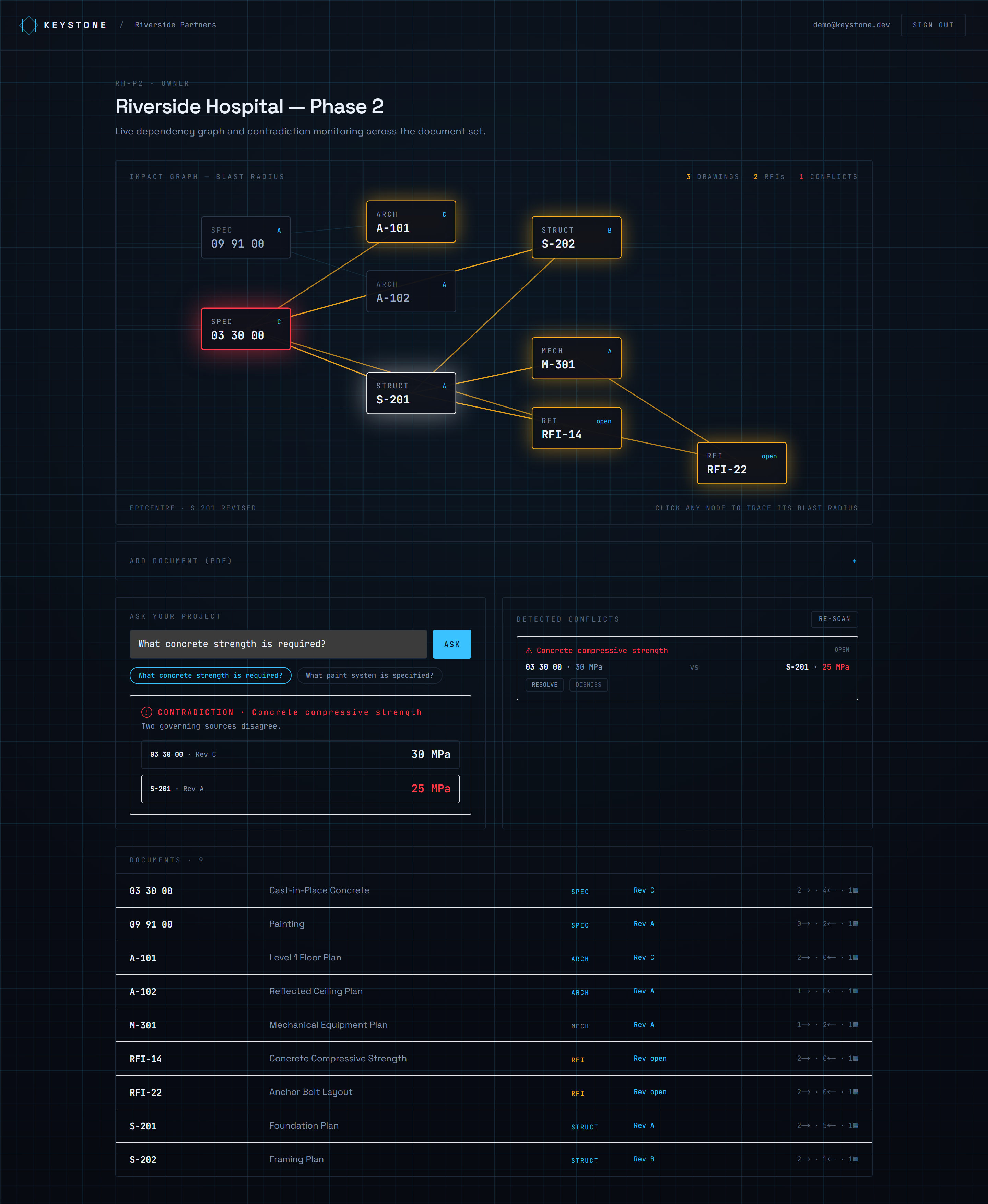
Ask across the project and Keystone returns the contradiction (30 MPa vs 25 MPa) with both sources — not a single confident answer.
The idea
Most AEC document tools are passive file cabinets with a search box. On a real project, dozens of people work off the same documents, and two things constantly go wrong:
- Documents contradict each other and nobody notices until it's expensive.
- A revision quietly makes other documents stale — and no one gets told.
Generic RAG makes #1 worse: it returns one confident answer from the top-matching chunk, even when another document disagrees. Keystone does two things differently.
1. Conflict-aware RAG
Ask "what concrete strength is required?" and instead of one answer, Keystone retrieves the evidence, clusters the claims, and — if sources disagree — returns the contradiction:
⚠️ Conflict —
03 30 00(Rev C) says 30 MPa,S-201(Rev A) says 25 MPa.
In construction, the disagreement is the answer worth knowing.
2. Change-impact graph ("blast radius")
Every document references others (S-201 → "per Spec 03 30 00"). Keystone extracts those references
into a dependency graph. Revise one document and it traces the blast radius — every drawing and RFI
downstream that just became suspect — and animates it outward from the epicentre.
Both are tractable because AEC documents use rigid identifiers (CSI MasterFormat codes like
03 30 00, sheet numbers like S-201), so reference extraction is deterministic, not guesswork.
Stack
| Layer | Tech |
|---|---|
| Frontend | Next.js 14 (App Router), React 18, TypeScript, Tailwind CSS |
| API | tRPC (end-to-end typesafe), Zod |
| Data | Prisma ORM, PostgreSQL 16 + pgvector |
| Auth | NextAuth (credentials + JWT), bcrypt, multi-tenant RBAC |
| AI | RAG over pgvector embeddings; conflict-aware retrieval; MCP server |
| DevOps | Docker, GitHub Actions CI, DigitalOcean App Platform |
Runs with zero API keys — a deterministic local embedder backs the AI layer out of the box. Set
OPENAI_API_KEY(or any OpenAI-compatible base URL) to swap in a real provider.
Quick start
npm install
cp .env.example .env          # defaults work for local Docker
npm run db:up                 # Postgres + pgvector in Docker
npm run db:migrate            # create schema
npm run db:seed               # demo project with a planted conflict
npm run dev                   # http://localhost:3000
Sign in with the seeded account: [email protected] / password123, then open Riverside Hospital — Phase 2.
Features
- Multi-tenant workspaces — organizations, members, role-based access (Owner / Architect / Engineer / Contractor / Client)
- Documents — drawings, specs, and RFIs; chunked, embedded into pgvector, cross-referenced into a graph
- Impact graph — interactive blast-radius visualization; click any document to trace what it affects
- Conflict detection — flags graph-adjacent documents that assert different values for the same unit
- Ask your project — conflict-aware Q&A with citations
- MCP server — exposes project tools (
ask_project,search_documents,list_conflicts, …) to any MCP client
MCP
npm run mcp        # stdio server for Claude Desktop / MCP clients
npm run mcp:test   # in-process smoke test
See mcp/README.md for the Claude Desktop config.
Deploy
- CI —
.github/workflows/ci.ymlruns typecheck, lint, and build on every push. - Docker —
docker build -t keystone .produces a standalone production image. - DigitalOcean —
doctl apps create --spec .do/app.yamlprovisions the web service + managed Postgres and runsprisma migrate deployas a pre-deploy job. (Enable thevectorextension on the managed database.)
Project structure
src/
  app/                 # routes: landing, auth, /app dashboard, /app/projects/[id]
  components/          # providers, auth shell, workspace (impact graph, ask, conflicts)
  server/
    routers/           # tRPC routers: auth, projects, documents, conflicts, ai
    services/          # ingest, conflict detection, conflict-aware ask
    lib/               # access control (RBAC)
  lib/                 # db, ai (embeddings + LLM), chunking, reference extraction, claims
prisma/                # schema + seed
mcp/                   # Model Context Protocol server
design/                # the "Lighttable" interactive prototype
Установка Keystone Server
У этого сервера нет опубликованного пакета — он собирается из исходников. Открой репозиторий и следуй инструкции в README.
▸ github.com/rajmodi262/keystoneFAQ
Keystone Server MCP бесплатный?
Да, Keystone Server MCP бесплатный — установка в пару кликов через Unyly без оплаты.
Нужен ли API-ключ для Keystone Server?
Нет, Keystone Server работает без API-ключей и переменных окружения.
Keystone Server — hosted или self-hosted?
Self-hosted: сервер запускается локально на твоей машине командой из раздела установки.
Как установить Keystone Server в Claude Desktop, Claude Code или Cursor?
Открой Keystone Server на unyly.org, выбери вкладку своего клиента (Claude Desktop, Claude Code, Cursor) и нажми Install — конфиг сгенерируется автоматически, без правки JSON.
Похожие MCP
Fetch
Web content fetching and conversion for efficient LLM usage.
AWS KB Retrieval
Retrieval from AWS Knowledge Base using Bedrock Agent Runtime.
 автор: modelcontextprotocol
Spring AI MCP Server
Provides auto-configuration for setting up an MCP server in Spring Boot applications.
llm-analysis-assistant
A very streamlined mcp client that supports calling and monitoring stdio/sse/streamableHttp, and can also view request responses through the /logs page. It also
 автор: xuzexin-hz
Compare Keystone Server with
Не уверен что выбрать?
Найди свой стек за 60 секунд
Автор?
Embed-бейдж для README
Похожее
Все в категории ai