
Kindly Web Search Server
БесплатноНе проверенProvides web search and content retrieval optimized for AI coding assistants, returning full conversations and structured content from StackOverflow, GitHub Iss

Описание
Provides web search and content retrieval optimized for AI coding assistants, returning full conversations and structured content from StackOverflow, GitHub Issues, arXiv, and Wikipedia in a single call.
README
Web search + robust content retrieval for AI coding tools.
Kindly Web Search is a part of the Shelpuk AI Technology Consulting agentic suite – a set of tools that together improve the code quality produced by AI coding agents by 15–20%. Read more on Claude Code generation quality improvement.
Works with Claude Code, Codex, Antigravity, Cursor, Windsurf, and any agent that supports skills or MCP servers.
| Component | Role |
|---|---|
| tdd | Enforces TDD, requirements discipline, and peer review for every coding task |
| Serena | Semantic code navigation + persistent project memory |
| Kindly Web Search ← you are here | Up-to-date API and package documentation via web search |
| Lad MCP Server | Project-aware AI design and code review |
If you like what we're building, please ⭐ star this repo – it's a huge motivation for us to keep going!
How to use the suite
1. Install three MCP servers and one skill:
2. Use the skill when requesting a feature:
Prompt your favorite AI coding agent (Claude Code, Codex, Cursor, etc.) as usual. Then just add Follow $tdd in the end.
> Build [your feature description]. Follow $tdd.
Kindly Web Search MCP Server
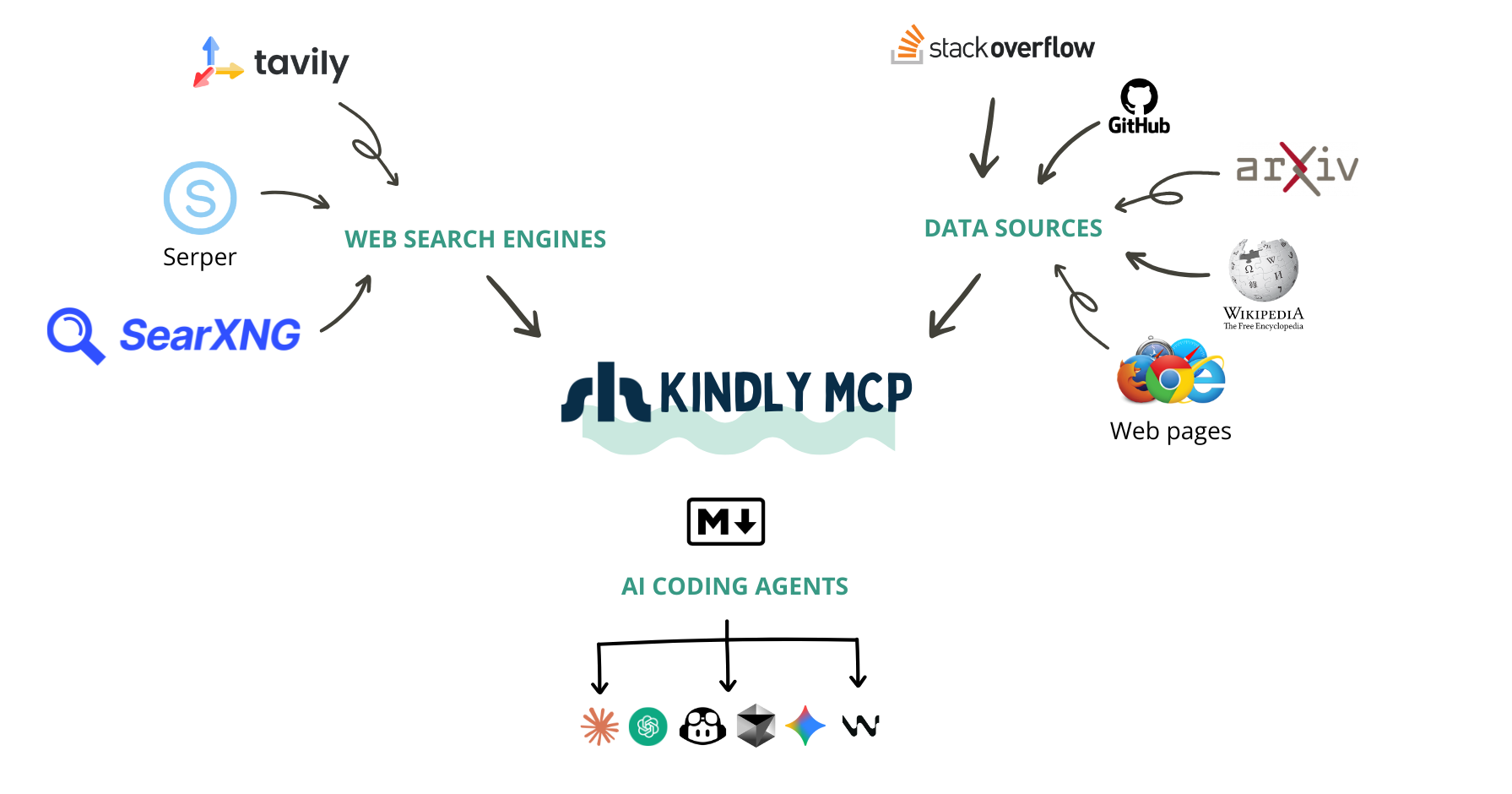
Why do we need another web search MCP server?
Picture this: You're debugging a cryptic error in Google Cloud Batch with GPU instances. Your AI coding assistant searches the web and finds the perfect StackOverflow thread. Great, right? Not quite. Here's what most web search MCP servers give your AI:
{
  "title": "GCP Cloud Batch fails with the GPU instance template",
  "url": "https://stackoverflow.com/questions/76546453/...",
  "snippet": "I am trying to run a GCP Cloud Batch job with K80 GPU. The job runs for ~30 min. and then fails..."
}
The question is there, but where are the answers? Where are the solutions that other developers tried? The workarounds? The "this worked for me" comments?
They're not there. Your AI now has to make a second call to scrape the page. Sometimes it does, sometimes it doesn't. And even when it does, most scrapers return either incomplete content or the entire webpage with navigation panels, ads, and other noise that wastes tokens and confuses the AI.
The Real Problem
At Shelpuk AI Technology Consulting, we build custom AI products under a fixed-price model. Development efficiency isn't just nice to have - it's the foundation of our business. We've been using AI coding assistants since 2023 (GitHub Copilot, Cursor, Windsurf, Claude Code, Codex), and we noticed something frustrating:
When we developers face a complex bug, we don't just want to find a URL - we want to find the conversation. We want to see what others tried, what worked, what didn't, and why. We want the GitHub Issue with all the comments. We want the StackOverflow thread with upvoted answers and follow-up discussions. We want the arXiv paper content, not just its abstract.
Existing web search MCP servers are basically wrappers around search APIs. They're great at finding content, but terrible at delivering it in a way that's useful for AI coding assistants.
What Kindly Does Differently
We built Kindly Web Search because we needed our AI assistants to work the way we work. When searching for solutions, Kindly:
✅ Integrates directly with APIs for StackExchange, GitHub Issues, arXiv, and Wikipedia - presenting content in LLM-optimized formats with proper structure
✅ Returns the full conversation in a single call: questions, answers, comments, reactions, and metadata
✅ Parses any webpage in real-time using a headless browser for cutting-edge issues that were literally posted yesterday
✅ Passes all useful content to the LLM immediately - no need for a second scraping call
✅ Supports multiple search providers (Serper and Tavily) with intelligent fallback
Now, when Claude Code or Codex searches for that GPU batch error, it gets the question and the answers. The code snippets. The "this fixed it for me" comments. Everything it needs to help you solve the problem - in one call.
If you give Kindly a try or like the idea, please drop us a star on GitHub - it’s always huge motivation for us to keep improving it! ⭐️
One MCP Server to Rule Them All
Kindly eliminates the need for:
✅ Generic web search MCP servers
✅ StackOverflow MCP servers
✅ Web scraping MCP servers (Playwright, Puppeteer, etc.)
It also significantly reduces reliance on GitHub MCP servers by providing structured Issue content through intelligent extraction.
Kindly has been our daily companion in production work for months, saving us countless hours and improving the effectiveness of our AI coding assistants. We're excited to share it with the community!
Tools
web_search(query, num_results=3)→ top results withtitle,link,snippet, andpage_content(Markdown, best-effort).get_content(url)→page_content(Markdown, best-effort).
Content resolver
When extracting page content (get_content or web_search results), Kindly routes each URL through a priority chain of specialized handlers before falling back to the universal HTML loader:
| Priority | Target | Handler | HTTP client | Proxy support |
|---|---|---|---|---|
| 1 | StackExchange (StackOverflow, etc.) | StackExchange API | httpx[socks] |
HTTP_PROXY / HTTPS_PROXY / ALL_PROXY (HTTP, SOCKS5) |
| 2 | GitHub Issues | GitHub GraphQL API | httpx[socks] |
HTTP_PROXY / HTTPS_PROXY / ALL_PROXY (HTTP, SOCKS5) |
| 3 | GitHub Discussions | GitHub GraphQL API | httpx[socks] |
HTTP_PROXY / HTTPS_PROXY / ALL_PROXY (HTTP, SOCKS5) |
| 4 | Wikipedia | MediaWiki Action API | httpx[socks] |
HTTP_PROXY / HTTPS_PROXY / ALL_PROXY (HTTP, SOCKS5) |
| 5 | arXiv | Atom API + PDF → Markdown | httpx[socks] |
HTTP_PROXY / HTTPS_PROXY / ALL_PROXY (HTTP, SOCKS5) |
| 6 | All other URLs | Universal HTML loader | headless Chromium (nodriver) |
KINDLY_CHROME_PROXY (HTTP, SOCKS5, etc.) |
All httpx-based handlers read standard proxy environment variables (HTTP_PROXY, HTTPS_PROXY, ALL_PROXY) and support both HTTP and SOCKS proxy URLs via the socksio dependency. The universal HTML loader uses Chromium's --proxy-server flag via KINDLY_CHROME_PROXY, which supports SOCKS5 and other schemes natively.
Search uses Serper (primary, if configured) or Tavily, and page extraction uses a local Chromium-based browser via nodriver.
Markdown fast paths (skip the browser for doc sites)
Before launching the headless browser, the universal HTML loader first tries to fetch markdown directly with one cheap httpx GET — returning it immediately on a hit and falling back to the browser unchanged on any miss. Two independent probes:
| Probe | Env var | Default | Mechanism |
|---|---|---|---|
| Suffix | KINDLY_MARKDOWN_SUFFIX_HOSTS |
help.aliyun.com,www.alibabacloud.com/help (on) |
For listed hosts, request {path}.md — Aliyun docs serve text/markdown at that route. Add host or host/path-prefix entries for other {path}.md sites. |
| Accept | KINDLY_MARKDOWN_ACCEPT_PROBE |
0 (off) |
Set to 1 to request every universal-path URL with Accept: text/markdown. Catches supporters automatically (Cloudflare, Microsoft Learn, AWS, GitHub, … per acceptmarkdown.com); on text/html the browser re-fetches (one extra request). |
Both probes validate the response (text/markdown, ≥1 KB, non-empty after sanitize) and apply the same output cap as the browser path, so the returned markdown is consistent across paths. See .env.example for the full entries.
Requirements
- A search provider (priority order):
SERPER_API_KEY(recommended) →TAVILY_API_KEY→SEARXNG_BASE_URL(self-hosted SearXNG) - A Chromium-based browser installed on the same machine running the MCP client (Chrome/Chromium/Edge/Brave)
- Without a browser: specialized sources (StackExchange, GitHub Issues/Discussions, Wikipedia, arXiv) still work well, but universal HTML
page_contentextraction may fail for other sites.
- Without a browser: specialized sources (StackExchange, GitHub Issues/Discussions, Wikipedia, arXiv) still work well, but universal HTML
- Highly recommended:
GITHUB_TOKEN(renders GitHub Issues in a much more LLM-friendly format: question + answers/comments + reactions/metadata; fewer rate limits) - Python 3.13+ is supported (Python 3.14 supported; optional “advanced PDF layout” extras are disabled on 3.14 because
onnxruntimewheels may be unavailable).
GITHUB_TOKEN can be read-only and limited to public repositories to avoid security/privacy concerns.
Quickstart
1) Install uvx
macOS / Linux:
curl -LsSf https://astral.sh/uv/install.sh | sh
Windows (PowerShell):
irm https://astral.sh/uv/install.ps1 | iex
Re-open your terminal and verify:
uvx --version
2) Install a Chromium-based browser (required for page_content)
You need Chrome / Chromium / Edge / Brave installed on the same machine running your MCP client.
Note: If you skip this, specialized sources (StackOverflow/StackExchange, GitHub Issues/Discussions, Wikipedia, arXiv) will still work well. Only universal page_content extraction for arbitrary sites requires the browser.
macOS:
- Install Chrome, or:
brew install --cask chromium
Windows:
- Install Chrome or Edge.
- If browser auto-detection fails later, you’ll need the path:
Get-Command chrome | Select-Object -ExpandProperty Source
# Common path:
# C:\Program Files\Google\Chrome\Application\chrome.exe
# If `Get-Command chrome` fails, try one of these:
# C:\Program Files (x86)\Google\Chrome\Application\chrome.exe
# C:\Program Files\Microsoft\Edge\Application\msedge.exe
Linux (Ubuntu/Debian):
sudo apt-get update
sudo apt-get install -y chromium
which chromium
Other Linux distros: install chromium (or chromium-browser) via your package manager.
3) Set your search API key (required)
Set one of these. Provider selection order is: Serper → Tavily → SearXNG.
macOS / Linux:
export SERPER_API_KEY="..."
# or:
export TAVILY_API_KEY="..."
# or (self-hosted SearXNG):
export SEARXNG_BASE_URL="https://searx.example.org"
Windows (PowerShell):
$env:SERPER_API_KEY="..."
# or:
$env:TAVILY_API_KEY="..."
# or (self-hosted SearXNG):
$env:SEARXNG_BASE_URL="https://searx.example.org"
Optional (SearXNG): if your instance requires authentication or blocks bots, set:
export SEARXNG_HEADERS_JSON='{"Authorization":"Bearer ..."}'
export SEARXNG_USER_AGENT="Mozilla/5.0 ..."
Windows (PowerShell):
$env:SEARXNG_HEADERS_JSON='{"Authorization":"Bearer ..."}'
$env:SEARXNG_USER_AGENT="Mozilla/5.0 ..."
Optional (recommended for better GitHub Issue / PR extraction):
export GITHUB_TOKEN="..."
For public repos, a read-only token is enough (classic tokens often use public_repo; fine-grained tokens need repo read access).
4) Run command used by all MCP clients
uvx --from git+https://github.com/Shelpuk-AI-Technology-Consulting/kindly-web-search-mcp-server \
  kindly-web-search-mcp-server start-mcp-server
First-run note: the first uvx invocation may take 30–60 seconds while it builds the tool environment. If your MCP client times out on first start, run the command once in a terminal to “prewarm” it, then retry in your client.
Now configure your MCP client to run that command. Make sure your API keys are set in the same shell/OS environment that launches the MCP client (unless you paste them directly into the client config).
Client setup
Codex
Set one of SERPER_API_KEY, TAVILY_API_KEY, or SEARXNG_BASE_URL.
CLI (no file editing) — add a local stdio MCP server:
macOS / Linux (Serper):
codex mcp add kindly-web-search \
  --env SERPER_API_KEY="$SERPER_API_KEY" \
  --env GITHUB_TOKEN="$GITHUB_TOKEN" \
  --env KINDLY_BROWSER_EXECUTABLE_PATH="$KINDLY_BROWSER_EXECUTABLE_PATH" \
  -- uvx --from git+https://github.com/Shelpuk-AI-Technology-Consulting/kindly-web-search-mcp-server \
  kindly-web-search-mcp-server start-mcp-server
macOS / Linux (Tavily):
codex mcp add kindly-web-search \
  --env TAVILY_API_KEY="$TAVILY_API_KEY" \
  --env GITHUB_TOKEN="$GITHUB_TOKEN" \
  --env KINDLY_BROWSER_EXECUTABLE_PATH="$KINDLY_BROWSER_EXECUTABLE_PATH" \
  -- uvx --from git+https://github.com/Shelpuk-AI-Technology-Consulting/kindly-web-search-mcp-server \
  kindly-web-search-mcp-server start-mcp-server
If you use SearXNG, replace the provider env var above with:
--env SEARXNG_BASE_URL="$SEARXNG_BASE_URL"
Windows (PowerShell):
codex mcp add kindly-web-search `
  --env SERPER_API_KEY="$env:SERPER_API_KEY" `
  --env GITHUB_TOKEN="$env:GITHUB_TOKEN" `
  --env KINDLY_BROWSER_EXECUTABLE_PATH="$env:KINDLY_BROWSER_EXECUTABLE_PATH" `
  -- uvx --from git+https://github.com/Shelpuk-AI-Technology-Consulting/kindly-web-search-mcp-server `
  kindly-web-search-mcp-server start-mcp-server
Windows (PowerShell, Tavily):
codex mcp add kindly-web-search `
  --env TAVILY_API_KEY="$env:TAVILY_API_KEY" `
  --env GITHUB_TOKEN="$env:GITHUB_TOKEN" `
  --env KINDLY_BROWSER_EXECUTABLE_PATH="$env:KINDLY_BROWSER_EXECUTABLE_PATH" `
  -- uvx --from git+https://github.com/Shelpuk-AI-Technology-Consulting/kindly-web-search-mcp-server `
  kindly-web-search-mcp-server start-mcp-server
Alternative (file-based):
Edit ~/.codex/config.toml:
[mcp_servers.kindly-web-search]
command = "uvx"
args = [
  "--from",
  "git+https://github.com/Shelpuk-AI-Technology-Consulting/kindly-web-search-mcp-server",
  "kindly-web-search-mcp-server",
  "start-mcp-server",
]
# Forward variables from your shell/OS environment:
env_vars = ["SERPER_API_KEY", "TAVILY_API_KEY", "SEARXNG_BASE_URL", "GITHUB_TOKEN", "KINDLY_BROWSER_EXECUTABLE_PATH"]
startup_timeout_sec = 120.0
Claude Code
Set one of SERPER_API_KEY, TAVILY_API_KEY, or SEARXNG_BASE_URL.
CLI (no file editing) — add a local stdio MCP server:
macOS / Linux (Serper):
claude mcp add --transport stdio kindly-web-search \
  -e SERPER_API_KEY="$SERPER_API_KEY" \
  -e GITHUB_TOKEN="$GITHUB_TOKEN" \
  -e KINDLY_BROWSER_EXECUTABLE_PATH="$KINDLY_BROWSER_EXECUTABLE_PATH" \
  -- uvx --from git+https://github.com/Shelpuk-AI-Technology-Consulting/kindly-web-search-mcp-server \
  kindly-web-search-mcp-server start-mcp-server
macOS / Linux (Tavily):
claude mcp add --transport stdio kindly-web-search \
  -e TAVILY_API_KEY="$TAVILY_API_KEY" \
  -e GITHUB_TOKEN="$GITHUB_TOKEN" \
  -e KINDLY_BROWSER_EXECUTABLE_PATH="$KINDLY_BROWSER_EXECUTABLE_PATH" \
  -- uvx --from git+https://github.com/Shelpuk-AI-Technology-Consulting/kindly-web-search-mcp-server \
  kindly-web-search-mcp-server start-mcp-server
If you use SearXNG, replace the provider env var above with:
-e SEARXNG_BASE_URL="$SEARXNG_BASE_URL"
Windows (PowerShell):
claude mcp add --transport stdio kindly-web-search `
  -e SERPER_API_KEY="$env:SERPER_API_KEY" `
  -e GITHUB_TOKEN="$env:GITHUB_TOKEN" `
  -e KINDLY_BROWSER_EXECUTABLE_PATH="$env:KINDLY_BROWSER_EXECUTABLE_PATH" `
  -- uvx --from git+https://github.com/Shelpuk-AI-Technology-Consulting/kindly-web-search-mcp-server `
  kindly-web-search-mcp-server start-mcp-server
Windows (PowerShell, Tavily):
claude mcp add --transport stdio kindly-web-search `
  -e TAVILY_API_KEY="$env:TAVILY_API_KEY" `
  -e GITHUB_TOKEN="$env:GITHUB_TOKEN" `
  -e KINDLY_BROWSER_EXECUTABLE_PATH="$env:KINDLY_BROWSER_EXECUTABLE_PATH" `
  -- uvx --from git+https://github.com/Shelpuk-AI-Technology-Consulting/kindly-web-search-mcp-server `
  kindly-web-search-mcp-server start-mcp-server
Note: On current Claude Code versions, keep the server name immediately after --transport stdio and before -e/--env flags. Tested with Claude Code 2.0.76.
If Claude Code times out while starting the server, set a 120s startup timeout (milliseconds):
macOS / Linux:
export MCP_TIMEOUT=120000
Windows (PowerShell):
$env:MCP_TIMEOUT="120000"
Alternative (file-based):
Create/edit .mcp.json (project scope; recommended for teams):
{
  "mcpServers": {
    "kindly-web-search": {
      "command": "uvx",
      "args": [
        "--from",
        "git+https://github.com/Shelpuk-AI-Technology-Consulting/kindly-web-search-mcp-server",
        "kindly-web-search-mcp-server",
        "start-mcp-server"
      ],
      "env": {
        "SERPER_API_KEY": "${SERPER_API_KEY}",
        "TAVILY_API_KEY": "${TAVILY_API_KEY}",
        "SEARXNG_BASE_URL": "${SEARXNG_BASE_URL}",
        "GITHUB_TOKEN": "${GITHUB_TOKEN}",
        "KINDLY_BROWSER_EXECUTABLE_PATH": "${KINDLY_BROWSER_EXECUTABLE_PATH}"
      }
    }
  }
}
Gemini CLI
Set one of SERPER_API_KEY, TAVILY_API_KEY, or SEARXNG_BASE_URL.
Edit ~/.gemini/settings.json (or .gemini/settings.json in a project):
{
  "mcpServers": {
    "kindly-web-search": {
      "command": "uvx",
      "args": [
        "--from",
        "git+https://github.com/Shelpuk-AI-Technology-Consulting/kindly-web-search-mcp-server",
        "kindly-web-search-mcp-server",
        "start-mcp-server"
      ],
      "env": {
        "SERPER_API_KEY": "$SERPER_API_KEY",
        "TAVILY_API_KEY": "$TAVILY_API_KEY",
        "SEARXNG_BASE_URL": "$SEARXNG_BASE_URL",
        "GITHUB_TOKEN": "$GITHUB_TOKEN",
        "KINDLY_BROWSER_EXECUTABLE_PATH": "$KINDLY_BROWSER_EXECUTABLE_PATH"
      },
      "timeout": 120000
    }
  }
}
OpenClaw
Set one of SERPER_API_KEY, TAVILY_API_KEY, or SEARXNG_BASE_URL.
If mcporter is not installed yet: npm i -g mcporter.
mcporter docs: https://github.com/steipete/mcporter/blob/main/docs/config.md
CLI (no file editing) — mcporter (recommended):
# Replace `$...` vars with real values, or export them in your shell first.
mcporter config add kindly-search \
  --scope home \
  --command "uvx --from git+https://github.com/Shelpuk-AI-Technology-Consulting/kindly-web-search-mcp-server kindly-web-search-mcp-server start-mcp-server" \
  --env SERPER_API_KEY="$SERPER_API_KEY" \
  --env TAVILY_API_KEY="$TAVILY_API_KEY" \
  --env SEARXNG_BASE_URL="$SEARXNG_BASE_URL" \
  --env GITHUB_TOKEN="$GITHUB_TOKEN" \
  --env KINDLY_BROWSER_EXECUTABLE_PATH="$KINDLY_BROWSER_EXECUTABLE_PATH"
This writes to ~/.mcporter/mcporter.json (--scope home).
You can replace kindly-search with any server name you prefer.
Verify:
mcporter config get kindly-search
Alternative (file-based):
Edit mcporter config (~/.mcporter/mcporter.json, or config/mcporter.json if you use project scope) and add this under mcpServers:
{
  "mcpServers": {
    "kindly-search": {
      "command": "uvx",
      "args": [
        "--from",
        "git+https://github.com/Shelpuk-AI-Technology-Consulting/kindly-web-search-mcp-server",
        "kindly-web-search-mcp-server",
        "start-mcp-server"
      ],
      "env": {
        "SERPER_API_KEY": "PASTE_SERPER_KEY_OR_LEAVE_EMPTY",
        "TAVILY_API_KEY": "PASTE_TAVILY_KEY_OR_LEAVE_EMPTY",
        "SEARXNG_BASE_URL": "PASTE_SEARXNG_URL_OR_LEAVE_EMPTY",
        "GITHUB_TOKEN": "PASTE_GITHUB_TOKEN_OR_LEAVE_EMPTY",
        "KINDLY_BROWSER_EXECUTABLE_PATH": "PASTE_IF_NEEDED"
      }
    }
  }
}
Do not add root-level mcpServers to ~/.openclaw/openclaw.json (OpenClaw config uses strict schema validation and unknown keys are rejected).
If OpenClaw is already running and doesn’t pick up the new server, restart/reload the gateway:
openclaw gateway restart
Antigravity (Google IDE)
Set one of SERPER_API_KEY, TAVILY_API_KEY, or SEARXNG_BASE_URL.
In Antigravity, open the MCP store, then:
- Click Manage MCP Servers
- Click View raw config (this opens
mcp_config.json) - Add the server config under
mcpServers, save, then go back and click Refresh
Paste this into your mcpServers object (don’t overwrite other servers):
{
  "kindly-web-search": {
    "command": "uvx",
    "args": [
      "--from",
      "git+https://github.com/Shelpuk-AI-Technology-Consulting/kindly-web-search-mcp-server",
      "kindly-web-search-mcp-server",
      "start-mcp-server"
    ],
    "env": {
      "SERPER_API_KEY": "PASTE_SERPER_KEY_OR_LEAVE_EMPTY",
      "TAVILY_API_KEY": "PASTE_TAVILY_KEY_OR_LEAVE_EMPTY",
      "SEARXNG_BASE_URL": "PASTE_SEARXNG_URL_OR_LEAVE_EMPTY",
      "GITHUB_TOKEN": "PASTE_GITHUB_TOKEN_OR_LEAVE_EMPTY",
      "KINDLY_BROWSER_EXECUTABLE_PATH": "PASTE_IF_NEEDED"
    }
  }
}
If Antigravity can’t find uvx, replace "uvx" with the absolute path (which uvx on macOS/Linux, where uvx on Windows).
Make sure at least one of SERPER_API_KEY / TAVILY_API_KEY / SEARXNG_BASE_URL is non-empty.
If the first start is slow, run the uvx command from Quickstart once in a terminal to prebuild the environment, then click Refresh.
Don’t commit/share mcp_config.json if it contains API keys.
Cursor
Set one of SERPER_API_KEY, TAVILY_API_KEY, or SEARXNG_BASE_URL.
Startup timeout: Cursor does not currently expose a per-server startup timeout setting. If the first run is slow, run the uvx command from Quickstart once in a terminal to prebuild the tool environment, then restart Cursor.
Create .cursor/mcp.json:
{
  "mcpServers": {
    "kindly-web-search": {
      "type": "stdio",
      "command": "uvx",
      "args": [
        "--from",
        "git+https://github.com/Shelpuk-AI-Technology-Consulting/kindly-web-search-mcp-server",
        "kindly-web-search-mcp-server",
        "start-mcp-server"
      ],
      "env": {
        "SERPER_API_KEY": "${env:SERPER_API_KEY}",
        "TAVILY_API_KEY": "${env:TAVILY_API_KEY}",
        "SEARXNG_BASE_URL": "${env:SEARXNG_BASE_URL}",
        "GITHUB_TOKEN": "${env:GITHUB_TOKEN}",
        "KINDLY_BROWSER_EXECUTABLE_PATH": "${env:KINDLY_BROWSER_EXECUTABLE_PATH}"
      }
    }
  }
}
Claude Desktop
Edit claude_desktop_config.json:
- macOS:
~/Library/Application Support/Claude/claude_desktop_config.json - Windows:
%APPDATA%\\Claude\\claude_desktop_config.json
Note: values in this file are literal strings. Don’t commit this file or share it.
Startup timeout: Claude Desktop does not expose a per-server startup timeout setting. If the first run is slow, run the uvx command from Quickstart once in a terminal to prebuild the tool environment, then restart Claude Desktop.
{
  "mcpServers": {
    "kindly-web-search": {
      "command": "uvx",
      "args": [
        "--from",
        "git+https://github.com/Shelpuk-AI-Technology-Consulting/kindly-web-search-mcp-server",
        "kindly-web-search-mcp-server",
        "start-mcp-server"
      ],
      "env": {
        "SERPER_API_KEY": "PASTE_SERPER_KEY_OR_LEAVE_EMPTY",
        "TAVILY_API_KEY": "PASTE_TAVILY_KEY_OR_LEAVE_EMPTY",
        "SEARXNG_BASE_URL": "PASTE_SEARXNG_URL_OR_LEAVE_EMPTY",
        "GITHUB_TOKEN": "PASTE_GITHUB_TOKEN_OR_LEAVE_EMPTY",
        "KINDLY_BROWSER_EXECUTABLE_PATH": "PASTE_IF_NEEDED"
      }
    }
  }
}
GitHub Copilot / Microsoft Copilot (VS Code)
Most secure option: uses interactive prompts, so secrets don’t need to be stored in the file.
Startup timeout: VS Code currently does not expose a per-server startup timeout setting for MCP servers. If the first run is slow, run the uvx command from Quickstart once in a terminal to prebuild the tool environment, then restart VS Code.
Create .vscode/mcp.json:
{
  "servers": {
    "kindly-web-search": {
      "type": "stdio",
      "command": "uvx",
      "args": [
        "--from",
        "git+https://github.com/Shelpuk-AI-Technology-Consulting/kindly-web-search-mcp-server",
        "kindly-web-search-mcp-server",
        "start-mcp-server"
      ],
      "env": {
        "SERPER_API_KEY": "${input:serper-api-key}",
        "TAVILY_API_KEY": "${input:tavily-api-key}",
        "SEARXNG_BASE_URL": "${input:searxng-base-url}",
        "GITHUB_TOKEN": "${input:github-token}",
        "KINDLY_BROWSER_EXECUTABLE_PATH": "${input:browser-path}"
      }
    }
  },
  "inputs": [
    { "id": "serper-api-key", "type": "promptString", "description": "Serper API key (optional if using Tavily or SearXNG)" },
    { "id": "tavily-api-key", "type": "promptString", "description": "Tavily API key (optional if using Serper or SearXNG)" },
    { "id": "searxng-base-url", "type": "promptString", "description": "SearXNG base URL (optional if using Serper or Tavily)" },
    { "id": "github-token", "type": "promptString", "description": "GitHub token (recommended)" },
    { "id": "browser-path", "type": "promptString", "description": "Browser binary path (only if needed)" }
  ]
}
Browser path (only if auto-detection fails)
Set KINDLY_BROWSER_EXECUTABLE_PATH to your browser binary.
macOS (Homebrew Chromium):
export KINDLY_BROWSER_EXECUTABLE_PATH="/Applications/Chromium.app/Contents/MacOS/Chromium"
Linux:
export KINDLY_BROWSER_EXECUTABLE_PATH="$(command -v chromium || command -v chromium-browser)"
Windows (PowerShell):
$env:KINDLY_BROWSER_EXECUTABLE_PATH="C:\\Program Files\\Google\\Chrome\\Application\\chrome.exe"
Chromium proxy (optional)
Set KINDLY_CHROME_PROXY to route all headless Chromium traffic (used for page_content extraction) through a proxy server. The value is passed directly as Chromium's --proxy-server flag.
Supported schemes: http://, https://, socks5://, socks4://.
export KINDLY_CHROME_PROXY="socks5://127.0.0.1:1080"
When running in Docker, use host.docker.internal instead of 127.0.0.1 to reach the host:
docker run ... -e KINDLY_CHROME_PROXY="socks5://host.docker.internal:1080" ...
This only affects Chromium-based page_content extraction. Search API calls (Serper, Tavily, SearXNG) use httpx and respect standard HTTP_PROXY / HTTPS_PROXY / ALL_PROXY environment variables instead.
Note: Chromium's --proxy-server does not support embedded credentials (e.g. socks5://user:pass@host:port will not work). If your proxy requires authentication, set up a local credential-less proxy forwarder (e.g. SSH tunnel, gost, socat) and point KINDLY_CHROME_PROXY to the local endpoint.
Proxy bypass list
Set KINDLY_CHROME_PROXY_BYPASS to exclude specific hosts from the proxy. The value is passed directly as Chromium's --proxy-bypass-list flag (comma-separated). Syntax:
- Exact host:
localhost,127.0.0.1 - Wildcard suffix:
*.example.com,.local - IPv6:
[::1]
export KINDLY_CHROME_PROXY_BYPASS="localhost,127.0.0.1,*.internal"
When unset, Chromium uses its default bypass list (which includes localhost and 127.0.0.1).
Remote / Docker deployment (separate machine)
Whether you can run the MCP server on a different PC depends on your MCP client:
- Stdio / command-based clients (config uses
command+argsto spawn the server): the server must run on the same machine (or at least somewhere the client can run the command). You can still use Docker, but locally (the client launchesdocker run ...). - HTTP-capable clients (can connect to a server URL): you can run Kindly remotely in Docker using Streamable HTTP.
Docker (Streamable HTTP)
Build the image:
docker build -t kindly-web-search-mcp-server .
Run the server (port 8000):
docker run --rm -p 8000:8000 \
  -e SERPER_API_KEY="..." \
  -e GITHUB_TOKEN="..." \
  -e KINDLY_CHROME_PROXY="socks5://host.docker.internal:1080" \
  kindly-web-search-mcp-server \
  --http --host 0.0.0.0 --port 8000
- Or (Tavily):
docker run --rm -p 8000:8000 \
  -e TAVILY_API_KEY="..." \
  -e GITHUB_TOKEN="..." \
  -e KINDLY_CHROME_PROXY="socks5://host.docker.internal:1080" \
  kindly-web-search-mcp-server \
  --http --host 0.0.0.0 --port 8000
- MCP endpoint:
http://<server-host>:8000/mcp - Make sure at least one of
SERPER_API_KEY/TAVILY_API_KEY/SEARXNG_BASE_URLis set. page_contentextraction runs on the server machine/container (this Docker image includes Chromium).- Remote HTTP is typically unauthenticated and unencrypted by default; don’t expose this port publicly. Use VPN/firewall rules or a reverse proxy with TLS + auth.
- Don’t bake API keys into the image; pass them via env vars at runtime.
Troubleshooting
- “No Chromium-based browser executable found”: install Chrome/Chromium/Edge and set
KINDLY_BROWSER_EXECUTABLE_PATHif needed. - “Failed to connect to browser”: increase retries/timeouts:
KINDLY_NODRIVER_RETRY_ATTEMPTS=5KINDLY_NODRIVER_DEVTOOLS_READY_TIMEOUT_SECONDS=20- Ensure proxy/VPN env vars don’t hijack localhost (set
NO_PROXY=localhost,127.0.0.1if you useHTTP_PROXY/HTTPS_PROXY) KINDLY_HTML_TOTAL_TIMEOUT_SECONDS=45
page_contentshows_Failed to retrieve page content: TimeoutError_(can happen on any OS, especially Windows): the MCP tool time budget was exceeded (often due to slower headless browser cold starts).- How to spot it: one or more results include
_Failed to retrieve page content: TimeoutError_inpage_content(orget_content(url)returns that message). - Fix: increase
KINDLY_TOOL_TOTAL_TIMEOUT_SECONDS(and, if needed, raise the capKINDLY_TOOL_TOTAL_TIMEOUT_MAX_SECONDS). - Env vars:
KINDLY_TOOL_TOTAL_TIMEOUT_SECONDS: total time budget perweb_search/get_contentcall (search + extraction). Default:120.KINDLY_TOOL_TOTAL_TIMEOUT_MAX_SECONDS: caps the above value (safety). Default:600.KINDLY_WEB_SEARCH_MAX_CONCURRENCY: max parallel content fetches. Default:3(when unset or invalid).
- Recommended starting point (PowerShell):
$env:KINDLY_TOOL_TOTAL_TIMEOUT_SECONDS="180"$env:KINDLY_TOOL_TOTAL_TIMEOUT_MAX_SECONDS="600"- Optional (reduces parallel browser work):
$env:KINDLY_WEB_SEARCH_MAX_CONCURRENCY="1"
- How to spot it: one or more results include
- Browser reuse is on by default for universal HTML loading. Note: pooled Chromium shares state across requests (cookies, local storage, cache, and user-agent from the first request handled by each slot).
KINDLY_NODRIVER_REUSE_BROWSER=0disables reuse (fresh Chromium per request).KINDLY_NODRIVER_BROWSER_POOL_SIZE=2controls how many Chromium instances are kept warm.KINDLY_NODRIVER_ACQUIRE_TIMEOUT_SECONDS=30controls how long to wait for a pooled slot before falling back to per-request Chromium.- Optional:
KINDLY_NODRIVER_PORT_RANGE=45000-45100restricts remote debugging ports. - Pooled slots are health-checked before use and auto-restarted if the DevTools endpoint is stale (diagnostics emit
pool.slot_probeandpool.slot_restart). - If pool acquisition times out or fails, the server falls back to per-request Chromium and emits a
pool.acquire_timeout/pool.slot_errordiagnostic when diagnostics are enabled.
- Need deeper debugging? Enable diagnostics:
- Set
KINDLY_DIAGNOSTICS=1to emit JSON-line diagnostics to stderr and includediagnosticsin tool responses. get_contentreturns top-leveldiagnostics;web_searchattachesdiagnosticsper result.
- Set
OSError: [Errno 39] Directory not empty: '/tmp/kindly-nodriver-.../Default': update to the latest server revision (uv may cache tool envs;uv cache cleancan help).- “web_search fails: no provider key”: set
SERPER_API_KEY,TAVILY_API_KEY, orSEARXNG_BASE_URL.
Security
- Don’t commit API keys.
- Prefer env-var expansion (Codex
env_vars, Cursor${env:...}, Gemini$VAR, Claude Code${VAR}) instead of hardcoding secrets.
from github.com/Shelpuk-AI-Technology-Consulting/kindly-web-search-mcp-server
Установка Kindly Web Search Server
У этого сервера нет опубликованного пакета — он собирается из исходников. Открой репозиторий и следуй инструкции в README.
▸ github.com/Shelpuk-AI-Technology-Consulting/kindly-web-search-mcp-serverFAQ
Kindly Web Search Server MCP бесплатный?
Да, Kindly Web Search Server MCP бесплатный — установка в пару кликов через Unyly без оплаты.
Нужен ли API-ключ для Kindly Web Search Server?
Нет, Kindly Web Search Server работает без API-ключей и переменных окружения.
Kindly Web Search Server — hosted или self-hosted?
Self-hosted: сервер запускается локально на твоей машине командой из раздела установки.
Как установить Kindly Web Search Server в Claude Desktop, Claude Code или Cursor?
Открой Kindly Web Search Server на unyly.org, выбери вкладку своего клиента (Claude Desktop, Claude Code, Cursor) и нажми Install — конфиг сгенерируется автоматически, без правки JSON.
Похожие MCP
GitHub
PRs, issues, code search, CI status
 автор: GitHub
Filesystem
Secure file operations with configurable access controls.
Memory
Knowledge graph-based persistent memory system.
Template MCP Server
A CLI tool to create a new Model Context Protocol server project with TypeScript support, dual transport options, and an extensible structure
 автор: mcpdotdirect
Compare Kindly Web Search Server with
Не уверен что выбрать?
Найди свой стек за 60 секунд
Автор?
Embed-бейдж для README
Похожее
Все в категории development