

Описание
Create powerpoint slideshows using MCP or CLI
README
kslide is a tool for creating and manipulating PowerPoint-style slideshows. It provides both a command-line interface
and an MCP (Model Context Protocol) server for AI integration.
Getting Started
Prerequisites
- Java 17+
- Kotlin 1.9.25
- Gradle 7.6+
Build and Run
Clone the repository:
git clone https://github.com/karlll/kslide.git
cd kslide
Build the project:
./gradlew build -Pversion=0.0.1-SNAPSHOTRun tests:
./gradlew test
Dependencies
Core Libraries
- Apache POI 5.4.0: PowerPoint file manipulation and formatting
- Flexmark-Java 0.64.8: CommonMark/Markdown parsing and processing
- Kotlin Standard Library: Core Kotlin functionality
Framework Dependencies
- Spring Boot 3.5.0: Application framework and dependency injection
- Spring Shell 3.4.0: Interactive command-line interface
- Spring AI 1.0.0: MCP server integration for AI clients
- Jackson Kotlin Module: JSON serialization/deserialization
Testing Dependencies
- JUnit 5: Testing framework
- MockK 1.13.10: Kotlin-specific mocking library
MCP Server
The MCP server enables AI clients to generate PowerPoint slideshows programmatically.
Features
- Template-based slideshow creation with configurable layouts
- Markdown support for rich text formatting
- Slide content management with placeholder-based content insertion
- File export to PowerPoint (.pptx) format
Setup
Build the MCP server:
./gradlew :mcp:bootJar -Pversion=0.0.1-SNAPSHOTConfigure Claude Desktop (example configuration):
{
  "mcpServers": {
    "kslide-mcp": {
      "command": "java",
      "args": [
        "-Dspring.ai.mcp.server.stdio=true",
        "-Dspring.main.web-application-type=none",
        "-Dlogging.pattern.console=",
        "-jar",
        "/path/to/kslide/mcp/build/libs/kslide-mcp-0.0.1-SNAPSHOT.jar",
        "--templatePath=/path/to/kslide/templates",
        "--outputPath=/path/to/kslide/output"
      ]
    }
  }
}
alternatively, use the Docker image as described in the Docker section.
{
  "mcpServers": {
    "kslide-mcp": {
      "command": "docker",
      "args": [
        "run",
        "--name",
        "kslide-mcp-server",
        "-v",
        "/path/to/kslide/templates:/app/templates",
        "-v",
        "/path/to/kslide/output:/app/output",
        "-i",
        "--rm",
        "kslide-mcp-server"
      ]
    }
  }
}
Example Usage
Example prompt
Using kslide, create a slideshow about dogs with 5 to 10 slides. Select suitable layout for each slide. When done, save the slideshow as "dogs-slideshow-2".
Result
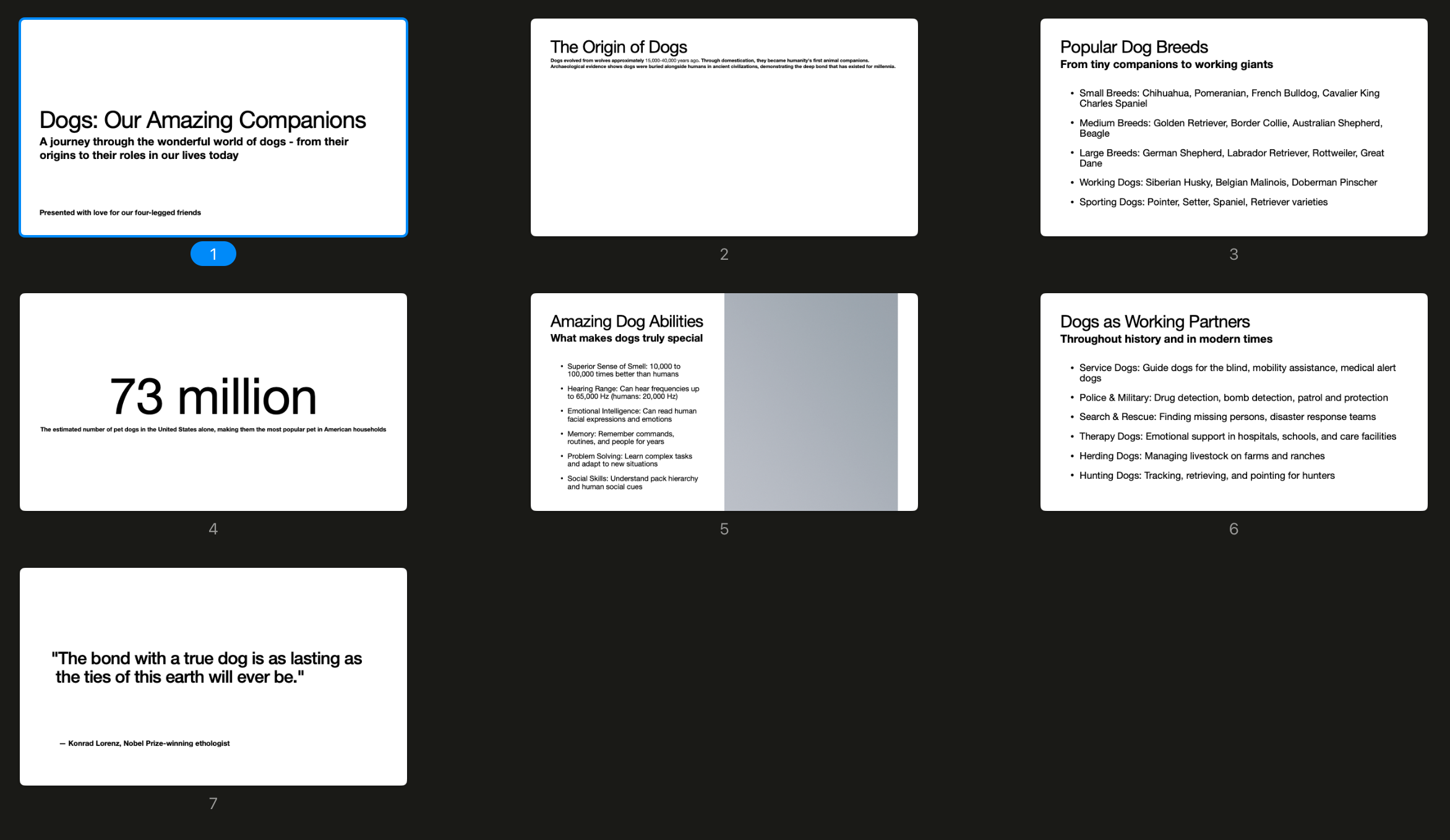
- Also see resulting PPTX.
Available MCP Tools
listTemplates()
- Lists all available PowerPoint templates
listLayouts(template: String)
- Shows available slide layouts for a specific template
createSlideshow(template: String)
- Creates a new slideshow using the specified template
- Returns a unique slideshow identifier
createSlide(slideshowId: String, layoutIndex: Int, content: Map<Int, String>)
- Creates a slide with plain text content
- Content map: placeholder ID → text content
createSlideWithMarkdown(slideshowId: String, layoutIndex: Int, content: Map<Int, String>)
- Creates a slide with markdown-formatted content
- Supports:
**bold**,*italic*,`code`, and- bullet lists - Content map: placeholder ID → markdown content
saveSlideshow(slideshowId: String, fileName: String)
- Exports the slideshow to a PowerPoint file
Workflow Example
// 1. List available templates
listTemplates()
// → "Available templates: - 'Default', A simple template with 17 different slide layouts."

// 2. Check available layouts
listLayouts("Default")
// → Shows layouts with their indices and descriptions

// 3. Create a new slideshow
createSlideshow("Default")
// → "Slideshow created. Identifier: 123e4567-e89b-12d3-a456-426614174000"

// 4. Create slides with markdown content
createSlideWithMarkdown(
    "123e4567-e89b-12d3-a456-426614174000",
    0,
    {
        1: "# Main Title with **bold** text",
        2: "- First bullet point\n- Second point with *italic*\n- Code example: `console.log('hello')`"
    }
)

// 5. Save the slideshow
saveSlideshow("123e4567-e89b-12d3-a456-426614174000", "my-presentation")
// → Saves as "my-presentation.pptx"
CLI
The Spring Shell-based CLI provides an interactive interface for slideshow creation and manipulation.
Running the CLI
./gradlew :shell:bootRun
Available Commands
The CLI organizes commands into functional groups:
- New Commands: Create slideshows, slides, text boxes, paragraphs, text runs, and bullets
- List Commands: Display slideshows, slides, layouts, and content information
- Set Commands: Configure active elements and properties
- Load Commands: Import templates and existing slideshows
- Write Commands: Export slideshows to files
- Delete Commands: Remove slideshows, slides, and content elements
- Clear Commands: Clear content from text boxes and paragraphs
Example Usage
[To be added]
Docker
You can also run the MCP server in a Docker container.
There are two Dockerfiles available:
Dockerfile.mcp, multi-stage build for MCP ServerDockerfile.mcp.local, simple runtime-only Dockerfile for pre-built JAR
Building the Docker Image
To build the Docker image for the MCP server, run:
docker build -t kslide-mcp-server -f Dockerfile.mcp .
Running the Docker Container
To run the MCP server in a Docker container, use:
docker run --name kslide-mcp-server -i --rm \
  -v /path/to/templates:/app/templates \
  -v /path/to/output:/app/output \
  kslide-mcp-server
License
This project is licensed under the MIT License.
Установка Kslide
У этого сервера нет опубликованного пакета — он собирается из исходников. Открой репозиторий и следуй инструкции в README.
▸ github.com/karlll/kslideFAQ
Kslide MCP бесплатный?
Да, Kslide MCP бесплатный — установка в пару кликов через Unyly без оплаты.
Нужен ли API-ключ для Kslide?
Нет, Kslide работает без API-ключей и переменных окружения.
Kslide — hosted или self-hosted?
Self-hosted: сервер запускается локально на твоей машине командой из раздела установки.
Как установить Kslide в Claude Desktop, Claude Code или Cursor?
Открой Kslide на unyly.org, выбери вкладку своего клиента (Claude Desktop, Claude Code, Cursor) и нажми Install — конфиг сгенерируется автоматически, без правки JSON.
Похожие MCP
GitHub
PRs, issues, code search, CI status
 автор: GitHub
Filesystem
Secure file operations with configurable access controls.
Memory
Knowledge graph-based persistent memory system.
Template MCP Server
A CLI tool to create a new Model Context Protocol server project with TypeScript support, dual transport options, and an extensible structure
 автор: mcpdotdirect
Compare Kslide with
Не уверен что выбрать?
Найди свой стек за 60 секунд
Автор?
Embed-бейдж для README
Похожее
Все в категории development