
Lad Server
БесплатноНе проверенA project-aware AI design and code review server that uses dual reviewers via OpenRouter to catch context-blind errors in AI-generated code, optionally integrat

Описание
A project-aware AI design and code review server that uses dual reviewers via OpenRouter to catch context-blind errors in AI-generated code, optionally integrating with Serena for long-term project memory.
README
Project-aware AI code review for AI coding agents.
Lad is a part of the Shelpuk AI Technology Consulting agentic suite – a set of tools that together improve the code quality produced by AI coding agents by 15–20%. Read more on Claude Code generation quality improvement.
Works with Claude Code, Codex, Antigravity, Cursor, Windsurf, and any agent that supports skills or MCP servers.
| Component | Role |
|---|---|
| tdd | Enforces TDD, requirements discipline, and peer review for every coding task |
| Serena | Semantic code navigation + persistent project memory |
| Kindly Web Search | Up-to-date API and package documentation via web search |
| Lad MCP Server ← you are here | Project-aware AI design and code review |
If you like what we're building, please ⭐ star this repo – it's a huge motivation for us to keep going!
How to use the suite
1. Install three MCP servers and one skill:
2. Use the skill when requesting a feature:
Prompt your favorite AI coding agent (Claude Code, Codex, Cursor, etc.) as usual. Then just add Follow $tdd in the end.
> Build [your feature description]. Follow $tdd.
Lad MCP PServer
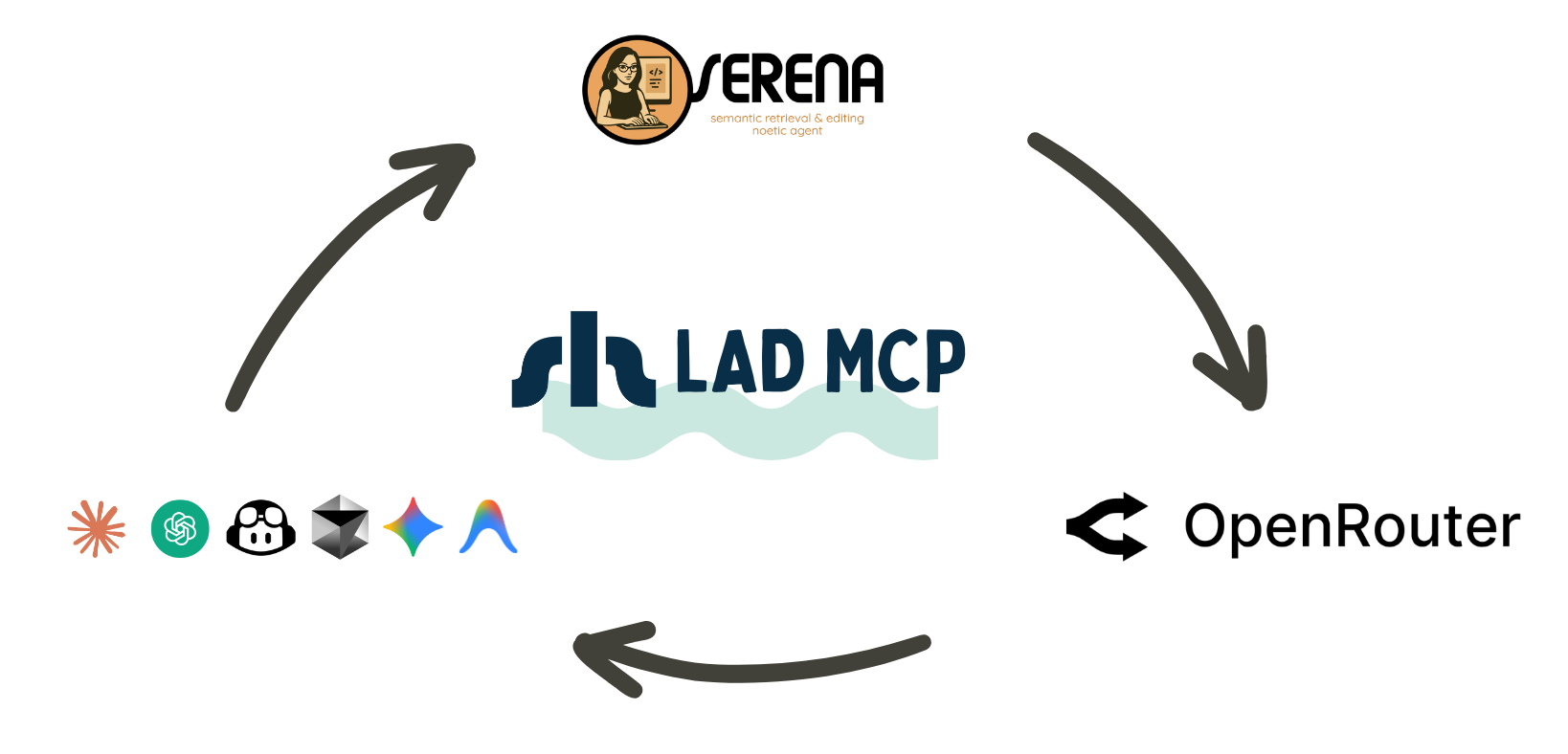
Why review AI-generated code with another AI?
Picture this: Your coding agent just spent 20 minutes refactoring your authentication module. The code looks clean, passes tests, and the agent is confident. You merge it. Three days later, you discover it breaks the SSO integration that was documented in a design decision from two months ago – a decision the agent never saw.
This isn't a bug in the code. It's a bug in the context.
The "Bad Token" Problem
LLMs generate text token by token. Each new token is chosen to maximize coherence with all previous tokens. So when an agent makes a questionable design choice early on, every subsequent token tries to justify and reinforce that mistake to maintain cohesion. The agent effectively gaslights itself.
Think of it like this: if you start a sentence with a wrong assumption, your brain automatically tries to make the rest of the sentence sound convincing – even if the premise is flawed. LLMs do the same thing, but they can't step back and question their earlier choices.
When generating large code segments, "if" the agent makes a bad choice becomes "when" – it's statistically inevitable.
The solution? A fresh pair of eyes. A second LLM that isn't constrained by the first agent's token history can spot these coherence-driven mistakes that the original agent is blind to.
What's wrong with existing AI code review solutions?
At Shelpuk AI Technology Consulting, we build custom AI products under a fixed-price model. Development efficiency isn't optional – it's how we stay profitable. We've been using AI coding assistants since 2023 (GitHub Copilot, Cursor, Windsurf, Claude Code, Codex), and we needed our agents' code reviewed by state-of-the-art open-source models via OpenRouter.
Why OpenRouter? It's a unified gateway to both private and open-source models with Bring Your Own Key support. Essentially, OpenRouter is all you need :)
(Disclaimer: We are not affiliated with OpenRouter in any way.)
We tried the PAL MCP server for OpenRouter-based review, but it failed us for two reasons:
Problem 1: Manual per-model configuration
PAL requires package-level configuration for every OpenRouter model. Without it, PAL assumes a 32k context window and limits file input to ~6k tokens – clearly insufficient for code review tasks.
We even submitted PRs to add support for cutting-edge models like moonshotai/kimi-k2-thinking and z-ai/glm-4.7 (current SOTA open-source models), but they've been sitting open for months. The PAL team seems overwhelmed, and the approach doesn't scale.
Problem 2: The bigger issue – lack of project context
This is the real problem with AI-reviewing-AI.
When a human engineer reviews a diff, they don't just check if the code "makes sense in isolation." They evaluate it against:
- Requirements from the spec
- Team constraints and conventions
- Prior architectural decisions
- Design patterns used in other modules
- Debug notes from similar past issues
Most of the review value doesn't come from catching logical contradictions in the code itself – AI-generated code rarely has those. The value comes from spotting gaps, inconsistencies, and contradictions with the larger system.
Most AI code reviewers are "amnesic" – they see the diff, but not the project's history, requirements, or architectural context. They're reviewing in a vacuum.
How Lad solves this
We built Lad for our internal use and decided to open-source it. Here's what makes it different:
Zero-config OpenRouter integration
✅ Lad fetches model metadata (context window size, tool calling support) directly from OpenRouter via the OpenRouter API.
✅ If a model is available on OpenRouter, Lad can use it – no manual configuration needed.
✅ New models? They just work.
Dual-reviewer mode by default
✅ Lad runs two reviewers in parallel (default: moonshotai/kimi-k2.5 and minimax/minimax-m2.7)
✅ Reduces individual model bias and catches more issues
✅ Returns both reviews plus a synthesized summary
✅ You can switch to single-reviewer mode with OPENROUTER_SECONDARY_REVIEWER_MODEL=0
Project-aware review (the killer feature)
Note: This feature is optional – Lad works perfectly fine without Serena for basic code review. However, if you want project-aware review with long-term memory and codebase indexing, Serena integration provides significant advantages.
✅ Lad can integrate with Serena – a "headless IDE" for AI coding agents
✅ Serena provides token-efficient project indexing and persistent "memories"
✅ Your agents can record requirements, design decisions, debug findings, and more
✅ Memories survive across coding sessions and can be shared across teams
(Disclaimer: We are not affiliated with Serena in any way.)
Here's the magic when Serena is available: Lad connects your Serena repository index and memories to the reviewer LLMs. Now the reviewing agent can:
- Spot inconsistencies with other system modules
- Catch mismatches with requirements settled months ago
- Reference design decisions from your project's memory bank
- Review code in the context of your entire project history, not just the diff
This is what human reviewers do – and now your AI reviewer can too.
Without Serena: Lad still provides excellent dual-reviewer code analysis, but reviews will be based solely on the code you submit, without access to project history, requirements, or architectural context.
Workflow integration
✅ system_design_review for planning and architectural decisions
✅ code_review for implementation and diffs
✅ Both tools support text input and file references via paths – no need to regenerate code for review
Works everywhere
Lad works with Claude Code, Codex, Cursor, Antigravity, Windsurf, and any other MCP client that supports stdio servers. It can also run as a standalone Docker-based tool.
Battle-tested in production
We've been using Lad daily for months in our production work. It's caught countless issues that would've slipped through – inconsistencies with requirements, architectural mismatches, and those subtle "bad token" effects that are invisible to the original coding agent.
If you give it a try or like the idea, please drop us a star on GitHub – it's huge motivation for us to keep improving it! ⭐️
What Lad replaces
Lad eliminates the need for:
✅ Manual OpenRouter model configuration
✅ Context-blind AI code reviewers
✅ Separate tools for design review vs. code review
✅ Constantly re-explaining requirements to reviewers
Tools
Lad exposes two MCP tools:
system_design_review– Reviews architectural proposals, design documents, and planning decisionscode_review– Reviews implementation code, diffs, and file changes
Each tool runs two OpenRouter-backed reviewers in parallel (Primary + Secondary) and returns both outputs plus a synthesized summary.
Requirements
- Python 3.11+
uv(recommended) orpipOPENROUTER_API_KEY(required)
Quickstart
Run command used by MCP clients (stdio):
uvx --from git+https://github.com/Shelpuk-AI-Technology-Consulting/lad_mcp_server \
  lad-mcp-server
First-run note: the first uvx invocation may take 30–60 seconds while it builds the tool environment. If your MCP client times out on first start, run the command once in a terminal to “prewarm” it, then retry in your client.
Tip: add --refresh before --from to force uvx to re-resolve the latest commit from GitHub on every launch. This ensures you get the newest version without clearing the cache manually:
uvx --refresh --from git+https://github.com/Shelpuk-AI-Technology-Consulting/lad_mcp_server \
  lad-mcp-server
Install & run (local development)
Lad ships a stdio CLI entrypoint: lad-mcp-server.
- From a local checkout (recommended for development):
uv run lad-mcp-server - From a published package (when installed):
lad-mcp-server
Client setup
All client examples below run Lad over stdio (the MCP client spawns the server process).
Make sure OPENROUTER_API_KEY is available to the MCP client:
- either set it in your OS environment, or
- paste it directly into the client config (not recommended for repos you commit).
Codex (Codex CLI)
Install Codex CLI:
npm i -g @openai/codex
CLI (no file editing) – add a local stdio MCP server (macOS / Linux):
codex mcp add lad \
  --env OPENROUTER_API_KEY="$OPENROUTER_API_KEY" \
  -- uvx --from git+https://github.com/Shelpuk-AI-Technology-Consulting/lad_mcp_server \
  lad-mcp-server
Windows (PowerShell):
codex mcp add lad `
  --env OPENROUTER_API_KEY="$env:OPENROUTER_API_KEY" `
  -- uvx --from git+https://github.com/Shelpuk-AI-Technology-Consulting/lad_mcp_server `
  lad-mcp-server
Alternative (file-based):
Edit ~/.codex/config.toml (or project-scoped .codex/config.toml in trusted projects):
[mcp_servers.lad]
command = "uvx"
args = [
  "--from",
  "git+https://github.com/Shelpuk-AI-Technology-Consulting/lad_mcp_server",
  "lad-mcp-server",
]
# Forward variables from your shell/OS environment:
env_vars = ["OPENROUTER_API_KEY"]
startup_timeout_sec = 120.0
Claude Code
CLI (no file editing) – add a local stdio MCP server (macOS / Linux):
claude mcp add --transport stdio lad \
  -e OPENROUTER_API_KEY="$OPENROUTER_API_KEY" \
  -- uvx --from git+https://github.com/Shelpuk-AI-Technology-Consulting/lad_mcp_server \
  lad-mcp-server
Windows (PowerShell):
claude mcp add --transport stdio lad `
  -e OPENROUTER_API_KEY="$env:OPENROUTER_API_KEY" `
  -- uvx --from git+https://github.com/Shelpuk-AI-Technology-Consulting/lad_mcp_server `
  lad-mcp-server
If Claude Code times out while starting the server, increase the startup timeout (milliseconds):
macOS / Linux:
export MCP_TIMEOUT=120000
Windows (PowerShell):
$env:MCP_TIMEOUT="120000"
Alternative (file-based):
Create/edit .mcp.json (project scope; recommended for teams):
{
  "mcpServers": {
    "lad": {
      "command": "uvx",
      "args": [
        "--from",
        "git+https://github.com/Shelpuk-AI-Technology-Consulting/lad_mcp_server",
        "lad-mcp-server"
      ],
      "env": {
        "OPENROUTER_API_KEY": "${OPENROUTER_API_KEY}"
      }
    }
  }
}
Cursor
Create .cursor/mcp.json (project) or ~/.cursor/mcp.json (global):
{
  "mcpServers": {
    "lad": {
      "type": "stdio",
      "command": "uvx",
      "args": [
        "--from",
        "git+https://github.com/Shelpuk-AI-Technology-Consulting/lad_mcp_server",
        "lad-mcp-server"
      ],
      "env": {
        "OPENROUTER_API_KEY": "${env:OPENROUTER_API_KEY}"
      }
    }
  }
}
Startup timeout: Cursor does not always expose a per-server startup timeout. If the first run is slow, run the uvx command once in a terminal to prebuild the tool environment, then restart Cursor.
Gemini CLI
You can configure MCP servers via CLI or by editing settings.json.
CLI (adds to .gemini/settings.json by default; use -s user for ~/.gemini/settings.json):
gemini mcp add -s user -t stdio \
  -e OPENROUTER_API_KEY="$OPENROUTER_API_KEY" \
  lad uvx --from git+https://github.com/Shelpuk-AI-Technology-Consulting/lad_mcp_server lad-mcp-server
Alternative (file-based):
Edit ~/.gemini/settings.json (or .gemini/settings.json in a project):
{
  "mcpServers": {
    "lad": {
      "command": "uvx",
      "args": [
        "--from",
        "git+https://github.com/Shelpuk-AI-Technology-Consulting/lad_mcp_server",
        "lad-mcp-server"
      ],
      "env": {
        "OPENROUTER_API_KEY": "$OPENROUTER_API_KEY"
      },
      "timeout": 120000,
      "trust": false
    }
  }
}
Windsurf
Windsurf stores MCP servers in ~/.codeium/windsurf/mcp_config.json.
In Windsurf:
- Open Cascade
- Click MCPs (top-right)
- Click Manage MCP Servers
- Click View raw config (opens
mcp_config.json) - Add the server under
mcpServers, save, then click Refresh
Paste this into your mcpServers object (don’t overwrite other servers):
{
  "lad": {
    "command": "uvx",
    "args": [
      "--from",
      "git+https://github.com/Shelpuk-AI-Technology-Consulting/lad_mcp_server",
      "lad-mcp-server"
    ],
    "env": {
      "OPENROUTER_API_KEY": "${env:OPENROUTER_API_KEY}"
    }
  }
}
If Windsurf can’t find uvx, replace "uvx" with an absolute path (run which uvx in a terminal).
Antigravity
In Antigravity, open the MCP store, then:
- Click Manage MCP Servers
- Click View raw config (opens
mcp_config.json) - Add the server config under
mcpServers, save, then go back and click Refresh
Paste this into your mcpServers object (don’t overwrite other servers):
{
  "lad": {
    "command": "uvx",
    "args": [
      "--from",
      "git+https://github.com/Shelpuk-AI-Technology-Consulting/lad_mcp_server",
      "lad-mcp-server"
    ],
    "env": {
      "OPENROUTER_API_KEY": "PASTE_OPENROUTER_KEY_HERE"
    }
  }
}
Replace PASTE_OPENROUTER_KEY_HERE with your actual key.
If Antigravity can’t find uvx, replace "uvx" with an absolute path (run which uvx in a terminal).
Configuration (environment variables)
Required
OPENROUTER_API_KEY
OpenRouter models
OPENROUTER_PRIMARY_REVIEWER_MODEL(default:moonshotai/kimi-k2.5)OPENROUTER_SECONDARY_REVIEWER_MODEL(default:minimax/minimax-m2.7)- Set to
0to disable the Secondary reviewer (Primary-only mode).
- Set to
Direct provider endpoints
Lad can route reviewer calls directly to provider endpoints, bypassing OpenRouter for lower latency and cost. When a direct call fails, Lad automatically falls back to OpenRouter.
| Model prefix | Endpoint | Env variable | Notes |
|---|---|---|---|
z-ai/ or zai/ |
Z.AI Coding Plan | ZAI_CODING_PLAN_KEY |
Supports Preserved Thinking (reasoning models like GLM-5). Model prefix is stripped: z-ai/glm-5 → glm-5. |
deepseek/ |
DeepSeek API | DEEPSEEK_API_KEY |
Thinking mode enabled automatically. Model prefix is stripped: deepseek/deepseek-v4-pro → deepseek-v4-pro. Reasoning content is preserved across tool-call rounds. |
moonshotai/ or kimi-for-coding |
Kimi Code | KIMI_CODE_API_KEY |
Routes to Kimi Code endpoint. All models normalize to kimi-for-coding. |
Example configuration for Z.AI GLM-5.1 as primary, DeepSeek as secondary:
{
  "lad": {
    "env": {
      "OPENROUTER_API_KEY": "...",
      "ZAI_CODING_PLAN_KEY": "...",
      "DEEPSEEK_API_KEY": "...",
      "OPENROUTER_PRIMARY_REVIEWER_MODEL": "z-ai/glm-5.1",
      "OPENROUTER_SECONDARY_REVIEWER_MODEL": "deepseek/deepseek-v4-pro"
    }
  }
}
OpenRouter request behavior
OPENROUTER_MAX_CONCURRENT_REQUESTS(default:4)OPENROUTER_REVIEWER_TIMEOUT_SECONDS(default:300, wall-clock per reviewer run)OPENROUTER_TOOL_CALL_TIMEOUT_SECONDS(default:360, per tool call; must be >= reviewer timeout)OPENROUTER_HTTP_REFERER(optional; forwarded to OpenRouter)OPENROUTER_X_TITLE(optional; forwarded to OpenRouter)INTERMITTENT_REVIEW_CALLS(default:2). When> 0, Lad dispatches a parallel, non-blocking LLM side-call to the same model every N tool calls during a reviewer's Serena-exploration loop. The side-call asks for a partial review based on the conversation gathered so far. The most recent successful snapshot is cached. If the reviewer wall-clock timeout fires before the model finalizes, Lad returns the cached snapshot (marked as intermittent). If no model-generated snapshot is available, Lad synthesizes a deterministic exploration digest from the tool call history (files read, symbols found, search matches), or a tool-exploration trace summary from the Serena tool call history. Both fallbacks produce review-shaped markdown with all required sections. Set to0to disable.
Direct provider API keys (optional – bypass OpenRouter)
ZAI_CODING_PLAN_KEY(optional). When set, models withz-ai/prefix route directly to the Z.AI Coding Plan endpoint.KIMI_CODE_API_KEY(optional). When set, models withmoonshotai/prefix orkimi-for-codingroute directly to the Kimi Code endpoint.DEEPSEEK_API_KEY(optional). When set, models withdeepseek/prefix route directly to the DeepSeek API with thinking mode enabled.
Budgeting / limits
OPENROUTER_FIXED_OUTPUT_TOKENS(default:8192)OPENROUTER_CONTEXT_OVERHEAD_TOKENS(default:2000)OPENROUTER_MODEL_METADATA_TTL_SECONDS(default:3600)OPENROUTER_MAX_INPUT_CHARS(default:100000)OPENROUTER_INCLUDE_REASONING(default:false)
Note: if your reviewer output is frequently cut off, increase OPENROUTER_FIXED_OUTPUT_TOKENS (this reduces room for file context in the prompt).
Serena bridge (optional – only when .serena/ exists and tool calling is supported)
Note: These variables are only used when Serena integration is active. You don't need to set them if you're not using Serena.
LAD_SERENA_MAX_TOOL_CALLS(default:32)LAD_SERENA_TOOL_TIMEOUT_SECONDS(default:30)LAD_SERENA_MAX_TOOL_RESULT_CHARS(default:12000)LAD_SERENA_MAX_TOTAL_CHARS(default:50000)LAD_SERENA_MAX_DIR_ENTRIES(default:100)LAD_SERENA_MAX_SEARCH_RESULTS(default:20)
Env files (optional)
LAD_ENV_FILE(optionalKEY=VALUEfile, loaded only for missing vars).env(optional; loaded ifpython-dotenvis installed)
Precedence note: Lad never overrides variables that are already set in the process environment. It only fills missing variables from LAD_ENV_FILE first, then (optionally) from .env.
Path-based review requests
Both tools accept either direct text (proposal / code) or paths (files/dirs under inferred project root). When paths are provided, Lad reads and embeds text-like files from disk (language-agnostic) and skips common binary files and oversized files.
During directory expansion, hidden files and directories (dotfiles) are skipped; pass an explicit path (e.g., .gitignore) if you want it included.
Example tool payloads:
system_design_review:{"paths":["src/retrieval.py"],"constraints":"..."}code_review:{"paths":["lad_mcp_server","tests"],"context":"Please prioritize correctness and failure modes in auth/session logic."}
Notes:
- For multi-project usage (one Lad config for many repos), prefer absolute
paths. Relativepathswork when the MCP host starts Lad with CWD set to the project root (or when the host provides a workspace root). - For safety, Lad rejects path-based reviews that resolve to obvious system roots (e.g.
/etc,/proc,C:\Windows).
Serena integration (optional)
Serena is completely optional. Lad works without Serena and will perform code reviews based on the code you provide. However, without Serena, reviewers won't have access to:
- Long-term project memory (requirements, design decisions, debug notes)
- Codebase index for exploring related modules
- Historical context from previous coding sessions
If Serena is available: When the repo being reviewed contains .serena/ and the model supports tool calling, both reviewers automatically get a read-only Serena toolset (directory listing, file reads, memory reads, pattern search) and are instructed to call activate_project(".") first. This enables project-aware reviews with full context.
Docker deployment (local stdio)
This is the most compatible Docker setup: your MCP client still runs Lad as a stdio server, but the process it spawns is docker run ... instead of uvx ....
Build the image:
docker build -t lad-mcp-server .
Don’t bake API keys into the image. Pass them via environment variables at runtime.
Run Lad over stdio (for manual testing):
docker run --rm -i \
  -e OPENROUTER_API_KEY="..." \
  lad-mcp-server
Use Docker from an MCP client (example config fragment):
{
  "lad": {
    "command": "docker",
    "args": [
      "run",
      "-i",
      "--rm",
      "-e",
      "OPENROUTER_API_KEY",
      "lad-mcp-server"
    ],
    "env": {
      "OPENROUTER_API_KEY": "${env:OPENROUTER_API_KEY}"
    }
  }
}
Note: stdio servers are local-process servers. If your client config uses command/args, it must be able to execute that command (locally), even if the command is docker.
How to Speed Up Lad MCP Server
If you face timeouts or design / code review takes too long, you can improve the performance as follows.
MCP Server Timeout Configuration
Both reviewers usually complete in under a minute, but for larger review tasks (especially with multiple Serena tool calls), set the MCP tool execution timeout to 5 minutes where your client supports it.
Important: the 5-minute recommendation is for tool execution/request timeout, not MCP server startup timeout.
As of February 8, 2026, timeout configuration differs by client:
Codex (supports both startup timeout and tool execution timeout in config.toml):
[mcp_servers.lad]
command = "uvx"
args = ["--from", "git+https://github.com/Shelpuk-AI-Technology-Consulting/lad_mcp_server", "lad-mcp-server"]
startup_timeout_sec = 60.0
tool_timeout_sec = 300.0
Docs: https://developers.openai.com/codex/mcp/
Claude Code (does not currently document a separate MCP tool execution timeout setting):
MCP_TIMEOUTis documented as startup timeout (milliseconds), not tool execution timeout.
export MCP_TIMEOUT=120000
claude
Docs: https://code.claude.com/docs/en/mcp
Cursor (MCP config is documented, but no timeout key is documented in mcp.json fields):
- Documented fields include
command/args/env/envFile(stdio), andurl/headers/auth(remote). - Workaround: prewarm once in a terminal, then restart Cursor:
uvx --from git+https://github.com/Shelpuk-AI-Technology-Consulting/lad_mcp_server lad-mcp-server
Docs: https://cursor.com/docs/context/mcp
Gemini CLI (supports per-server MCP request timeout in milliseconds via timeout):
{
  "mcpServers": {
    "lad": {
      "command": "uvx",
      "args": [
        "--from",
        "git+https://github.com/Shelpuk-AI-Technology-Consulting/lad_mcp_server",
        "lad-mcp-server"
      ],
      "timeout": 300000,
      "trust": false
    }
  }
}
You can also set it from CLI when adding a server:
gemini mcp add --timeout 300000 lad uvx --from git+https://github.com/Shelpuk-AI-Technology-Consulting/lad_mcp_server lad-mcp-server
Docs: https://github.com/google-gemini/gemini-cli/blob/main/docs/tools/mcp-server.md
Windsurf (MCP config is documented, but no timeout key is documented in mcp_config.json):
- Use the same prewarm workaround if first run is slow. Docs: https://docs.windsurf.com/windsurf/cascade/mcp
Antigravity (MCP integration is documented, but no timeout key is documented for custom mcp_config.json setup):
- Use the same prewarm workaround if first run is slow. Docs: https://antigravity.google/docs/mcp
Optimizing OpenRouter Configuration
Check OpenRouter Activity to see the throughput for your LLM calls:
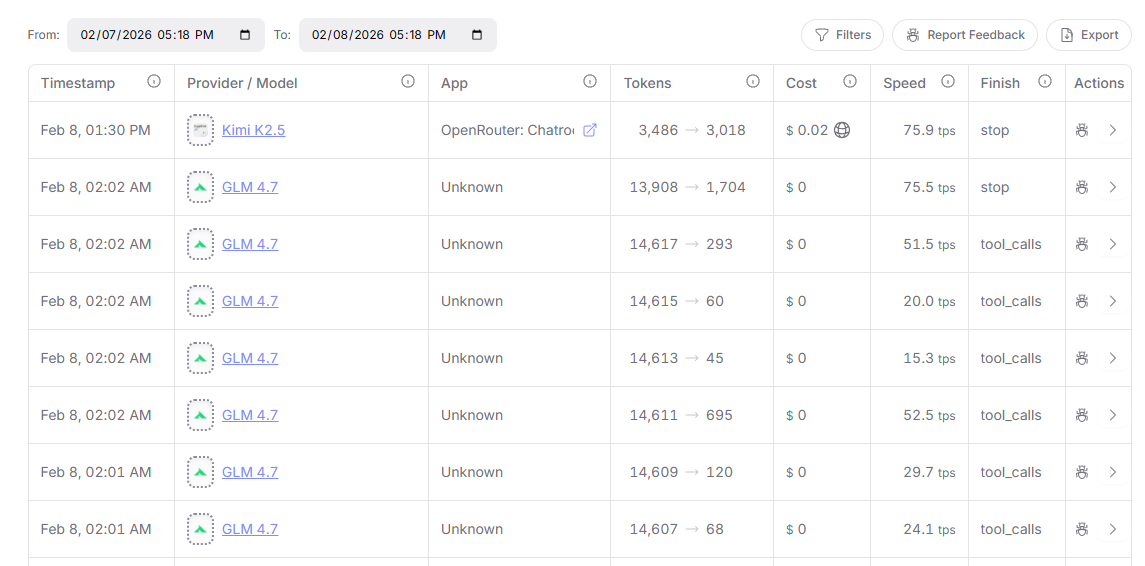
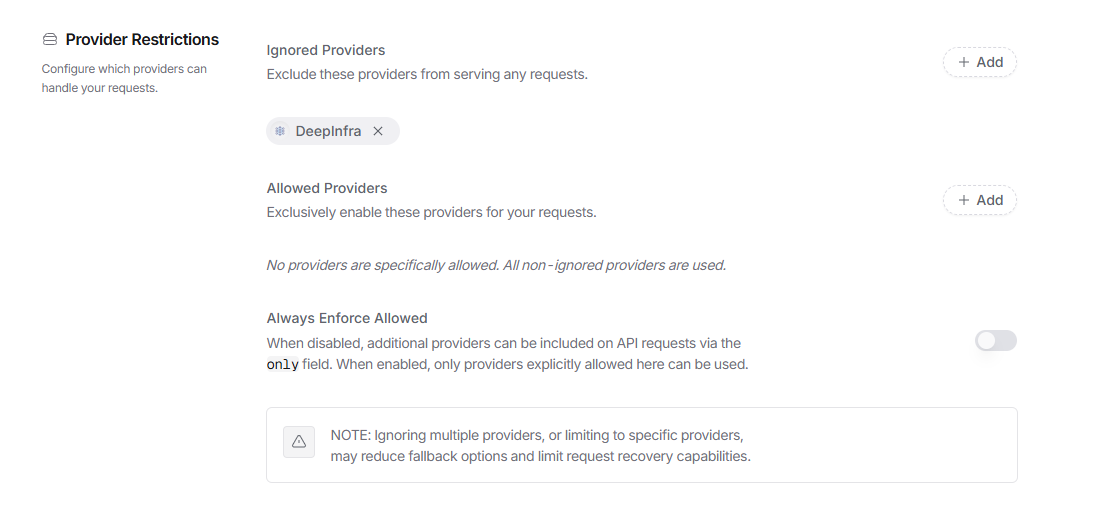
If you see your LLM calls have low throughput (less than 30 tokens/second), consider restricting the low-throughput provider. For example, as of February 8, 2026, DeepInfra has very low throughput for both moonshotai/kimi-k2.5 and z-ai/glm-4.7, so we restrict OpenRouter from routing our LLM calls there:
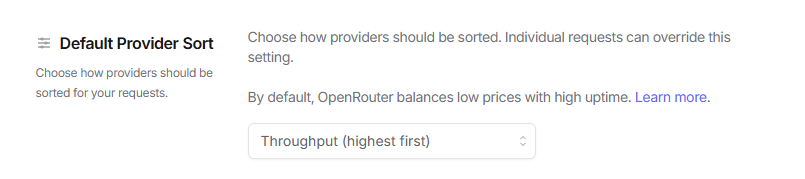
We also recommend that you prioritize OpenRouter providers by throughput:
Troubleshooting
- First run is slow / client times out: run the
uvxcommand from Quickstart once in a terminal to prewarm, then restart the client. - “OPENROUTER_API_KEY is required”: ensure the MCP client process has access to the variable (or paste it into the client config).
- Secondary reviewer is too expensive/slow: set
OPENROUTER_SECONDARY_REVIEWER_MODEL=0. - Reviewer returns “Reviewer Error” on timeout: ensure your MCP client's tool execution timeout exceeds Lad's
OPENROUTER_TOOL_CALL_TIMEOUT_SECONDS. For Claude Code, setMCP_TOOL_TIMEOUT(in the Ladenvblock or globally) to at least 2× your reviewer timeout. OPENROUTER_TOOL_CALL_TIMEOUT_SECONDS must be >= OPENROUTER_REVIEWER_TIMEOUT_SECONDS: Lad validates that the tool-call timeout is at least as large as the reviewer timeout. IncreaseOPENROUTER_TOOL_CALL_TIMEOUT_SECONDSor decreaseOPENROUTER_REVIEWER_TIMEOUT_SECONDS.- Stale package after updating: add
--refreshto theuvxargs in your MCP config, then fully restart your MCP client (not just reconnect).
Security notes
- Don’t commit API keys.
- Treat code review as data egress: anything you pass via
code/proposalorpathsmay be sent to OpenRouter (after redaction). - Prefer environment-variable forwarding (
env_vars/${env:...}) over hardcoding secrets in config files.
Dev helpers
python3 scripts/verify_openrouter_key.py(fetches model list)python3 scripts/verify_serena_usage.py(ensures both reviewers used Serena and readproject_overview.md)
from github.com/Shelpuk-AI-Technology-Consulting/lad_mcp_server
Установить Lad Server в Claude Desktop, Claude Code, Cursor
unyly install lad-mcp-serverСтавит в Claude Desktop, Claude Code, Cursor и VS Code — сам разбирается с npx, uvx и сборкой из исходников.
Впервые? Поставь CLI: curl -fsSL https://unyly.org/install | sh
Или настроить вручную
Выполни в терминале:
claude mcp add lad-mcp-server -- uvx --from git+https://github.com/Shelpuk-AI-Technology-Consulting/lad_mcp_server lad-mcp-serverFAQ
Lad Server MCP бесплатный?
Да, Lad Server MCP бесплатный — установка в пару кликов через Unyly без оплаты.
Нужен ли API-ключ для Lad Server?
Нет, Lad Server работает без API-ключей и переменных окружения.
Lad Server — hosted или self-hosted?
Self-hosted: сервер запускается локально на твоей машине командой из раздела установки.
Как установить Lad Server в Claude Desktop, Claude Code или Cursor?
Открой Lad Server на unyly.org, выбери вкладку своего клиента (Claude Desktop, Claude Code, Cursor) и нажми Install — конфиг сгенерируется автоматически, без правки JSON.
Похожие MCP
GitHub
PRs, issues, code search, CI status
 автор: GitHub
Filesystem
Secure file operations with configurable access controls.
Memory
Knowledge graph-based persistent memory system.
Template MCP Server
A CLI tool to create a new Model Context Protocol server project with TypeScript support, dual transport options, and an extensible structure
 автор: mcpdotdirect
Compare Lad Server with
Не уверен что выбрать?
Найди свой стек за 60 секунд
Автор?
Embed-бейдж для README
Похожее
Все в категории development