
Local Hub
БесплатноНе проверенmcp-local-hub (mcphub): a local supervisor + router that compresses dozens of duplicate MCP (Model Context Protocol) server processes across parallel clients in

Описание
mcp-local-hub (mcphub): a local supervisor + router that compresses dozens of duplicate MCP (Model Context Protocol) server processes across parallel clients into one managed hub. Windows-GA; Linux-beta / macOS-preview for supervisor lifecycle.
README
One managed local hub for every MCP server you use — N duplicate processes per server collapse to 1 shared daemon.
Run one copy of each Model Context Protocol server on your workstation, shared across every MCP client that needs it — instead of each client spawning its own redundant stdio process. Install the binary (mcphub) once with npm, point your clients at the hub, and stop paying for the same server N times.
[!WARNING] Preview version:
mcp-local-hubis actively under development. Interfaces, manifests, GUI flows, install/migration behavior, and supported-client wiring may still change. Windows 11 is the primary tested path, but not every feature, server, client combination, or platform path is fully tested yet; use dry-runs and backups before applying changes to important MCP client configs.
Install (npm)
The fastest path — the npm distribution is generally available. The npm
package is mcp-local-hub; the command it installs is mcphub.
# 1. Install the binary globally (the command it installs is `mcphub`)
npm install -g mcp-local-hub

# 2. Put mcphub on your PATH and register state (idempotent)
mcphub setup

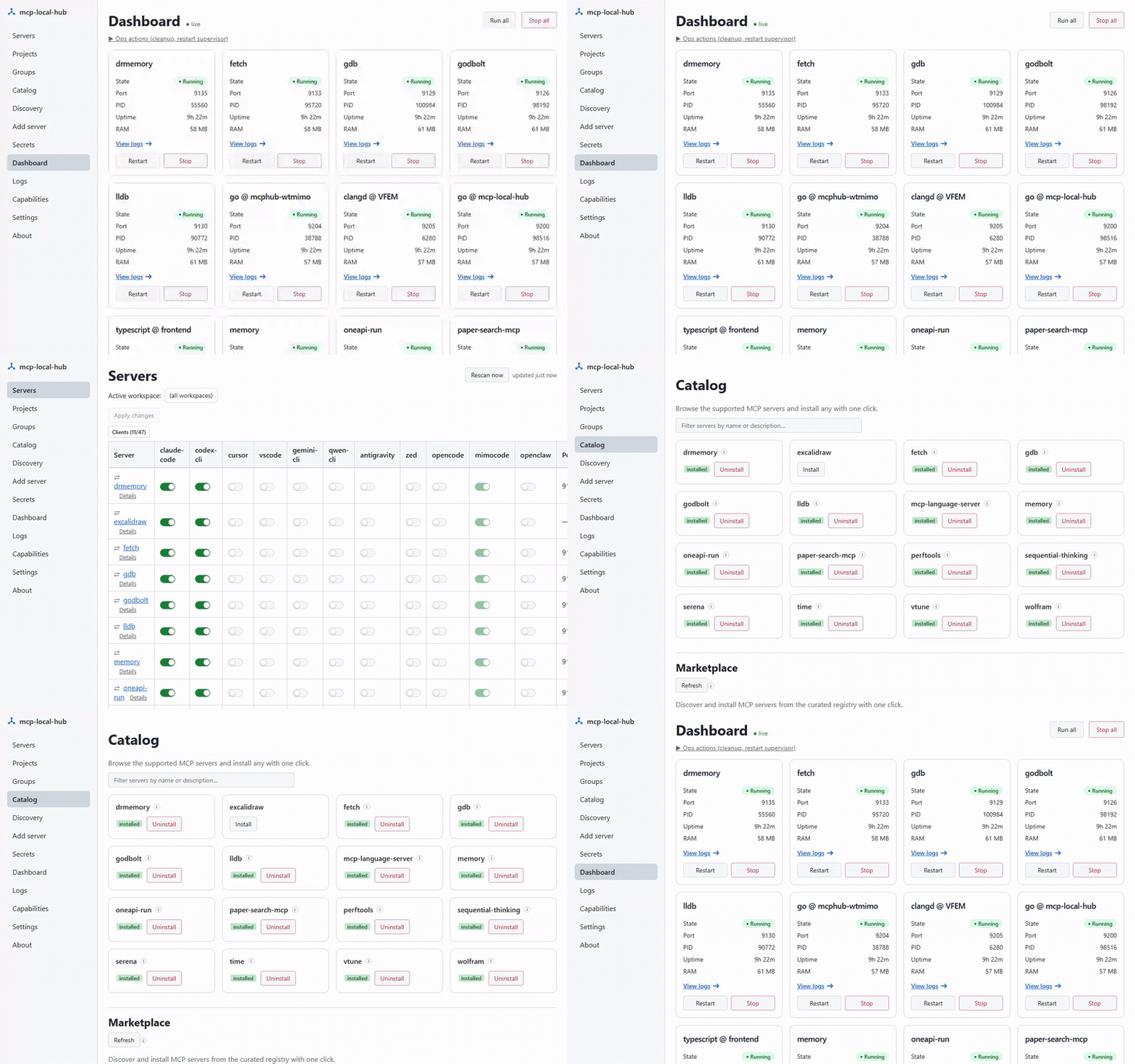
# 3. Open the GUI — install servers with one click, see every daemon's health
mcphub gui
# Or run once without installing:
npx mcp-local-hub version
The meta package ships no postinstall download script (the top npm
supply-chain attack vector) — npm installs only the platform binary that
matches your os/cpu via an optional dependency, and a tiny Node shim execs
it. Building from source is still supported for dev iteration — see
Building from source below.
Detailed setup, per-client behaviour, and troubleshooting in INSTALL.md.
Why mcphub — the problem and the cure
The problem. Every modern coding assistant (Claude Code, Codex CLI, Cursor, VS Code, Gemini CLI, Qwen Code CLI, Antigravity, Continue, ...) speaks MCP, and each client independently execs whatever stdio servers you configure — uvx serena, npx @modelcontextprotocol/server-memory, mcp-language-server, and so on. Run three assistants side-by-side on the same project and you get three Serena processes, three gopls subprocesses, three separate memory stores. Scale that across the editors, agents, and CLIs a working developer keeps open and you get dozens of duplicate node/python processes — each per-session spawn re-downloads dependencies, re-indexes your code, and eats RAM, all to do the same work the process next to it is already doing.
The cure. mcp-local-hub is one managed local hub: install once, and every client routes through it. Each MCP server runs once per OS user, supervised, restarted on failure, and shared — so the process tail compresses from N duplicate procs → 1 managed daemon each.
What this tool does
mcp-local-hub runs each MCP server once per OS user, exposes it as a local HTTP endpoint via Streamable HTTP transport, and writes the correct client-config entry into each managed MCP client. Clients see a shared daemon instead of their own child process.
  MCP clients                      mcphub                  shared daemons
  (Claude Code,                                            (one per server,
   Codex, Cursor,        ┌──────────────────────┐           per OS user)
   VS Code, Gemini,      │   mcphub supervise   │         ┌──────────────┐
   Qwen, …)              │  ───────────────────  │   ┌────▶│ serena ×2    │
                         │  supervisor: owns,    │   │     ├──────────────┤
   ┌──────────┐  HTTP    │  restarts, shares     │   ├────▶│ memory       │
   │ client A │ ───────▶ │  every daemon         │ ──┤     ├──────────────┤
   ├──────────┤  HTTP    │                       │   ├────▶│ godbolt …    │
   │ client B │ ───────▶ │  (HTTP front +        │   │     ├──────────────┤
   ├──────────┤  HTTP    │   stdio-host /        │   └────▶│ +7 more      │
   │ client C │ ───────▶ │   embedded Go)        │         └──────────────┘
   └──────────┘          └──────────────────────┘
Each MCP server runs once per OS user; every client shares the same daemon over loopback HTTP instead of spawning its own copy. See docs/supervisor-architecture.md for the full lifecycle, state-file layout, migration, and per-OS behavior.
Stdio-only MCP servers (memory, time, sequential-thinking, wolfram, gdb, paper-search-mcp) run behind a native Go stdio-host (internal/daemon/host.go): one subprocess per daemon, multiplexed across concurrent HTTP clients via JSON-RPC id rewriting and a cached initialize response. Three servers (godbolt, lldb-bridge, perftools) ship as Go code embedded directly in the mcphub binary — no npm/pip dependency, starts instantly.
Antigravity's Cascade agent rejects loopback-HTTP MCP entries, so mcp-local-hub bridges it via a stdio relay subprocess: mcphub relay translates between stdio JSON-RPC and the shared HTTP daemon. Cascade sees a normal stdio command; the daemon stays shared.
Building from source
The npm install above is the fastest path. To build from source instead — for dev iteration or to embed your own version metadata:
# 1. Build (embeds git commit + build date into the binary)
bash build.sh        # Git Bash / WSL / Linux / macOS
# or on Windows native:
pwsh ./build.ps1

# Plain `go build -o mcphub.exe ./cmd/mcphub` also works for dev
# iteration but leaves version metadata as dev/unknown.

# 2. Install to ~/.local/bin and register on user PATH (idempotent)
./mcphub.exe setup
Whether you installed via npm or built from source, the rest is identical — use the CLI to install the servers you want shared and verify they connect:
# Install the MCP servers you want shared
mcphub install --server serena       # default clients: Claude/Codex/Cursor
mcphub install --all                 # all 10 servers, default clients

# Optional client targeting
mcphub install --server serena --clients qwen-cli,vscode
mcphub install --server serena --all-clients

# Verify
mcphub status
claude mcp get serena    # shows: Status: ✓ Connected, Type: http
Ten shipped servers
| Server | Port | Transport | Notes |
|---|---|---|---|
| serena (×2 daemons) | 9121 / 9122 | native-http (uvx) | Flagship: per-client daemons (claude / codex) for context isolation |
| memory | 9123 | stdio-bridge (npx) | Shared JSONL write-serialized across all clients |
| sequential-thinking | 9124 | stdio-bridge (npx) | Stateless reasoning helper |
| wolfram | 9132 | stdio-bridge (node) | Requires wolfram_app_id secret |
| godbolt | 9126 | embedded Go | Compiler Explorer — compile/execute/disasm via godbolt.org + optimization remarks, llvm-mca, pahole |
| paper-search-mcp | 9127 | stdio-bridge (uvx) | Requires unpaywall_email secret |
| time | 9128 | stdio-bridge (npx) | Trivial stateless |
| gdb | 9129 | stdio-bridge (uv run) | Multi-debugger with session management |
| lldb | 9130 | embedded Go bridge | Auto-spawns lldb.exe, HTTP-multiplexes concurrent clients onto single TCP connection |
| perftools | 9131 | embedded Go | clang-tidy + llvm-objdump + include-what-you-use over real projects; hyperfine is opt-in only (RCE surface — set MCP_LOCAL_HUB_ENABLE_UNSAFE_HYPERFINE=1, see INSTALL) |
Plus context7 as a direct HTTPS entry (no daemon, no scheduler task).
Embedded vs external servers
Three servers (godbolt, lldb-bridge, perftools) are implemented as Go packages inside internal/<name>/ and run as subcommands of the mcphub binary itself — no external runtime dependency. Each also ships as an independent standalone binary via go build ./cmd/<name> for users who want just that one server without the full hub.
Performance-review workflow combining multiple servers in one chat:
# audit real project for perf antipatterns
perftools.clang_tidy(files=["src/hot.cpp"], checks="performance-*")

# sanity-check asm on godbolt with optimization remarks
godbolt.compile_code(source=..., filters={optOutput: true, intel: true})

# statistical bench (requires opt-in: MCP_LOCAL_HUB_ENABLE_UNSAFE_HYPERFINE=1 on
# the perftools daemon — see INSTALL.md "Opting into hyperfine")
perftools.hyperfine(commands=["./old_bin", "./new_bin"], warmup=3)

# verify the LTO-linked final binary keeps the vectorization
perftools.llvm_objdump(binary="./new_bin", project_root=".", function="hot_loop")
Supported clients
Default install targets are claude-code, codex-cli, and cursor.
vscode, gemini-cli, qwen-cli, antigravity, zed, kiro, windsurf,
cline, kilocode, opencode, hermes, and openclaw are opt-in via
--clients ... or --all-clients, so install does not silently mutate every
assistant installed on the workstation.
| Client | Install mode | Version/status | Config path | Transport |
|---|---|---|---|---|
| Claude Code CLI | Default | 2.1.112 tested | ~/.claude.json |
HTTP (type: "http") |
| Codex CLI | Default | 0.121.0 tested | ~/.codex/config.toml |
HTTP (streamable_http) |
| Cursor | Default | Preview; live smoke pending | ~/.cursor/mcp.json |
HTTP (type: "http") |
| VS Code | Opt-in | Preview; live smoke pending | user-profile mcp.json |
HTTP (type: "http") |
| Gemini CLI | Opt-in | 0.38.1 tested | ~/.gemini/settings.json |
HTTP (type: "http") |
| Qwen Code CLI | Opt-in | Preview; live smoke pending | ~/.qwen/settings.json |
HTTP (httpUrl) |
| Antigravity IDE | Opt-in | v0.x tested | ~/.gemini/antigravity/mcp_config.json |
stdio relay -> HTTP |
| Zed | Opt-in | Preview; built from upstream docs, live smoke pending | ~/.config/zed/settings.json (%APPDATA%\Zed\settings.json on Windows) |
stdio relay -> HTTP (context_servers) |
| Kiro | Opt-in | Preview; built from upstream docs, live smoke pending | ~/.kiro/settings/mcp.json |
HTTP |
| Windsurf | Opt-in | Preview; built from upstream docs, live smoke pending | ~/.codeium/windsurf/mcp_config.json |
HTTP (serverUrl) |
| Cline | Opt-in | Preview; built from upstream docs, live smoke pending | VS Code globalStorage …/saoudrizwan.claude-dev/settings/cline_mcp_settings.json |
HTTP (type: "streamableHttp") |
| Kilo Code | Opt-in | Preview; built from upstream docs, live smoke pending | VS Code globalStorage …/kilo-code.kilo-code/settings/mcp_settings.json |
HTTP |
| OpenCode | Opt-in | Preview; built from upstream docs, live smoke pending | ~/.config/opencode/opencode.json |
HTTP |
| Hermes | Opt-in | Preview; built from upstream docs, live smoke pending | ~/.hermes/config.yaml |
HTTP |
| OpenClaw | Opt-in | Preview; built from upstream docs, live smoke pending | ~/.openclaw/openclaw.json |
HTTP |
Antigravity note: Cascade rejects loopback-HTTP MCP entries, so mcp-local-hub writes a stdio relay entry instead — mcphub.exe relay --server <name> --daemon <d>. Cascade spawns the relay as a normal stdio subprocess; the relay forwards JSON-RPC to the shared HTTP daemon. No extra server process per Antigravity session.
CLI surface
The commands you reach for day to day:
| Command | What it does |
|---|---|
mcphub setup |
Install binary to ~/.local/bin and register on user PATH (idempotent) |
mcphub install --server <name> |
Create scheduler tasks, write default client configs, start daemons |
mcphub install --all |
Bulk install every manifest under servers/ into default clients |
mcphub status |
Show state of every mcp-local-hub-* task (Running / Scheduled / Stopped) with PID, RAM, uptime, next-run |
mcphub restart --server <n> / --all |
Stop + re-launch one or all daemons |
mcphub scan |
Classify every MCP entry across managed clients (via-hub, can-migrate, unknown, per-session, not-installed) |
mcphub migrate --server <n> |
Rewrite stdio client entries to hub HTTP for a given server |
mcphub secrets {init,set,get,list,…} |
Age-encrypted vault for API keys |
mcphub rollback |
Restore the latest client-config backup for every client |
mcphub version |
Print version, commit, build metadata |
The full command surface — install flags, discovery/migration, logs/backups/recovery, scheduler/secrets, and the hidden transport shims — is in docs/cli-reference.md.
Architecture highlights
- PATH-based install model — scheduler tasks reference
~/.local/bin/mcphub.exeby absolute path;mcphub setupputs the binary there and registers it on user PATH. - First-run onboarding —
mcphub setup --trusted-rootblesses LSP trusted roots up front; the GUI shows a dismissable welcome banner until the first server is installed. - go:embed manifests — all 10 server manifests are baked into the binary, so the binary runs without a sibling
servers/directory. - Dual-entry pattern — embedded Go servers expose a
NewCommand()factory imported by both the standalone binary and the hub subcommand; one code path, two shipping shapes. - Native Go stdio-host with child-exit detection — one subprocess per daemon, multiplexed across concurrent HTTP clients, with child-exit detection feeding Task Scheduler's restart policy.
See docs/architecture-highlights.md for the full prose on each highlight, and docs/supervisor-architecture.md for supervisor / lifecycle depth.
Supervisor architecture (v0.5.0)
A single long-lived mcphub supervise process per user owns every MCP daemon,
restarts it on failure, and shares it across clients. Full design — new commands
(supervise, strict-mode, autostart, install --upgrade), state-file
layout, v0.4.x migration flow, and per-OS behavior matrix — is in
docs/supervisor-architecture.md.
Current status
Preview / Phase 3B-II hardening — the core CLI, daemon layer, Windows GUI, tray, secrets, settings, backup, migration, and workspace-scoped LSP surfaces are in the tree. Phase 3A and Phase 3B-I are closed; Phase 3B-II has delivered multiple follow-up slices, but still needs the live/manual smoke matrix and backlog reconciliation before a release-ready claim.
Delivered and documented:
- 15 built-in servers (incl. the gdb/lldb/godbolt/perftools/drmemory/vtune/oneapi-run debug+profile suite) plus a 52-row curated catalog (one-click install across engineering/CAD, music, data/BI, creative, science, PKM, office) and the direct HTTPS
context7entry. - 22 user-facing CLI commands across install, migration, logs, backups, scheduler, secrets, settings, cleanup, and version surfaces.
- Go rewrites of godbolt and lldb, embedded as dual-entry servers.
- Perftools wrapping clang-tidy, opt-in hyperfine, llvm-objdump, and iwyu.
- PATH-based install model with
mcphub setup. - go:embed manifests for filesystem-independent binaries.
- Native stdio-host, child-exit detection, and Task Scheduler restart policy.
- Local-loopback GUI, SSE event bus, dashboard, logs, migration matrix, secrets/settings/about screens, Windows tray subprocess, and Playwright/E2E infrastructure.
- Workspace-scoped LSP lazy proxies and a Phase 3B-II live/manual smoke checklist for tray, console, reboot, daemon kill, and multi-language LSP validation.
Phase evidence:
- Phase 1 — Serena consolidation across the original 4 clients (docs/phase-1-verification.md).
- Phase 2 — 7 global daemons added, supergateway -> native Go stdio-host (docs/phase-2-verification.md).
- Phase 3A — CLI parity and Go-embedded servers (docs/phase-3a-verification.md).
- Phase 3B-I — GUI Installer MVP (docs/phase-3b-verification.md).
- Phase 3B-II — backlog and manual smoke matrix (docs/superpowers/plans/phase-3b-ii-backlog.md, docs/phase-3b-ii-verification.md).
Forward development proposals:
- Ideas to evaluate from
ravitemer/mcp-hubare captured in docs/superpowers/plans/2026-05-04-ravitemer-mcp-hub-adoption-proposals.md.
Roadmap / remaining work:
- Phase 3B-II release hardening — execute the D2/D3 live/manual smoke matrix and reconcile the remaining backlog before tagging.
- Phase 3C+ candidate work — optional unified MCP endpoint and VS Code workspace/JSON5 import compatibility. (Richer health/capability status, the curated marketplace + one-click install, and remote-server
httpmanifests have since SHIPPED — see the matrix below.) - Phase 4+ — Linux/macOS scheduler backends (systemd user units + launchd agents).
Feature & readiness matrix
A surface-by-surface map of what this project actually does today, with explicit honesty about preview-state coverage. See CONTRIBUTING.md for the promotion rules a row follows.
- ✅ Stable — fresh automated test coverage OR a recent live-smoke pass for the exact user-visible surface, AND no open critical caveat. Not "production-ready"; "works as advertised in this preview, with evidence."
- ⚠ Preview — feature is shipped and reachable, but live-smoke coverage is partial, an open caveat exists in
work-items/bugs/or the backlog, OR the surface may change in incompatible ways. Backups and dry-run before applying. - 🚧 Roadmap — feature is acknowledged in the backlog but not yet shipped, OR currently exists only as a cross-compile path with no runtime evidence.
| Surface | Status | Notes |
|---|---|---|
| Run on Windows | ✅ Stable | Tested on Windows 11 (10.0.26100); primary platform |
| Run on Linux | 🚧 Roadmap | Ubuntu CI builds/tests; install/scheduler not implemented |
| Run on macOS | 🚧 Roadmap | darwin cross-build only; scheduler + force-kill probe stubbed |
| Auto-start on logon — Windows | ✅ Stable | Task Scheduler with restart-on-failure |
| Auto-start on logon — Linux | ⚠ Beta | systemd user units (F2) + loginctl enable-linger (F3) both implemented — mcphub autostart enable writes the --user unit, runs systemctl --user enable --now, then best-effort enable-linger so the supervisor survives logout; live-verify on a real systemd host pending |
| Auto-start on logon — macOS | 🚧 Roadmap | launchd auto-start is not currently tracked in the backlog F-tier; manual launch only |
| Default client install | ⚠ Preview | Claude Code, Codex CLI, Cursor; Cursor live-smoke pending in verification matrix |
| Opt-in client install | ⚠ Preview | VS Code, Gemini-CLI, Qwen-CLI, Antigravity (stdio-relay), Zed (stdio-relay), Kiro, Windsurf, Cline, Kilo Code, OpenCode, Hermes, OpenClaw; built from upstream config docs, live smoke pending |
GUI dashboard (mcphub gui) |
⚠ Preview | Loopback-only; CSRF/DNS-rebind hardened (PR #51); manual GUI browser smoke pending |
GUI logs viewer (/api/logs/:server) |
⚠ Preview | SSE tail follow + filter + ERROR/WARN highlight + Open folder all shipped |
| Workspace-scoped LSP lazy proxies | ⚠ Preview | mcphub register + per-language proxy; D3 manual multi-language smoke pending |
| Encrypted secrets vault | ⚠ Preview | age-encrypted; argv-leak removed (PR #128); open cross-process last-write-wins limitation tracked in work-items/bugs/a3a-vault-concurrent-edit-lww.md |
Local manifest authoring (GUI Add server / mcphub manifest create) |
⚠ Preview | Form + Paste YAML import; YAML smuggling hardened (PR #51) but still surface-may-change before 1.0 |
| Backups, rollback, migration | ⚠ Preview | backups.keep_n enforced + per-write timestamped; tracked race in interleaved migrate/demigrate (work-items/bugs/b1-backup-file-race.md) |
Per-server HTTP API (/mcp per daemon) |
⚠ Preview | DNS-rebind + Content-Type + body-size guards; GET/SSE server-notification semantics still being reconciled |
| Unified health/status snapshot | ⚠ Preview | Shipped (G2) — /api/health combines ping/status/version + per-daemon capability probes; drives the GUI Dashboard |
| Capability browser (tools/resources/prompts) | ⚠ Preview | Shipped (G3) — the Capabilities screen lists each daemon's declared tools/resources/prompts |
| Catalog / marketplace (one-click install) | ⚠ Preview | Shipped — Catalog screen + a 52-row curated marketplace (33 installable + 19 docs-only pointers) across engineering/CAD, music/audio, data/BI, creative, science, PKM, office; one-click install/uninstall, theme-grouped, arch-aware install-probe; GUI and CLI (mcphub marketplace). Remote (http) + docs-only OAuth shapes supported |
License
Mozilla Public License Version 2.0 (MPL-2.0) — see LICENSE.
Commercial licenses and commercial versions are available by separate agreement for teams that need different licensing terms, private distribution, support, warranty, indemnity, integration, packaging, or proprietary deployment terms. To discuss a commercial version or commercial license, contact Dmitry Denisenko through GitHub at @applicate2628.
Unless and until a separate commercial agreement is signed, use, modification,
and distribution of this repository remain governed by MPL-2.0. A commercial
offer does not reduce the rights granted for the public source code under
MPL-2.0.
Copyright 2026 Dmitry Denisenko (@applicate2628)
Terms and Abbreviations
CLI: Command-Line Interface; commands such asmcphub installandmcphub status.Commercial license: separate private agreement for different licensing, support, distribution, warranty, indemnity, integration, packaging, or deployment terms.Cursor: Cursor editor/agent client; default MCP client target in this preview.GUI: Graphical User Interface; the embedded local web interface and tray surface.MCP: Model Context Protocol; the protocol used by managed clients and servers.MPL-2.0: Mozilla Public License Version 2.0; the open-source license used by this repository.Qwen Code CLI: Qwen command-line agent client; opt-in MCP client target.SSE: Server-Sent Events; the HTTP event stream used by the GUI.VS Code: Visual Studio Code; opt-in MCP client target and future workspace-import surface.
Установить Local Hub в Claude Desktop, Claude Code, Cursor
unyly install local-hubСтавит в Claude Desktop, Claude Code, Cursor и VS Code — сам разбирается с npx, uvx и сборкой из исходников.
Впервые? Поставь CLI: curl -fsSL https://unyly.org/install | sh
Или настроить вручную
Выполни в терминале:
claude mcp add local-hub -- npx -y mcp-local-hubFAQ
Local Hub MCP бесплатный?
Да, Local Hub MCP бесплатный — установка в пару кликов через Unyly без оплаты.
Нужен ли API-ключ для Local Hub?
Нет, Local Hub работает без API-ключей и переменных окружения.
Local Hub — hosted или self-hosted?
Self-hosted: сервер запускается локально на твоей машине командой из раздела установки.
Как установить Local Hub в Claude Desktop, Claude Code или Cursor?
Открой Local Hub на unyly.org, выбери вкладку своего клиента (Claude Desktop, Claude Code, Cursor) и нажми Install — конфиг сгенерируется автоматически, без правки JSON.
Похожие MCP
GitHub
PRs, issues, code search, CI status
 автор: GitHub
Filesystem
Secure file operations with configurable access controls.
Memory
Knowledge graph-based persistent memory system.
Template MCP Server
A CLI tool to create a new Model Context Protocol server project with TypeScript support, dual transport options, and an extensible structure
 автор: mcpdotdirect
Compare Local Hub with
Не уверен что выбрать?
Найди свой стек за 60 секунд
Автор?
Embed-бейдж для README
Похожее
Все в категории development