
Logicstamp
БесплатноНе проверенMCP server that provides AI assistants with structured access to codebases via LogicStamp Context, enabling component analysis, dependency graphs, drift detecti

Описание
MCP server that provides AI assistants with structured access to codebases via LogicStamp Context, enabling component analysis, dependency graphs, drift detection, and token-optimized context delivery.
README


Model Context Protocol (MCP) server for LogicStamp Context, the Context Compiler for TypeScript - exposing deterministic architectural contracts to AI agents via secure, structured context delivery.
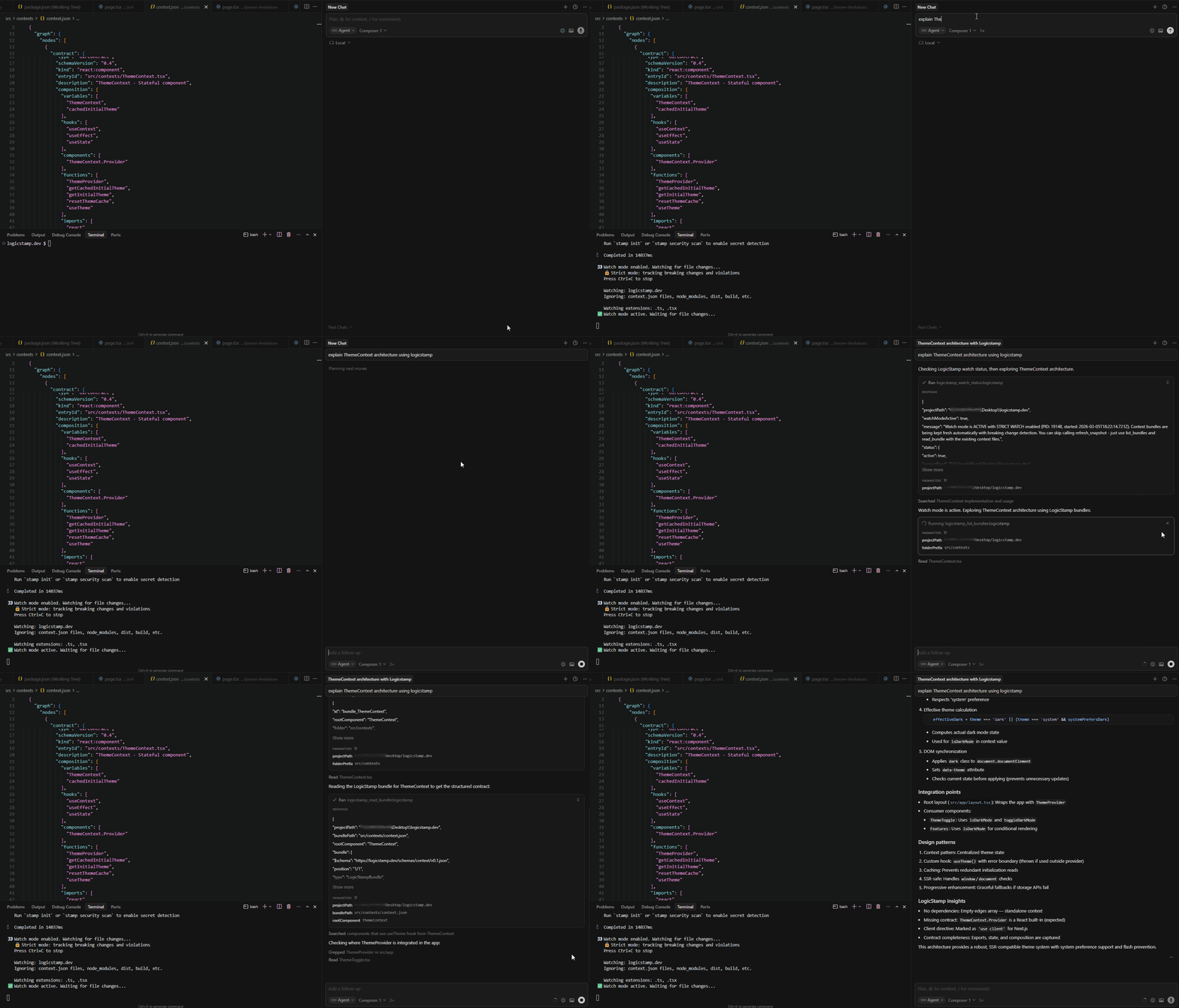 Example workflow:
 stamp context --strict-watch generates context bundles that MCP-powered assistants use to explain component architecture (ThemeContext shown here).
📑 Table of Contents
Overview
This MCP server provides AI assistants with structured access to your codebase through LogicStamp Context's analysis engine. It acts as a thin wrapper around the stamp CLI, offering:
- Snapshot-based analysis - Capture codebase state before making edits
- Component contracts - Extract props, state, hooks, and dependencies
- Style metadata - Extract Tailwind classes, SCSS modules, framer-motion animations, color palettes, layout patterns
- Dependency graphs - Understand component relationships
- Drift detection - Verify changes after modifications
- Token optimization - Control context size with configurable code inclusion modes
⚡ Features
7 Tools
logicstamp_refresh_snapshot- Analyze project and create snapshotlogicstamp_list_bundles- List available component bundleslogicstamp_read_bundle- Read full component contract + graphlogicstamp_compare_snapshot- Detect changes after editslogicstamp_compare_modes- Generate token cost comparison across all modeslogicstamp_read_logicstamp_docs- Read LogicStamp documentationlogicstamp_watch_status- Check if watch mode is active (for incremental rebuilds)
Key Benefits
- Context-Aware Edits - AI reads actual component contracts before modifying
- Self-Verification - AI verifies its own changes via drift detection
- Token-Efficient - Only load bundles relevant to the task
- Safe by Default - Changes must pass drift check before approval
- Watch Mode Aware - Detects when
stamp context --watchis running and skips regeneration (context is already fresh)
Prerequisites
- Node.js >= 20
- LogicStamp Context CLI - The
stampcommand must be installed and available in PATHnpm install -g logicstamp-context
Quick Start
Setup is done once - After configuring the MCP server, it will be available in all your projects. The MCP client automatically starts the server when needed - you don't need to start it manually.
Install prerequisites (if not already installed):
npm install -g logicstamp-context  # Required: LogicStamp CLI
npm install -g logicstamp-mcp       # MCP server
Configure your MCP client (one-time setup) - Create a config file for your platform:
For Cursor: Create
~/.cursor/mcp.json(macOS/Linux) or%USERPROFILE%\.cursor\mcp.json(Windows)For Claude CLI: Create
~/.claude.json(macOS/Linux) or%USERPROFILE%\.claude.json(Windows)For Claude Desktop: Create
~/Library/Application Support/Claude/claude_desktop_config.json(macOS) or%APPDATA%\Claude\claude_desktop_config.json(Windows)Add this configuration:
{
  "mcpServers": {
    "logicstamp": {
      "command": "npx",
      "args": ["-y", "logicstamp-mcp"]
    }
  }
}
Note:
-ytellsnpxnot to prompt (MCP clients often run the server without a terminal, so prompts can hang). Some clients may require"type": "stdio"— if the above does not work, add it to the config. See integration guides for platform-specific details:- Claude CLI Integration - For Claude Code users
- Claude Desktop Integration - For Claude Desktop users
- Cursor Integration - For Cursor IDE users
Restart your MCP client (Cursor/Claude Desktop) or verify with
claude mcp list(Claude CLI)Start using LogicStamp:
cd /path/to/your/react-project
claude  # or open Cursor
Ask your AI assistant: "Can you analyze my React project using LogicStamp?"
For detailed setup instructions, see the Quick Start Guide.
Usage Example
You: "Analyze the Button component in my project"

AI:
1. Uses logicstamp_refresh_snapshot to create snapshot
2. Uses logicstamp_list_bundles to find Button component
3. Uses logicstamp_read_bundle to read Button's contract
4. Provides detailed analysis of Button's props, state, hooks, etc.
For more examples and workflows, see Usage Examples in the MCP Integration Guide.
Tool Reference
The MCP server provides 7 tools. For complete API documentation with input/output examples, see the MCP Integration Guide.
📋 Quick Reference
logicstamp_refresh_snapshot - Create a snapshot of the current codebase state (STEP 1)
- Parameters:
profile(optional),mode(optional),includeStyle(optional),depth(optional),projectPath(required),cleanCache(optional),skipIfWatchActive(optional) - Returns:
snapshotId,summary,folders,watchMode(if active) - Always call this first when analyzing a new repo
- Note:
projectPathis REQUIRED - must be an absolute path to the project root. Omitting this parameter can cause the server to hang. - Watch Mode Optimization: Set
skipIfWatchActive: trueto skip regeneration when watch mode is running. When watch mode (stamp context --watch) is active, context is already being kept fresh - no need to regenerate - Depth Parameter: By default, dependency graphs include nested components (depth=2). To include only direct dependencies, explicitly set
depth: 1. The default depth=2 ensures nested components are included in dependency graphs. - Cache is automatically cleaned if corruption is detected
logicstamp_list_bundles - List available bundles for selective loading (STEP 2)
- Parameters:
snapshotId(required),folderPrefix(optional) - Returns:
bundlesarray with metadata - Call this after refresh_snapshot to discover available bundles
logicstamp_read_bundle - Read full component contract and dependency graph (STEP 3)
- Parameters:
snapshotId(required),bundlePath(required),rootComponent(optional) - Returns: Complete bundle with contracts and dependency graph
- This is where the valuable data is - prefer bundles over raw source files
logicstamp_compare_snapshot - Detect changes after edits
- Parameters:
profile(optional): Analysis profile (default:llm-chat)mode(optional): Code inclusion mode (default:header)includeStyle(optional): Include style metadata in comparison. Only takes effect whenforceRegenerateistrue(default:false)depth(optional): Dependency traversal depth. Only used whenforceRegenerateistrue. IMPORTANT: By default, dependency graphs include nested components (depth=2). To include only direct dependencies, setdepth: 1. The default depth=2 ensures nested components are included in dependency graphs.forceRegenerate(optional): Force regeneration of context before comparing. Whenfalse, reads existingcontext_main.jsonfrom disk (fast). Whentrue, runsstamp contextto regenerate (default:false)projectPath(optional): Project path (defaults to current directory)baseline(optional): Comparison baseline:disk(default),snapshot, or custom pathcleanCache(optional): Force cache cleanup (default:false, auto-detects corruption)
- Returns: Comparison result with change details
- Note: By default (
forceRegenerate: false), reads from disk for fast comparison. SetforceRegenerate: trueto ensure fresh context or whencontext_main.jsonis missing.
logicstamp_compare_modes - Generate token cost comparison across all modes
- Parameters:
projectPath(optional),cleanCache(optional) - Returns: Token counts for all modes (none/header/header+style/full), savings percentages, file statistics
- Use this to understand token costs before generating context or when user asks about token budgets/optimization
logicstamp_read_logicstamp_docs - Read LogicStamp documentation
- Parameters: None
- Returns: Complete LogicStamp documentation bundle
- Use this when confused - explains LogicStamp, workflow, and best practices
logicstamp_watch_status - Check if watch mode is active
- Parameters:
projectPath(required),includeRecentLogs(optional),logLimit(optional) - Returns:
watchModeActive,status(if active),recentLogs(if requested),message - Use this to check if
stamp context --watchis running before calling refresh_snapshot - When watch mode is active: Context is being kept fresh automatically via incremental rebuilds - you can skip regeneration and just read existing bundles
Startup Ritual
When starting work with a new project, use the Startup Ritual to guide the AI through the recommended workflow. This ensures the AI:
- Calls
logicstamp_refresh_snapshotfirst - Uses bundles instead of raw source files when possible
- Follows the recommended LogicStamp workflow
Documentation
MCP-Specific Docs (This Repo)
- Quick Start Guide - Get up and running in minutes
- Startup Ritual - Recommended message to paste when starting with a new project
- MCP Integration Guide - Complete API reference and architecture
- Integration Guides - Platform-specific setup (Claude CLI, Claude Desktop, Cursor)
Canonical LogicStamp Docs (Redundant Sources)
Full CLI & Context Documentation:
- Primary: logicstamp.dev/docs/cli/context - Complete documentation (landing page, best UX)
- Fallback: CLI Repository Docs - GitHub docs (always available, versioned)
Key Topics (both primary and fallback links):
| Topic | Primary (Landing Page) | Fallback (GitHub) |
|---|---|---|
| Usage Guide | logicstamp.dev/docs/cli/usage | GitHub |
| UIF Contracts | logicstamp.dev/docs/cli/uif-contracts | GitHub |
| Schema Reference | logicstamp.dev/docs/cli/schema | GitHub |
| CLI Commands | logicstamp.dev/docs/cli/context | GitHub |
| Compare Modes | logicstamp.dev/docs/cli/compare-modes | GitHub |
| Limitations | logicstamp.dev/docs/complete-reference/known-limitations | GitHub |
Note:
- Docs are maintained in the CLI repo and synced to the landing page
- If the landing page is unavailable, use the GitHub links as fallback
- The
logicstamp_read_logicstamp_docstool returns an embedded LLM-focused doc snapshot (docs/logicstamp-for-llms.md) for offline use
Troubleshooting
Common Issues
"stamp: command not found"
- Install LogicStamp Context CLI:
npm install -g logicstamp-context
Server doesn't show up
- Verify installation:
npm list -g logicstamp-mcp - Test server manually:
npx logicstamp-mcp(should wait for stdin, press Ctrl+C to exit) - Check configuration in your MCP client (see integration guides)
- Restart your MCP client completely
"Snapshot not found"
- Always call
logicstamp_refresh_snapshotfirst before using other tools
For detailed troubleshooting, see:
- Troubleshooting in Quick Start Guide
- Platform-specific troubleshooting in integration guides
- MCP Integration Guide for architecture details
Development
Build
npm install
npm run build
Run the Server
Important: You don't need to start the MCP server manually. Once configured, your MCP client (Cursor, Claude Desktop, etc.) automatically starts the server when needed. The commands below are only for testing/debugging.
For testing/debugging only:
After building from source:
npm start
# or directly
node dist/index.js
After global installation:
npx logicstamp-mcp
Note: The server runs via stdio (standard input/output) and waits for MCP protocol messages. When configured with an MCP client (Claude CLI, Cursor, etc.), the client automatically starts the server - you don't need to run it manually. The commands above are useful for:
- Testing the server during development
- Debugging connection issues
- Verifying the server starts correctly
When running manually, the server will wait for stdin input. Press Ctrl+C to exit.
Watch Mode
npm run dev
For development details, see MCP Integration Guide.
Architecture
The MCP server follows these design principles:
- Thin Wrapper - Shells out to existing
stampCLI - Stateful Snapshots - Tracks context before/after edits
- Read-Only - Server never writes to project files
- Token-Efficient - Selective bundle loading
For detailed architecture documentation, see MCP Integration Guide.
Requirements
The LogicStamp MCP server requires:
- Node.js >= 20
- TypeScript codebase (React, Next.js, Vue (TS/TSX), Express, or NestJS)
stamp contextcommand - Must be installed and available in PATH:- The CLI generates
context_main.jsonfiles - The MCP server reads these JSON files directly (no special flags required)
- The CLI generates
Need Help?
- Issues - github.com/LogicStamp/logicstamp-mcp/issues
- Roadmap - logicstamp.dev/roadmap
License
Branding & Attribution
The LogicStamp Fox mascot and related brand assets are © 2025 Amit Levi. These assets may not be used for third-party branding without permission.
Contributing
Issues and PRs welcome! See CONTRIBUTING.md for guidelines.
This project follows a Code of Conduct.
Установка Logicstamp
У этого сервера нет опубликованного пакета — он собирается из исходников. Открой репозиторий и следуй инструкции в README.
▸ github.com/LogicStamp/logicstamp-mcpFAQ
Logicstamp MCP бесплатный?
Да, Logicstamp MCP бесплатный — установка в пару кликов через Unyly без оплаты.
Нужен ли API-ключ для Logicstamp?
Нет, Logicstamp работает без API-ключей и переменных окружения.
Logicstamp — hosted или self-hosted?
Self-hosted: сервер запускается локально на твоей машине командой из раздела установки.
Как установить Logicstamp в Claude Desktop, Claude Code или Cursor?
Открой Logicstamp на unyly.org, выбери вкладку своего клиента (Claude Desktop, Claude Code, Cursor) и нажми Install — конфиг сгенерируется автоматически, без правки JSON.
Похожие MCP
Fetch
Web content fetching and conversion for efficient LLM usage.
AWS KB Retrieval
Retrieval from AWS Knowledge Base using Bedrock Agent Runtime.
 автор: modelcontextprotocol
Spring AI MCP Server
Provides auto-configuration for setting up an MCP server in Spring Boot applications.
llm-analysis-assistant
A very streamlined mcp client that supports calling and monitoring stdio/sse/streamableHttp, and can also view request responses through the /logs page. It also
 автор: xuzexin-hz
Compare Logicstamp with
Не уверен что выбрать?
Найди свой стек за 60 секунд
Автор?
Embed-бейдж для README
Похожее
Все в категории ai