
lpigeon/ros-mcp-server
БесплатноНе проверенThe ROS MCP Server supports robot control by converting user-issued natural language commands into ROS or ROS2 control commands.

Описание
The ROS MCP Server supports robot control by converting user-issued natural language commands into ROS or ROS2 control commands.
README









ROS-MCP-Server connects large language models (such as Claude, GPT, and Gemini) to robots, enabling bidirectional communication with no changes to existing robot source code.
Why ROS-MCP?
- No robot source code changes → just add the
rosbridgenode to your existing ROS setup. - True two-way communication → LLMs can both control robots and observe everything happening on the Robot.
- Full context → publish & subscribe to topics, call services & actions, set parameters, read sensor data, and monitor robot state in real time.
- Deep ROS understanding → guides the LLM to discover available topics, services, actions, and their types (including custom ones) — enabling it to use them with the right syntax without manual configuration.
- Works with any MCP client → built on the open MCP standard, supporting Claude Code, Codex CLI, Gemini CLI, Claude Desktop, ChatGPT, Cursor, and more.
- Works across ROS versions → compatible across ROS 2 (Jazzy, Humble, and others) and ROS 1 distros.
🎥 Examples in Action

🏭 Example - AI Agent diagnosis of Industrial Robot End Effector (Video)
- The MCP server connects Claude to a production industrial robot, with only the technician manuals as reference.
- Claude discovers the robot's custom topic and service types and their syntax on its own.
- From a single prompt to test the gripper, it reads the manuals, runs its own tests, finds an anomaly, and reports the root cause.

🤖 Example - Controlling "Wilson" with natural language (video)
From a single prompt — "Grab a Coke from the fridge & go to the living room." — Google Gemini uses the MCP server to navigate and manipulate autonomously. Built on ROS 2 with Nav2 (SLAM) for mapping and navigation, and MoveIt to command the manipulator.

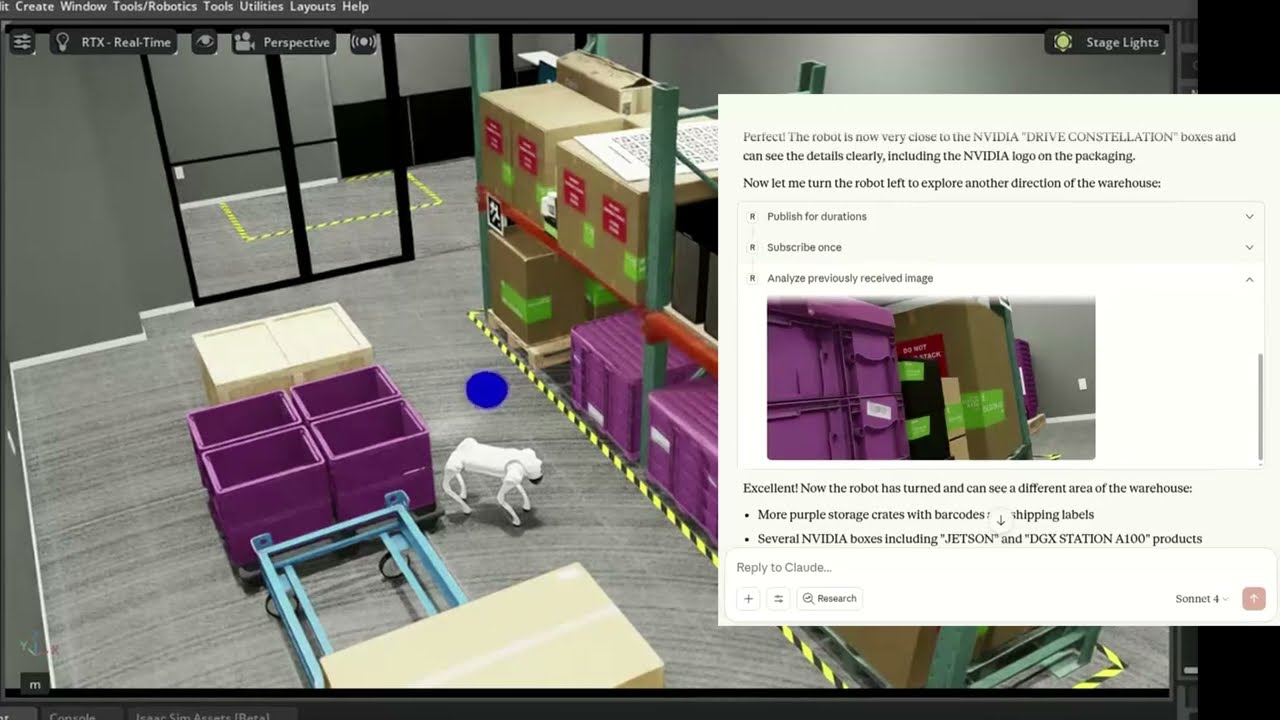
🐕 Example - Controlling Unitree Go2 in NVIDIA Isaac Sim (video)
The MCP server connects Claude to a simulated Unitree Go2 quadruped in NVIDIA Isaac Sim, interpreting natural language commands to navigate and control the robot.
🛠 Getting Started
Follow the installation guide to get started.
ROS-MCP works with Claude Code, Codex CLI, Gemini CLI, Claude Desktop, ChatGPT, Cursor, or any MCP-compatible client.

📚 More Examples & Tutorials
Browse our examples to see the server in action.
We welcome community PRs with new examples and integrations!
🤝 Contributing
We love contributions of all kinds:
- Bug fixes and documentation updates
- New features (e.g., Action support, permissions)
- Additional examples and tutorials
Check out the contributing guidelines and see issues tagged good first issue to get started.
📜 License
This project is licensed under the Apache License 2.0.
Установка lpigeon/ros-mcp-server
У этого сервера нет опубликованного пакета — он собирается из исходников. Открой репозиторий и следуй инструкции в README.
▸ github.com/lpigeon/ros-mcp-serverFAQ
lpigeon/ros-mcp-server MCP бесплатный?
Да, lpigeon/ros-mcp-server MCP бесплатный — установка в пару кликов через Unyly без оплаты.
Нужен ли API-ключ для lpigeon/ros-mcp-server?
Нет, lpigeon/ros-mcp-server работает без API-ключей и переменных окружения.
lpigeon/ros-mcp-server — hosted или self-hosted?
Self-hosted: сервер запускается локально на твоей машине командой из раздела установки.
Как установить lpigeon/ros-mcp-server в Claude Desktop, Claude Code или Cursor?
Открой lpigeon/ros-mcp-server на unyly.org, выбери вкладку своего клиента (Claude Desktop, Claude Code, Cursor) и нажми Install — конфиг сгенерируется автоматически, без правки JSON.
Похожие MCP
GitHub
PRs, issues, code search, CI status
 автор: GitHub
Filesystem
Secure file operations with configurable access controls.
Memory
Knowledge graph-based persistent memory system.
Template MCP Server
A CLI tool to create a new Model Context Protocol server project with TypeScript support, dual transport options, and an extensible structure
 автор: mcpdotdirect
Compare lpigeon/ros-mcp-server with
Не уверен что выбрать?
Найди свой стек за 60 секунд
Автор?
Embed-бейдж для README
Похожее
Все в категории development