loading…
en/
Browse all
Accessibility Bridge
FreeNot checkedConnects Claude to a live Chrome browser's accessibility tree to generate stable, framework-agnostic test selectors and perform accessibility audits. It enables

About
Connects Claude to a live Chrome browser's accessibility tree to generate stable, framework-agnostic test selectors and perform accessibility audits. It enables users to read element roles and states exactly as a screen reader would to help write, debug, and migrate test suites using natural language.
README
MCP Accessibility Bridge
Expose any live webpage's accessibility tree to Claude — generate rock-solid, framework-agnostic test selectors in seconds.
npm version npm downloads License: MIT Node.js TypeScript MCP SDK
Quick Start
No cloning. No building. Paste this into your Claude Desktop config and you're done:
{
  "mcpServers": {
    "accessibility-bridge": {
      "command": "npx",
      "args": ["-y", "mcp-accessibility-bridge"]
    }
  }
}
What Is This?
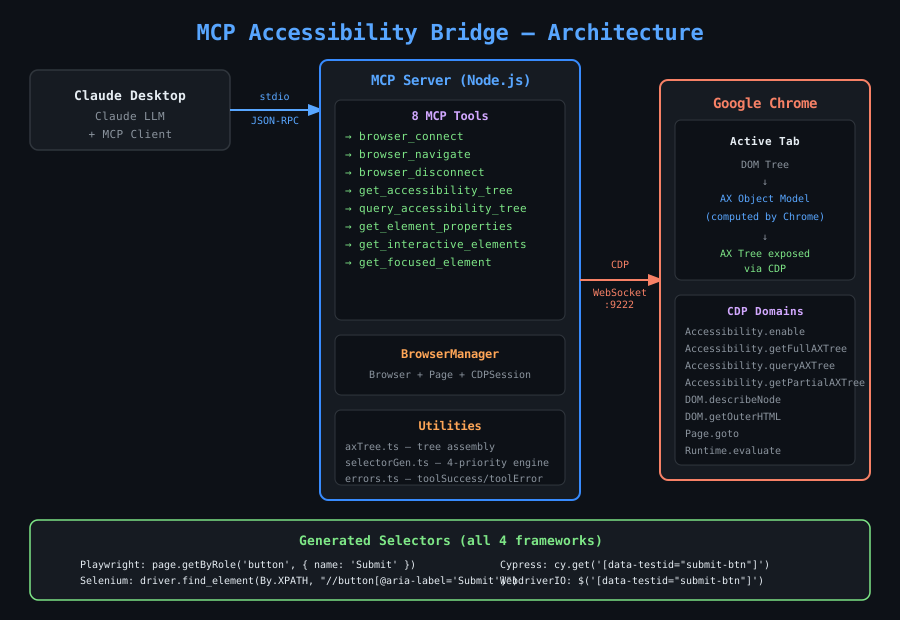
MCP Accessibility Bridge is a stdio MCP server that connects Claude Desktop to a live Chrome browser via the Chrome DevTools Protocol (CDP). It exposes the browser's full ARIA accessibility tree so Claude can:
- Read every element's role, name, state, and relationships exactly as a screen reader would
- Generate reliable, stable test selectors for Playwright, Selenium, Cypress, and WebdriverIO — without ever opening DevTools
- Audit pages for accessibility issues
- Write, debug, and migrate test suites using natural language
No bundled Chromium. Uses your existing Chrome installation via
puppeteer-core.
Table of Contents
- Quick Start
- Architecture
- Why the Accessibility Tree?
- 8 MCP Tools
- Selector Priority Engine
- Real-World Use Cases
- Chrome Setup
- Claude Desktop Configuration
- Usage Examples
- Example Project
- Project Structure
- How It Works (Deep Dive)
- Contributing
- License
Architecture
┌─────────────────────────────────────────────────────────────────────┐
│                        Claude Desktop                               │
│                                                                     │
│   ┌─────────────┐    MCP (stdio)    ┌──────────────────────────┐   │
│   │   Claude    │◄─────────────────►│  MCP Accessibility       │   │
│   │   LLM       │   JSON-RPC 2.0    │  Bridge (Node.js)        │   │
│   └─────────────┘                   │                          │   │
│                                     │  ┌────────────────────┐  │   │
│                                     │  │  8 MCP Tools       │  │   │
│                                     │  │  browser_connect   │  │   │
│                                     │  │  browser_navigate  │  │   │
│                                     │  │  get_ax_tree       │  │   │
│                                     │  │  query_ax_tree     │  │   │
│                                     │  │  get_element_props │  │   │
│                                     │  │  get_interactive   │  │   │
│                                     │  │  get_focused       │  │   │
│                                     │  │  browser_disconnect│  │   │
│                                     │  └────────┬───────────┘  │   │
│                                     │           │               │   │
│                                     │  ┌────────▼───────────┐  │   │
│                                     │  │  BrowserManager    │  │   │
│                                     │  │  (Singleton)       │  │   │
│                                     │  │  Browser + Page +  │  │   │
│                                     │  │  CDPSession        │  │   │
│                                     │  └────────┬───────────┘  │   │
│                                     │           │               │   │
│                                     │  ┌────────▼───────────┐  │   │
│                                     │  │  Utilities         │  │   │
│                                     │  │  axTree.ts         │  │   │
│                                     │  │  selectorGen.ts    │  │   │
│                                     │  │  errors.ts         │  │   │
│                                     │  └────────────────────┘  │   │
│                                     └────────────┬─────────────┘   │
└──────────────────────────────────────────────────┼─────────────────┘
                                                   │
                                     CDP WebSocket │
                                     (port 9222)   │
                                                   │
                              ┌────────────────────▼──────────────────┐
                              │          Google Chrome                 │
                              │                                        │
                              │  ┌──────────────────────────────────┐  │
                              │  │  Active Tab                      │  │
                              │  │                                  │  │
                              │  │  DOM Tree ──► AX Tree            │  │
                              │  │                ▲                 │  │
                              │  │  Computed      │                 │  │
                              │  │  Accessibility │                 │  │
                              │  │  Object Model  │                 │  │
                              │  └────────────────┼─────────────────┘  │
                              │                   │                    │
                              │   CDP Domains Used:                    │
                              │   • Accessibility.enable               │
                              │   • Accessibility.getFullAXTree        │
                              │   • Accessibility.getPartialAXTree     │
                              │   • Accessibility.queryAXTree          │
                              │   • DOM.describeNode                   │
                              │   • DOM.getOuterHTML                   │
                              └────────────────────────────────────────┘
Data Flow
User prompt in Claude Desktop
         │
         ▼
Claude decides which tool to call
         │
         ▼
MCP SDK dispatches tool call (stdio JSON-RPC)
         │
         ▼
Tool handler in src/tools/
         │
         ▼
BrowserManager.requireConnection()
     returns { browser, page, cdpSession }
         │
         ▼
CDP commands sent over WebSocket to Chrome
         │
         ▼
Chrome computes AX tree from live DOM
         │
         ▼
Raw CDP response parsed + transformed
         │
         ▼
selectorGenerator.ts builds multi-framework selectors
         │
         ▼
toolSuccess({ ... }) → JSON returned to Claude
         │
         ▼
Claude reads selectors, names, roles → responds to user
Why the Accessibility Tree?
Most test automation targets the DOM — brittle class names, nested div soup, hashed CSS modules. The accessibility tree is different:
| Property | DOM Selectors | AX Tree Selectors |
|---|---|---|
| Stability | Break on CSS refactors | Stable across visual redesigns |
| Dynamic state | Miss disabled, expanded, checked |
Reflect real runtime state |
| Semantic meaning | Target implementation details | Target user-facing intent |
| Framework coupling | Often framework-specific | Framework-agnostic |
| Accessibility signal | Silent on a11y problems | Surface a11y bugs automatically |
| Screen reader parity | Unknown | Exactly what a screen reader announces |
The AX tree is Chrome's computed semantic model — what the browser exposes to assistive technology. Selectors built from it use role and name attributes that are:
- Immune to visual redesigns — renaming a CSS class doesn't change
role=button[name='Submit'] - Semantically verified — if Claude can select it, a screen reader can reach it
- Framework-neutral — the same ARIA semantics translate to any test framework
8 MCP Tools
browser_connect
Connect Claude to a running Chrome instance via CDP.
Input:  debugUrl (string, default: "http://localhost:9222")
Output: { connected, debugUrl, currentUrl, pageTitle }
Chrome must be started with --remote-debugging-port=9222. The tool creates a single shared CDPSession that all other tools reuse, enabling Accessibility.* CDP domain calls.
browser_navigate
Navigate the connected tab to any URL.
Input:  url (string), waitUntil (load|domcontentloaded|networkidle0|networkidle2), timeout (ms)
Output: { navigated, url, finalUrl, title, status }
Returns the HTTP status code and final URL (after redirects).
browser_disconnect
Close the CDP connection cleanly. Does not kill Chrome.
Input:  (none)
Output: { disconnected, message }
get_accessibility_tree
Snapshot the full accessibility tree of the current page.
Input:  interestingOnly (bool), maxDepth (int), useFullTree (bool)
Output: { url, title, nodeCount, tree }
Two modes:
- Default:
page.accessibility.snapshot()— fast, filters noise, ideal for most pages - Full CDP:
Accessibility.getFullAXTree— raw, complete, slower — use when the default misses nodes
query_accessibility_tree
Search the tree by ARIA role and/or accessible name.
Input:  role (string), accessibleName (string), backendNodeId (int)
Output: { query, count, nodes[] }
Uses CDP Accessibility.queryAXTree — targeted and fast. Example: find all unchecked checkboxes, all level-2 headings, all disabled buttons.
get_element_properties
Given a CSS selector, return the element's full AX profile and multi-framework selectors.
Input:  selector (string), includeHtml (bool)
Output: { selector, tagName, domAttributes, backendNodeId, accessibility, suggestedSelectors }
Resolves: CSS selector → backendNodeId → Accessibility.getPartialAXTree → selectorGenerator.
get_interactive_elements
Find every interactive element on the page — buttons, inputs, links, tabs, etc.
Input:  roles (string[]), includeDisabled (bool), maxElements (int)
Output: { totalFound, returned, elements[] }
Filters Accessibility.getFullAXTree by 20 interactive ARIA roles, then calls DOM.describeNode in parallel for each to retrieve DOM attributes for selector generation.
20 covered roles:
button · link · textbox · searchbox · combobox · listbox · option · checkbox · radio · switch · slider · spinbutton · menuitem · tab · treeitem · gridcell · rowheader · columnheader · progressbar · scrollbar
get_focused_element
Return the currently keyboard-focused element's AX info and selectors.
Input:  (none)
Output: { focused: { role, name, value, tagName, domAttributes, suggestedSelectors } }
Uses document.activeElement + Accessibility.getPartialAXTree to report what a keyboard user is currently on.
Selector Priority Engine
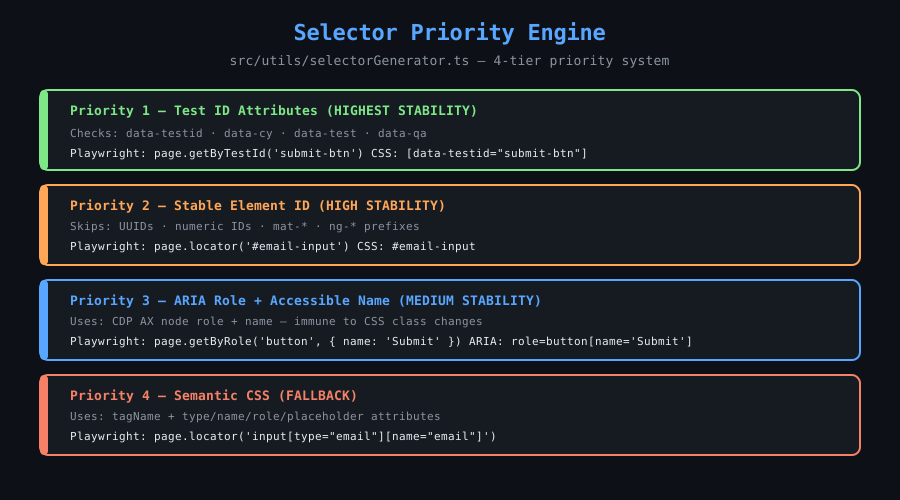
src/utils/selectorGenerator.ts implements a 4-tier priority system:
Priority 1 — Test ID attributes (HIGHEST STABILITY)
──────────────────────────────────────────────────
Checks: data-testid, data-cy, data-test, data-qa
Output: [data-testid="submit-btn"]
Playwright: page.getByTestId('submit-btn')


Priority 2 — Stable element ID
──────────────────────────────────────────────────
Checks: id attribute
Skips:  UUIDs, numeric IDs, mat-* / ng-* prefixes
Output: #email-input
Playwright: page.locator('#email-input')


Priority 3 — ARIA role + accessible name (MEDIUM STABILITY)
──────────────────────────────────────────────────
Uses: role + computed accessible name from AX tree
Output: role=button[name='Submit']
Playwright: page.getByRole('button', { name: 'Submit' })


Priority 4 — Semantic CSS (FALLBACK)
──────────────────────────────────────────────────
Uses: tagName + type/name/role/placeholder attributes
Output: input[type="email"][name="email"]
Playwright: page.locator('input[type="email"][name="email"]')
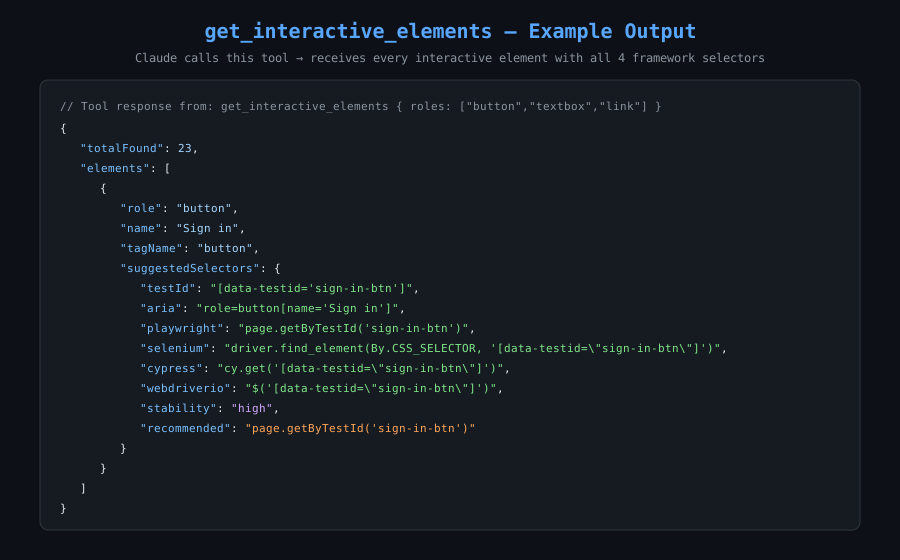
Every element returns selectors for all four frameworks:
{
  "testId": "[data-testid=\"search-input\"]",
  "aria": "role=searchbox[name='Search']",
  "css": "input[type=\"search\"]",
  "playwright": "page.getByRole('searchbox', { name: 'Search' })",
  "selenium": "driver.find_element(By.CSS_SELECTOR, '[data-testid=\"search-input\"]')",
  "cypress": "cy.get('[data-testid=\"search-input\"]')",
  "webdriverio": "$('[data-testid=\"search-input\"]')",
  "stability": "high",
  "recommended": "page.getByTestId('search-input')"
}
Real-World Use Cases
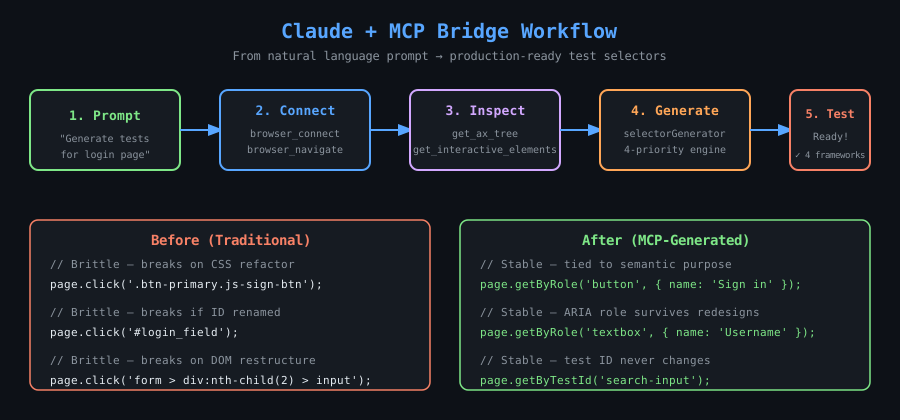
1. Instant Test Suite from Zero
A legacy app with no tests. Navigate to any page and ask:
"Generate a Playwright test that fills the checkout form and submits it."
Claude calls get_interactive_elements, receives all inputs and buttons with selectors, and writes the full test — in minutes, not days.
2. Cross-Framework Selector Migration
Moving from Selenium to Playwright? Hundreds of brittle XPath selectors?
"Give me the Playwright equivalent of every interactive element on this page."
Claude maps driver.find_element(By.XPATH, ...) → page.getByRole(...) using the live AX tree as ground truth.
3. Accessibility Audit
"Get the full accessibility tree for /checkout and identify elements missing accessible names, wrong roles, or bad focus order."
Claude reads the AX tree and reports:
- Buttons with
name: ""(icon buttons missingaria-label) <div>acting as buttons (role: generic, no keyboard access)- Form fields missing
requiredoraria-describedby
4. Debugging Flaky Tests
"The test can't find #submit-btn. Navigate to the page and check if it exists in the AX tree, and if it's enabled."
Claude checks: is the element ignored? Is disabled: true? Is a modal trapping focus? All invisible to raw DOM queries, visible here.
5. Component Library Selector Documentation
"Open Storybook at localhost:6006 and document the recommended selector for every interactive element in every story."
Claude iterates stories, calls get_interactive_elements, and outputs a complete selector reference.
6. Natural Language → Selector (for Non-Technical QA)
"Find the selector for the blue submit button at the bottom of the registration form."
No DevTools needed. Claude queries the AX tree, identifies the button by its accessible name, and returns all four framework selectors.
7. Dynamic SPA Testing
React/Vue/Angular apps with hashed class names (sc-abc123) break CSS selectors on every build. AX tree selectors (page.getByRole('button', { name: 'Subscribe' })) are permanently stable — hashing class names never changes semantic meaning.
8. Pre-Merge Selector Validation
"Before merging this PR, verify these 10 selectors still resolve correctly on staging."
Claude calls get_element_properties for each selector and confirms role + name still match expected values. Catches regressions before CI runs.
Chrome Setup
Chrome must be running with the remote debugging port open before calling browser_connect.
macOS
/Applications/Google\ Chrome.app/Contents/MacOS/Google\ Chrome \
  --remote-debugging-port=9222 \
  --user-data-dir=/tmp/chrome-debug-profile
Linux
google-chrome \
  --remote-debugging-port=9222 \
  --user-data-dir=/tmp/chrome-debug-profile
Windows (PowerShell)
& "C:\Program Files\Google\Chrome\Application\chrome.exe" `
  --remote-debugging-port=9222 `
  --user-data-dir="$env:TEMP\chrome-debug-profile"
Verify Chrome is Ready
curl http://localhost:9222/json/version
Expected response:
{
  "Browser": "Chrome/124.0.0.0",
  "Protocol-Version": "1.3",
  "webSocketDebuggerUrl": "ws://localhost:9222/devtools/browser/..."
}
Why a separate
--user-data-dir? Chrome requires a dedicated profile directory when remote debugging is enabled. Using/tmp/chrome-debug-profilekeeps it isolated from your regular browsing profile.
Claude Desktop Configuration
Edit ~/Library/Application Support/Claude/claude_desktop_config.json (macOS) or %APPDATA%\Claude\claude_desktop_config.json (Windows).
Option 1 — npx (recommended)
Zero install. Works on any machine. npx downloads the package on first run and caches it.
{
  "mcpServers": {
    "accessibility-bridge": {
      "command": "npx",
      "args": ["-y", "mcp-accessibility-bridge"]
    }
  }
}
Option 2 — Global install
npm install -g mcp-accessibility-bridge
Then use just the command name — no path, no args:
{
  "mcpServers": {
    "accessibility-bridge": {
      "command": "mcp-accessibility-bridge"
    }
  }
}
Option 3 — Local dev (cloned repo)
git clone https://github.com/yashpreetbathla/mcp-accessibility-bridge.git
cd mcp-accessibility-bridge
npm install && npm run build
npm link
Config becomes identical to Option 2. Any local edits are reflected immediately without reinstalling.
After saving: fully quit Claude Desktop (Cmd+Q on macOS), then relaunch. The accessibility-bridge tools will appear in Claude's tool list.
Usage Examples
Connect and Navigate
"Connect to Chrome and navigate to https://github.com"
Claude calls browser_connect then browser_navigate and confirms the page title and HTTP status.
Get the Accessibility Tree
"Show me the accessibility tree for this page, 5 levels deep"
{
  "url": "https://github.com",
  "title": "GitHub",
  "nodeCount": 847,
  "tree": {
    "role": "WebArea",
    "name": "GitHub",
    "children": [
      { "role": "banner", "name": "", "children": ["..."] },
      { "role": "main",   "name": "", "children": ["..."] }
    ]
  }
}
Find All Buttons
"List all buttons on this page with their Playwright selectors"
{
  "totalFound": 12,
  "elements": [
    {
      "role": "button",
      "name": "Sign in",
      "suggestedSelectors": {
        "playwright":  "page.getByRole('button', { name: 'Sign in' })",
        "selenium":    "driver.find_element(By.XPATH, \"//button[@aria-label='Sign in']\")",
        "cypress":     "cy.get('[data-testid=\"sign-in-btn\"]')",
        "webdriverio": "$('[data-testid=\"sign-in-btn\"]')",
        "stability":   "high",
        "recommended": "page.getByRole('button', { name: 'Sign in' })"
      }
    }
  ]
}
Inspect a Specific Element
"What's the best selector for the search input on this page?"
Claude calls get_element_properties with selector: "input[type=search]" and returns the full AX profile + all framework selectors.
Check What's Focused
"What element is currently focused on the keyboard?"
Claude calls get_focused_element and returns the role, name, and selectors of the active element — useful for testing keyboard navigation and focus management.
Example Project
The examples/playwright-github-tests/ directory contains a complete Playwright test suite for GitHub built entirely using selectors generated by Claude + this MCP server. Zero time was spent in Chrome DevTools.
examples/playwright-github-tests/
├── selectors/
│   └── github.selectors.ts        ← selector library generated by Claude
└── tests/
    ├── github-home.spec.ts         ← home page landmark + CTA tests
    ├── github-login.spec.ts        ← login form: happy path, tab order, error alerts
    ├── github-search.spec.ts       ← search flow + keyboard shortcut discovery
    └── accessibility-audit.spec.ts ← WCAG 2.1 AA: headings, labels, focus trapping
Every selector has a comment showing which Claude prompt and which MCP tool produced it. See the example README for the full walkthrough.
Project Structure
mcp-accessibility-bridge/
├── package.json                   # ESM module, bin entry, npm metadata
├── tsconfig.json                  # ES2022, NodeNext modules
├── bin/
│   └── mcp-accessibility-bridge.js  # CLI entry point (shebang wrapper)
├── src/
│   ├── index.ts                   # McpServer setup, tool registration, stdio transport
│   ├── browser/
│   │   ├── BrowserManager.ts      # Singleton: Browser + Page + CDPSession lifecycle
│   │   └── types.ts               # CDP response interfaces (CdpAXNode, etc.)
│   ├── tools/
│   │   ├── browserConnect.ts      # browser_connect
│   │   ├── browserNavigate.ts     # browser_navigate
│   │   ├── browserDisconnect.ts   # browser_disconnect
│   │   ├── getAccessibilityTree.ts    # get_accessibility_tree
│   │   ├── queryAccessibilityTree.ts  # query_accessibility_tree
│   │   ├── getElementProperties.ts    # get_element_properties
│   │   ├── getInteractiveElements.ts  # get_interactive_elements
│   │   └── getFocusedElement.ts       # get_focused_element
│   └── utils/
│       ├── axTree.ts              # Tree assembly, traversal, pruning
│       ├── selectorGenerator.ts   # 4-priority selector engine
│       └── errors.ts              # toolSuccess(), toolError(), BrowserNotConnectedError
├── examples/
│   └── playwright-github-tests/   # Full Playwright suite generated with this tool
├── screenshots/                   # Architecture + workflow diagrams
├── README.md
├── POLICY.md                      # Responsible use guidelines
└── LICENSE
Key Design Decisions
Singleton BrowserManager — One CDPSession is created at browser_connect time and reused across all tool calls. This avoids the overhead of creating a new session per call and ensures Accessibility.enable is called exactly once.
puppeteer-core only — No bundled Chromium download (~300MB). Connects to the user's existing Chrome via browserURL. This is intentional: you want to inspect the same browser you use day-to-day.
browser.disconnect() not browser.close() — The MCP server does not own the Chrome process. disconnect() closes the WebSocket connection without killing Chrome.
Parallel DOM resolution — get_interactive_elements calls DOM.describeNode for all matched AX nodes via Promise.all. For pages with 50+ interactive elements, this is 5–10x faster than sequential calls.
Never throw through MCP — All tool handlers wrap execution in try/catch and return toolError() on failure. MCP errors are surfaced as readable text, not unhandled exceptions.
How It Works (Deep Dive)
CDP Accessibility Domain
Chrome DevTools Protocol exposes the Accessibility domain, which provides programmatic access to the browser's internal Accessibility Object Model (AOM). Before any AX calls can be made, the domain must be activated:
await cdpSession.send('Accessibility.enable');
This is done once at connection time by BrowserManager.connect().
AX Node Resolution Pipeline
For get_element_properties:
page.$(cssSelector)                      // Puppeteer: find element
  → remoteObject.objectId                // V8 object reference
  → DOM.describeNode({ objectId })       // CDP: get backendNodeId + attributes
  → Accessibility.getPartialAXTree       // CDP: get AX nodes for this DOM node
    ({ backendNodeId, fetchRelatives: false })
  → cdpAXNodeToSummary()                 // Parse role, name, properties
  → buildSelectorFromRawNode()           // Generate selectors
AX Tree Assembly
Accessibility.getFullAXTree returns a flat array of CdpAXNode objects with nodeId, parentId, and childIds references. The axTree.ts utilities:
buildTreeIndex— builds aMap<nodeId, CdpAXNode>for O(1) lookupassembleTree— recursively walkschildIds, skippingignorednodes, building a nestedAXNodeSummarytreepruneToDepth— trims the tree to the requestedmaxDepth
Selector Stability Heuristics
The UNSTABLE_ID_RE regex in selectorGenerator.ts skips IDs that are likely auto-generated:
const UNSTABLE_ID_RE = /^(mat-|ng-|[0-9]|[a-f0-9]{8}-)/i;
This prevents Claude from recommending #mat-input-3 (Angular Material auto-ID) or #a3f2b1c4-... (UUID) as stable selectors, falling back to ARIA role selectors instead.
Contributing
Contributions are welcome. Please read POLICY.md before contributing.
# Clone and set up
git clone https://github.com/yashpreetbathla/mcp-accessibility-bridge.git
cd mcp-accessibility-bridge
npm install

# Development mode (watch + recompile on save)
npm run dev

# One-off build
npm run build

# Link globally for local testing
npm link
Areas to contribute:
- Additional CDP domain support (e.g.,
Page,Runtimefor JS state) - Firefox DevTools Protocol support
- Shadow DOM / web component traversal
- Selector quality scoring improvements
- Unit tests for
selectorGenerator.tsandaxTree.ts
License
MIT — see LICENSE.
How to install
Run in your terminal:
claude mcp add mcp-accessibility-bridge -- npx 


