
Boards Nk
БесплатноНе проверенMCP server for Mattermost Boards (Focalboard) that enables natural language management of teams, boards, and cards, including CRUD operations.

Описание
MCP server for Mattermost Boards (Focalboard) that enables natural language management of teams, boards, and cards, including CRUD operations.
README
npm version npm downloads CI License: MIT Node >=18
MCP server for Mattermost Boards (Focalboard) — lets Claude and other MCP-compatible clients list teams, boards, and cards, create and update tasks, add comments, and more — all via natural language.
The first MCP server with full support for Mattermost Boards (Focalboard).
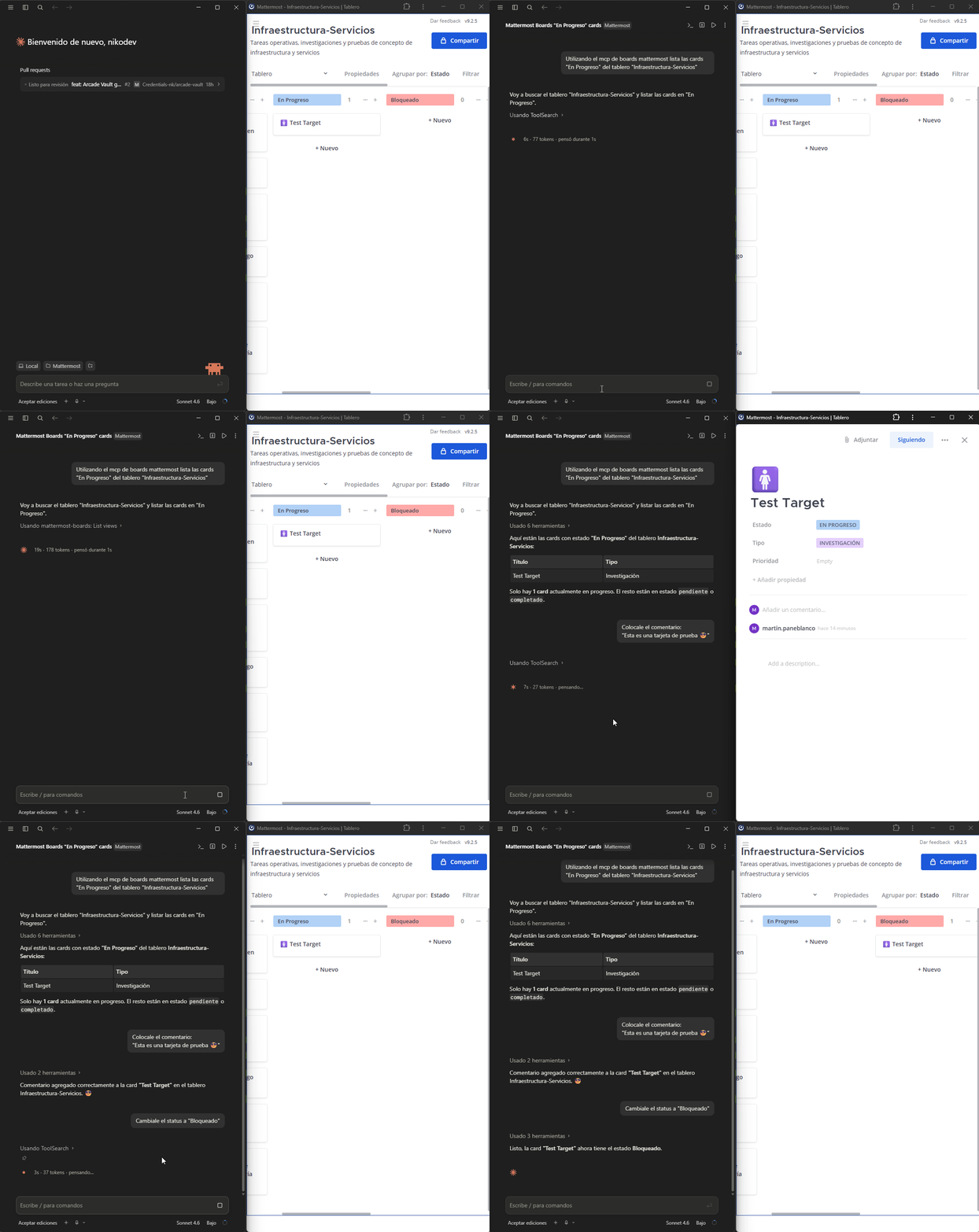
Tools available
| Tool | Description |
|---|---|
list_teams |
List all Mattermost teams |
list_boards |
List boards in a team |
get_board |
Get board details including properties and columns |
list_cards |
List cards/tasks in a board. Optional filter: filter_property + filter_value (e.g. prop_estado / opt_pendiente) |
get_card |
Get full card details |
create_card |
Create a new card with title, properties and content |
update_card |
Update title, properties or content of an existing card |
delete_card |
Delete a card from a board |
add_comment |
Add a comment to a card |
list_views |
List views of a board (kanban, table, gallery…) |
list_board_members |
List members of a board |
Requirements
- Self-hosted Mattermost instance with the Boards (Focalboard) plugin enabled
- A Mattermost Personal Access Token
Installation
Run the interactive setup wizard — it configures Claude Desktop or Claude Code automatically:
npx --prefer-online --package=mcp-boards-nk mcp-boards-nk-setup
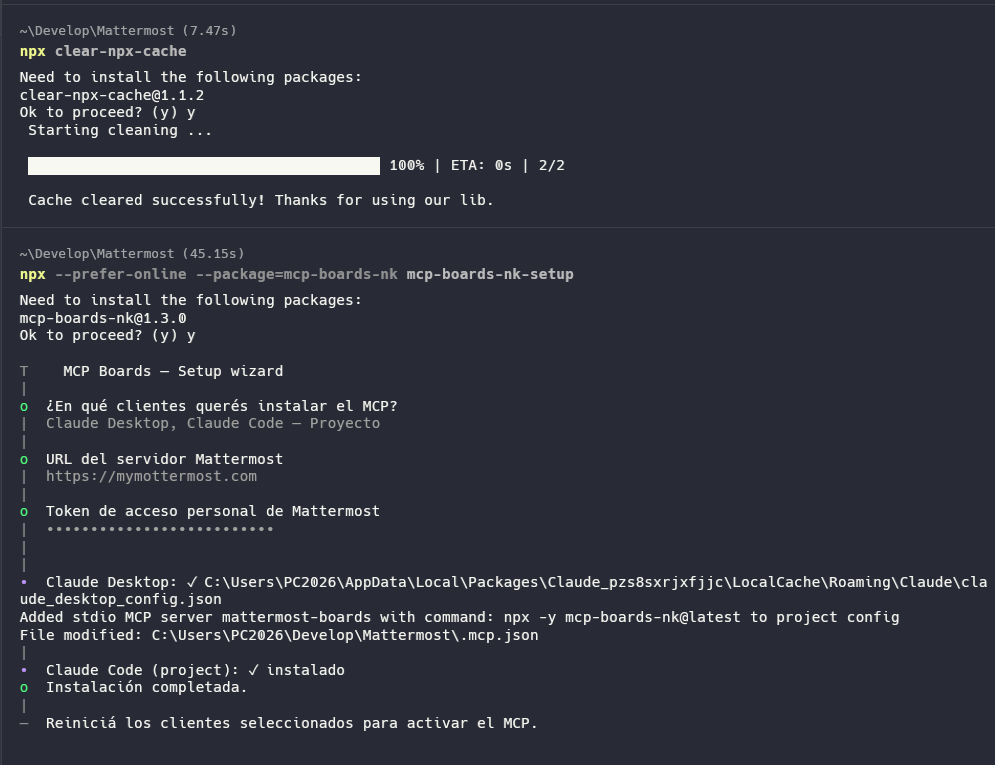
The wizard will ask you:
- Which client to install to (Claude Desktop / Claude Code global or project)
- Your Mattermost URL
- Your personal access token
You can install to multiple clients in a single run.

Uninstall
npx --prefer-online --package=mcp-boards-nk mcp-boards-nk-setup --uninstall
Select which clients to remove the MCP from and the wizard handles the rest.
Environment variables
| Variable | Required | Description |
|---|---|---|
MATTERMOST_URL |
✅ | Base URL of your Mattermost instance (no trailing slash) |
MATTERMOST_TOKEN |
✅ | Personal access token of the Mattermost user |
Getting a Personal Access Token
- Go to Profile → Security → Personal Access Tokens → Edit
- Click Create Token, give it a name, copy the value
If the option doesn't appear, ask your Mattermost admin to enable it: System Console → User Management → Users → Manage Roles → Allow this account to generate personal access tokens
How to use card properties
When creating or updating cards, pass properties as a JSON object using the IDs defined in the board.
Use get_board to see all available property IDs and their option values.
Example:
{
  "prop_estado": "opt_pendiente"
}
License
MIT
Установка Boards Nk
У этого сервера нет опубликованного пакета — он собирается из исходников. Открой репозиторий и следуй инструкции в README.
▸ github.com/nikodev-documentacion/mcp-boards-nkFAQ
Boards Nk MCP бесплатный?
Да, Boards Nk MCP бесплатный — установка в пару кликов через Unyly без оплаты.
Нужен ли API-ключ для Boards Nk?
Нет, Boards Nk работает без API-ключей и переменных окружения.
Boards Nk — hosted или self-hosted?
Доступен hosted-вариант: Unyly запускает сервер в облаке, локальная установка не обязательна.
Как установить Boards Nk в Claude Desktop, Claude Code или Cursor?
Открой Boards Nk на unyly.org, выбери вкладку своего клиента (Claude Desktop, Claude Code, Cursor) и нажми Install — конфиг сгенерируется автоматически, без правки JSON.
Похожие MCP
Gmail
Read, send and search emails from Claude
 автор: Google
Slack
Send, search and summarize Slack messages
 автор: Slack
Runbear
No-code MCP client for team chat platforms, such as Slack, Microsoft Teams, and Discord.
Discord Server
A community discord server dedicated to MCP by [Frank Fiegel](https://github.com/punkpeye)
Compare Boards Nk with
Не уверен что выбрать?
Найди свой стек за 60 секунд
Автор?
Embed-бейдж для README
Похожее
Все в категории communication