
Dev Utils
БесплатноНе проверенA lightweight MCP server providing everyday developer utilities such as JSON formatting, UUID generation, Base64 conversion, HTTP status lookup, and Unix timest

Описание
A lightweight MCP server providing everyday developer utilities such as JSON formatting, UUID generation, Base64 conversion, HTTP status lookup, and Unix timestamp conversion as tools and resources.
README
A lightweight Model Context Protocol server that exposes everyday developer utilities as MCP tools and resources.
Built with mcp — the official Python MCP SDK (uses FastMCP for a clean, decorator-based API).
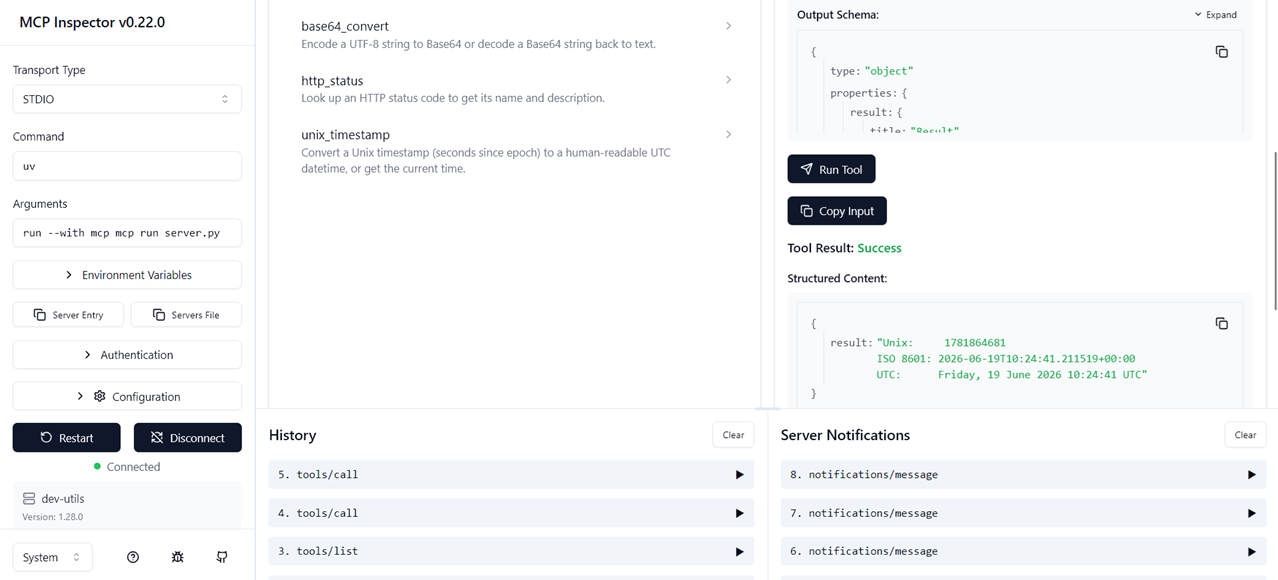
Tools
| Tool | Description |
|---|---|
format_json |
Pretty-print and validate a JSON string |
generate_uuid |
Generate 1–20 random UUID v4 values |
base64_convert |
Encode or decode Base64 strings |
http_status |
Look up an HTTP status code name and description |
unix_timestamp |
Convert a Unix timestamp to UTC or get the current time |
Resources
| URI | Description |
|---|---|
utils://http-status-codes |
Full reference list of supported HTTP status codes |
Running locally
Requirements: Python ≥ 3.11, uv (or pip)
# Install dependencies
uv sync

# Run over stdio (default — used by most MCP hosts)
uv run python server.py

# Or run as an SSE server on port 8000
uv run python -c "from server import mcp; mcp.run(transport='sse')"

# Test interactively in the browser
uv run mcp dev server.py
Connecting to Claude Desktop
Add the following to your claude_desktop_config.json:
{
  "mcpServers": {
    "dev-utils": {
      "command": "uv",
      "args": ["run", "python", "server.py"],
      "cwd": "/absolute/path/to/mcp-dev-utils"
    }
  }
}
On macOS the config lives at:
~/Library/Application Support/Claude/claude_desktop_config.json
On Windows the config lives at:
%APPDATA%\Claude\claude_desktop_config.json
Project structure
mcp-dev-utils/
├── server.py        # All tools, resources, and server definition
├── test_client.py   # Example MCP client for manual testing
├── test_msg.txt     # Raw JSON-RPC messages (educational — use test_client.py for reliable testing)
├── pyproject.toml   # Project metadata and dependencies
└── README.md
Key design decisions
- Single-file server — keeps the codebase easy to read and audit at a glance; ideal for a portfolio piece where clarity matters.
- FastMCP — the high-level SDK wrapper that removes boilerplate while still showing the underlying MCP concepts (tools, resources, structured arguments).
- stdio transport — the default and most universally supported transport; no extra infrastructure needed.
- No external dependencies — all tools rely only on the Python standard library plus
mcpitself.
Установить Dev Utils в Claude Desktop, Claude Code, Cursor
unyly install mcp-dev-utilsСтавит в Claude Desktop, Claude Code, Cursor и VS Code — сам разбирается с npx, uvx и сборкой из исходников.
Впервые? Поставь CLI: curl -fsSL https://unyly.org/install | sh
Или настроить вручную
Выполни в терминале:
claude mcp add mcp-dev-utils -- uvx --from git+https://github.com/jegor377/mcp-dev-utils mcp-dev-utilsFAQ
Dev Utils MCP бесплатный?
Да, Dev Utils MCP бесплатный — установка в пару кликов через Unyly без оплаты.
Нужен ли API-ключ для Dev Utils?
Нет, Dev Utils работает без API-ключей и переменных окружения.
Dev Utils — hosted или self-hosted?
Self-hosted: сервер запускается локально на твоей машине командой из раздела установки.
Как установить Dev Utils в Claude Desktop, Claude Code или Cursor?
Открой Dev Utils на unyly.org, выбери вкладку своего клиента (Claude Desktop, Claude Code, Cursor) и нажми Install — конфиг сгенерируется автоматически, без правки JSON.
Похожие MCP
GitHub
PRs, issues, code search, CI status
 автор: GitHub
Filesystem
Secure file operations with configurable access controls.
Memory
Knowledge graph-based persistent memory system.
Template MCP Server
A CLI tool to create a new Model Context Protocol server project with TypeScript support, dual transport options, and an extensible structure
 автор: mcpdotdirect
Compare Dev Utils with
Не уверен что выбрать?
Найди свой стек за 60 секунд
Автор?
Embed-бейдж для README
Похожее
Все в категории development