
Eleven
БесплатноНе проверенAn open-source MCP server that turns any AI assistant into a football data analytics and scouting platform, enabling natural language queries over 40+ stats, 20

Описание
An open-source MCP server that turns any AI assistant into a football data analytics and scouting platform, enabling natural language queries over 40+ stats, 20+ leagues, and 10,000+ players.
README
MCP Eleven
An open-source MCP server that turns any AI assistant into a football data analytics and scouting platform.






Demo
https://github.com/user-attachments/assets/783f91cd-1143-4060-bc0d-edbd11757ff9
What It Does
Finding football stats usually means jumping between websites, dealing with filters, and copy-pasting data. MCP Eleven lets you skip all that — connect it to any AI assistant, ask in plain language, and get real data back from 40+ stats, 20+ leagues, and 10,000+ players.
"Find me a creative playmaker with 8+ assists, 85%+ pass accuracy, and at least 3 goals this season" — that's it. No SQL, no filters, no scraping.
Tools
| Tool | Description | Source |
|---|---|---|
search_players |
Query 40+ stats across 20+ leagues with flexible filters | Database |
get_player_context |
Deep scouting dossier — market value, injuries, transfers, personality | Web search |
get_team_context |
Team analysis — tactics, coach, form, transfer targets | Web search |
get_player_highlights |
Find highlight videos from YouTube, Instagram, TikTok | Web search |
Scouting Workflow
The tools are designed to be used together, the same way a real scout works:
- Analyze the team —
get_team_contextto understand tactics, weaknesses, and what positions need reinforcing - Search for candidates —
search_playersto find players that match the profile statistically - Deep dive on the best fit —
get_player_contextto check market value, injuries, contract, and personality - Watch them play —
get_player_highlightsto find video evidence before making a decision
Usage Example
Scouting Flow: "Real Madrid needs a creative midfielder"
Step 1 — Analyze the team
"Get context on Real Madrid in La Liga"
Uses get_team_context. You understand the squad, tactics, coach philosophy, current form, and transfer targets. Now you know what they need.
Step 2 — Search for candidates
"Find creative midfielders across top leagues: min 5 assists, min 25 key passes, min 3 goals, pass accuracy above 82%"
Uses search_players. You get a shortlist of candidates with real stats:
| Player | Team | Assists | Key Passes | Pass % | Goals |
|---|---|---|---|---|---|
| Michael Olise | Bayern Munich | 16 | 56 | 85.0% | 10 |
| Bruno Fernandes | Manchester United | 12 | 78 | 83.3% | 6 |
| Federico Dimarco | Inter | 11 | 63 | 82.2% | 5 |
| Nico Paz | Como | 6 | 40 | 82.8% | 8 |
Step 3 — Deep dive on the best fit
"Get full scouting context on Nico Paz from Como"
Uses get_player_context. You get market value, injuries, transfer history, awards, personality — everything to make a decision.
Step 4 — Watch him play
"Get highlight videos of Nico Paz"
Uses get_player_highlights. You get YouTube/Instagram/TikTok links to actually see the player in action.
The story: Team context (what do they need?) → Player search (who fits?) → Scouting report (is he available, healthy, affordable?) → Highlights (does the eye test match the data?)
Architecture
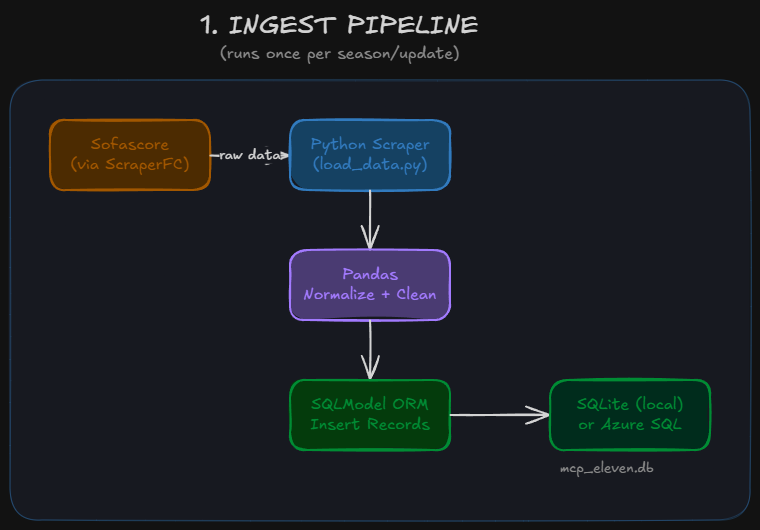
Ingest Pipeline
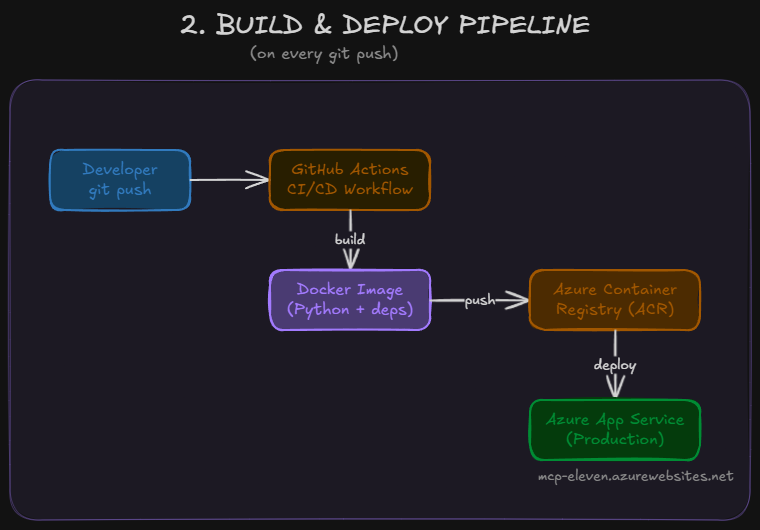
Build & Deploy Pipeline
Client Request Flow
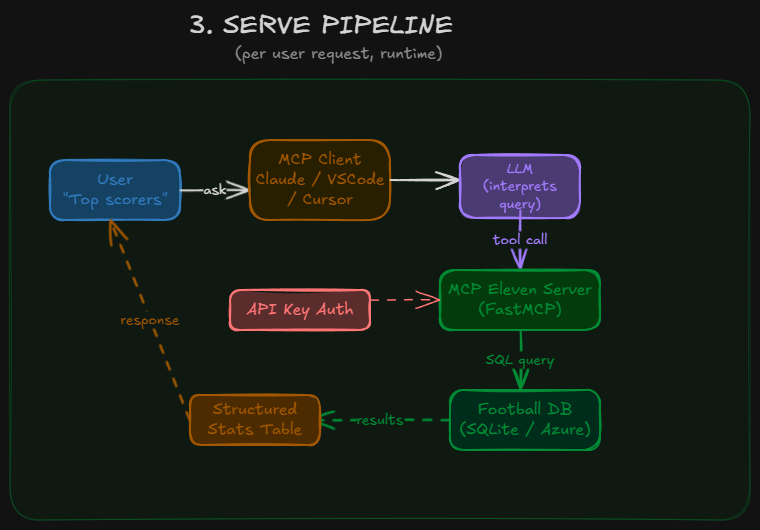
See docs/v1/specs/architecture.md for detailed breakdowns.
Project Structure & Tech Stack
mcp-eleven/
├── main.py                  # Entry point
├── server.py                # MCP instance + auth middleware
├── tools/                   # One file per MCP tool
│   ├── search_players.py
│   ├── player_context.py
│   ├── team_context.py
│   └── player_highlights.py
├── services/                # Business logic
│   └── web_search/
│       ├── config.py        # Search categories, video domains
│       ├── prompts.py       # LLM instructions per tool
│       └── search.py        # Tavily search functions
├── config/                  # Settings, DB config, leagues
├── model/                   # Player stats schema, filters, API key
├── db/                      # Query engine (SQLite / Azure SQL)
├── auth/                    # API key validation
├── scripts/                 # Data loading, key generation
├── docs/                    # Versioned documentation (v1/, v2/)
└── tests/                   # HTTP and unit tests
| Component | Technology | Purpose |
|---|---|---|
| Language | Python 3.12 | Core runtime |
| MCP Framework | FastMCP 2.13.3 | Exposes tools to AI assistants |
| ORM | SQLModel 0.0.27 | Type-safe database operations |
| Web Search | Tavily | Real-time scouting context |
| Data Source | ScraperFC (Sofascore) | Football statistics |
| Database | SQLite / Azure SQL | Player stats storage |
| Auth | API key (hashed + tracked) | Access control |
| Container | Docker | Reproducible deployment |
| CI/CD | GitHub Actions | Auto build + deploy |
| Hosting | Azure App Service | Production server |
Leagues Supported
| Top 5 | Continental | Americas | Other |
|---|---|---|---|
| Premier League | Champions League | MLS | Saudi Pro League |
| La Liga | Europa League | Copa Libertadores | Turkish Super Lig |
| Bundesliga | Conference League | Argentina Liga | World Cup |
| Serie A | Euros | USL Championship | Women's World Cup |
| Ligue 1 | Liga 1 Peru | Gold Cup |
Quick Start
1. Clone and install
git clone https://github.com/ivan-escribano/mcp-eleven.git
cd mcp-eleven
python -m venv venv
source venv/bin/activate  # Windows: venv\Scripts\activate
pip install -r requirements.txt
2. Configure environment
cp .env.example .env
Edit .env with your values:
APIKEY_SALT=your-random-salt-here
HOST=0.0.0.0
PORT=8000
TAVILY_API_KEY=tvly-your-api-key-here

# Azure SQL (optional — uses local SQLite by default)
# DATABASE_URL=mssql+pyodbc://user:[email protected]:1433/dbname?driver=ODBC+Driver+18+for+SQL+Server
3. Load data and create API key
python scripts/load_data.py
python scripts/create_api_key.py
4. Run the server
python main.py
Server starts at http://localhost:8000. Health check at /health.
5. Connect an MCP client
Claude Desktop (needs mcp-remote bridge — requires Node.js):
{
  "mcpServers": {
    "mcp-eleven": {
      "command": "npx",
      "args": [
        "mcp-remote@latest",
        "http://localhost:8000/mcp?api_key=YOUR_API_KEY",
        "--allow-http"
      ]
    }
  }
}
Config file location:
- Windows:
%APPDATA%\Claude\claude_desktop_config.json - macOS:
~/Library/Application Support/Claude/claude_desktop_config.json
VSCode / Cursor (direct HTTP — no bridge needed):
{
  "mcpServers": {
    "mcp-eleven": {
      "url": "http://localhost:8000/mcp?api_key=YOUR_API_KEY"
    }
  }
}
Documentation
All docs are versioned. See docs/DOCS_GUIDE.md for the structure.
| Version | Content |
|---|---|
| docs/v1/ | Original architecture, diagrams, overview |
| docs/v2/ | Specs, implementation plans, explanations, changelog |
Roadmap
- Player search with 40+ statistical filters
- Deep player scouting via web search
- Team tactical analysis via web search
- Video highlights search
- Project reorganization (tools/ folder, versioned docs)
- Player comparison tool
- Historical season-over-season tracking
- Streaming responses for large queries
License
MIT
Connect
Установка Eleven
У этого сервера нет опубликованного пакета — он собирается из исходников. Открой репозиторий и следуй инструкции в README.
▸ github.com/ivan-escribano/mcp-football-elevenFAQ
Eleven MCP бесплатный?
Да, Eleven MCP бесплатный — установка в пару кликов через Unyly без оплаты.
Нужен ли API-ключ для Eleven?
Нет, Eleven работает без API-ключей и переменных окружения.
Eleven — hosted или self-hosted?
Self-hosted: сервер запускается локально на твоей машине командой из раздела установки.
Как установить Eleven в Claude Desktop, Claude Code или Cursor?
Открой Eleven на unyly.org, выбери вкладку своего клиента (Claude Desktop, Claude Code, Cursor) и нажми Install — конфиг сгенерируется автоматически, без правки JSON.
Похожие MCP
Fetch
Web content fetching and conversion for efficient LLM usage.
AWS KB Retrieval
Retrieval from AWS Knowledge Base using Bedrock Agent Runtime.
 автор: modelcontextprotocol
Spring AI MCP Server
Provides auto-configuration for setting up an MCP server in Spring Boot applications.
llm-analysis-assistant
A very streamlined mcp client that supports calling and monitoring stdio/sse/streamableHttp, and can also view request responses through the /logs page. It also
 автор: xuzexin-hz
Compare Eleven with
Не уверен что выбрать?
Найди свой стек за 60 секунд
Автор?
Embed-бейдж для README
Похожее
Все в категории ai