
Knowledge Viz
БесплатноНе проверенEnables storage and semantic search of facts, and interactive 3D visualization of embeddings via MCP tools.

Описание
Enables storage and semantic search of facts, and interactive 3D visualization of embeddings via MCP tools.
README
A knowledge-base chatbot with semantic search and interactive embedding visualisation, built as a hybrid of REST microservices (browser UI) and a proper MCP stdio server (Claude Desktop / Cursor integration).
Store facts in natural language, ask questions, and explore the embedding space in 2D (matplotlib) or interactive 3D (Plotly) — all backed by ChromaDB and SentenceTransformers.
Architecture Overview
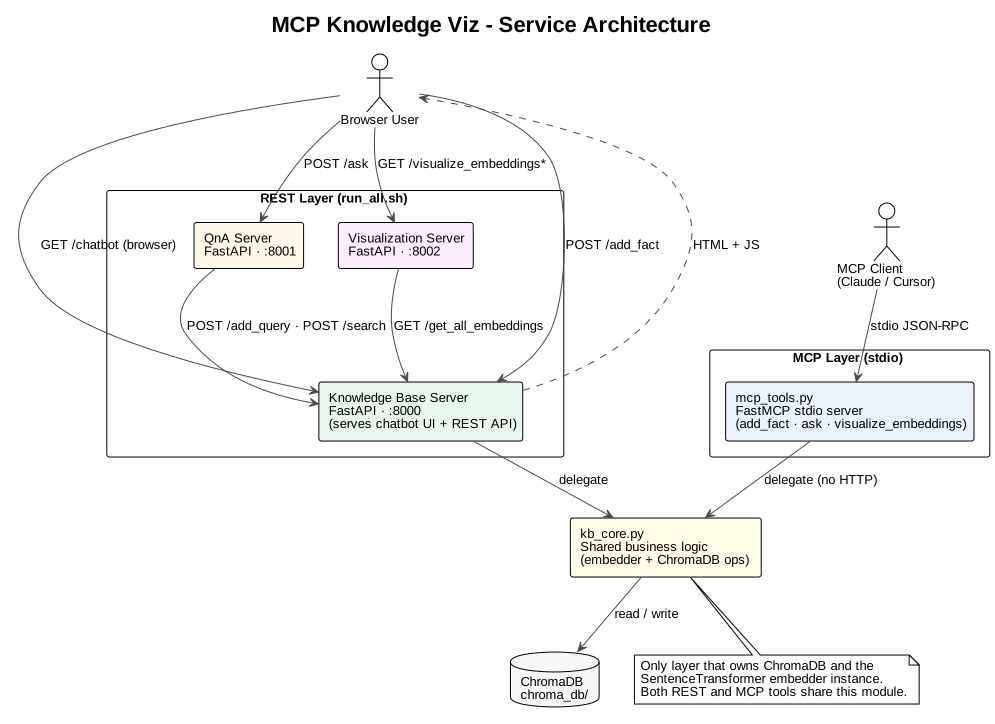
The system has two independent access paths that share the same business logic:
| Layer | Transport | Use case |
|---|---|---|
REST servers (run_all.sh) |
HTTP | Browser chatbot UI |
MCP stdio server (mcp_tools.py) |
stdin/stdout JSON-RPC | Claude Desktop, Cursor, any MCP client |
Both layers delegate to kb_core.py — the single module that owns the ChromaDB client and the SentenceTransformer embedder. Neither layer duplicates data-access logic.
Key Design Principles
- Single source of truth for data access — only
kb_core.pytalks to ChromaDB. REST endpoints and MCP tools are thin wrappers. - No HTTP for MCP —
mcp_tools.pycallskb_coredirectly; the REST servers do not need to be running for an MCP client to use the tools. - SOLID / Pydantic structure — the Visualization package uses typed Pydantic models at every boundary (
EmbeddingPayload,VisualizationRequest,ReducedEmbeddings).
Diagrams
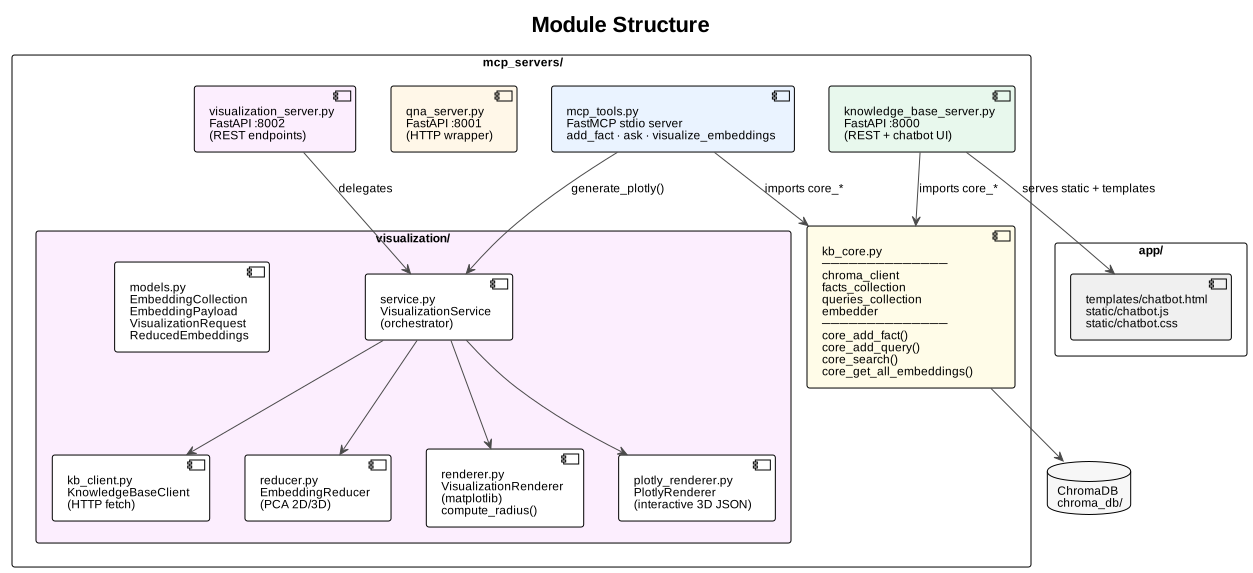
Module Structure
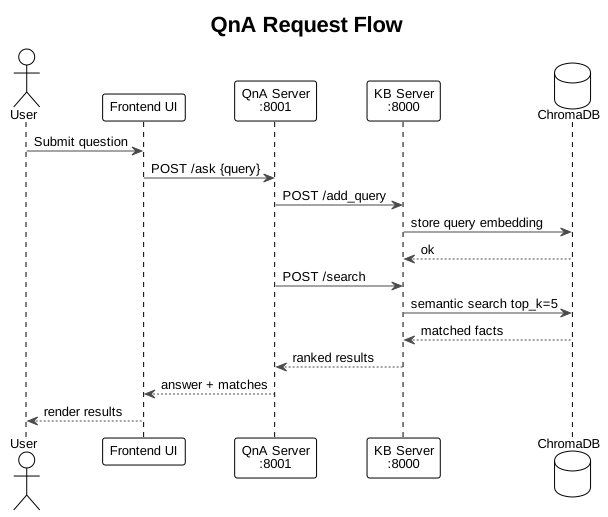
QnA Request Flow (REST)
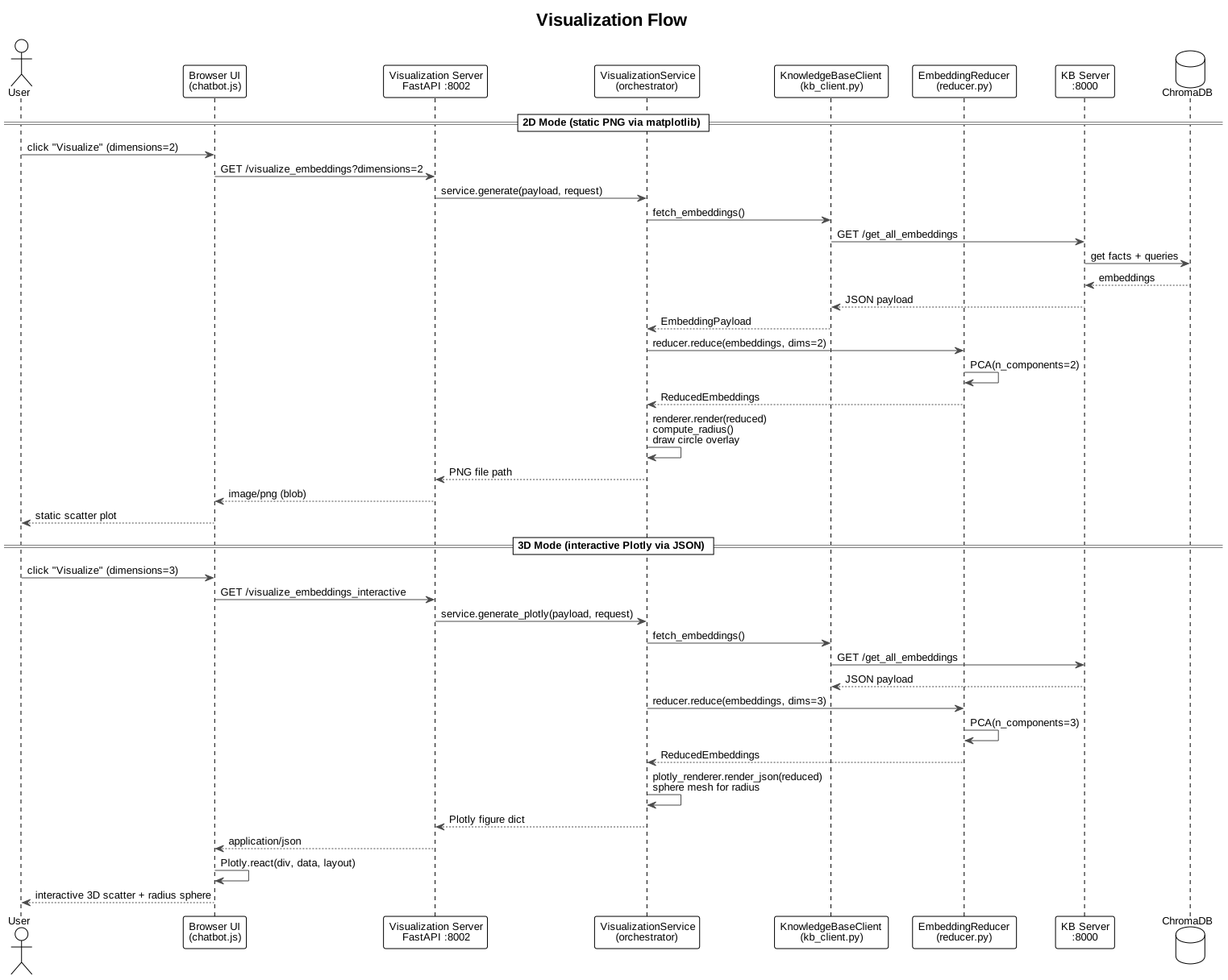
Visualization Flow (2D + 3D)
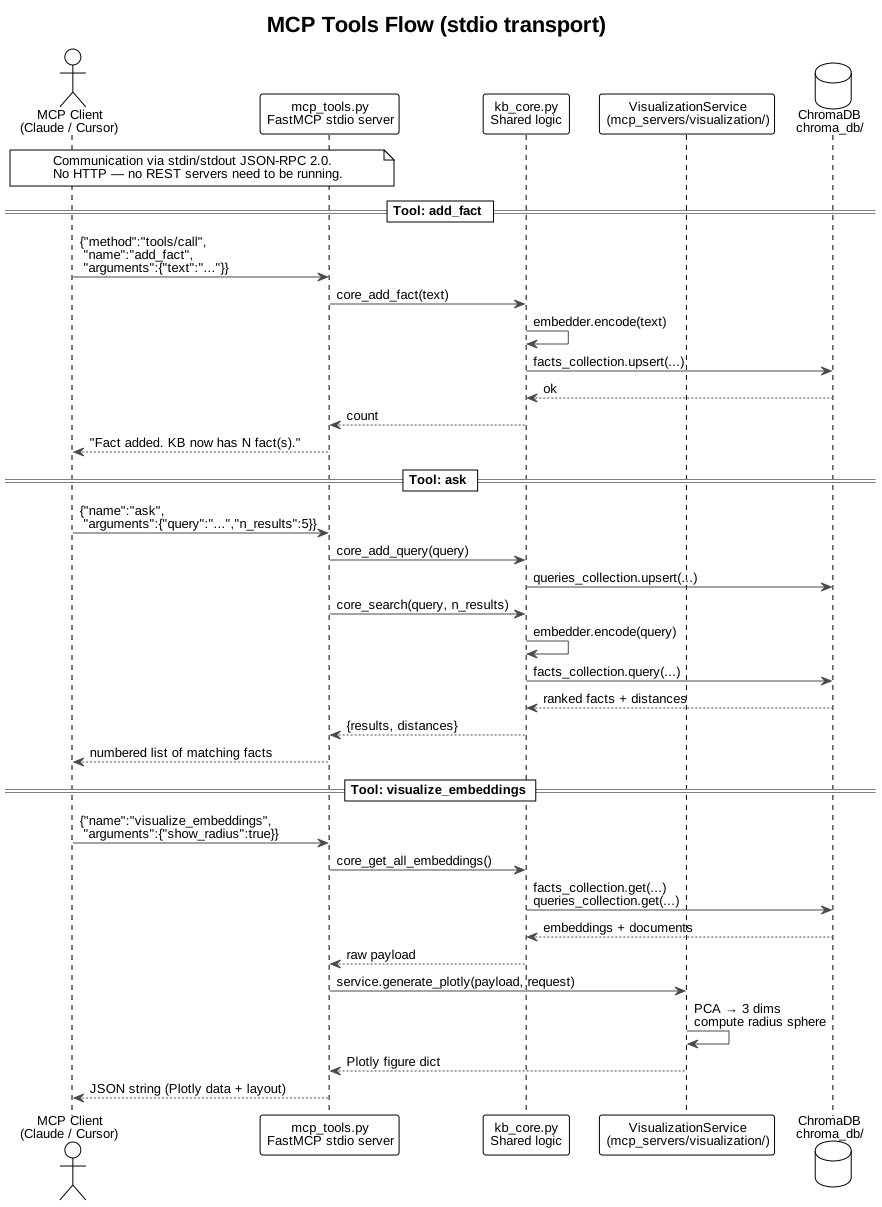
MCP Tools Flow (stdio)
Regenerating diagrams
plantuml -tsvg docs/architecture/uml/*.puml -o ../images
plantuml -tpng docs/architecture/uml/*.puml -o ../images
REST API Reference
Knowledge Base Server — port 8000
Central data service. Also serves the chatbot browser UI.
| Method | Endpoint | Description |
|---|---|---|
GET |
/chatbot |
Browser UI (two-column layout) |
POST |
/add_fact |
Embed and store a fact in ChromaDB facts collection |
POST |
/add_query |
Embed and store a query in ChromaDB queries collection |
POST |
/search |
Semantic search — returns top-k facts + distances. Body: {"query": "...", "n_results": 5} |
GET |
/get_all_embeddings |
Return all facts + queries with raw embeddings (used by Viz server) |
QnA Server — port 8001
Thin HTTP wrapper. Calls the KB server; no direct DB access.
| Method | Endpoint | Description |
|---|---|---|
POST |
/ask |
Stores query via /add_query, fetches matches via /search, returns ranked results |
Visualization Server — port 8002
Generates embedding plots via PCA dimensionality reduction.
| Method | Endpoint | Query params | Returns |
|---|---|---|---|
GET |
/visualize_embeddings |
dimensions (2|3), show_radius, radius_neighbors, figure_width, figure_height, dpi |
image/png (matplotlib) |
GET |
/visualize_embeddings_3d |
show_radius, radius_neighbors, figure_width, figure_height, dpi |
image/png (matplotlib 3D) |
GET |
/visualize_embeddings_interactive |
show_radius, radius_neighbors |
application/json (Plotly figure) |
MCP Tools Reference
mcp_tools.py is a FastMCP stdio server. Configure it in your MCP client and the three tools below appear automatically — no REST servers needed.
| Tool | Arguments | Description |
|---|---|---|
add_fact |
text: str |
Embed and persist a fact in ChromaDB |
ask |
query: str, n_results: int = 5 |
Semantic search; also records the query for visualisation |
visualize_embeddings |
show_radius: bool = true, radius_neighbors: int = 3 |
Returns a Plotly 3D figure as a JSON string |
Connecting to Claude Desktop / Cursor
Copy mcp.json.example to mcp.json, fill in your absolute paths, then copy the mcpServers block into your client's config file:
- Claude Desktop:
~/Library/Application Support/Claude/claude_desktop_config.json - Cursor:
~/.cursor/mcp.json
// mcp.json.example — fill in your local paths
{
  "mcpServers": {
    "knowledge-viz": {
      "command": "/path/to/your/project/.venv/bin/python",
      "args": ["-m", "mcp_servers.mcp_tools"],
      "cwd": "/path/to/your/project"
    }
  }
}
mcp.jsonis gitignored because it contains absolute local paths. Always editmcp.json.examplefor committed changes.
Getting Started
Prerequisites
- Python 3.11+
- PlantUML (optional, only to regenerate diagrams)
Setup
git clone <repository-url>
cd mcp-knowledge-viz

python -m venv .venv
source .venv/bin/activate        # Windows: .venv\Scripts\activate

pip install -r requirements.txt
Run the REST + browser UI stack
chmod +x run_all.sh
./run_all.sh
Starts three servers:
| Server | Port | Role |
|---|---|---|
| Knowledge Base | 8000 | Data + chatbot UI |
| QnA | 8001 | Question answering |
| Visualization | 8002 | Embedding plots |
Open http://127.0.0.1:8000/chatbot in your browser.
Visualisation tuning parameters
| Parameter | Default | Range | Effect |
|---|---|---|---|
dimensions |
2 |
2 or 3 |
PCA target dimensions |
show_radius |
true |
bool | Draw search-radius circle / sphere around latest query |
radius_neighbors |
5 |
1–50 | Neighbour count used to compute the radius |
figure_width |
16 |
float | Matplotlib figure width (inches) |
figure_height |
10 |
float | Matplotlib figure height (inches) |
dpi |
160 |
int | Matplotlib output resolution |
n_results |
5 |
1–50 | Facts returned per search |
Project Structure
mcp-knowledge-viz/
├── app/
│   ├── static/
│   │   ├── chatbot.css        # Two-column layout, vis viewport
│   │   └── chatbot.js         # Fetch facts/QnA, Plotly 3D, spinner
│   └── templates/
│       └── chatbot.html       # Bootstrap 5 two-column UI
├── docs/
│   └── architecture/
│       ├── images/            # Generated SVG + PNG diagrams
│       └── uml/               # PlantUML sources
├── mcp_servers/
│   ├── kb_core.py             # ★ Shared ChromaDB + embedder logic
│   ├── knowledge_base_server.py  # REST :8000 — delegates to kb_core
│   ├── qna_server.py             # REST :8001 — HTTP wrapper
│   ├── visualization_server.py   # REST :8002 — delegates to visualization/
│   ├── mcp_tools.py           # ★ MCP stdio server (add_fact, ask, visualize)
│   └── visualization/
│       ├── models.py          # Pydantic models
│       ├── kb_client.py       # HTTP client → KB server
│       ├── reducer.py         # PCA 2D/3D
│       ├── renderer.py        # matplotlib (2D/3D static PNG)
│       ├── plotly_renderer.py # Plotly interactive 3D JSON
│       └── service.py         # Orchestrator
├── chroma_db/                 # Persistent vector store (gitignored)
├── mcp.json                   # Local MCP config (gitignored)
├── mcp.json.example           # Template — commit this, not mcp.json
├── run_all.sh                 # Start all three REST servers
└── requirements.txt
Tech Stack
| Concern | Library |
|---|---|
| REST framework | FastAPI + uvicorn |
| Vector store | ChromaDB (persistent) |
| Embeddings | SentenceTransformers all-MiniLM-L6-v2 |
| Dimensionality reduction | scikit-learn PCA |
| 2D/3D static plots | matplotlib |
| Interactive 3D plots | Plotly (JS CDN + Python) |
| MCP server | mcp[cli] FastMCP |
| HTTP client | httpx |
| Frontend | Bootstrap 5, vanilla JS |
Установка Knowledge Viz
У этого сервера нет опубликованного пакета — он собирается из исходников. Открой репозиторий и следуй инструкции в README.
▸ github.com/abtpst/mcp-knowledge-vizFAQ
Knowledge Viz MCP бесплатный?
Да, Knowledge Viz MCP бесплатный — установка в пару кликов через Unyly без оплаты.
Нужен ли API-ключ для Knowledge Viz?
Нет, Knowledge Viz работает без API-ключей и переменных окружения.
Knowledge Viz — hosted или self-hosted?
Self-hosted: сервер запускается локально на твоей машине командой из раздела установки.
Как установить Knowledge Viz в Claude Desktop, Claude Code или Cursor?
Открой Knowledge Viz на unyly.org, выбери вкладку своего клиента (Claude Desktop, Claude Code, Cursor) и нажми Install — конфиг сгенерируется автоматически, без правки JSON.
Похожие MCP
GitHub
PRs, issues, code search, CI status
 автор: GitHub
Filesystem
Secure file operations with configurable access controls.
Memory
Knowledge graph-based persistent memory system.
Template MCP Server
A CLI tool to create a new Model Context Protocol server project with TypeScript support, dual transport options, and an extensible structure
 автор: mcpdotdirect
Compare Knowledge Viz with
Не уверен что выбрать?
Найди свой стек за 60 секунд
Автор?
Embed-бейдж для README
Похожее
Все в категории development