
Local Llm
БесплатноНе проверенMCP server that lets Claude Code delegate mechanical tasks to a local LLM for summarization, classification, extraction, and drafting.

Описание
MCP server that lets Claude Code delegate mechanical tasks to a local LLM for summarization, classification, extraction, and drafting.
README
MCP server that lets Claude Code delegate mechanical tasks to a local LLM. Claude does the thinking; your local model handles the grunt work — summarization, classification, extraction, drafting.
This is not a replacement for Claude. It's a cost-optimization layer. Claude stays in control, decides what to delegate, and reviews the output. The local model just does volume work that doesn't need frontier reasoning.
Architecture
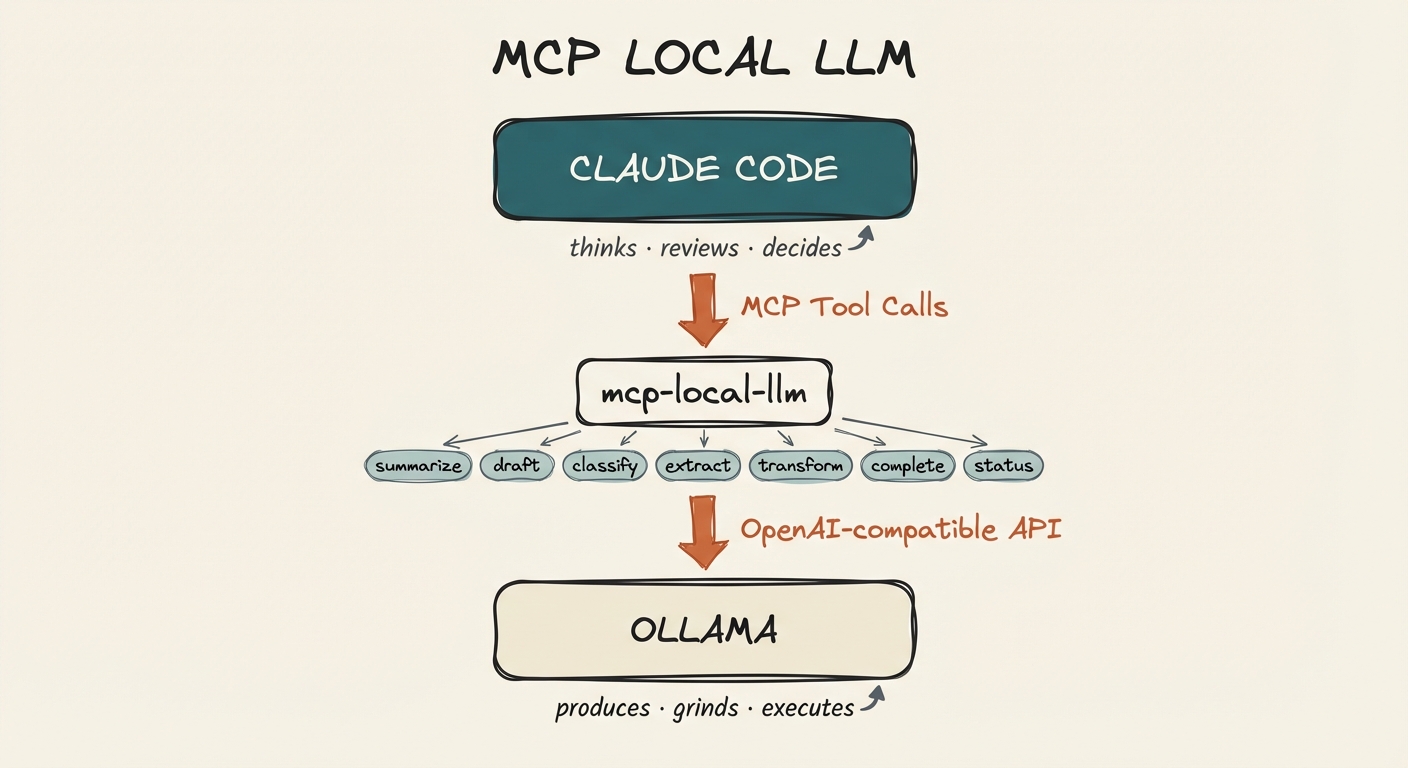
Claude Code sits at the top as the orchestrator. It calls mcp-local-llm tools via MCP, which forward requests to Ollama (or any OpenAI-compatible backend) running locally. Claude decides what to delegate and reviews what comes back.
Requirements
- Ollama installed and running
- Node.js 18+
- Claude Code (or any MCP-compatible client)
Setup
1. Install Ollama and pull a model
# Install Ollama (macOS)
brew install ollama

# Start the Ollama service
ollama serve

# Pull the default model
ollama pull qwen2.5-coder:7b
2. Clone and build
git clone https://github.com/aplaceforallmystuff/mcp-local-llm.git
cd mcp-local-llm
npm install
npm run build
3. Add to Claude Code
claude mcp add local-llm -s user -- node /path/to/mcp-local-llm/dist/index.js
Or add manually to ~/.claude.json:
{
  "mcpServers": {
    "local-llm": {
      "command": "node",
      "args": ["/path/to/mcp-local-llm/dist/index.js"]
    }
  }
}
4. Verify
In Claude Code, the local_status tool should show your Ollama connection and available models.
Available Tools
local_summarize
Summarize text using the local LLM.
Parameters:
text(required): Text to summarizestyle:"brief"|"detailed"|"bullet_points"|"executive"max_length: Approximate max words (default: 150)focus: Specific aspect to emphasize
Use for: Bulk summarization, condensing research, meeting notes
local_draft
Generate initial drafts for refinement.
Parameters:
task(required): What to draftcontext(required): Context and requirementsformat: Output format (markdown, plain text, etc.)tone: Desired tone (professional, casual, technical)
Use for: Boilerplate, initial content, template-based generation
local_classify
Classify text into categories.
Parameters:
text(required): Text to classifycategories(required): Array of possible categoriesallow_multiple: Allow multiple categories (default: false)explain: Include explanation (default: false)
Use for: Sorting, tagging, organizing content
local_extract
Extract structured information from text.
Parameters:
text(required): Text to extract fromfields(required): Array of fields to extractoutput_format:"json"|"yaml"|"markdown_table"
Use for: Parsing documents, data extraction
local_transform
Transform text according to instructions.
Parameters:
text(required): Text to transforminstruction(required): Transformation instructions
Use for: Formatting, style conversion, simple rewrites
local_complete
Raw completion for maximum flexibility.
Parameters:
prompt(required): The promptsystem: System messagemax_tokens: Max tokens (default: 2048)temperature: Temperature (default: 0.7)
Use for: Custom tasks that don't fit other tools
local_status
Check local LLM connection status and available models.
Configuration
Environment variables (all optional — defaults work with a standard Ollama install):
| Variable | Default | Description |
|---|---|---|
LOCAL_LLM_BASE_URL |
http://localhost:11434/v1 |
Ollama API endpoint |
LOCAL_LLM_MODEL |
qwen2.5-coder:7b |
Model to use |
LOCAL_LLM_MAX_TOKENS |
2048 |
Default max tokens |
LOCAL_LLM_TEMPERATURE |
0.7 |
Default temperature |
Alternative: Docker Model Runner
If you prefer Docker Model Runner over Ollama:
# Enable Model Runner with TCP access
docker desktop enable model-runner --tcp=12434

# Pull a model
docker model pull ai/gemma3:latest
Then set the environment variables:
export LOCAL_LLM_BASE_URL="http://localhost:12434/engines/v1"
export LOCAL_LLM_MODEL="ai/gemma3:latest"
Any backend that exposes an OpenAI-compatible API will work.
Delegation Philosophy
| Claude Does | Local Model Does |
|---|---|
| Complex reasoning | Bulk summarization |
| Architecture decisions | Boilerplate generation |
| Quality review | Text extraction/formatting |
| Novel problem solving | Simple classification |
| Final editing | Initial draft generation |
Claude reviews, local model produces. The local model handles volume; Claude handles quality control.
Teaching Claude to Delegate
Once the MCP server is running, Claude Code can call these tools automatically. But Claude won't know when to use them unless you tell it. Here's how to set that up.
Option 1: Add routing instructions to CLAUDE.md
The most reliable approach. Add delegation rules to your project or global CLAUDE.md file so Claude applies them every session:
## Local LLM Routing

Route mechanical tasks to local models via `mcp__local-llm__*` tools to save API costs.

| Task Type | Tool | Example |
|-----------|------|---------|
| Summarizing content | `local_summarize` | Condensing research notes |
| Initial drafts | `local_draft` | Boilerplate emails, docstrings |
| Classification | `local_classify` | Sorting items, tagging content |
| Data extraction | `local_extract` | Parsing structured data from text |
| Text transformation | `local_transform` | Formatting changes, style conversions |
| Custom simple tasks | `local_complete` | Any mechanical task with clear instructions |

### When NOT to Route Locally

- Complex reasoning or analysis
- Security-sensitive operations
- Tasks requiring multi-step tool chains
- Content requiring voice/style judgment
- Anything you specifically want Claude's opinion on
Option 2: Ask Claude directly
You can tell Claude to delegate in conversation:
"Summarize these 20 files using the local model"
"Use local_classify to sort these inbox items into categories: work, personal, spam"
"Draft a README section using local_draft, then review and clean it up yourself"
Claude will call the MCP tools and review the output before presenting it to you.
Option 3: Build it into custom agents
If you use Claude Code's agent system, add delegation instructions to agent definitions:
## Agent: inbox-processor

When classifying inbox items, use `local_classify` to categorize each item
before deciding where to file it. Use `local_summarize` to create brief
descriptions for items that need them.
Practical Examples
Batch summarize research files:
"Read all the markdown files in ./research/ and use local_summarize to create
a bullet-point summary of each one. Compile the summaries into a single document."
Classify and sort content:
"I have 30 notes in my inbox folder. Use local_classify with categories
[project, reference, action-item, archive] to sort them, then move each
file to the appropriate folder."
Draft-then-refine workflow:
"Use local_draft to generate initial docstrings for all exported functions
in src/. Then review each one and fix anything that's inaccurate or unclear."
Extract structured data:
"Extract the name, email, company, and role from each of these email signatures
using local_extract. Output as a JSON array."
The pattern is always the same: local model produces, Claude reviews. You get the cost savings of a 7B model for volume work, with Claude's judgment as the quality gate.
Troubleshooting
"Connection refused" or status shows error
- Check Ollama is running:
ollama list - Start it if needed:
ollama serve - Verify the port:
curl http://localhost:11434/v1/models
"Model not found"
- Pull the model:
ollama pull qwen2.5-coder:7b - Or set a different model via
LOCAL_LLM_MODEL
Using a different backend
- Set
LOCAL_LLM_BASE_URLto your backend's OpenAI-compatible endpoint - Set
LOCAL_LLM_MODELto a model your backend supports
Tools not appearing in Claude Code
- Verify the MCP server is configured:
claude mcp list - Check the path to
dist/index.jsis correct - Rebuild if needed:
npm run build
License
MIT
Установка Local Llm
У этого сервера нет опубликованного пакета — он собирается из исходников. Открой репозиторий и следуй инструкции в README.
▸ github.com/aplaceforallmystuff/mcp-local-llmFAQ
Local Llm MCP бесплатный?
Да, Local Llm MCP бесплатный — установка в пару кликов через Unyly без оплаты.
Нужен ли API-ключ для Local Llm?
Нет, Local Llm работает без API-ключей и переменных окружения.
Local Llm — hosted или self-hosted?
Self-hosted: сервер запускается локально на твоей машине командой из раздела установки.
Как установить Local Llm в Claude Desktop, Claude Code или Cursor?
Открой Local Llm на unyly.org, выбери вкладку своего клиента (Claude Desktop, Claude Code, Cursor) и нажми Install — конфиг сгенерируется автоматически, без правки JSON.
Похожие MCP
GitHub
PRs, issues, code search, CI status
 автор: GitHub
Filesystem
Secure file operations with configurable access controls.
Memory
Knowledge graph-based persistent memory system.
Template MCP Server
A CLI tool to create a new Model Context Protocol server project with TypeScript support, dual transport options, and an extensible structure
 автор: mcpdotdirect
Compare Local Llm with
Не уверен что выбрать?
Найди свой стек за 60 секунд
Автор?
Embed-бейдж для README
Похожее
Все в категории development