loading…
en/
Browse all
Monitor
FreeNot checkedAn observability tool for agentic AI pipelines that intercepts MCP and Python tool calls to provide real-time metrics, session replays, and alerts via a local d

About
An observability tool for agentic AI pipelines that intercepts MCP and Python tool calls to provide real-time metrics, session replays, and alerts via a local dashboard. It enables centralized monitoring of multiple MCP servers through multiplexer and proxy modes without requiring changes to existing agent code.
README
Transparent observability for agentic AI pipelines.
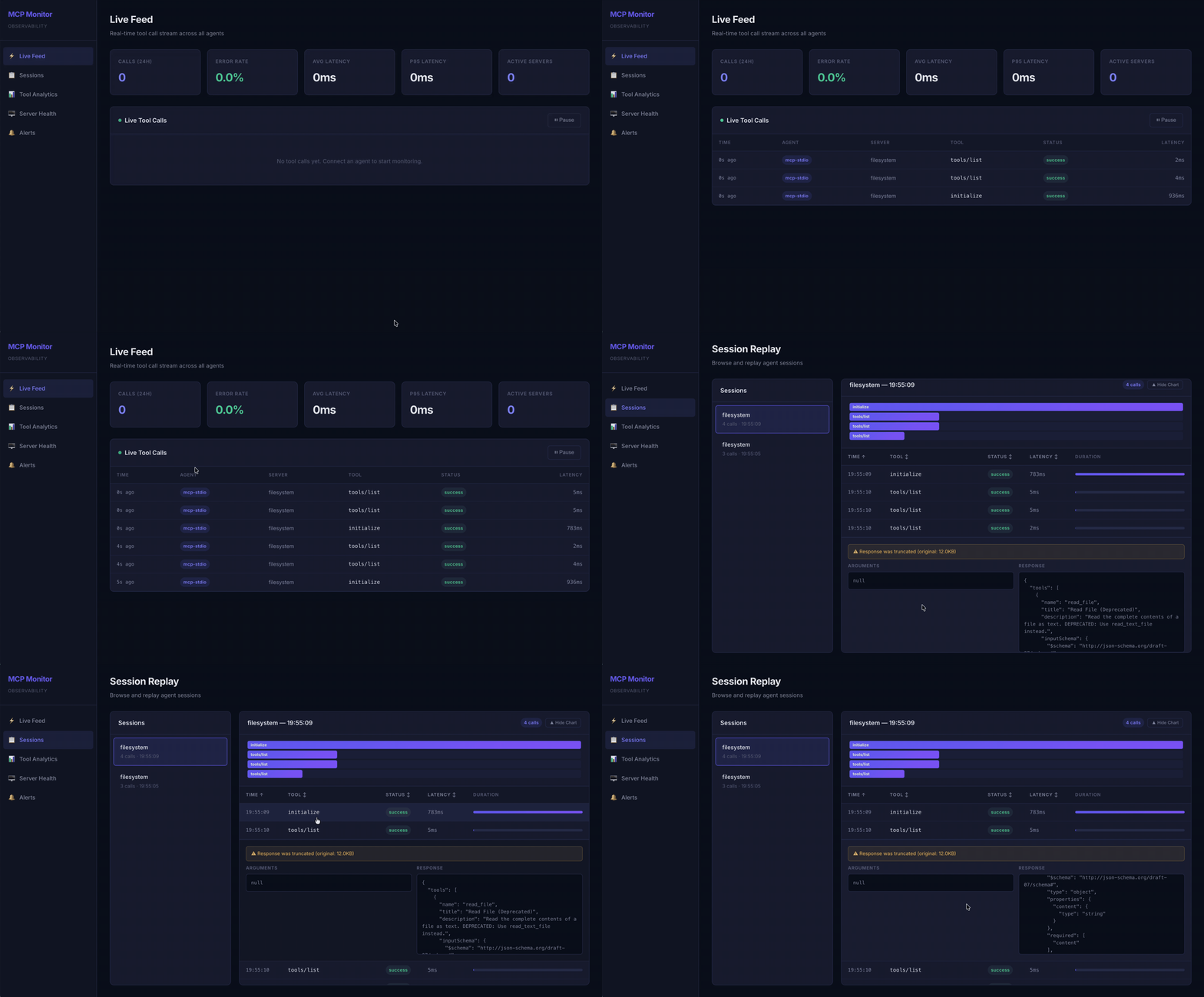
MCP Monitor intercepts every tool call made by an AI agent — whether the agent uses the Model Context Protocol (MCP) or calls Python functions directly — and surfaces metrics, session replays, token & cost estimates, and error classification through a local web dashboard.
Zero changes to your agent. Zero changes to your MCP servers.
Why this exists
An agent that calls tools is a distributed system wearing a trench coat. The model decides what to call, the tool decides whether to answer, and the only thing you usually see is the final response. When something goes wrong — it's slow, it's expensive, it loops, it fails — the interesting evidence has already scrolled past in a log somewhere.
Most "LLM observability" tools ask you to wrap your model client or adopt a tracing SDK. MCP Monitor takes the opposite bet: the tool boundary is the cheapest place to observe an agent. Every meaningful action an agent takes eventually becomes a tool call on the wire. If you sit at that boundary — the MCP transport — you can watch the whole agent without touching its code.
The rest of this README is organized around the metrics MCP Monitor records, and, for each, why it's worth recording — not just what it is.
Features
- ⚡ Live Feed — Real-time SSE-powered stream of all tool calls with status badges and latency
- 📋 Session Replay + Diffs — Browse sessions, view call timelines, and diff any two calls side-by-side to see exactly what changed
- 📊 Tool Analytics — P50/P95/P99 latency charts, call volume, and error rate trends via Chart.js
- 💰 Tokens & Cost — Estimated token usage and spend, broken down per agent node (server + tool)
- 🚨 Error Classification — Every failure bucketed as hallucination, tool failure, or timeout
- 🖥️ Server Health — Per-server status cards (healthy / degraded / down) with auto-refresh
- 🔔 Alerts — Configurable P95 latency and error rate thresholds with cooldown-based alerting
- 🔒 Secret Sanitization — Automatically redacts tokens, passwords, API keys from stored arguments
- 🐍 Python SDK — Zero-dependency pip package to monitor any Python agent (QwenAgent, LangChain, custom)
- 💾 SQLite Storage — Single-file database with WAL mode for fast concurrent reads
The metrics, and why they matter
Latency percentiles (P50 / P95 / P99)
What: for each tool, the median, 95th, and 99th percentile of wall-clock duration.
Why not an average? Averages lie about tail behavior. An agent that calls a tool 100 times feels exactly as slow as its slowest calls, because the model blocks on each one. P95/P99 are where the user-visible pain lives; the mean hides it. We sort raw latencies and index into them rather than computing a running mean, precisely so a few slow calls can't be averaged away.
Token usage — estimated, and per node
What: for every tool call we estimate input_tokens (the arguments the model emitted) and output_tokens (the response the model has to read back), then aggregate them per node — a (server, tool) pair — and per agent type.
Why estimate at all? MCP is a tool protocol, not an LLM protocol. The bytes on the wire are JSON-RPC, and nothing in them carries a real LLM token count. But those bytes are not arbitrary: the arguments are exactly what the model generated, and the response is exactly what the model will ingest on its next turn. So payload size is a faithful proxy for token pressure. We use tokens ≈ ceil(bytes / charsPerToken) with charsPerToken defaulting to 4 — the long-standing rule of thumb for English-ish text. It is an estimate, deliberately: it costs nothing, adds no dependency, and is consistent enough to compare nodes against each other and watch trends over time.
Why per node? Because "my agent uses a lot of tokens" is not actionable, but "the github/search_issues node is responsible for 70% of my context budget" is. Token cost in an agent is almost never uniform — one chatty tool that returns giant JSON blobs can dominate everything else. Attributing tokens to the specific tool that generated them is what turns a number into a fix (paginate that tool, trim its response, cache it).
Subtlety — pre-truncation size. Responses are truncated to 10KB for storage, but token estimation uses the original
sizeBytes, captured before truncation. Truncation is a display/disk concern; the model still consumed the full payload, so the accounting must reflect the full payload.
Cost — a budget, not a bill
What: each call's estimated tokens multiplied by a configurable price, aggregated per node, per session, and over time.
Why: tokens are the unit you measure, but dollars are the unit you decide with. Cost reframes "this tool is chatty" as "this tool costs $40/day," which is the sentence that gets a fix prioritized. Pricing is inputPerMillion / outputPerMillion (USD per 1M tokens) and ships with sensible defaults ($3 / $15), with per-server overrides — because different MCP servers often sit in front of different backing models, and one flat rate would misattribute spend. Treat the dollar figure as a directional budget, not an invoice: it inherits the token estimate's fuzziness. Its value is in relative comparison and trend, not in matching your provider's statement to the cent.
Error classification — three failures that need three different fixes
What: every non-successful call is bucketed into one of:
| Class | What it means | Who's at fault | The fix |
|---|---|---|---|
| Hallucination | The model invented a tool that doesn't exist, or fabricated arguments the schema rejects (JSON-RPC -32601 / -32602, or an "unknown tool" message) |
The prompt | Tighten tool descriptions / few-shots |
| Tool failure | The tool exists and was called correctly, but errored internally (a 500, a missing file, an upstream outage) | The backing service | Fix or harden the tool |
| Timeout | No response within the deadline | Capacity / latency | Scale, cache, or add a budget |
Why bother splitting them? Because a raw "error rate" is a number you can't act on. A 12% error rate that's all hallucinations is a prompting problem — your model is reaching for things that aren't there, and no amount of infrastructure work will help. A 12% error rate that's all tool failures is an ops problem in a completely different building. And a 12% rate of timeouts is a capacity conversation. Same headline number, three unrelated on-call responses. Collapsing them into one metric throws away the single most useful piece of information about the failure: what kind of failure it is. The classification is derived at ingest time from the JSON-RPC error code where available, and falls back to message heuristics for sources (like the Python SDK) that don't carry codes.
Session replay & diffs — because agents are nondeterministic
What: every session is replayable as an ordered timeline of calls; you can expand any call to inspect its full arguments and response, and select any two calls to diff them line-by-line. There's also a one-click "diff vs the previous call of the same tool."
Why diff? Aggregate metrics tell you that behavior changed; a diff tells you what changed. Agents are nondeterministic — the same tool, called twice with "the same" intent, can receive subtly different arguments and return subtly different results. When a tool starts misbehaving, the fastest path to understanding is usually to put a good call and a bad call next to each other and read the delta. Did the model start passing a malformed argument? Did the tool's response shape drift? A line diff makes a five-minute investigation a five-second one. It's the debugger's "compare two states" instinct, applied to agent traces.
Architecture
Agent (Claude, Cursor, etc.)
    │
    ├── Multiplexer mode
    │     mcp-monitor serve
    │       ├── spawns Server A ──┐
    │       ├── spawns Server B ──┤── POST /api/ingest ──► Dashboard Server ──► SQLite
    │       └── spawns Server C ──┘         │
    │                                  EventBus.emit()
    ├── Per-server proxy mode                │
    │     mcp-monitor proxy             SSE push to
    │       └── spawns Server ──────►   Dashboard UI
    │
    └── Python SDK ──► POST /api/ingest
Every ingestion path converges on a single enrichment point in the dashboard process: collector.handle(). That's where arguments are sanitized, responses truncated, tokens estimated, cost computed, and errors classified — once, centrally, so the multiplexer, the per-server proxy, and the Python SDK all get identical treatment without per-path code.
Multiplexer mode is the recommended approach: add one entry to your MCP config and monitor all servers. The serve command spawns every configured server, merges their tools, routes calls, and records everything.
Per-server proxy mode wraps a single server — useful when you want fine-grained control over which servers are monitored.
Quick Start
Prerequisites
- Node.js 18+
- npm
Install via GitHub Packages
- Authenticate to GitHub Packages: You need a Personal Access Token (classic) with the
read:packagesscope. - Tell npm where to find the package:
echo "@partha-sust16:registry=https://npm.pkg.github.com" >> ~/.npmrc - Install the package globally:
npm install -g @partha-sust16/mcp-monitor
You are now ready to run mcp-monitor start!
Install from Source
git clone https://github.com/Partha-SUST16/mcp_monitor.git
cd mcp_monitor

# Install backend dependencies
npm install

# Build the backend and the dashboard UI automatically
npm run build

# Link globally to use the 'mcp-monitor' command anywhere
npm link

# Start the dashboard server
mcp-monitor start
The dashboard will be available at http://localhost:4242.
Send a Test Event
curl -X POST http://localhost:4242/api/ingest \
  -H 'Content-Type: application/json' \
  -d '{
    "sessionId": "test-session",
    "agentType": "python-sdk",
    "serverName": "my-server",
    "toolName": "read_file",
    "method": "read_file",
    "arguments": {"path": "/tmp/test.txt"},
    "response": null,
    "status": "success",
    "latencyMs": 150,
    "timestamp": "2026-03-09T10:00:00Z"
  }'
The dashboard will estimate tokens and cost for this call automatically. To see error classification in action, post one with "status": "error", "errorCode": -32601 (classified as a hallucination) or "status": "timeout".
Connecting Agents
Multiplexer Mode
Monitor all MCP servers with a single config entry. No need to wrap each server individually.
Step 1. List your servers in mcp-monitor.config.json:
{
  "servers": [
    { "name": "filesystem", "transport": "stdio", "command": "npx @modelcontextprotocol/server-filesystem /tmp" },
    { "name": "github", "transport": "stdio", "command": "npx @modelcontextprotocol/server-github", "env": { "GITHUB_TOKEN": "$GITHUB_TOKEN" } }
  ],
  "dashboard": { "port": 4242 }
}
Step 2. Replace all MCP server entries in your agent config with one:
{
  "mcpServers": {
    "mcp-monitor": {
      "command": "mcp-monitor",
      "args": ["serve", "-c", "/absolute/path/to/mcp-monitor.config.json"]
    }
  }
}
Step 3. Start the dashboard server separately:
mcp-monitor start
The agent sees one MCP server with all tools combined. MCP Monitor spawns each real server internally, routes every tools/call to the correct child, and records the call.
Note on Tool Names: To prevent naming collisions between different MCP servers that happen to expose identical tools, the Multiplexer prefixes all tool names with their originating server's name. For example, if your
filesystemserver has a tool namedread_file, the LLM will see it exposed asfilesystem_read_file.
Per-Server Proxy Mode
Alternatively, wrap individual servers by replacing their command:
{
  "mcpServers": {
    "filesystem": {
      "command": "mcp-monitor",
      "args": ["proxy", "--name", "filesystem",
               "--cmd", "npx @modelcontextprotocol/server-filesystem /tmp"]
    }
  }
}
Python Agent (QwenAgent)
from agent_monitor import patch_qwen_agent

patch_qwen_agent(server_name="my-agent")  # call once before creating agent
# rest of agent code unchanged
Generic Python Tool
from agent_monitor import monitor

@monitor(server_name="my-tools")
def query_database(sql: str) -> dict:
    ...
Python SDK Installation
cd sdk/python
pip install -e .
The SDK has zero external dependencies — it uses only Python stdlib (urllib, threading, json).
Configuration
Create mcp-monitor.config.json in the project root:
{
  "servers": [
    {
      "name": "filesystem",
      "transport": "stdio",
      "command": "npx @modelcontextprotocol/server-filesystem /tmp"
    },
    {
      "name": "github",
      "transport": "stdio",
      "command": "npx @modelcontextprotocol/server-github",
      "env": { "GITHUB_TOKEN": "$GITHUB_TOKEN" }
    },
    {
      "name": "remote-tools",
      "transport": "http",
      "targetUrl": "https://my-mcp-server.com",
      "listenPort": 4243
    }
  ],
  "dashboard": {
    "port": 4242
  },
  "alerts": {
    "latencyP95Ms": 2000,
    "errorRatePercent": 10,
    "cooldownMinutes": 5
  },
  "pricing": {
    "charsPerToken": 4,
    "inputPerMillion": 3.0,
    "outputPerMillion": 15.0,
    "perServer": {
      "github": { "inputPerMillion": 1.0, "outputPerMillion": 5.0 }
    }
  }
}
Environment variable substitution is supported in env fields — $VAR_NAME is replaced with process.env.VAR_NAME.
Pricing block
| Field | Meaning |
|---|---|
charsPerToken |
Bytes-per-token divisor for the token estimate (default 4). Lower it for token-dense content (code, CJK), raise it for prose. |
inputPerMillion |
USD per 1M input (argument) tokens |
outputPerMillion |
USD per 1M output (response) tokens |
perServer |
Optional per-server rate overrides — use when different MCP servers front different models |
Pricing lives in the dashboard process. Because every ingestion path POSTs to the dashboard's single
collector.handle(), pricing only needs to be configured where you runmcp-monitor start. Proxy/serve processes inherit enrichment automatically.
Backfill note. Token, cost, and error-class columns are added to existing databases automatically via an idempotent migration. Rows recorded before you upgraded default to zero tokens/cost and an unclassified error state — historical aggregates will under-count until new data accumulates.
CLI Commands
# Start dashboard server + alert engine
mcp-monitor start [-c path/to/config.json]

# Run as a multiplexing MCP server (add as single entry in agent config)
mcp-monitor serve [-c path/to/config.json] [--dashboard-url http://localhost:4242]

# Start a single MCP proxy (wrap one server)
mcp-monitor proxy --name filesystem --cmd "npx @modelcontextprotocol/server-filesystem /tmp"

# List recent sessions
mcp-monitor sessions [--limit 20]

# Replay a session's tool calls
mcp-monitor replay <session-id>

# Show per-tool stats
mcp-monitor stats [--sort latency_p95|error_rate|call_count] [--since 1h|6h|24h|7d]

# Show estimated token usage & cost per node and session
mcp-monitor cost [--format json|csv] [--since 1h|6h|24h|7d]

# Export data
mcp-monitor export [--format json|csv] [--since 24h] [--output file.json]
REST API
| Endpoint | Description |
|---|---|
GET /api/overview |
Aggregated stats: total calls, error rate, avg/p95 latency, total tokens & cost, recent calls |
GET /api/sessions |
Paginated session list with call counts (?limit=20&offset=0) |
GET /api/sessions/:id/calls |
All tool calls for a session in chronological order (with tokens, cost, error class) |
GET /api/tools/stats |
Per-tool latency percentiles and error rates (?since=24h) |
GET /api/tokens/usage |
Token usage broken down by node and agent type (?since=24h) |
GET /api/cost/breakdown |
Estimated cost by node, by session, and over time (?since=24h) |
GET /api/errors/classification |
Error counts by class, trend, and recent errors (?since=24h) |
GET /api/servers |
Server health status derived from last 5 minutes of data |
GET /api/alerts |
Fired alert history (?limit=50&offset=0) |
GET /api/stream |
SSE endpoint — pushes tool_call and alert events in real time |
POST /api/ingest |
Accepts CollectorEvent JSON (used by Python SDK) |
Project Structure
mcp-monitor/
├── src/
│   ├── types.ts                          # All shared TypeScript interfaces
│   ├── config.ts                         # Config loader with env var substitution
│   ├── cli.ts                            # Commander.js entry point
│   ├── core/
│   │   ├── Store.ts                      # SQLite (better-sqlite3) CRUD + aggregations + migration
│   │   ├── Collector.ts                  # Sanitize → truncate → estimate tokens/cost → classify → persist → emit
│   │   ├── classify.ts                   # Error classifier (hallucination / tool_failure / timeout)
│   │   ├── RemoteCollector.ts           # HTTP POST to dashboard /api/ingest
│   │   ├── SessionManager.ts            # Session lifecycle + idle timeout
│   │   ├── EventBus.ts                  # Node.js EventEmitter singleton
│   │   └── AlertEngine.ts              # P95 latency & error rate monitoring
│   ├── ingestion/
│   │   ├── mcp/
│   │   │   ├── MuxServer.ts             # Multiplexing MCP server (aggregates all servers)
│   │   │   ├── ProtocolInterceptor.ts   # JSON-RPC request/response matching (+ error codes)
│   │   │   ├── StdioProxy.ts            # MCP stdio transport proxy
│   │   │   └── HttpProxy.ts            # MCP HTTP reverse proxy
│   │   └── IngestEndpoint.ts            # POST /api/ingest handler
│   └── dashboard/
│       ├── server.ts                     # Express + SSE + static serving
│       ├── routes/                       # API route handlers (overview, sessions, tools, tokens, cost, errors, ...)
│       └── ui/                           # React + Vite dashboard
│           └── src/
│               ├── lib/diff.ts           # Zero-dep LCS line diff
│               └── pages/
│                   ├── LiveFeed.tsx
│                   ├── SessionReplay.tsx  # + call diffs
│                   ├── ToolAnalytics.tsx
│                   ├── TokenCost.tsx      # tokens & cost per node
│                   ├── Errors.tsx         # error classification
│                   ├── ServerHealth.tsx
│                   └── Alerts.tsx
├── sdk/python/
│   ├── pyproject.toml
│   └── agent_monitor/
│       ├── __init__.py
│       ├── collector.py                  # Fire-and-forget POST to /api/ingest
│       └── decorators.py                # patch_qwen_agent() + @monitor
├── mcp-monitor.config.json
├── package.json
└── tsconfig.json
Tech Stack
| Layer | Technology |
|---|---|
| MCP Proxy | TypeScript (child_process, JSON-RPC parsing) |
| Core | TypeScript + Express 5 |
| Database | SQLite via better-sqlite3 (WAL mode) |
| Dashboard UI | React 19 + Vite + Chart.js |
| Real-time Push | Server-Sent Events (SSE) |
| Python SDK | Python 3.9+ (stdlib only) |
| CLI | Commander.js |
Session Management
Sessions are created and managed automatically:
- MCP connections: A new session starts on every
initializeJSON-RPC message - Idle timeout: If 5+ minutes pass between tool calls, a new session is created
- Explicit session ID: Set
MCP_MONITOR_SESSION_IDenv var for deterministic session grouping - Python SDK: Each Python process gets a unique UUID session, or set
AGENT_MONITOR_SESSION_ID - Session end: Marked when the proxied process exits or the connection closes
Alert System
The AlertEngine is fully event-driven — no polling. It listens to every tool_call event from the EventBus and evaluates thresholds in real time:
- P95 Latency per tool → fires if above
latencyP95Msthreshold - Error Rate per tool → fires if above
errorRatePercentthreshold (requires ≥5 calls)
Cooldown logic prevents the same alert from re-firing within cooldownMinutes (default: 5 min). Alerts are persisted to SQLite and pushed to the dashboard via SSE.
License
MIT
How to install
Run in your terminal:
claude mcp add mcp-monitor -- npx 
