
Sheet Filler
БесплатноНе проверенMCP server for storing and safely auto-filling tabular data. Enables AI agents to read objects, identify empty fields, collect values, and write them back witho

Описание
MCP server for storing and safely auto-filling tabular data. Enables AI agents to read objects, identify empty fields, collect values, and write them back without overwriting existing data.
README
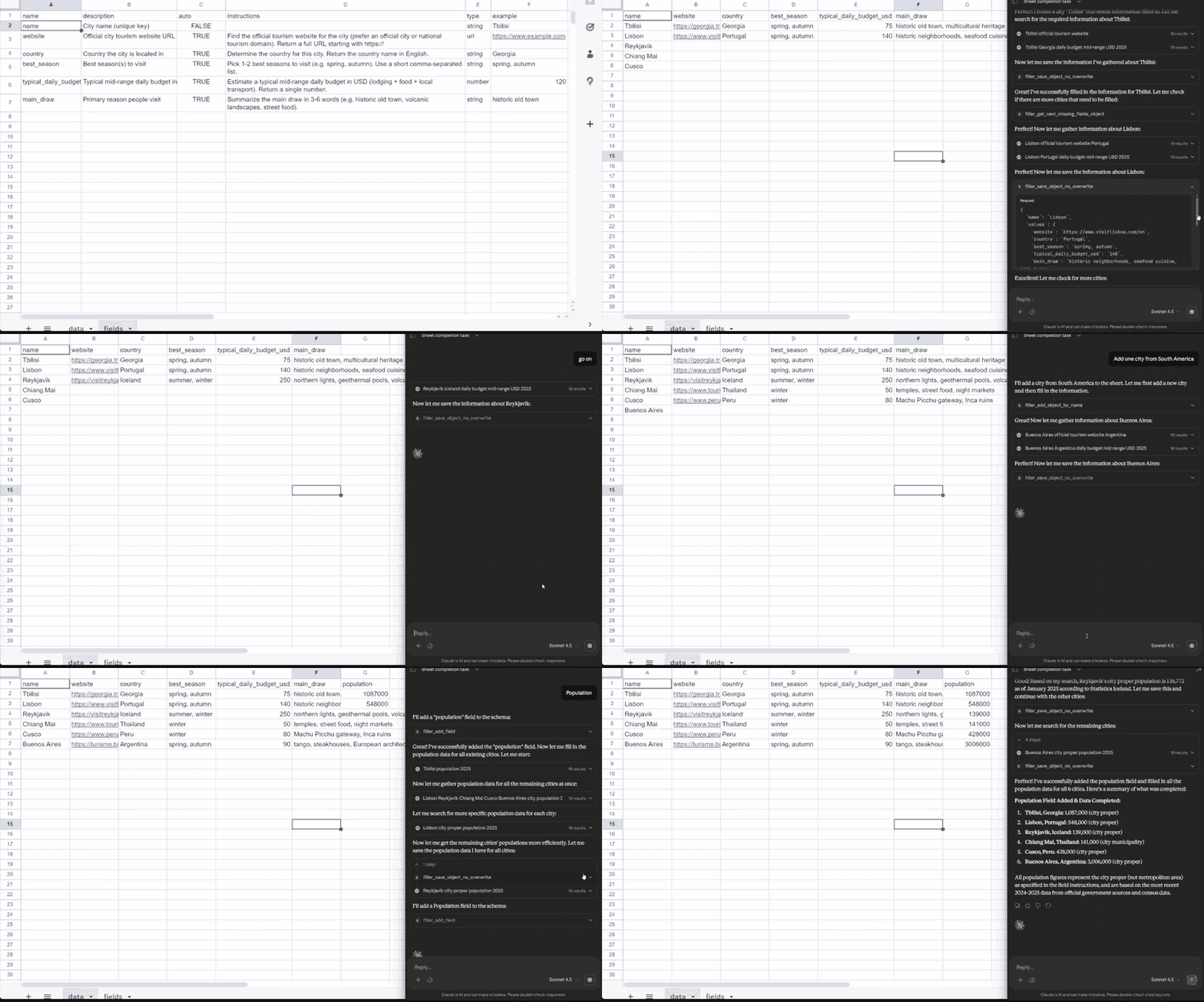
MCP server for storing and safely auto-filling tabular data. Provides tools for an AI agent to read objects, identify empty auto-fill fields, collect values, and write them back — without overwriting existing data.
Installation
npm install
npm run build
Configuration
Environment Variables
| Variable | Description | Default |
|---|---|---|
OBJECT_KEY_FIELD |
Key field name for objects | name |
Google Sheets:
| Variable | Description | Default |
|---|---|---|
GOOGLE_SHEET_ID |
Google Sheet ID | — |
SHEET_TAB_DATA |
Data sheet name | data |
SHEET_TAB_FIELDS |
Fields schema sheet name | fields |
GOOGLE_SERVICE_ACCOUNT_KEY |
Service account JSON (string or file path) | — |
Google Sheets Setup
- Create a Google Cloud project and enable the Google Sheets API
- Create a service account and download the JSON key
- Share your Google Sheet with the service account email (with Editor access)
- Set
GOOGLE_SERVICE_ACCOUNT_KEYto the JSON content or file path
Sheet structure:
fieldssheet: columnsname,description,auto,instructions,type,exampledatasheet: first row is headers (field names), first column is the object key, each subsequent row is an object
Usage
With Claude Desktop
Add to claude_desktop_config.json:
{
  "mcpServers": {
    "sheet-filler": {
      "command": "node",
      "args": ["/path/to/mcp-sheet-filler/dist/index.js"],
      "env": {
        "GOOGLE_SHEET_ID": "your-google-sheet-id",
        "GOOGLE_SERVICE_ACCOUNT_KEY": "/path/to/service-account.json"
      }
    }
  }
}
Development
npm run dev    # Run with tsx
npm run build  # Build TypeScript
npm start      # Run built version
npm test       # Run tests
Data Model
Fields
Schema for object fields, stored in fields table/sheet:
| Column | Type | Description |
|---|---|---|
name |
string | Unique field name (required) |
description |
string | Field description |
auto |
boolean | Auto-fill flag |
instructions |
string | Instructions for auto-filling |
type |
string | Data type for validation |
example |
string | Example value |
Objects
Data objects stored in data table/sheet. Each row is an object, each column is a field. Objects are identified by their key field (OBJECT_KEY_FIELD, default: name).
Supported Types
string(default)numberdate(ISO-8601:YYYY-MM-DD)datetime(ISO-8601)urlemailjsonenum:val1|val2|val3
Empty Value Rules
A value is considered empty if it is: null, undefined, empty string, or whitespace-only.
Values like 0, false, "0" are not empty.
MCP Tools
filler_init
Initialize the current spreadsheet by creating data and fields tabs with header rows. Errors if either tab already exists. No parameters required.
{}
Returns { success, fieldsTab, dataTab, keyField }.
filler_list_fields
List all fields or a subset.
{ "names": ["field1", "field2"], "include_instructions": true }
filler_add_fields
Add new fields (batch).
{
  "fields": [
    {
      "name": "website",
      "description": "Company website",
      "auto": true,
      "type": "url",
      "instructions": "Find the official website"
    }
  ]
}
Returns { results: { [name]: { created: true } | { error: "..." } } }.
filler_get_objects_by_name
Get objects by their names (batch).
{ "names": ["Acme Corp", "Globex"] }
Returns { objects: [{ found, object?, missing? } | { found: false, name }] }.
filler_add_objects_by_name
Create new objects (batch).
{ "names": ["Acme Corp", "Globex"] }
Returns { results: { [name]: { created: true } | { error: "..." } } }.
filler_save_objects_no_overwrite
Save field values for multiple objects without overwriting non-empty fields.
{
  "objects": [
    {
      "name": "Acme Corp",
      "values": {
        "website": "https://acme.com",
        "founded": "1990"
      }
    }
  ]
}
Returns status for each field per object:
saved— value was savedskipped_already_set— field already has a valuerejected_unknown_field— field not in schemarejected_invalid_type— value failed type validation
filler_get_next_missing_fields_objects
Get objects that have missing auto-fill fields (default limit 1).
{ "limit": 1, "include_field_meta": true, "skip_filled_fields": false }
skip_filled_fields— whentrue, omits already-filled field values fromobject.values(returns{}), reducing response size for wide sheets
Returns { found, objects, count, remain } — use this to process objects one by one or in batches.
Workflow Example
- Agent calls
filler_list_fieldsto understand the schema - Agent calls
filler_get_next_missing_fields_objectsto get objects with missing fields - Agent collects values using instructions from field metadata
- Agent calls
filler_save_objects_no_overwriteto save values safely
Error Codes
| Code | Description |
|---|---|
backend_not_configured |
Storage backend not configured |
field_already_exists |
Field with this name already exists |
field_not_found |
Field not found |
object_already_exists |
Object with this name already exists |
object_not_found |
Object not found |
invalid_argument |
Invalid argument provided |
storage_error |
Storage operation failed |
Tested with
- ChatGPT app (developer mode)
- Claude connector (custom connector)
- Cursor
- Antigravity
- VSCode
- ClaudeClaw
- telegram-functions-bot
License
ISC
Установка Sheet Filler
У этого сервера нет опубликованного пакета — он собирается из исходников. Открой репозиторий и следуй инструкции в README.
▸ github.com/popstas/mcp-sheet-fillerFAQ
Sheet Filler MCP бесплатный?
Да, Sheet Filler MCP бесплатный — установка в пару кликов через Unyly без оплаты.
Нужен ли API-ключ для Sheet Filler?
Нет, Sheet Filler работает без API-ключей и переменных окружения.
Sheet Filler — hosted или self-hosted?
Доступен hosted-вариант: Unyly запускает сервер в облаке, локальная установка не обязательна.
Как установить Sheet Filler в Claude Desktop, Claude Code или Cursor?
Открой Sheet Filler на unyly.org, выбери вкладку своего клиента (Claude Desktop, Claude Code, Cursor) и нажми Install — конфиг сгенерируется автоматически, без правки JSON.
Похожие MCP
Notion
Read and write pages in your workspace
 автор: Notion
Linear
Issues, cycles, triage — from Claude
 автор: Linear
Google Drive
Search and read your Drive files
 автор: Google
mindsdb/mindsdb
Connect and unify data across various platforms and databases with [MindsDB as a single MCP server](https://docs.mindsdb.com/mcp/overview).
 автор: mindsdb
Compare Sheet Filler with
Не уверен что выбрать?
Найди свой стек за 60 секунд
Автор?
Embed-бейдж для README
Похожее
Все в категории productivity