
MDS
БесплатноНе проверенA lightweight MCP server that exposes read-only Cisco MDS NX-OS show commands as tools, allowing LLM clients to inspect SAN fabric in plain language.

Описание
A lightweight MCP server that exposes read-only Cisco MDS NX-OS show commands as tools, allowing LLM clients to inspect SAN fabric in plain language.
README
A lightweight FastMCP server that exposes
read-only Cisco MDS NX-OS show commands as Model Context Protocol tools. Point it at one or many MDS switches and let an LLM client (VS Code, Claude, a LangChain agent, etc) inspect your SAN fabric in plain language.
- Read-only & safe — every tool maps to a
showcommand over NX-API (JSON-RPC). - Multi-switch — register as many switches as you want; clients pick one per call.
- Two transports —
stdioorhttp. - 63 tools spanning zoning, device-aliases, FLOGI/FCNS, VSANs, interfaces, port-channels, transceivers, counters, environment, logging, and inventory.
- Generative UI — in MCP-Apps-capable clients, the model can turn
showoutput into live charts, tables, and dashboards on the fly.
Requirements
- Python 3.13+
- uv
- Cisco MDS switch(es) with NX-API enabled (
feature nxapi)
Configuration
Switches are declared with indexed environment variables. Add more by repeating the block with the next number (gaps are tolerated):
| Variable | Required | Default | Description |
|---|---|---|---|
MCP_TRANSPORT |
http |
stdio or http |
|
MCP_HOST |
0.0.0.0 |
HTTP bind address | |
MCP_PORT |
8000 |
HTTP bind port | |
MDS_<N>_HOST |
✅ | — | Switch IP or hostname |
MDS_<N>_USERNAME |
✅ | — | NX-API username |
MDS_<N>_PASSWORD |
✅ | — | NX-API password |
MDS_<N>_NAME |
the host | Friendly name used by the switch argument |
|
MDS_<N>_PORT |
8443 |
NX-API HTTPS port | |
MDS_<N>_VERIFY_SSL |
false |
Verify the TLS certificate |
MDS_1_NAME=mds-fab-a
MDS_1_HOST=192.0.2.10
MDS_1_USERNAME=admin
MDS_1_PASSWORD=secret

MDS_2_NAME=mds-fab-b
MDS_2_HOST=192.0.2.11
MDS_2_USERNAME=admin
MDS_2_PASSWORD=secret
Copy .env.example to .env and fill it in. On startup the server reads
this .env file, so you don't have to export the variables by hand. Variables set in the
actual environment (shell, Docker, or an MCP client's env block) take precedence over .env.
Run
Install dependencies once, then start the server:
uv sync                 # create the virtualenv and install dependencies

uv run python main.py   # start the server (defaults to HTTP on http://localhost:8000/mcp)
To use stdio instead of HTTP, set MCP_TRANSPORT=stdio — either in .env (MCP_TRANSPORT=stdio)
or inline for a single run:
MCP_TRANSPORT=stdio uv run python main.py
Docker / Podman
Build the image, then run it with your .env providing the switch credentials. The commands
below use docker; replace it with podman if you prefer (the syntax is identical):
docker build -t mds-mcp .
docker run --rm -p 8000:8000 --env-file .env mds-mcp   # HTTP on http://localhost:8000/mcp
Using it from a client (Visual Studio Code)
Using Visual Studio Code here for the example, but any LLM client that supports MCP will work more or less the same way.
You register the server in a mcp.json file: .vscode/mcp.json for this workspace only,
or your user mcp.json (Command Palette → MCP: Open User Configuration) to use it
everywhere. Pick one of the two options below, paste it into that file, then open the
Command Palette → MCP: List Servers → cisco-mds → Start.
Option A — HTTP
You run the server yourself; VS Code just connects to it.
- Configure your switches in
.env(see Configuration). - Start the server:
uv run python main.py. - Add this to
mcp.json:
{
  "servers": {
    "cisco-mds": { "type": "http", "url": "http://localhost:8000/mcp" }
  }
}
Option B — stdio
VS Code launches the process for you. Set cwd to where you cloned the
repo so the server finds your .env. The env block below is optional — use it only to set
or override variables without an .env file (remember it takes precedence over .env).
{
  "servers": {
    "cisco-mds": {
      "type": "stdio",
      "command": "uv",
      "args": ["run", "python", "main.py"],
      "cwd": "/path/to/mds-mcp",
      "env": {
        "MCP_TRANSPORT": "stdio",
        "MDS_1_HOST": "192.0.2.10",
        "MDS_1_USERNAME": "admin",
        "MDS_1_PASSWORD": "secret"
      }
    }
  }
}
Once started, open Copilot Chat and the cisco-mds tools become available to the model.
Usage
Ask the model questions in plain language about your SAN fabric. Examples:
- "List the configured switches and their software version."
- "Which zones are active in VSAN 20 on mds-fab-a?"
- "Show me the FLOGI database on both switches."
- "List all device aliases and tell me which ones aren't logged in right now."
- "Resolve pwwn
50:00:00:00:00:00:00:01to a device alias and show its FCNS entry." - "Are there any interfaces with CRC errors or link failures on mds-fab-b?"
- "Compare the transceiver Rx/Tx power on all fc interfaces and flag anything below -7 dBm."
- "Which ports are members of port-channel 220, and what's their negotiated speed?"
- "Show the traffic counters for interface fc1/3 — how much is it sending vs receiving?"
- "Which interfaces are seeing the most txwait or discarded frames on mds-fab-a?"
- "Summarize the VSAN membership across both fabrics."
- "Check the environment and module status — any failed fans, power supplies, or modules?"
Tool catalog
All tools are read-only.
| Area | Tools |
|---|---|
| Discovery | list_switches |
| Zoning | show_zone, show_zone_active, show_zone_name, show_zone_vsan, show_zone_name_vsan, show_zone_status, show_zoneset, show_zoneset_active, show_zoneset_active_vsan, show_zoneset_name, show_zoneset_vsan, show_zoneset_name_vsan |
| Devices Aliases | show_device_alias_database, show_device_alias_name, show_device_alias_pwwn |
| System / Inventory | show_hardware, show_version, show_inventory, show_module, show_module_uptime, show_boot, show_switchname, show_cdp_neighbors, show_hosts, show_environment |
| Interfaces and Port-Channels (all) | show_interface_brief, show_interface_bbcredit, show_interface_transceiver, show_interface_transceiver_detail, show_interface_description, show_interface_mgmt, show_port_channel_summary, show_port_channel_usage |
| Interface detail (per-port) | show_running_config_interface_for, show_interface_for, show_interface_brief_for, show_interface_bbcredit_for, show_interface_transceiver_for, show_interface_transceiver_detail_for, show_interface_description_for |
| Flogi / Name Server / Login | show_flogi_database, show_flogi_database_for, show_flogi_database_vsan, show_fcns_database, show_fcns_database_vsan, show_fcns_database_detail |
| VSAN | show_vsan, show_vsan_id, show_vsan_usage, show_vsan_membership, show_vsan_membership_for |
| Interface Counters | show_interface_counters, show_interface_counters_brief, show_interface_counters_for, show_interface_counters_brief_for, show_interface_counters_detailed_for, show_interface_aggregate_counters_for |
| Sessions / Users | show_users, show_accounting_log |
| Logging | show_logging |
| Generative UI | generate_prefab_ui, search_prefab_components |
Generative UI
The server registers FastMCP's GenerativeUI
provider, which exposes two extra tools: generate_prefab_ui and
search_prefab_components. In a client that supports MCP Apps,
the model can take the raw JSON from any show tool and render it as an
interactive Prefab view — bar/pie charts,
sortable tables, KPI cards, and full dashboards — without any purpose-built UI
tool. For example:
- "Query the interface brief on mds-fab-a and chart the ports per VSAN."
- "Build a dashboard of interface performance counters for mds-fab-b."
- "Show the FCNS database as a sortable table grouped by VSAN."
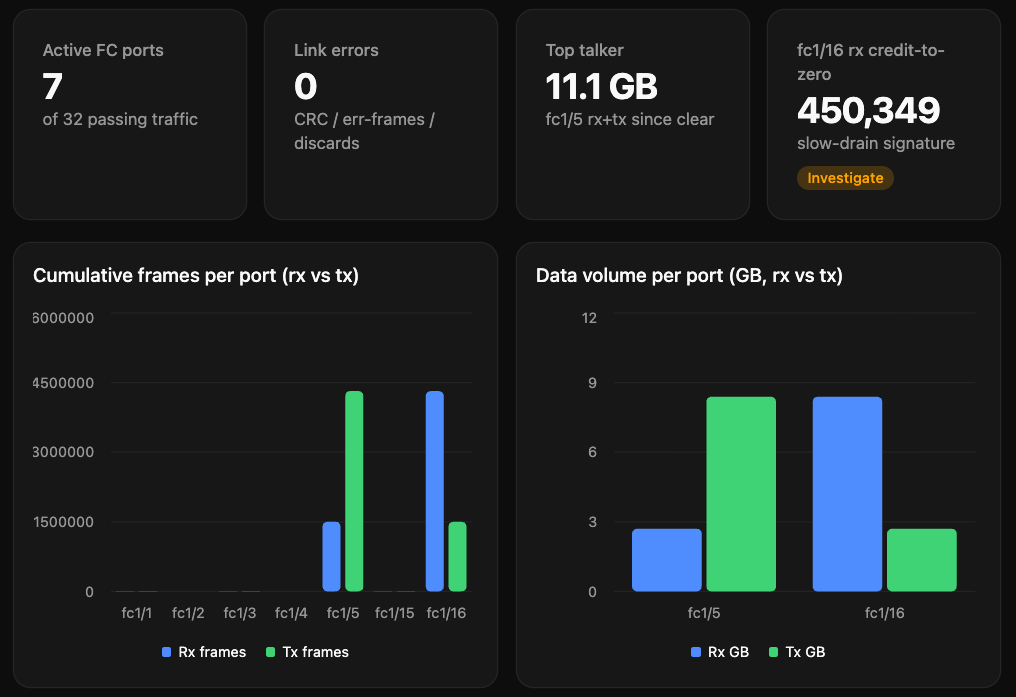
Clients without MCP-Apps support still get the underlying show data as JSON.
Disclaimer
A personal project, not affiliated with or endorsed by Cisco.
Установить MDS в Claude Desktop, Claude Code, Cursor
unyly install mds-mcpСтавит в Claude Desktop, Claude Code, Cursor и VS Code — сам разбирается с npx, uvx и сборкой из исходников.
Впервые? Поставь CLI: curl -fsSL https://unyly.org/install | sh
Или настроить вручную
Выполни в терминале:
claude mcp add mds-mcp -- uvx --from git+https://github.com/alecharn/mds-mcp mds-mcp-serverFAQ
MDS MCP бесплатный?
Да, MDS MCP бесплатный — установка в пару кликов через Unyly без оплаты.
Нужен ли API-ключ для MDS?
Нет, MDS работает без API-ключей и переменных окружения.
MDS — hosted или self-hosted?
Доступен hosted-вариант: Unyly запускает сервер в облаке, локальная установка не обязательна.
Как установить MDS в Claude Desktop, Claude Code или Cursor?
Открой MDS на unyly.org, выбери вкладку своего клиента (Claude Desktop, Claude Code, Cursor) и нажми Install — конфиг сгенерируется автоматически, без правки JSON.
Похожие MCP
Fetch
Web content fetching and conversion for efficient LLM usage.
AWS KB Retrieval
Retrieval from AWS Knowledge Base using Bedrock Agent Runtime.
 автор: modelcontextprotocol
Spring AI MCP Server
Provides auto-configuration for setting up an MCP server in Spring Boot applications.
llm-analysis-assistant
A very streamlined mcp client that supports calling and monitoring stdio/sse/streamableHttp, and can also view request responses through the /logs page. It also
 автор: xuzexin-hz
Compare MDS with
Не уверен что выбрать?
Найди свой стек за 60 секунд
Автор?
Embed-бейдж для README
Похожее
Все в категории ai