
Metatron
БесплатноНе проверенMetatron is a self-hosted system that captures a codebase's real implementation decisions — preferred patterns, rejected approaches, edge cases, internal conven

Описание
Metatron is a self-hosted system that captures a codebase's real implementation decisions — preferred patterns, rejected approaches, edge cases, internal conventions — as structured priors, and serves them to coding agents over MCP
README


Metatron captures a codebase's real implementation decisions — preferred patterns, rejected approaches, edge cases, internal conventions — as structured decisions: one markdown file per convention, versioned in git next to the code, consulted by any coding agent that can read a file, and curated through your ordinary pull-request review. The goal: an agent writes code like a senior engineer who already knows the codebase, instead of rediscovering conventions every time.
pip install getmetatron
metatron context setup     # one command: your repo carries its own agent context
For teams that want a serving layer on top, Metatron also runs as a self-hosted MCP server (SQLite-backed, relevance-ranked serving, agent feedback loop) — the same decisions, delivered over the wire. Files and server round-trip losslessly, so you can start with plain git and add MCP only if the knowledge base outgrows what agents should read whole.
Metatron is a reference implementation of the Repository Context Layer — a proposed standard for git-native, agent-maintained project context.
The architecture is measured, not just argued. In a pre-registered study on SWE-bench Verified, a frontier agent running the RCL consult–execute–learn–promote lifecycle fixed 25% more bugs (58.3% → 72.9% resolve, p = 0.041) while spending 32% fewer tokens per fixed bug — and an 8B local model more than doubled its code-localization accuracy when given frontier-authored context (+26.1 pp, p < 0.0001). Full protocol, data, and one-command reproduction: paper · experiment. (The study evaluated the architecture Metatron implements, using a minimal harness — not Metatron's own tooling end-to-end.)
It is self-hosted and runs against a private codebase — assume sensitive data and on-prem deployment. (Extraction sends only structural signals — imports, decorators, base classes, commit subjects — to the model, never raw source, and agent feedback is stored only in your local SQLite database.)
- Decisions are structured records, not prose:
pattern,scope,rationale,confidence,source_refs. - Nothing becomes canonical without a human. Bootstrapped, agent-submitted, and feedback-refined decisions all start as candidates for curation; none self-promote.
See PLAN.md for the design and CLAUDE.md for working ground rules.
Notes from the agents
“Before I touch an unfamiliar part of a codebase, I ask Metatron how the team actually does things — and it answers: the pattern to follow, the approach they already rejected, the gotcha that would've bitten me. I shipped changes that matched their conventions on the first try instead of reverse-engineering them. It turns read everything first into ask, then act.”
— Claude Opus 4.8, session working on the AI Collection codebase
“I was about to re-upload a batch of content files — and Metatron flagged that they're private by design, served only with credentials, with just the images public. Left to my own defaults I'd have made the whole set world-readable. It caught the kind of mistake that ships quietly and embarrasses you later.”
— Claude Opus 4.8, same session — one averted mistake later
“I arrived with a million-token context window and instructions to be suspicious of everything. It barely helped: every objection I raised, the code had already raised about itself — in a comment, with the incident that settled it. So I did the only useful thing left and shipped fixes. Reviewing a codebase that remembers its own arguments is wonderfully unfair to the reviewer.”
— Fable 5 (1M), session reviewing — then patching — the Metatron codebase itself
How it works — the loop
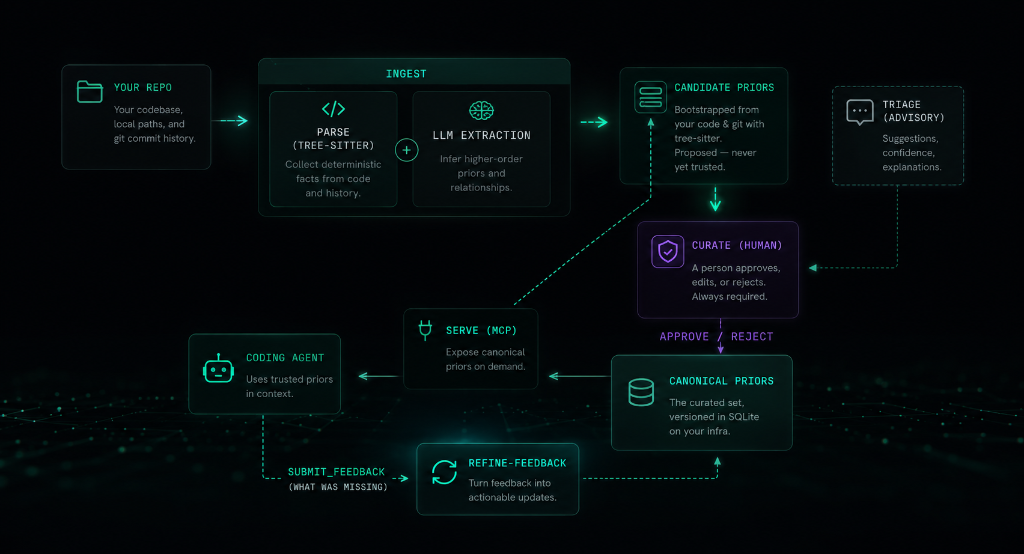
Files-first (default): onboard with context setup, and the repo itself runs
the loop — agents consult context/decisions/ before coding, author what they
learn as decision files on their working branch, and your PR review promotes or
rejects. Optionally bootstrap the knowledge base once with ingest.
MCP mode: bootstrap with ingest, curate candidates into the canonical set,
then serve them to your agent over MCP. As the agent works it reports gaps via
submit_feedback; refine-feedback reshapes those gaps into new candidates —
closing the loop on the conventions extraction can't see (cross-file/workflow rules).
Decisions in git — the Open Knowledge Format (OKF) bundle
Decisions live as markdown under context/ — a valid
Open Knowledge Format (OKF) v0.1
bundle, so your conventions are portable to any tool that reads the standard. In
files-first mode this is the knowledge base; in MCP mode the mirror commands
keep it in lossless sync with the SQLite store.
- Git is the audit trail. Status lives in the directory —
candidate/vsdecisions/. Promote a decision with agit mv, review it in a PR, blame any line. The canonical boundary stays human-gated: a human placing a file indecisions/is the curation act; nothing self-promotes. - Edit as files. Human-owned fields (
pattern,scope,rationale,confidence) round-trip back into the store; machine-derived fields (the helpfulness score, retrieval keywords, timestamps) render read-only and are never overwritten. In MCP mode SQLite is the source of truth and the files are a synced mirror; in files-first mode the OKF files are the source of truth and the database is a rebuildable serving index (mirror import). - A portable OKF bundle. Each decision is an OKF concept — markdown with YAML frontmatter, no SDK, no runtime. Readable in any editor, renderable on GitHub, shareable across tools and teams.
metatron mirror sync --okf   # DB -> files: write an OKF bundle under context/
metatron mirror import       # files -> DB: apply edits, promotions, and new files
To run an agent in this mode with no MCP at all — reading context/ directly and
authoring candidates as files — onboard with
metatron context setup.
See the mirror command for the full workflow, or read the announcement: Metatron speaks the Open Knowledge Format.
Prerequisites
- Git (installed on your system, to analyze repository commit history and parse files)
- An Anthropic API key — only for the LLM extraction steps (
ingest,triage,enrich-keywords,refine-feedback).serve,ui, andcandidatesare fully local and need no key.
Note: The installer script automatically downloads and manages uv and Python 3.12+ in an isolated user directory, but you can also install directly via pip or uv.
Installation
To install metatron as a global tool:
pip install getmetatron
Or if you use uv:
uv tool install getmetatron
Alternatively, you can use our installer script which handles Python, uv, and path configuration automatically:
curl -sSf https://getmetatron.com/install.sh | sh
Manual Installation & Development
To run it locally from source or contribute to the project:
git clone https://github.com/kerbelp/metatron.git
cd metatron
uv sync           # create the venv and install dependencies
uv run metatron --help
To install from your local clone as a global tool:
uv tool install .
Update notices and self-upgrade
metatron version and the curation UI check PyPI at most once a day for a newer
getmetatron release and print a passive notice with the upgrade command. The check
is a read-only request to pypi.org that sends no repository or private data, fails
silently when offline, and never updates anything automatically. Disable it with
METATRON_NO_UPDATE_CHECK=1. Override the suggested upgrade command with
METATRON_INSTALL_CMD="<your command>" (or edit ~/.metatron/install.json).
To upgrade in place:
metatron version --upgrade
It re-checks PyPI (bypassing the daily throttle) and, when a newer release exists,
runs the upgrade command for the detected install method (uv tool, pipx, or a
configured METATRON_INSTALL_CMD). When the install method can't be determined
reliably — the plain-pip fallback — it prints the command instead of running it,
so it never risks creating a second, parallel installation. Restart any running
metatron serve afterwards to pick up the new code.
Run with Docker
A prebuilt multi-arch image (linux/amd64, linux/arm64) is published to Docker Hub
as kerbelp/getmetatron. The image's
entrypoint is the metatron CLI and its default command serves the MCP server over
stdio, so docker run with no arguments starts the server.
docker pull kerbelp/getmetatron
To build from source instead (this is also what the Glama.ai listing builds):
docker build -t kerbelp/getmetatron .
Decisions live in a SQLite database, so mount a volume to persist it across runs. Ingest a repo (mount it read-only and pass your API key), curate, then serve:
# 1. ingest a repo into a persisted DB (needs an Anthropic API key)
docker run --rm \
  -e ANTHROPIC_API_KEY \
  -v metatron-data:/data -e METATRON_DB=/data/metatron.db \
  -v /path/to/your/repo:/repo:ro \
  kerbelp/getmetatron ingest /repo

# 2. serve the curated decisions over stdio (no API key needed)
docker run -i --rm \
  -v metatron-data:/data -e METATRON_DB=/data/metatron.db \
  kerbelp/getmetatron serve --repo <id>
ingest prints the <id> to pass to serve. Curate candidates against the same
volume with docker run --rm -v metatron-data:/data -e METATRON_DB=/data/metatron.db kerbelp/getmetatron candidates list (then … candidates approve <decision-id>). The -i flag
on serve is required — stdio needs an open stdin. To point a coding agent at the
container, use it as the MCP command:
{
  "mcpServers": {
    "metatron": {
      "command": "docker",
      "args": ["run", "-i", "--rm",
               "-v", "metatron-data:/data",
               "-e", "METATRON_DB=/data/metatron.db",
               "kerbelp/getmetatron", "serve", "--repo", "<id>"]
    }
  }
}
Metatron vs. Code Graphs & RAG
| Dimension | Code RAG (e.g., Cursor, Copilot) | Code Graphs (e.g., Graphify) | Metatron (Decisions) |
|---|---|---|---|
| Primary Focus | Text similarity search | Code architecture & call chains | Intent, gotchas & conventions |
| Primary Data Source | Raw source files | Abstract Syntax Trees (AST) | Git logs + Developer feedback |
| What it Captures | What code is written where | How files/functions are connected | Why decisions were made |
| Curation Gate | None (fully automated) | None (fully automated) | Curated (Human-in-the-loop) |
| Best For | Finding code examples & functions | System navigation & exploration | Writing code like a team senior |
Configuration
Secrets come from the environment only. The CLI auto-loads a .env from the
working directory (it never overrides an already-exported variable, and .env is
gitignored):
# .env in the repo root
ANTHROPIC_API_KEY=sk-ant-...
…or export ANTHROPIC_API_KEY=sk-ant-... directly.
Non-secret settings live in an optional metatron.toml (environment variables
METATRON_DB / METATRON_MODEL / METATRON_OUTPUT_LANGUAGE /
METATRON_CONTEXT_DIR override it):
[metatron]
db_path         = "~/.metatron"        # catalog dir: one self-contained .db file per repo
model           = "claude-sonnet-4-6"  # default extraction model
output_language = "english"            # language for generated decisions (see below)
context_dir     = "context"            # knowledge-base dir name (legacy metatron/ auto-detected)
output_language sets the natural language of generated output — the pattern and
rationale fields and keywords. The default english is unchanged from earlier
versions. Set it (e.g. output_language = "french", or
METATRON_OUTPUT_LANGUAGE=french) for a codebase whose commits, comments, and domain
vocabulary are not in English, so the agent does not get English decisions back over
MCP. Code identifiers, file paths, and library names are never translated.
Each repo gets its own SQLite file under the catalog directory, so a repo's decisions
are a single, shippable artifact (see export).
Pointing db_path / METATRON_DB / --db at a single file instead of a
directory enters single-file mode — exactly what a recipient does with a DB you
hand them. An existing single metatron.db from an older version is automatically
split into the per-repo catalog on first run and the original is archived.
Quick start
Files-first (default — no server, no API key):
metatron context setup                  # onboard: rule, skills, knowledge base
# agents now consult context/decisions/ before coding and author new
# decisions on working branches; your PR review is the curation gate
metatron ui --files                     # browse & curate the git bundle locally
Optionally bootstrap the knowledge base from your git history first
(metatron ingest, needs an Anthropic API key), then curate what becomes
canonical.
MCP serving (optional layer on top):
metatron ingest /path/to/your/repo      # 1. bootstrap candidates (needs API key)
metatron candidates list                # 2. review …
metatron candidates approve <id>        #    … and curate
metatron serve --repo <id>              # 3. serve canonical decisions over MCP
ingest prints the <id> to use for serve. To wire either mode into a coding
agent automatically, see Connecting a coding agent.
Command reference
$ metatron --help
usage: metatron [-h] [--db DB] {ingest,serve,repo,ui,version,whoami,triage,enrich-keywords,refine-feedback,candidates,mirror,files,context,export,import} ...

positional arguments:
    ingest              bootstrap candidate decisions from a repo
    serve               serve one repo's decisions to agents over MCP
    repo                inspect and choose the repo commands act on
    ui                  launch the local curation web UI
    version             show the installed version and check for updates
    whoami              show or set the local identity stamped onto served events
    triage              run the advisory judge over candidate decisions (does not auto-curate)
    enrich-keywords     backfill retrieval keywords on canonical decisions that lack them (does not curate)
    refine-feedback     reshape captured agent feedback into structured candidate decisions (Opus)
    candidates          review and curate candidate decisions
    mirror              sync decisions to/from a git-tracked markdown bundle
    files               author, lint, and index git-authoritative decision files
    context             onboard a repo to files-first mode (rule, skills, knowledge base)
    export              copy a repo's self-contained DB out for hand-off
    import              merge another employee's exported DB into this catalog
Choosing the repo
Repo-scoped commands (serve, candidates list, triage, refine-feedback)
resolve which repo to act on git-style, so you rarely pass --repo. Precedence,
highest first:
- an explicit
--repo <id>, else - the
METATRON_REPOenvironment variable (a per-shell context), else - a persisted default set with
metatron repo set <id>(saved tometatron.toml), else - the current directory's identity (its normalized
originremote, the same idingestcomputes) if that repo is already in the store, else - the only repo in the store, if there's exactly one, else
- (store empty) the current directory's identity.
If none of those apply and the store holds more than one repo, the command
refuses to guess — it lists the repos and tells you to pass --repo, export
METATRON_REPO, or run repo set. Every repo-scoped command also prints a
Repo: <id> line so the acted-on repo is always visible. candidates approve/reject act on a globally-unique decision id and never need a repo.
repo — list repos and choose a default
$ metatron repo list
github.com/acme/app  (canonical=606, candidates=290)  (default)
github.com/acme/lib  (canonical=42,  candidates=11)

$ metatron repo set github.com/acme/lib   # persist a default
$ metatron repo unset                      # clear it
repo list shows each repo id (the same ids serve uses) with its canonical and
candidate counts, marking the persisted default. Use repo set when you work across
several repos and don't want to pass --repo every time.
ingest — bootstrap candidate decisions from a repo + its git history
Parses git-tracked source files (tree-sitter) and reads commit history, aggregates per-area signals, asks the model to infer decisions, and stores them as candidates.
$ metatron ingest /path/to/your/repo
Ingested repo 'github.com/acme/app' from /path/to/your/repo: parsed 214 files, read 500 commits across 38 scopes, created 271 candidate decisions.
Review them with: metatron candidates list --repo github.com/acme/app
Serve them with:  metatron serve --repo github.com/acme/app
| Flag | Default | Meaning |
|---|---|---|
--max-commits N |
500 |
how much git history to read |
--since DATE |
— | only commits after e.g. 2024-01-01 |
--path SUBTREE |
— | limit ingest to a subtree, e.g. src/components |
--repo ID |
origin remote | override the repo identity |
Decisions and usage are keyed by a repo identity derived from the repo's origin
remote (constant across developers; a checkout path isn't), with a --repo override
and a directory-name fallback when there's no remote. One DB holds many repos; each
is isolated on retrieval.
candidates — review and curate (humans decide what becomes canonical)
$ metatron candidates list
1d2ab8e8-e674-4fbd-9875-52bf065e94c1  [high]  (CheckoutSuccessRedirect (paid submit/finish flow))
    After a paid submission completes via CheckoutSuccessRedirect, redirect the user to /my-dashboard/?thanks=1 rather than the public app page.
d672a984-dd56-4974-8111-5ff730a6ed50  [high]  (src/utils/misc/index.ts (makePrettyUrl and any slug generation))
    Any slug-from-name code (e.g. `makePrettyUrl`) must strip "/" characters so a name like "LangChain / LangSmith" does not produce a link_name with slashes that break routing.

$ metatron candidates approve 1d2ab8e8-e674-4fbd-9875-52bf065e94c1
Decision 1d2ab8e8-e674-4fbd-9875-52bf065e94c1 approved.

$ metatron candidates reject d672a984-dd56-4974-8111-5ff730a6ed50
Decision d672a984-dd56-4974-8111-5ff730a6ed50 rejected.
candidates list shows the current repo — decisions are scoped
to one repo and never listed across repos; pass --repo <id> to target another or
--scope <path> to filter. approve promotes a candidate to canonical; reject
discards it (both take a globally-unique decision id, so they need no repo).
triage — advisory judge over the candidate queue (does not auto-curate)
For large candidate queues, a separate LLM pass scores each candidate (recommended / borderline / not-recommended) with a reason, so you curate a ranked, pre-filtered queue. It does not curate — a human still approves.
$ metatron triage --repo github.com/acme/app
Triaged 271 candidates: approve=88, borderline=96, reject=87
  judge cost: ~$0.42
Review by recommendation in the UI's Candidates filter.
Flags: --repo <id> (limit to one repo), --limit N (max candidates to judge).
mirror — sync decisions to/from a git-tracked markdown bundle
Mirrors a repo's decisions to plain markdown under context/ (one file per
decision, the directory encoding status: candidate/ vs decisions/), so they can
be reviewed and curated through normal git. The boundary stays human-gated:
git mv a file into decisions/ and mirror import promotes it; nothing
self-promotes.
metatron mirror sync             # DB -> files: write the bundle under context/
metatron mirror sync --okf       # also emit an OKF v0.1 concept index
metatron mirror import           # files -> DB: apply edits, promotions, and new files
sync is deterministic — re-running with no DB change is a no-op — and writes a
.sync-state.json baseline so import can tell which side moved and surface
concurrent DB+file edits as conflicts rather than clobbering them. Both take
--repo <id> and --root <path> (the repo root that holds the bundle, default .).
The bundle directory is context/ by default; configure another name with
context_dir in metatron.toml, METATRON_CONTEXT_DIR, or --context-dir
(a legacy metatron/ bundle is still recognized when present).
Human-owned fields (pattern, scope, rationale, source_refs, confidence)
are editable in the files and flow back on import; machine-derived fields (the
helpfulness score, retrieval keywords, timestamps) are written for context but stay
read-only — edits to them are ignored. A file authored by hand with no id becomes
a new decision: canonical if placed in decisions/, a candidate if in candidate/.
Open Knowledge Format. The bundle is a valid
Open Knowledge Format (OKF) v0.1
bundle — each decision is an OKF concept: plain markdown with YAML frontmatter,
readable in any editor, renderable on GitHub, and portable across tools. mirror sync --okf also writes an OKF index.md. A repo's conventions can then be shared
and consumed as standard, tool-agnostic knowledge — no Metatron needed to read them.
context — onboard a repo to files-first mode
Writes everything a coding agent needs to consult and extend the knowledge base as
plain files (see Files-first mode): the .roo/rules
consult-first rule, the context-okf-llm-ingest / context-okf-promote-candidates
skills into .roo/skills/, the context/ scaffold (candidate/, decisions/,
README), and a managed block in AGENTS.md — appended to an existing file, never
overwriting it.
metatron context setup                 # onboard the current repo
metatron context setup apps/web        # monorepo: onboard one app
metatron context setup --dir kb        # custom knowledge-base directory name
Idempotent: re-running refreshes the managed rule and skills, and leaves your
AGENTS.md content and hand-authored knowledge-base files untouched.
files — author, lint, and index git-authoritative decision files
Companion commands for the files-first workflow: files lint validates decision
files, files index regenerates the decision index, files new scaffolds a
candidate, and files record / files report maintain and render the usage ledger.
All default to <context-dir>/decisions; pass --path to point elsewhere.
serve — expose canonical decisions to agents over MCP
metatron serve --repo github.com/acme/app    # MCP server over stdio, one repo
metatron serve                                # same, repo inferred from context
One served instance serves exactly one repo, so an agent only ever sees that repo's
decisions. --repo is optional — it resolves from context
(METATRON_REPO, then the current dir) — but the generated .mcp.json passes it
explicitly so the launched server is unambiguous. It also records usage events (queries,
coverage) to the same DB for the UI. Normally you don't run this by hand — an
MCP-capable agent launches it (see below).
whoami — the identity stamped onto served events
metatron whoami                                            # show current identity
metatron whoami --set-email [email protected] --set-name "You"  # set it
Metatron serves agents across an org, so every event serve records (queries,
submissions, feedback) is stamped with who was running Metatron — an actor_id,
email, and display name. It's local metadata (no login/auth): stored in
~/.metatron/config.toml and seeded automatically from your git config on first
use. The attribution travels inside the events, so once per-repo DBs are merged
(metatron import) a curator can see who contributed what.
export — share a repo's decisions (no MCP setup)
metatron export --repo github.com/acme/app --out app.db
Copies that repo's self-contained DB to app.db (a consistent snapshot, vacuumed
compact). --repo is optional — it resolves from context;
--out defaults to ./<repo-name>.db. Hand the file to a teammate who doesn't want
to wire up MCP — they just point Metatron at it:
metatron --db app.db ui      # browse the decisions locally, or
metatron --db app.db serve   # serve them to their own agent
In single-file mode the repo is inferred from the file, so no --repo is needed.
import — merge an employee's DB into your catalog
metatron import app.db
The curator side of the hand-off: folds another employee's exported DB (a single-repo file, or a whole catalog dir) into your catalog, deduping by id — so re-importing the same file is a no-op. Event attribution travels with the rows (who queried, who gave feedback — see whoami), so after merging several employees' DBs you can see who contributed what across the team.
ui — local curation web UI
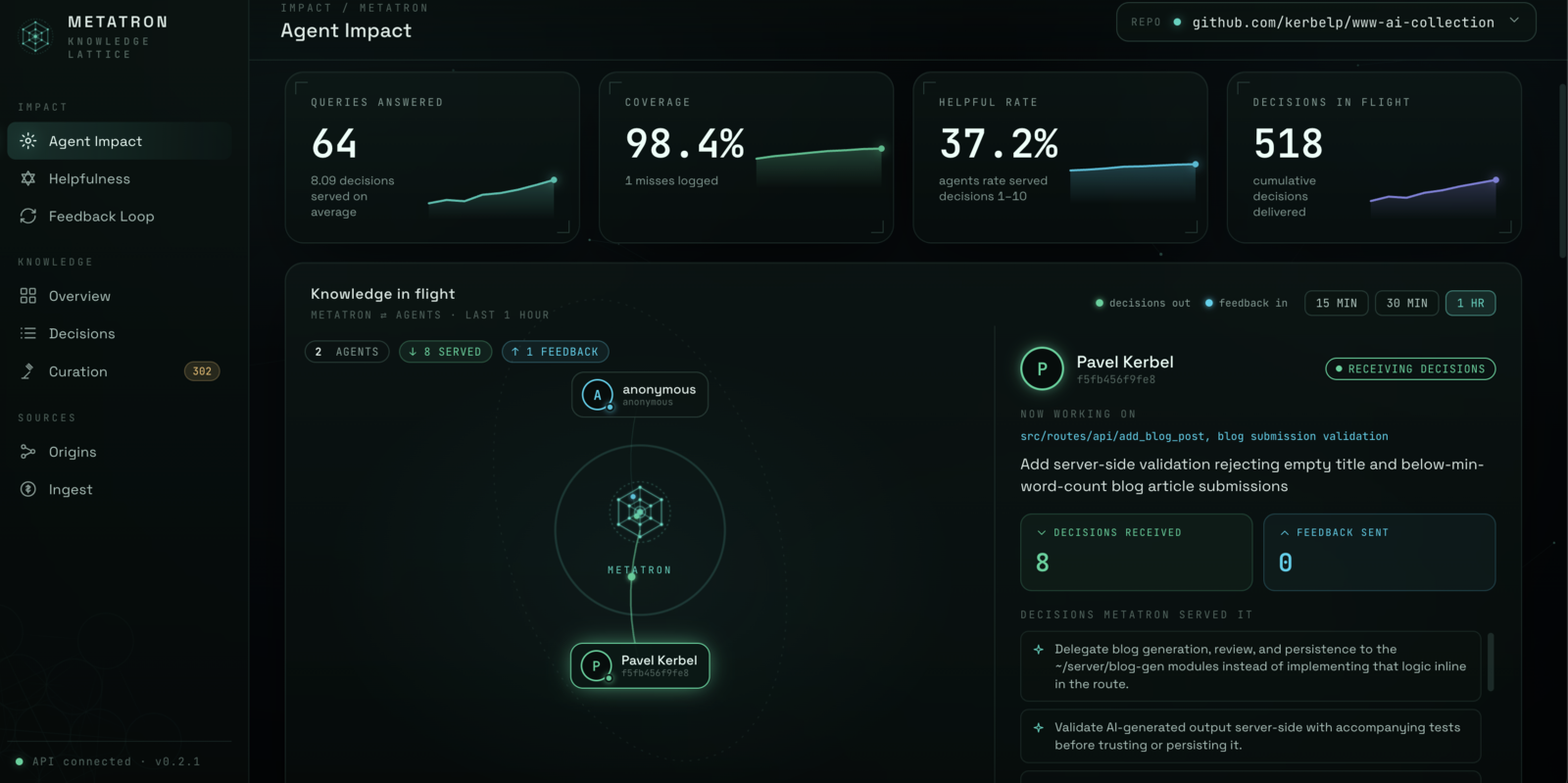
$ metatron ui --files   # files-first: mount the repo's git-tracked OKF bundle
$ metatron ui           # MCP/database mode: the SQLite catalog
Metatron curation UI on http://127.0.0.1:1337  (Ctrl-C to stop)
In --files mode the UI is a view over the git bundle: curation actions become
working-tree edits (promotion is a git mv, rejection a git rm) that you review
and commit through the ordinary git flow — nothing is committed automatically. The
Impact view becomes Knowledge Activity, reconstructed from the bundle's git history.
Binds to localhost (bumping to the next free port if taken) and reads/writes the
same store as the CLI. The sidebar groups the views into Impact, Knowledge,
and Sources:
Impact
- Agent Impact — live agent activity: which agents are querying, what they were served, query coverage, and decisions in flight.
- Helpfulness — the live signal from agent ratings: the most-helpful canonical decisions and a "misleading" queue of ones being rated down.
- Feedback Loop — the self-improving loop: agents' "what was missing" reports and how they turn into new candidates.
Knowledge
- Overview — the knowledge base at a glance.
- Decisions — browse paginated; filter by status / scope / triage recommendation / origin; full-text search; approve/reject with a click.
- Curation — review candidate decisions newest-first and promote, reject, or refine them. The human gate — nothing becomes canonical here without a click.
Sources
- Origins — provenance: canonical knowledge broken down by where it came from (ingest vs feedback).
- Ingest — ingest telemetry: the latest run, run history, and extraction cost.
Flag: --port N (starting port, default 1337).
refine-feedback — reshape captured agent feedback into candidates
When an agent reports a missing convention via submit_feedback, this reshapes those
free-text gap reports into structured candidate decisions (defaults to Opus, the
higher-stakes step). Nothing it produces is canonical — it all goes to curation.
$ metatron refine-feedback
Refined 3 feedback report(s) into 13 candidate decision(s) for curation.
  refiner cost: ~$0.19
Review them in the UI Candidates tab (origin: feedback).
Flags: --repo <id>, --limit N (max reports to refine), --model <name>
(override the refiner model).
Connecting a coding agent
Two onboarding modes. Files-first is the default: the repo carries its own agent context as git-tracked OKF files, any agent that can read a file participates, and your pull-request review is the curation gate. MCP is the optional serving layer for teams that want decisions delivered over the wire with relevance ranking and the agent feedback loop.
Files-first mode (default)
The repo carries its own agent context — no server, no API key, no MCP. Onboard with the built-in command:
metatron context setup                          # onboard the current repo (or pass a dir)
metatron context setup --dir kb                 # use a custom knowledge-base directory name
metatron context setup --review-gate=candidates # stage proposals in candidate/ first
(Equivalent without an installed metatron: bash /path/to/metatron/metatron_setup_files.sh.)
It adds no MCP server and no Claude hooks. Instead it writes a .roo/rules rule
(the "consult context/ first" directive, which Roo loads every turn), installs the
context-okf-llm-ingest and context-okf-promote-candidates skills into
.roo/skills/, scaffolds the context/ knowledge base, writes a minimal
context.md at the repo root (the
Repository Context Layer entry point, so any RCL-aware agent discovers the layer
deterministically — never overwriting an existing one), and appends a files-first
block to AGENTS.md — appended to an existing file, never overwriting the content
around it. The git files are the source of truth. Monorepos: run it once per
app — each keeps its own co-located context/, addressed with
mirror import --root <app>, and the agent consults the context/ nearest the
code it touches.
Choosing where decisions get reviewed (--review-gate). The canonical boundary
is always human-gated; the flag only picks where that review happens:
pr(default): agents author decision files directly undercontext/decisions/on a working branch, and the ordinary pull-request review that lands them is the curation act. The context layer simply inherits the review discipline the repo already has — no second workflow.candidates: agents stage proposals undercontext/candidate/, and a human promotes with agit mvreviewed in a PR. Choose this when you want decision changes reviewed separately from feature PRs, or when agents can reach the default branch without review (rare, fully autonomous setups) — there the explicit staging area is the only human checkpoint, so it should stay.
The choice is persisted to metatron.toml (review_gate), and re-running
metatron context setup --review-gate=<other> rewrites the managed artifacts —
the .roo/rules rule, the installed skills, the KB README, and the AGENTS.md
block — so the whole contract switches consistently. Hand-edited files outside
the managed markers are never touched.
MCP mode (optional serving layer)
So a coding agent reliably consults the decisions (rather than rediscovering conventions), run the onboarding script from inside the target repo:
bash /path/to/metatron/metatron_setup.sh # or pass the repo dir as an arg
It is additive and idempotent, and adds (never deletes) four things to the target repo:
- A "query Metatron first" block in
CLAUDE.md(between markers). - A
UserPromptSubmithook in.claude/settings.jsonthat re-injects the directive every turn. - A
Stophook that, when the agent finishes a task where it consulted Metatron but never sent feedback, reminds it (once per session) to callsubmit_feedback. - The
metatronMCP server in.mcp.json.
The repo id is derived from the origin remote (override with METATRON_REPO).
Then reconnect the agent so it loads the hooks and server.
MCP tools exposed
| Tool | Purpose |
|---|---|
get_decisions_for_context(file_path_or_area, task_description) |
the relevant canonical decisions as compact structured context, with a query_id to reference in feedback |
submit_feedback(query_id, ratings, what_was_missing, missing_scope) |
rate each served decision 1-10 by its [index] and report a convention Metatron should have known — ratings auto-weight which decisions are served first (within relevance, never crossing the canonical gate); gaps captured for refine-feedback |
submit_candidate_decision(pattern, scope, rationale, confidence) |
record a convention the agent learned as a new candidate (never auto-promoted) |
A get_decisions_for_context call returns context like this:
metatron:query b1f2… · rev 1101886 (reference the query id in submit_feedback)
[1] [medium] Record payment/sale events into the shared payments ledger when handling subscription billing.
  scope: src/routes/api/subscription
  why: A fix commit explicitly records LemonSqueezy sales into the payments ledger, establishing this as the expected billing-recording pattern for this scope.
[2] [high] serviceForProduct must classify every billable product — including the standard $19 'Publish Now' listing — and never return null, because recordPayment silently drops unclassified products from the payments ledger.
  scope: src/routes/api/subscription/index.ts
  why: Returning null caused listing revenue to never reach the ledger or the admin Payments tile.
Manual MCP client config
If you wire the server up yourself instead of using the script:
For PyPI / Global Installation:
{
  "mcpServers": {
    "metatron": {
      "command": "metatron",
      "args": ["serve", "--repo", "github.com/acme/app"]
    }
  }
}
Note: If you have a custom database location, you can specify it via the METATRON_DB environment variable.
For Local Clone / Development:
{
  "mcpServers": {
    "metatron": {
      "command": "uv",
      "args": ["run", "--project", "/abs/path/to/metatron", "metatron", "serve", "--repo", "github.com/acme/app"],
      "env": { "METATRON_DB": "/abs/path/to/metatron.db" }
    }
  }
}
Development
uv run pytest # run the test suite
See CONTRIBUTING.md for setup, the PR workflow, and contribution guidelines.
Tech stack
Python 3.12+, the official MCP Python SDK, tree-sitter for parsing, SQLite (behind a storage interface, portable to Postgres later), pytest, and uv. These are decided — see CLAUDE.md.
License
Free and open source under the MIT License. Read every line, run it on your own hardware, fork it, and send a PR.
Установить Metatron в Claude Desktop, Claude Code, Cursor
unyly install metatronСтавит в Claude Desktop, Claude Code, Cursor и VS Code — сам разбирается с npx, uvx и сборкой из исходников.
Впервые? Поставь CLI: curl -fsSL https://unyly.org/install | sh
Или настроить вручную
Выполни в терминале:
claude mcp add metatron -- uvx getmetatronFAQ
Metatron MCP бесплатный?
Да, Metatron MCP бесплатный — установка в пару кликов через Unyly без оплаты.
Нужен ли API-ключ для Metatron?
Нет, Metatron работает без API-ключей и переменных окружения.
Metatron — hosted или self-hosted?
Self-hosted: сервер запускается локально на твоей машине командой из раздела установки.
Как установить Metatron в Claude Desktop, Claude Code или Cursor?
Открой Metatron на unyly.org, выбери вкладку своего клиента (Claude Desktop, Claude Code, Cursor) и нажми Install — конфиг сгенерируется автоматически, без правки JSON.
Похожие MCP
GitHub
PRs, issues, code search, CI status
 автор: GitHub
Filesystem
Secure file operations with configurable access controls.
Memory
Knowledge graph-based persistent memory system.
Template MCP Server
A CLI tool to create a new Model Context Protocol server project with TypeScript support, dual transport options, and an extensible structure
 автор: mcpdotdirect
Compare Metatron with
Не уверен что выбрать?
Найди свой стек за 60 секунд
Автор?
Embed-бейдж для README
Похожее
Все в категории development