
Meteo Swiss
БесплатноНе проверенA Model Context Protocol (MCP) server that exposes Swiss weather forecast data callable tools.

Описание
A Model Context Protocol (MCP) server that exposes Swiss weather forecast data callable tools.
README



A Model Context Protocol (MCP) server that exposes Swiss weather forecast data callable tools.
It fetches data from the official MeteoSwiss meteodata-lab, caches it locally, and serves predictions such as rainfall, sunshine, temperature, etc. The prediction data is from the ICON-CH2-EPS forecast system that produces data for up to 5 days ahead.
Additionally there is also a MCP client that can be run to test the server using the stdio transport.
Note:
This project is not an official MeteoSwiss product.
All forecast data are from the MeteoSwiss Open Data portal.
Source: MeteoSwiss
📦 Installation
# Clone the repo
git clone https://github.com/cuolm/meteo-swiss-mcp.git
cd meteo-swiss-mcp

# Create a virtual environment
python -m venv .venv
source .venv/bin/activate   # Windows: .\.venv\Scripts\activate

# Install dependencies
pip install -r requirements.txt
Note:
- Ollama is optional – only needed if you want to use the MCP client
meteo_swiss_mcp_client.py. - The server uses a cache (
cache/EarthKitCache) to avoid re‑downloading weather data. Clear it withrm -rf cache/EarthKitCacheif needed. - The server uses a cache (
cache/nominatim_geocode_cache.json) for lat/lon lookups. Clear it withrm -rf cache/nominatim_geocode_cache.jsonif needed.
⚙️ Server Configuration
Create a .env file in the root directory and specify an environment variable that tells Nominatim (the geocoding service) who is making the call.
echo 'NOMINATIM_USER_AGENT="YourWeatherMCPServer/1.0 ([email protected])"' > .env
🚀 Running the Server
# stdio (default)
python src/meteo_swiss_mcp_server.py

# streamable-http
python src/meteo_swiss_mcp_server.py --transport=streamable-http --host=localhost --port=8050
Optional flags: --help
🐳 Running the Server with Docker
Run the MCP server in Docker with these steps:
- Create a
.envfile in the project root containing your Nominatim user agent environment variable (replace"YourWeatherMCPServer/1.0 ([email protected])"):
echo 'NOMINATIM_USER_AGENT="YourWeatherMCPServer/1.0 ([email protected])"' > .env
- Build the Docker image from the root folder:
docker build -t meteo_swiss_mcp_server .
- Run the container, passing the
.envfile and mapping port 8050:
docker run --env-file .env -p 8050:8050 meteo_swiss_mcp_server
- Access the server at:
http://localhost:8050/mcp/
This runs the MCP server isolated with all dependencies and environment variables preconfigured.
🖥️ Running the MCP Client using Stdio Transport
The MCP client src/meteo_swiss_mcp_client.py can be used to test the server over the stdio transport.
Make sure Ollama is installed on your system. You can download it here or install via Homebrew on macOS: brew install ollama
# Pull a local Ollama LLM model (e.g. qwen3:4b)
ollama pull qwen3:4b

# Run the MCP client (the client script will automatically start the server)
python src/meteo_swiss_mcp_client.py --model=qwen3:4b --server-script=src/meteo_swiss_mcp_server.py
🔧 Available Tools
| Tool | Purpose | Example Call |
|---|---|---|
current_date_and_time() |
Current date and time (weekday day.month.year hour:minute:second) in Swiss local time | current_date_and_time() |
total_rainfall(location, lead_time_start_swiss, lead_time_end_swiss) |
Total rainfall (mm) for a period | total_rainfall("Zurich", 24, 48) |
sunshine_hours(location, lead_time_start_swiss, lead_time_end_swiss) |
Sunshine hours for a period | sunshine_hours("Zurich", 24, 48) |
temperature(location, lead_time_swiss) |
Max temperature (°C) at a specific lead time | temperature("Zurich", 36) |
wind_speed(location, lead_time_swiss) |
Wind speed (m/s) at a specific lead time | wind_speed("Zurich", 36) |
pressure_msl(location, lead_time_swiss) |
Sea‑level pressure (Pa) at a specific lead time | pressure_msl("Zurich", 36) |
total_cloud_cover(location, lead_time_swiss) |
Cloud cover (%) at a specific lead time | total_cloud_cover("Zurich", 36) |
snow_depth(location, lead_time_swiss) |
Snow depth (m) at a specific lead time | snow_depth("Zurich", 36) |
precipitation_rate(location, lead_time_swiss) |
Precipitation rate (mm/s) at a specific lead time | precipitation_rate("Zurich", 36) |
| Lead Time |
- Lead time is the number of hours counted from Swiss local time 00:00, internally converted to UTC (the ICON-CH2-EPS forecast system uses UTC).
- Example: A lead time of 36 hours returns the forecast for 12:00 Swiss local time tomorrow.
- Minimum lead time: 2 hours; maximum lead time: 121 hours.
📂 Project Structure
meteo-swiss-mcp/
├── src/
│   ├── meteo_swiss_mcp_server.py   # MCP server
│   ├── meteo_swiss_predictions.py  # Data fetching logic
│   └── meteo_swiss_mcp_client.py   # MCP client (optional)
├── requirements.txt
├── .env
│
├── cache/
├── tests/
├── docs/
└── Dockerfile
⚡ Example Usage with LMStudio
Using the streamable-http transport layer
Configure the mcp.json file in LMStudio:
{
  "mcpServers": {
    "meteo_swiss_mcp_server": {
      "url": "http://localhost:8050/mcp/"
    }
  }
}
Run the MCP server with the streamable-http transport layer:
# Make sure the virtual environment is activated
source .venv/bin/activate

python src/meteo_swiss_mcp_server.py --transport=streamable-http --host=localhost --port=8050
Using the stdio transport layer
Configure the mcp.json file in LMStudio. Replace <path-to-the-project> with your actual local path:
{
  "mcpServers": {
    "meteo_swiss_mcp_server": {
      "command": "<path-to-the-project>/.venv/bin/python",
      "args": [
        "<path-to-the-project>/src/meteo_swiss_mcp_server.py"
      ]
    }
  }
}
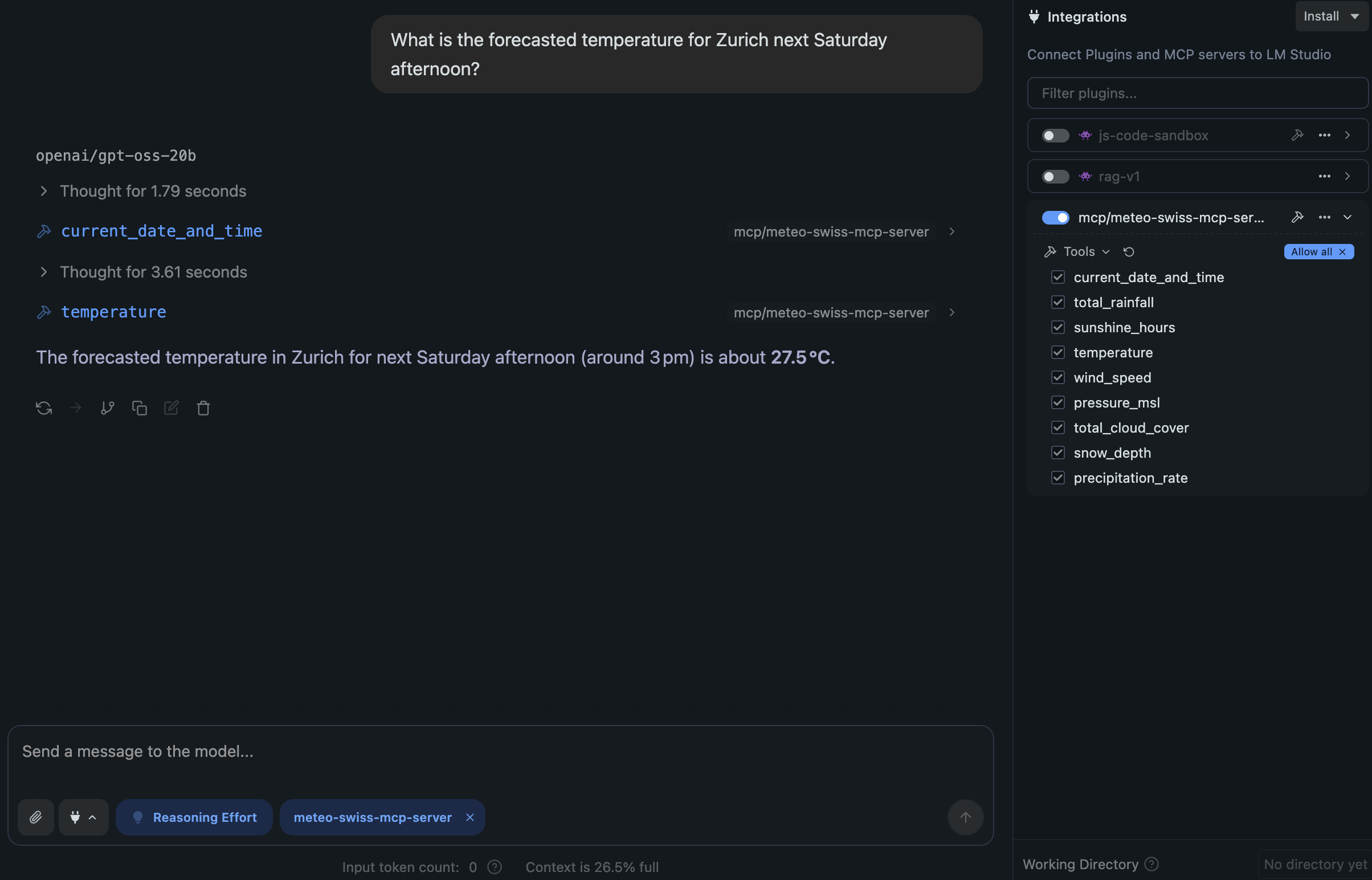
🧪 Tests
Run all tests with:
cd tests
pytest
📚 Useful Resources
📄 License
This project is licensed under the Apache License 2.0.
Установка Meteo Swiss
У этого сервера нет опубликованного пакета — он собирается из исходников. Открой репозиторий и следуй инструкции в README.
▸ github.com/cuolm/meteo-swiss-mcpFAQ
Meteo Swiss MCP бесплатный?
Да, Meteo Swiss MCP бесплатный — установка в пару кликов через Unyly без оплаты.
Нужен ли API-ключ для Meteo Swiss?
Нет, Meteo Swiss работает без API-ключей и переменных окружения.
Meteo Swiss — hosted или self-hosted?
Self-hosted: сервер запускается локально на твоей машине командой из раздела установки.
Как установить Meteo Swiss в Claude Desktop, Claude Code или Cursor?
Открой Meteo Swiss на unyly.org, выбери вкладку своего клиента (Claude Desktop, Claude Code, Cursor) и нажми Install — конфиг сгенерируется автоматически, без правки JSON.
Похожие MCP
GitHub
PRs, issues, code search, CI status
 автор: GitHub
Filesystem
Secure file operations with configurable access controls.
Memory
Knowledge graph-based persistent memory system.
Template MCP Server
A CLI tool to create a new Model Context Protocol server project with TypeScript support, dual transport options, and an extensible structure
 автор: mcpdotdirect
Compare Meteo Swiss with
Не уверен что выбрать?
Найди свой стек за 60 секунд
Автор?
Embed-бейдж для README
Похожее
Все в категории development