
mikan-atomoki/text-to-model
БесплатноНе проверенTurn natural language into 3D models in Fusion 360. 64 CAD tools including sketches, extrudes, fillets, and JIS standard parts.

Описание
Turn natural language into 3D models in Fusion 360. 64 CAD tools including sketches, extrudes, fillets, and JIS standard parts.
README
Turn natural language into 3D models in Fusion 360.
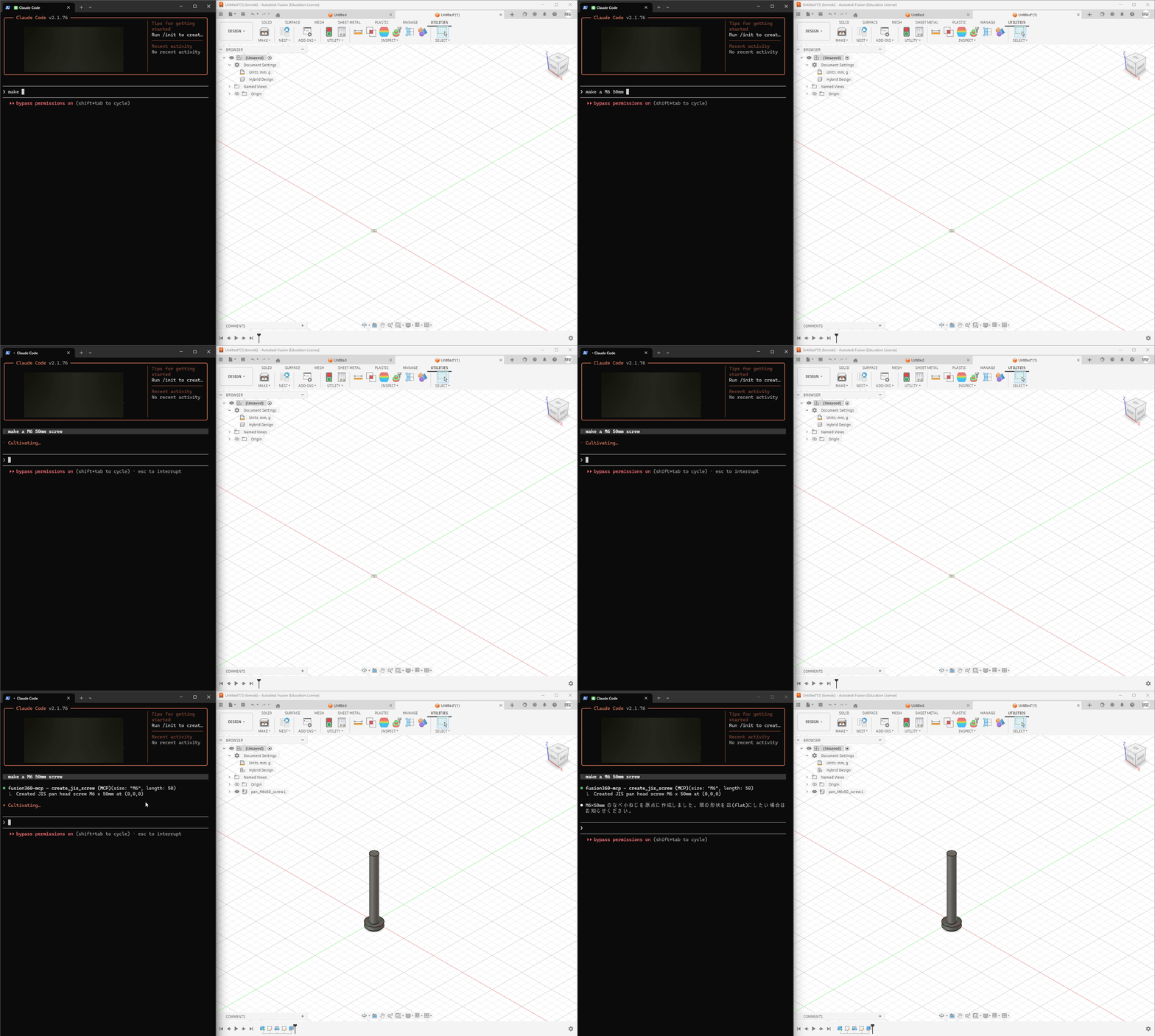
An MCP (Model Context Protocol) server add-in that connects Claude to Autodesk Fusion 360 — giving you 64 CAD tools controllable through plain text.
Highlights
- Natural Language → CAD — Describe what you want, Claude builds it in Fusion 360
- 64 MCP Tools — Sketches, extrudes, fillets, sweeps, lofts, booleans, patterns, and more
- JIS Standard Parts — Generate bolts, nuts, screws, washers, keyways, bearings, and O-rings with accurate JIS dimensions (ISO equivalents planned)
- Full Parametric Workflow — Sketches → features → modifications → export (STEP/STL)
- Works with Claude Desktop & Claude Code
Quick Start
Prerequisites
- Autodesk Fusion 360
- Claude Desktop or Claude Code
- Node.js (for
npx)
Installation
- Clone this repo into Fusion 360's add-in directory:
# Windows
git clone https://github.com/mikan-atomoki/text-to-model.git "%APPDATA%\Autodesk\Autodesk Fusion 360\API\AddIns\TextToModel"

# macOS
git clone https://github.com/mikan-atomoki/text-to-model.git ~/Library/Application\ Support/Autodesk/Autodesk\ Fusion\ 360/API/AddIns/TextToModel
In Fusion 360: UTILITIES → ADD-INS → Scripts and Add-Ins → Run TextToModel
Connect to Claude:
Claude Desktop — add to your MCP config (claude_desktop_config.json):
{
  "mcpServers": {
    "fusion360": {
      "command": "npx",
      "args": ["-y", "mcp-remote", "http://127.0.0.1:13405/sse"]
    }
  }
}
Claude Code — run:
claude mcp add fusion360-mcp --transport sse http://127.0.0.1:13405/sse
That's it. Open Claude and start modeling.
Examples
Create an M8x30 hex socket head bolt at the origin
Draw a 50mm × 30mm rectangle on the XY plane, extrude it 20mm,
and add a 3mm fillet to the top long edges
Draw a 20mm diameter circle, create a revolve, then add a keyway
Tool Categories (64 tools)
| Category | Count | Tools |
|---|---|---|
| Sketch | 7 | circle, rectangle, line, arc, spline, polygon, create sketch |
| Features | 4 | extrude, revolve, sweep, loft |
| Modify | 6 | fillet, chamfer, shell, mirror, variable fillet, draft |
| Patterns & Combine | 3 | circular/rectangular pattern, boolean combine |
| JIS Fasteners | 4 | bolt, nut, screw, washer (with JIS standard dimensions) |
| JIS Holes | 3 | threaded hole, counterbore, countersink |
| Mechanical | 3 | keyway (B1301), bearing hole (B1520), O-ring groove (B2401) |
| Construction | 4 | offset/angled/mid plane, construction axis |
| Inspect | 5 | list edges/faces/sketches/planes, bounding box |
| Surface | 4 | patch, thicken, offset, boundary fill |
| Split | 2 | split body, split face |
| Transform | 3 | move, scale, copy |
| Import | 2 | SVG, DXF |
| Constraints | 3 | geometric constraint, dimension, list entities |
| Appearance | 2 | body color, rename body |
| Utility | 9 | design info, list bodies/components, parameters, undo, export STEP/STL, execute code |
Architecture
Claude Desktop/Code ←→ MCP (HTTP/SSE) ←→ Bridge (CustomEvent) ←→ Fusion 360 API
The add-in runs an HTTP/SSE server inside Fusion 360. Claude sends tool calls via MCP protocol, and the bridge executes them on Fusion's main thread using a CustomEvent-based synchronization mechanism.
License
MIT
🇯🇵 日本語
Fusion 360 を Claude Desktop/Code から直接操作できる MCP サーバーアドイン。 テキストの指示だけで 3D モデリング・JIS 規格部品の生成が可能です。
64種類のMCPツールで、スケッチ作成・押し出し・フィレット・JIS ボルト生成など、幅広いCAD操作をテキスト指示で実行できます。
セットアップ方法や詳細は英語版をご参照ください。
Установка mikan-atomoki/text-to-model
У этого сервера нет опубликованного пакета — он собирается из исходников. Открой репозиторий и следуй инструкции в README.
▸ github.com/mikan-atomoki/text-to-modelFAQ
mikan-atomoki/text-to-model MCP бесплатный?
Да, mikan-atomoki/text-to-model MCP бесплатный — установка в пару кликов через Unyly без оплаты.
Нужен ли API-ключ для mikan-atomoki/text-to-model?
Нет, mikan-atomoki/text-to-model работает без API-ключей и переменных окружения.
mikan-atomoki/text-to-model — hosted или self-hosted?
Self-hosted: сервер запускается локально на твоей машине командой из раздела установки.
Как установить mikan-atomoki/text-to-model в Claude Desktop, Claude Code или Cursor?
Открой mikan-atomoki/text-to-model на unyly.org, выбери вкладку своего клиента (Claude Desktop, Claude Code, Cursor) и нажми Install — конфиг сгенерируется автоматически, без правки JSON.
Похожие MCP
GitHub
PRs, issues, code search, CI status
 автор: GitHub
Filesystem
Secure file operations with configurable access controls.
Memory
Knowledge graph-based persistent memory system.
Template MCP Server
A CLI tool to create a new Model Context Protocol server project with TypeScript support, dual transport options, and an extensible structure
 автор: mcpdotdirect
Amap Maps Mcp Server
MCP server for using the AMap Maps API
 автор: duxiaohui
Supabase
Database, auth and storage
 автор: Supabase
Everything
Reference / test server with prompts, resources, and tools.
Git
Tools to read, search, and manipulate Git repositories.
Sequential Thinking
Dynamic and reflective problem-solving through thought sequences.
Time
Time and timezone conversion capabilities.
Compare mikan-atomoki/text-to-model with
Не уверен что выбрать?
Найди свой стек за 60 секунд
Автор?
Embed-бейдж для README
Похожее
Все в категории development