
MinerU Document Explorer
БесплатноНе проверенEnables AI agents to search, deep-read, and build knowledge bases from Markdown, PDF, DOCX, and PPTX documents via MCP tools for retrieval, document navigation,

Описание
Enables AI agents to search, deep-read, and build knowledge bases from Markdown, PDF, DOCX, and PPTX documents via MCP tools for retrieval, document navigation, and ingestion.
README
 MinerU Document Explorer
Agent-native knowledge engine — search, deep-read, and build knowledge bases
from Markdown, PDF, DOCX, and PPTX.




中文文档 · MCP Setup · CLI Reference · Demo · Contributing
🤔 Why MinerU Document Explorer?
MinerU Document Explorer equips your agent with three tool suites — Retrieve, Deep Read, and Ingest — closing the full knowledge loop:
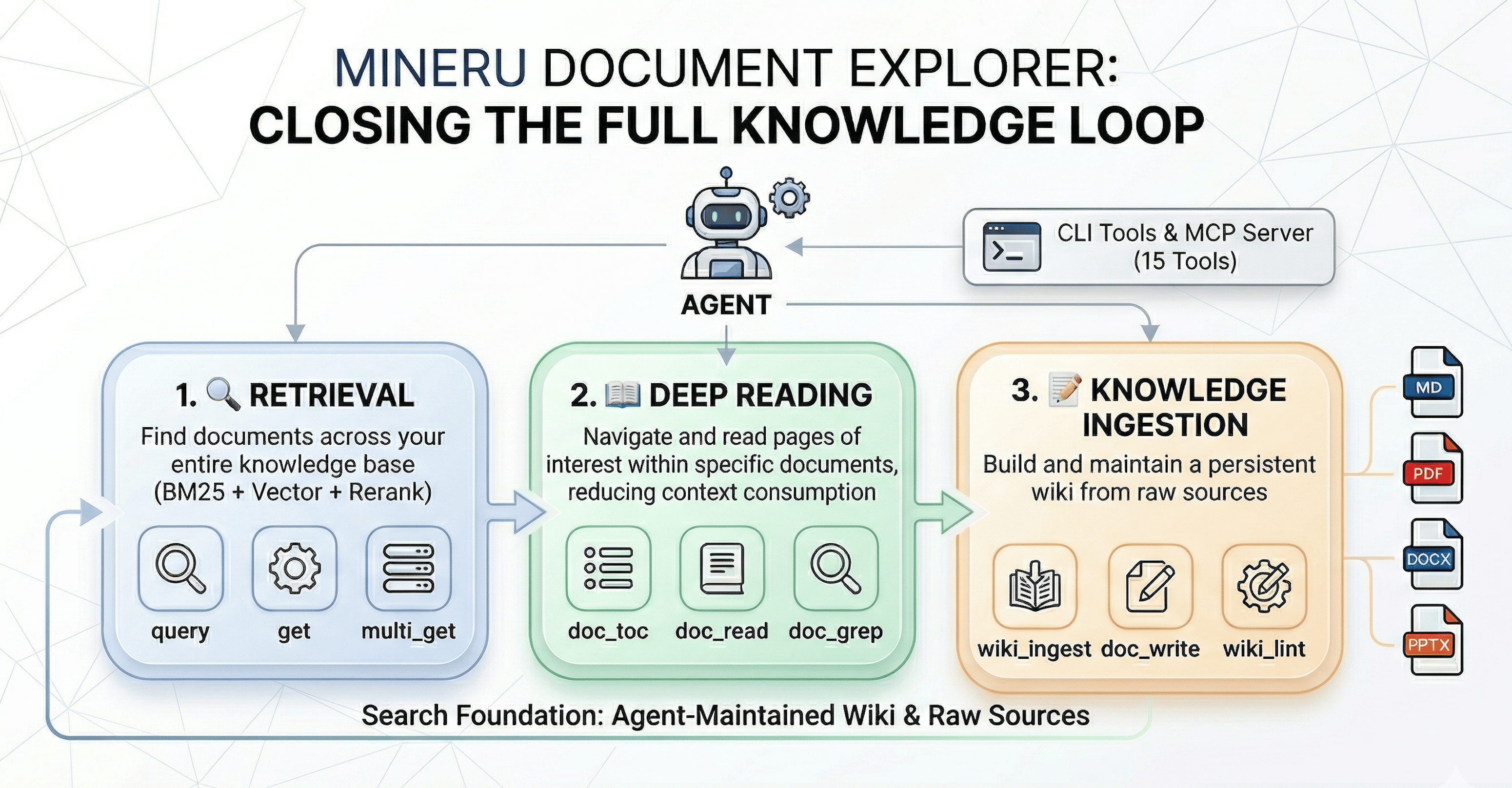
- 🔍 Retrieve — Cross-collection search: BM25, vector, and hybrid with LLM reranking and query expansion
- 📖 Deep Read — Navigate inside a single document without loading the whole file: table of contents, section reading, inline search, and element extraction
- 📝 Ingest — Build and maintain a LLM wiki from raw documents, following the Karpathy LLM Wiki pattern
Developed by the MinerU team, building on QMD and Karpathy's LLM Wiki.
💡 What can you do with it?
- Research assistant — Point it at a folder of PDFs and ask your AI agent to survey the literature, compare methods, or find specific results across papers
- Project knowledge base — Index your codebase, docs, and design specs; let the agent answer questions about architecture, find relevant code, or trace requirements
- Study companion — Upload textbooks or lecture notes; use
doc_toc+doc_readto navigate,doc_grepto search, and build a wiki of key concepts - Enterprise document search — Index contracts, reports, or manuals and search them with natural language queries enhanced by LLM reranking
See it in action: The demo/ folder contains a complete end-to-end example — an AI agent automatically reads ~10 arXiv papers on RAG, builds an interlinked wiki knowledge base, and writes a research survey. See the Demo Guide for step-by-step instructions.
🚀 Quick Start
Agent-Assisted Setup: If you're using an AI agent (Claude Code, Cursor, etc.), simply ask it to help you deploy MinerU Document Explorer and install skills — the agent can handle the entire setup process for you, including MCP configuration.
Follow the https://github.com/opendatalab/MinerU-Document-Explorer/blob/main/docs/quickstart.md to install MinerU Document Explorer and walk the user through configuration.
📖 Document Deep Reading
Navigate and search within a single document without reading the whole file:
# View document structure
qmd doc-toc papers/attention-is-all-you-need.pdf

# Read specific sections by address
qmd doc-read papers/attention-is-all-you-need.pdf "line:45-120"

# Search within one document
qmd doc-grep papers/attention-is-all-you-need.pdf "self-attention"
🔌 MCP Server — 15 Tools for AI Agents
Integrate with AI agents via Model Context Protocol.
MCP Server vs CLI: The MCP server runs as a persistent process — LLM models (embeddings, reranker, query expansion) are loaded once and stay in memory across requests. CLI commands like
qmd querymust reload all models on every invocation, adding ~5–15 s of startup overhead each time. For agent workflows, always prefer the MCP server.
Two transport modes:
| Mode | Command | Best for |
|---|---|---|
| stdio | qmd mcp |
Claude Desktop, Claude Code — client spawns and manages the process |
| HTTP daemon | qmd mcp --http --daemon |
Cursor, Windsurf, VS Code, multi-client setups — one shared persistent server |
# Start the HTTP daemon (recommended — models stay loaded across all requests)
qmd mcp --http --daemon             # default port 8181
qmd mcp --http --daemon --port 8080 # custom port

# Verify server is running
curl http://localhost:8181/health

# Stop the daemon
qmd mcp stop
Client Configuration
Cursor — add to .cursor/mcp.json (project) or ~/.cursor/mcp.json (global)
Option A — stdio (Cursor manages the process lifecycle):
{
  "mcpServers": {
    "qmd": {
      "command": "qmd",
      "args": ["mcp"]
    }
  }
}
Option B — HTTP (run qmd mcp --http --daemon first; models stay loaded, faster responses):
{
  "mcpServers": {
    "qmd": {
      "url": "http://localhost:8181/mcp"
    }
  }
}
Claude Desktop — add to ~/Library/Application Support/Claude/claude_desktop_config.json
{
  "mcpServers": {
    "qmd": {
      "command": "qmd",
      "args": ["mcp"]
    }
  }
}
Claude Code — add to ~/.claude/settings.json or run claude mcp add qmd -- qmd mcp
{
  "mcpServers": {
    "qmd": {
      "command": "qmd",
      "args": ["mcp"]
    }
  }
}
Windsurf / VS Code / Other MCP Clients
For stdio transport, use "command": "qmd", "args": ["mcp"] in your client's MCP configuration.
For HTTP transport, start qmd mcp --http --daemon and point your client to http://localhost:8181/mcp.
See MCP setup guide for all 15 tools and HTTP transport details.
Agent Skills
MinerU Document Explorer ships with a built-in Agent Skill that teaches AI agents how to use the full tool suite effectively — decision trees, usage patterns, and best practices for all 15 MCP tools.
# Install the skill (works with both npm and source installs)
qmd skill install              # local project (.agents/skills/)
qmd skill install --global     # global (~/.agents/skills/)

# Or from source repo
claude skill add ./skills/mineru-document-explorer/SKILL.md
📊 How It Compares
| MinerU Doc Explorer | LlamaIndex | Obsidian | NotebookLM | |
|---|---|---|---|---|
| Runs 100% locally | ✅ | ⚠️ LLM APIs | ✅ | ❌ Cloud |
| Agent integration (MCP) | 15 tools | Plugin | ❌ | ❌ |
| Deep reading within docs | ✅ | ❌ | ❌ | ✅ |
| Wiki knowledge compilation | ✅ | ❌ | Manual | ❌ |
| Formats | MD, PDF, DOCX, PPTX | Many | MD | PDF, URL |
| Search pipeline | BM25 + vec + rerank | Configurable | Basic | Proprietary |
| Zero-config search | ✅ qmd search |
❌ | Plugin | N/A |
| Open source | MIT | MIT | Partial | ❌ |
⚙️ Requirements
| Requirement | Notes |
|---|---|
| Node.js >= 22 or Bun | Runtime |
| Python >= 3.10 | Document processing (pymupdf, python-docx, python-pptx) |
| macOS | brew install sqlite for extension support |
📄 Document Processing Setup
Python 3.10+ is required for document processing (PDF, DOCX, PPTX):
# Check Python version
python3 --version  # needs >= 3.10

# Install required Python packages
pip install pymupdf python-docx python-pptx

# Verify
python3 -c "import pymupdf; import docx; import pptx; print('OK')"
MinerU Cloud — high-quality PDF extraction for scanned documents and complex layouts (optional)
pip install mineru-open-sdk
export MINERU_API_KEY="your-key"  # get from https://mineru.net
When MINERU_API_KEY is set, MinerU Cloud is automatically used as the primary PDF provider with PyMuPDF as fallback.
For advanced configuration (custom providers, local VLM models, GPT PageIndex), create ~/.config/qmd/doc-reading.json:
{
  "docReading": {
    "providers": {
      "fullText": { "pdf": ["mineru_cloud", "pymupdf"] }
    },
    "credentials": {
      "mineru": { "api_key": "your-api-key" }
    }
  }
}
🤖 LLM Models (auto-downloaded on first use)
| Model | Purpose | Size |
|---|---|---|
| embeddinggemma-300M | Vector embeddings | ~300 MB |
| qwen3-reranker-0.6b | Re-ranking | ~640 MB |
| qmd-query-expansion-1.7B | Query expansion | ~1.1 GB |
Models are only needed for
qmd embed,qmd vsearch, andqmd query.qmd searchruns BM25 retrieval.
📚 Documentation
| 🎯 Demo Guide | End-to-end example: agent-driven RAG research survey |
| 📖 CLI Reference | All commands, options, output formats |
| 🔌 MCP Server | Setup, 15 tools, HTTP transport |
| 📦 SDK / Library | TypeScript API, types, examples |
| 🏗️ Architecture | Search pipeline, scoring, data schema, chunking |
| 🤝 Contributing | Development setup, code style, how to contribute |
❤️ Acknowledgments
MinerU Document Explorer builds upon these foundational projects:
- QMD by Tobi Lutke — An on-device search engine and CLI toolkit for markdown documents
- LLM Wiki by Andrej Karpathy — the conceptual pattern for LLM-maintained knowledge bases
- MinerU by OpenDataLab — high-quality document parsing and extraction
📝 Changelog
v1 — 2026-04-07 (Current)
Rebuilt from an OpenClaw agent skill into a full agent-native knowledge engine: npm package (npm install -g mineru-document-explorer), qmd CLI, MCP server with 15 tools across three groups (Retrieval / Deep Reading / Knowledge Ingestion), multi-format support (MD, PDF, DOCX, PPTX), hybrid search (BM25 + vector + LLM reranking), and LLM Wiki knowledge base pattern.
v0 — 2026-03-30 (Previous)
OpenClaw-native agent skill (doc-search CLI). Four capabilities: Logic Retrieval, Semantic Retrieval, Keyword Retrieval, Evidence Extraction. See the v0 repository.
Установить MinerU Document Explorer в Claude Desktop, Claude Code, Cursor
unyly install mineru-document-explorerСтавит в Claude Desktop, Claude Code, Cursor и VS Code — сам разбирается с npx, uvx и сборкой из исходников.
Впервые? Поставь CLI: curl -fsSL https://unyly.org/install | sh
Или настроить вручную
Выполни в терминале:
claude mcp add mineru-document-explorer -- npx -y mineru-document-explorerFAQ
MinerU Document Explorer MCP бесплатный?
Да, MinerU Document Explorer MCP бесплатный — установка в пару кликов через Unyly без оплаты.
Нужен ли API-ключ для MinerU Document Explorer?
Нет, MinerU Document Explorer работает без API-ключей и переменных окружения.
MinerU Document Explorer — hosted или self-hosted?
Self-hosted: сервер запускается локально на твоей машине командой из раздела установки.
Как установить MinerU Document Explorer в Claude Desktop, Claude Code или Cursor?
Открой MinerU Document Explorer на unyly.org, выбери вкладку своего клиента (Claude Desktop, Claude Code, Cursor) и нажми Install — конфиг сгенерируется автоматически, без правки JSON.
Похожие MCP
Fetch
Web content fetching and conversion for efficient LLM usage.
AWS KB Retrieval
Retrieval from AWS Knowledge Base using Bedrock Agent Runtime.
 автор: modelcontextprotocol
Spring AI MCP Server
Provides auto-configuration for setting up an MCP server in Spring Boot applications.
llm-analysis-assistant
A very streamlined mcp client that supports calling and monitoring stdio/sse/streamableHttp, and can also view request responses through the /logs page. It also
 автор: xuzexin-hz
Compare MinerU Document Explorer with
Не уверен что выбрать?
Найди свой стек за 60 секунд
Автор?
Embed-бейдж для README
Похожее
Все в категории ai