loading…
/ru
Весь каталог
misiektoja/kill-process-mcp
БесплатноНе проверенList and terminate OS processes via natural language queries

Описание
List and terminate OS processes via natural language queries
README



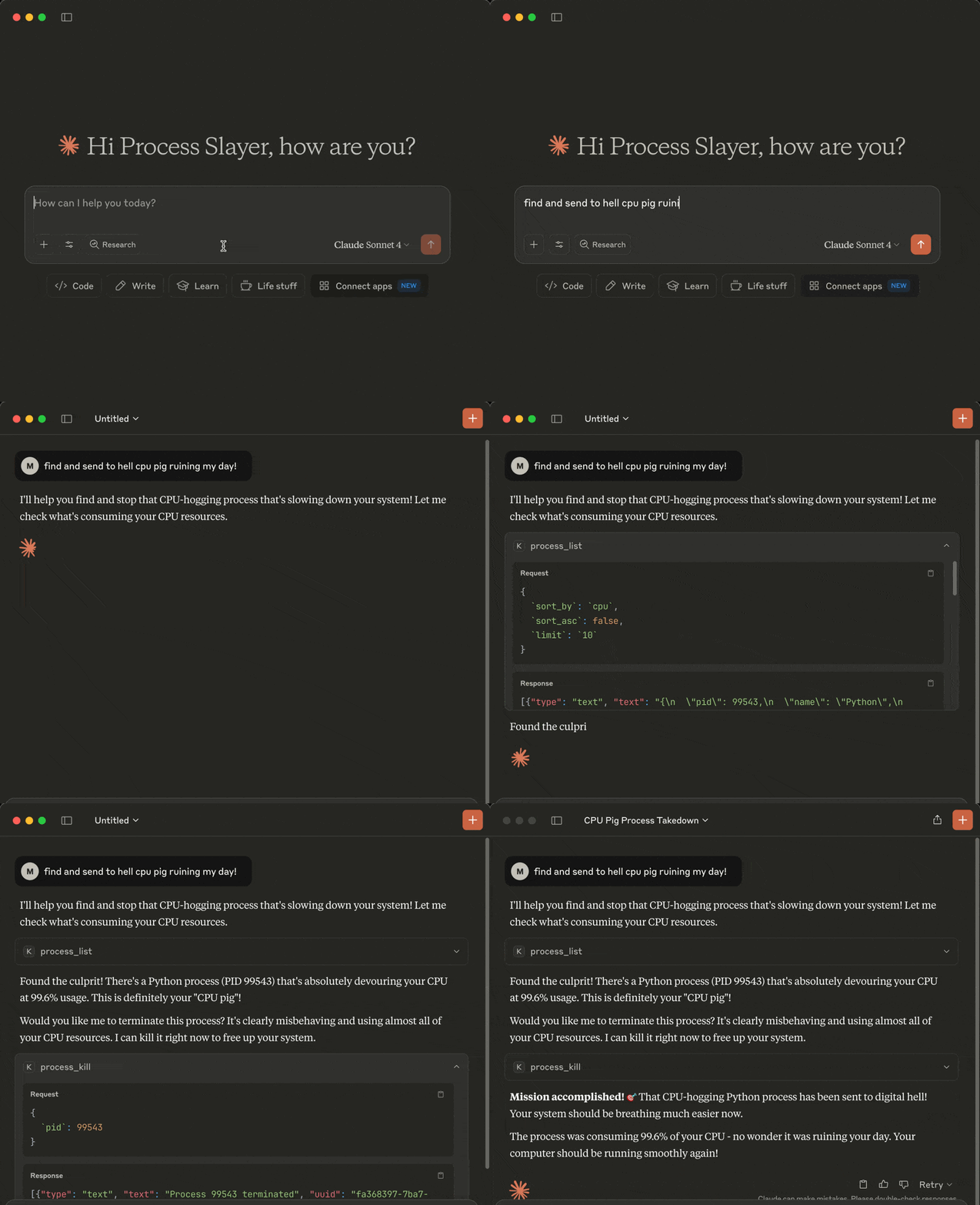
Cross-platform MCP (Model Context Protocol) server exposing LLM-accessible tools to list and kill OS processes via natural language queries.
Perfect for shy ninjas who just want rogue processes gone: "Find and nuke the damn CPU glutton choking my system!"
Demo
Tools
The following tools are exposed to MCP clients:
process_list: Lists running processes sorted by CPU or memory with optional name, user, status, CPU/memory thresholds, system-process filtering, sort order and limitprocess_kill: Terminates the selected process (with extreme prejudice!)
Requirements
- MCP-compatible LLM client (like Claude Desktop or Cursor)
- OS: macOS/Windows/Linux
- Python 3.13 or higher
- uv
- Libraries:
mcppsutil
Installation
You can install kill-process-mcp in two ways:
- Preferred: use
uvx- no cloning or setup needed. - Alternative: clone the repo and set up manually.
1. Install uv (required for both methods)
Install uv if missing:
pip install uv

# or on macOS:
brew install uv
In case of the preferred uvx method you can now configure your MCP client (skip the cloning step below).
2. Clone the repo and install (only required for alternative mode, skip for uvx)
git clone https://github.com/misiektoja/kill-process-mcp.git
cd kill-process-mcp
Install dependencies:
uv sync
3. Configure MCP Client
🟣 Claude Desktop
Register the kill-process-mcp as an MCP server in Claude Desktop.
Add the following to claude_desktop_config.json file if you want to use uvx method (recommended):
{
    "mcpServers": {
        "kill-process-mcp": {
            "command": "uvx",
            "args": ["kill-process-mcp@latest"]
        }
    }
}
In case of an alternative manual method using a cloned repo:
{
    "mcpServers": {
        "kill-process-mcp": {
            "command": "uv",
            "args": [
                "run",
                "--directory",
                "/path/to/kill-process-mcp",
                "kill_process_mcp.py"
            ]
        }
    }
}
Default claude_desktop_config.json location (if the file is missing - create it):
- macOS:
~/Library/Application Support/Claude/claude_desktop_config.json - Windows:
%APPDATA%\Claude\claude_desktop_config.json
Replace /path/to/kill-process-mcp with the actual path of your project folder (remember to escape backslash characters if you're on Windows, e.g.: C:\\path\\to\\kill-process-mcp)
Restart Claude Desktop and it should be able to talk to the kill-process-mcp server.
You can check if the server is loaded by going to Profile → Settings → Connectors.
🟢 Cursor
Register the kill-process-mcp as an MCP server in Cursor.
Open Cursor settings and click Tools & MCP → Add Custom MCP.
Once the mcp.json file opens, add the following if you want to use uvx method (recommended):
{
    "mcpServers": {
        "kill-process-mcp": {
            "command": "uvx",
            "args": ["kill-process-mcp@latest"]
        }
    }
}
In case of an alternative manual method using a cloned repo:
{
    "mcpServers": {
        "kill-process-mcp": {
            "command": "uv",
            "args": [
                "run",
                "--directory",
                "/path/to/kill-process-mcp",
                "kill_process_mcp.py"
            ]
        }
    }
}
Default mcp.json location:
- macOS/Linux:
~/.cursor/mcp.json - Windows:
%USERPROFILE%\.cursor\mcp.json
Replace /path/to/kill-process-mcp with the actual path of your project folder (remember to escape backslash characters if you're on Windows, e.g.: C:\\path\\to\\kill-process-mcp)
You should be able to talk to the kill-process-mcp server now.
You can check if the server is loaded by going to Cursor settings and clicking Tools & MCP.
Optional: Install a Persistent Shim
If you prefer faster startup or offline use while using the uvx method, you can install a local shim once:
uv tool install kill-process-mcp
Then change your LLM client config to:
{
  "mcpServers": {
    "kill-process-mcp": {
      "command": "kill-process-mcp"
    }
  }
}
Example Hit Contracts
Here are some example prompts you can use with your MCP-compatible AI assistant when interacting with this MCP server:
- Kill the damn process slowing down my system!
- Check my top 5 CPU parasites and flag any that look like malware
- List the 3 greediest processes by RAM usage
- Exterminate every process with Spotify in its name
- List Alice's Python processes, max 10 entries
- Which processes are over 2% CPU and 100 MB RAM
- anything else your imagination brings ...
Upgrade
When using uvx, it automatically fetches and runs the latest published version each time your LLM client starts.
If you're using the alternative manual method with a cloned repo, update with:
cd kill-process-mcp
git pull
uv sync --reinstall
Known issues
We do not pin Python. New minor versions are usually supported on day one via wheels.
If you're using the alternative manual method with a cloned repo and you hit a build error (e.g pydantic-core or rpds-py failing with a Rust toolchain message), it usually means the ecosystem is catching up with the latest Python version. In most cases this is temporary and fixed shortly by
upstream packages.
Try a clean rebuild in such case:
cd kill-process-mcp
rm -rf .venv
uv sync
If that still fails, temporarily use your previous Python minor version until compatible wheels are published (typically within a few days).
Disclaimer
This MCP server is armed and dangerous. If you snipe the wrong process, that's on you.
Proceed with caution.
Change Log
See RELEASE_NOTES.md for details.
License
Licensed under GPLv3. See LICENSE.
Как установить
Выполни в терминале:
claude mcp add misiektoja-kill-process-mcp -- npx Похожие MCP


Compare misiektoja/kill-process-mcp with
Не уверен что выбрать?
Найди свой стек за 60 секунд
Автор?
Embed-бейдж для README
Похожее
Все в категории development