

Описание
Standalone mixdog coding-agent CLI/TUI workspace.
README


Standalone coding-agent CLI/TUI that runs an orchestrated, multi-provider agent workflow from one terminal — built for maximum performance at minimum cost.
Mixdog combines an Ink-based terminal UI, per-role model routing across providers, workflow agents, MCP/plugin/skill/hook support, lightweight memory, web search, channel integrations, and repo-native tools for reading, editing, testing, and reviewing code.
Quick start
Requires Node.js >= 22.
npm install -g mixdog
mixdog
First run walks you through onboarding: provider auth, model pick, and workflow setup.
Terminal-Bench 2.1 — 89.9% (self-reported)
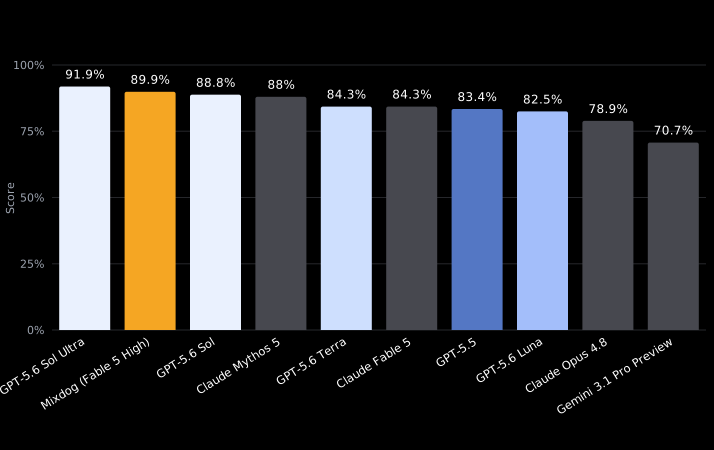
Single-run score of 80/89 = 89.9% (k=1) on
terminal-bench/terminal-bench-2-1, using a cost-reduced per-role routing
config:
| Role | Model | Effort |
|---|---|---|
| Lead (orchestrator) | Claude Fable 5 | high |
| Explorer | Claude Haiku 4.5 | default |
| Worker | Claude Opus 4.8 | medium |
| Heavy worker | Claude Opus 4.8 | high |
| Reviewer | GPT-5.5 | high (fast) |
Against published model scores this places second overall — behind GPT-5.6
Sol Ultra (91.9%), ahead of GPT-5.6 Sol (88.8%) and Claude Mythos 5 (88%),
and well above the same primary model run standalone (Claude Fable 5,
84.3%). Measured once (k=1) due to cost, so treat it as indicative — a
max-effort k=5 run is planned and is expected to land higher. Per-task
results, raw Harbor jobs, and the harness adapter live in
benchmarks/terminal-bench-2.1/.
Full transparency: 4 tasks refused by the primary model's safety layer were
re-run routed to Claude Opus 4.8 (effort xhigh) and passed; timeouts and
task resources were left unmodified. Raw Harbor result.json/config.json
for every constituent run are included.
Why mixdog
Maximum performance at minimum cost
- Orchestrated agent workflow that mixes providers and models per role, so each step runs on the cheapest model that can do the job well.
- Cache-aware prompt layout and aggressive context savings across turns.
- Lean output policy plus fine-grained session management: compaction, resumable sessions, and usage dashboards.
- A custom harness with tool-call routing tuned for the fewest, most
effective calls (
code_graph, batchedread/grep, windowed reads).
Any provider
- Anthropic, OpenAI, Google/Gemini, xAI/Grok, DeepSeek, OpenCode Go, OAuth-backed providers, OpenAI-compatible APIs, Ollama, and LM Studio/local endpoints.
- Live model catalog from provider
/modelsendpoints, enriched with LiteLLM/models.dev metadata for context windows, output limits, pricing, tool support, reasoning, and recency. - Customizable web search and repo exploration tools.
Any environment
- Full-screen TUI with slash commands, provider setup, model/workflow pickers, statusline integration, and detailed tool cards — plus headless role mode for scripting.
- Optional Discord/Telegram channels, webhook endpoints, cron schedules, and voice-message transcription for remote/event-driven workflows.
Memory
- Lightweight memory restores prior work context across sessions.
- Important memories are automatically promoted — and demoted when stale.
Agent-ecosystem compatible
- Skills, MCP servers, hooks, and plugins load through standard-compatible interfaces.
- Workflow delegation through the
agenttool and/agents: worker, heavy-worker, reviewer, debugger, maintainer, and explorer roles.
Run
For local development from this checkout:
npm install
npm start
# Start the TUI in the current project
mixdog

# Start with an explicit route
mixdog --provider anthropic-oauth --model claude-haiku-4-5-20251001

# Read-only tool surface
mixdog --readonly

# Enable remote/channel mode for this session
mixdog --remote
Headless role mode is also supported:
mixdog worker "fix the failing test"
mixdog reviewer "review the current diff"
TUI basics
Common slash commands:
/providers         configure provider auth and local endpoints
/model             choose the main provider/model (/effort, /fast tune it)
/workflow          choose the active workflow
/agents            show workflow agents and per-agent model overrides
/setting           open the runtime settings hub
/mcp               manage MCP servers and tools
/skills            choose a skill for the next request
/channels          manage Discord/Telegram, schedules, webhooks, voice
/compact           compact older conversation context
/clear             reset the conversation and screen
/OutputStyle       show or switch Lead output style
Use /providers first if no model is configured, then /model to pick the
route. The model picker warms the provider catalog in the background and keeps
Claude families such as Opus, Sonnet, Haiku, and Fable separate when filtering
current Anthropic models.
Scripts
npm run smoke                # fast core feature smoke
npm run smoke:all            # feature-surface smoke suite
npm run smoke:tui            # TUI feature smoke
npm run test:tool-contracts  # optional tool contract suite
npm run build:tui            # build the bundled Ink TUI
npm run audit:models         # inspect model catalog metadata
Additional diagnostics and benchmarks live under scripts/.
Data and configuration
Mixdog uses ~/.mixdog as its home root. Runtime data lives in
~/.mixdog/data by default.
MIXDOG_HOME=/path/to/home mixdog
MIXDOG_DATA_DIR=/path/to/data mixdog
Useful environment toggles:
MIXDOG_TUI_MOUSE=0— use terminal-native mouse behavior instead of the TUI mouse/selection layer.MIXDOG_DISABLE_MODEL_PREFETCH=1— disable background provider model prefetch.MIXDOG_PROVIDER_MODEL_WARMUP_DELAY_MS=<ms>— tune model-catalog warmup delay.MIXDOG_MODEL_STALE_MONTHS=<months>— tune catalog staleness filtering.MIXDOG_MODE=ship|dev— explicit shipping/dev mode. Shipping disables best-effort diagnostic trace/log file IO (agent-trace.jsonl, tool-failures.jsonl) by default; dev/debug opts back in. Default isdevfrom a git checkout andshipfor a published install.MIXDOG_DIAGNOSTICS=1— force diagnostic trace/log file IO on even under shipping mode.
Project layout
src/
  cli.mjs        # CLI entry point (bin: mixdog)
  app.mjs        # CLI/TUI/headless mode wiring
  help.mjs       # command help text
  runtime/       # providers, tools, memory, channels, session runtime
  session-runtime/
                 # model routing, catalog rows, workflow/session helpers
  tui/           # canonical Ink TUI
  agents/        # workflow agent definitions
  workflows/     # workflow definitions
  rules/         # Lead and agent instructions
scripts/
  smoke*.mjs     # smoke checks
  *test.mjs      # focused node:test checks
  build-tui.mjs  # esbuild bundle for the React TUI
vendor/
  ink/           # Mixdog Ink renderer
Published package contents
The npm package is limited by package.json#files to:
README.md
scripts/
src/
vendor/
docs/ is not included in the published package unless package.json#files is
changed.
License
MIT
Установить Mixdog в Claude Desktop, Claude Code, Cursor
unyly install mixdogСтавит в Claude Desktop, Claude Code, Cursor и VS Code — сам разбирается с npx, uvx и сборкой из исходников.
Впервые? Поставь CLI: curl -fsSL https://unyly.org/install | sh
Или настроить вручную
Выполни в терминале:
claude mcp add mixdog -- npx -y mixdogFAQ
Mixdog MCP бесплатный?
Да, Mixdog MCP бесплатный — установка в пару кликов через Unyly без оплаты.
Нужен ли API-ключ для Mixdog?
Нет, Mixdog работает без API-ключей и переменных окружения.
Mixdog — hosted или self-hosted?
Self-hosted: сервер запускается локально на твоей машине командой из раздела установки.
Как установить Mixdog в Claude Desktop, Claude Code или Cursor?
Открой Mixdog на unyly.org, выбери вкладку своего клиента (Claude Desktop, Claude Code, Cursor) и нажми Install — конфиг сгенерируется автоматически, без правки JSON.
Похожие MCP
Fetch
Web content fetching and conversion for efficient LLM usage.
AWS KB Retrieval
Retrieval from AWS Knowledge Base using Bedrock Agent Runtime.
 автор: modelcontextprotocol
Spring AI MCP Server
Provides auto-configuration for setting up an MCP server in Spring Boot applications.
llm-analysis-assistant
A very streamlined mcp client that supports calling and monitoring stdio/sse/streamableHttp, and can also view request responses through the /logs page. It also
 автор: xuzexin-hz
Compare Mixdog with
Не уверен что выбрать?
Найди свой стек за 60 секунд
Автор?
Embed-бейдж для README
Похожее
Все в категории ai