
MNotify Server
БесплатноНе проверенEnables AI IDEs like Cursor to send SMS, manage contacts/groups/templates, and check delivery reports via the MNotify API through natural language tool calls.

Описание
Enables AI IDEs like Cursor to send SMS, manage contacts/groups/templates, and check delivery reports via the MNotify API through natural language tool calls.
README
Bring MNotify to your AI IDE in one command.
This package exposes the MNotify SMS API as an MCP server so tools like Cursor can securely call real MNotify actions (send SMS, manage contacts/groups/templates, delivery reports) via stdio. This repo also includes a simple interactive MNotify Agent for CLI use. It is based on Mnotify API v2.0
Check out the PyPI MCP package here
Requirements
- Python 3.10+
- Environment variable:
MNOTIFY_API_KEY
Setup
- Using uv (recommended):
curl -LsSf https://astral.sh/uv/install.sh | sh # install uv if needed uv venv uv pip install -r requirements.txt - Using any virtualenv manager + pip:
python -m venv .venv && source .venv/bin/activate
pip install -r requirements.txt
Quick start — install and run the MCP server
pip install mnotify_mcp_server
export MNOTIFY_API_KEY=sk_mnotify_...

# Start the server (preferred)
mnotify_mcp server

# Alternatives
mnotify-mcp
python -m mnotify_mcp.server
Connect to Cursor
- Option A: Project config
.cursor/mcp.json(recommended)
{
  "mcpServers": {
    "mnotify": {
      "command": "mnotify_mcp",
      "args": ["server"]
    }
  }
}
Relaunch cursor from the same environment as the virtual environment
- Option B: Manual add in Cursor (Settings → MCP → Add Custom Server → Process)
- Command:
mnotify_mcp - Args:
server - Ensure
MNOTIFY_API_KEYis set in the environment where Cursor launches the process
- Command:
MNotify Agent (interactive CLI)
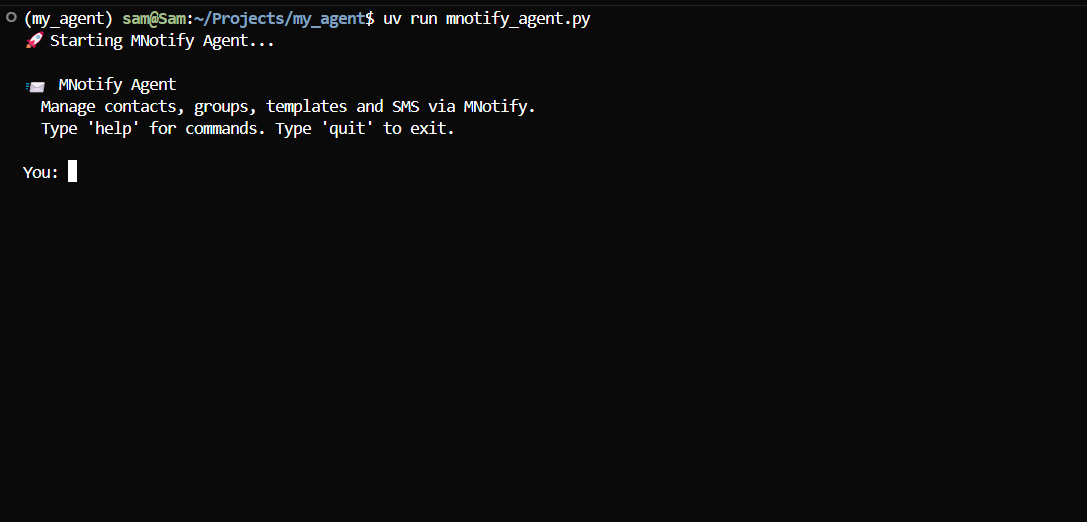
A local chat agent that can call all MNotify tools directly.
Setup
- Create a virtual environment and install dependencies with uv or pip (see above).
- Add a
.envfile with:
OPENROUTER_API_KEY=sk-or-v1-...
MNOTIFY_API_KEY=...
AGNO_API_KEY=ag-...   # optional, if monitoring is set.
Start the agent
uv run mnotify_agent.py
CLI commands
- help: list commands
- history: show recent messages
- tools: list available tools
- test: run a quick tool-call test
- clear: clear conversation context
Tools exposed
- SMS:
send_quick_bulk_sms,send_bulk_group_sms,update_scheduled_sms - Reports:
sms_delivery_report,specific_sms_delivery_report,periodic_sms_delivery_report - Contacts:
add_contact,update_contact,delete_contact,get_contact_details,get_contact_list,get_group_contacts - Groups:
add_group,update_group,delete_group,get_group_details,get_group_list - Templates:
get_template_list,get_message_template,add_message_template,update_message_template,delete_message_template - Utilities:
register_sender_id,check_sender_id,check_sms_balance - Helpers:
get_context_snapshot,resolve_group_name
Validation & guardrails
messagelength ≤ 460;sender_idlength ≤ 11.schedule=truerequiresschedule_time(YYYY-MM-DD HH:MM).- Optional:
verify_sender=trueperforms a best‑effort sender status check before sending.
Security
- Never pass secrets as tool arguments. The server reads
MNOTIFY_API_KEYfrom the environment. - The server does not log secrets.
Установка MNotify Server
У этого сервера нет опубликованного пакета — он собирается из исходников. Открой репозиторий и следуй инструкции в README.
▸ github.com/Nanayeb34/mnotify-mcp-serverFAQ
MNotify Server MCP бесплатный?
Да, MNotify Server MCP бесплатный — установка в пару кликов через Unyly без оплаты.
Нужен ли API-ключ для MNotify Server?
Нет, MNotify Server работает без API-ключей и переменных окружения.
MNotify Server — hosted или self-hosted?
Доступен hosted-вариант: Unyly запускает сервер в облаке, локальная установка не обязательна.
Как установить MNotify Server в Claude Desktop, Claude Code или Cursor?
Открой MNotify Server на unyly.org, выбери вкладку своего клиента (Claude Desktop, Claude Code, Cursor) и нажми Install — конфиг сгенерируется автоматически, без правки JSON.
Похожие MCP
Fetch
Web content fetching and conversion for efficient LLM usage.
AWS KB Retrieval
Retrieval from AWS Knowledge Base using Bedrock Agent Runtime.
 автор: modelcontextprotocol
Spring AI MCP Server
Provides auto-configuration for setting up an MCP server in Spring Boot applications.
llm-analysis-assistant
A very streamlined mcp client that supports calling and monitoring stdio/sse/streamableHttp, and can also view request responses through the /logs page. It also
 автор: xuzexin-hz
Compare MNotify Server with
Не уверен что выбрать?
Найди свой стек за 60 секунд
Автор?
Embed-бейдж для README
Похожее
Все в категории ai