
Mockups MPC
БесплатноНе проверенA self-hosted MCP server and gallery for AI-generated mockups, enabling AI tools to send mockups via MCP tool calls for storage and browsing in a clean web gall

Описание
A self-hosted MCP server and gallery for AI-generated mockups, enabling AI tools to send mockups via MCP tool calls for storage and browsing in a clean web gallery.
README
A self-hosted gallery for AI-generated mockups — with an MCP interface. Instead of cluttering your repo, mockups get a permanent home and a clean web gallery you can browse. AI tools upload them over a direct curl call; MCP handles only the lightweight coordination — listing, metadata, tagging, and retrieval.
Token-efficient by design. MCP tool parameters flow through the model context, so sending a large HTML file via a tool call wastes tokens. Mockups MPC provides an HTTP upload endpoint (POST /api/upload) — the AI writes the file locally and curls it to the server, keeping file content entirely out of the model context. MCP tools handle lightweight operations only: listing, metadata, tagging, and deletion.
Prerequisites
- Docker (for deployment) or Python 3.12+ (for local development)
- An MCP-compatible AI client (Claude Code, Claude Desktop, etc.)
- Optional: Traefik reverse proxy (for production with TLS)
Why
Every time an AI tool generates a mockup, there's no consistent place for it to go — so they pile up in your repo or get scattered across temp dirs, sessions lose track of them, and there's no history. Mockups MPC gives them a permanent home instead: the AI pushes the mockup to the gallery, you browse it there, and the local file gets cleaned up. One place for everything, nothing cluttering your project.
Architecture
┌─────────────────┐     MCP (HTTP/SSE)     ┌──────────────────────┐
│  Claude Code /  │ ◄───────────────────── │                      │
│  Claude Desktop │  send/list/get/update  │    Mockups MPC       │
│  Any MCP Client │  delete/tag            │    (FastAPI)         │
└─────────────────┘                        │                      │
                                           │  ┌────────────────┐  │
       Browser                             │  │  MCP Server    │  │
    ┌──────────┐      GET /                │  │  (fastmcp)     │  │
    │ Gallery  │ ◄──────────────────────── │  └────────────────┘  │
    │ Viewer   │                           │  ┌────────────────┐  │
    └──────────┘                           │  │  JSON API      │  │
                                           │  │  /api/*        │  │
                                           │  └────────────────┘  │
                                           │  ┌────────────────┐  │
                                           │  │  SQLite (WAL)  │  │
                                           │  │  + Filesystem  │  │
                                           │  └────────────────┘  │
                                           └──────────────────────┘
Single Docker container running a FastAPI app that serves two roles:
- MCP Server — mounted at
/mcp/(HTTP transport) and/mcp/sse(SSE transport). AI tools connect here to send and manage mockups. - Web Gallery — served at
/. Sidebar with project list and chronological feed, main viewer with iframe/image display.
Data Layer
- SQLite in WAL mode — metadata catalog (project, title, description, tags, content type, timestamps)
- Filesystem — mockup files stored in
data/{project_slug}/{uuid}.{ext} - Storage is a bind-mounted
data/directory next to the compose file
Tech Stack
- Python 3.12
- FastAPI + uvicorn
- fastmcp v3.x (standalone)
- SQLite via aiosqlite
- Jinja2 templates + vanilla JS
- Docker + Traefik
Security
There is no built-in authentication. All API endpoints and MCP tools are open to anyone who can reach the server. This is designed for trusted networks (LAN, VPN, Tailscale) or behind a reverse proxy that handles auth. If you deploy this on a public network, add authentication at the proxy layer.
MCP Tools
| Tool | Description |
|---|---|
send_mockup |
Send HTML/SVG (raw string) or PNG/JPG (base64) to the gallery. Returns a gallery URL. |
list_mockups |
List mockups reverse-chronologically, optionally filtered by project. |
get_mockup |
Get a specific mockup by UUID with view and gallery URLs. Curl the view_url to read the file content. |
update_mockup |
Update metadata (title, description, tags) or replace content. |
delete_mockup |
Delete a mockup — removes both the DB record and file on disk. |
tag_mockup |
Add or remove tags on an existing mockup. |
The server stores all content permanently. AI clients can clean up local files when they're no longer needed, or retrieve content later via get_mockup.
API Routes
| Route | Purpose |
|---|---|
GET / |
Gallery UI |
GET /view/{id} |
Raw mockup (HTML rendered, images served with correct MIME type) |
GET /api/mockups |
JSON listing with limit, offset, project filter |
GET /api/mockups/{id} |
Single mockup metadata |
GET /api/projects |
Project list with counts |
POST /api/upload |
Upload a mockup file (multipart form: file, project, title, description?, tags?) |
GET /health |
Health check |
Setup
1. Clone and configure
git clone https://github.com/kgNatx/mockups-mpc.git
cd mockups-mpc
2. Deploy
Quick start (pre-built image):
docker compose -f docker-compose.local.yml up -d
# Gallery available at http://localhost:8000
Build from source:
docker compose -f docker-compose.local.yml up -d --build
Production (with Traefik):
cp .env.example .env
# Edit .env with your domain and Traefik network name
docker compose up -d --build
3. Verify
curl http://localhost:8000/health
# {"status":"ok"}
4. Connect Claude Code
claude mcp add-json mockups-gallery '{"type":"http","url":"https://your-domain.com/mcp"}'
Or add to .mcp.json (project-level) or ~/.claude/.mcp.json (global):
{
  "mcpServers": {
    "mockups-gallery": {
      "type": "http",
      "url": "https://your-domain.com/mcp"
    }
  }
}
5. Connect Claude Desktop
Add to your Claude Desktop config file:
- macOS:
~/Library/Application Support/Claude/claude_desktop_config.json - Windows:
%APPDATA%\Claude\claude_desktop_config.json - Linux:
~/.config/Claude/claude_desktop_config.json
{
  "mcpServers": {
    "mockups-gallery": {
      "type": "sse",
      "url": "https://your-domain.com/mcp/sse"
    }
  }
}
6. Tell your AI to use it
Add instructions to your CLAUDE.md (or equivalent) so your AI uploads mockups via curl instead of passing file content through the model context:
# Mockups

When generating UI mockups, design concepts, or visual prototypes,
write the file locally then upload it to the Mockups MPC gallery via curl:

    curl -s -X POST https://your-domain.com/api/upload \
      -F file=@/path/to/file.html -F project=name -F title=name \
      [-F description=text] [-F "tags=a,b,c"]

To read a mockup's content later, use `get_mockup` to get its
`view_url`, then curl it.
Add to ~/.claude/CLAUDE.md for all projects, or a project's CLAUDE.md for specific ones.
Gallery UI
The gallery auto-seeds a Setup Guide as the first entry on fresh installs. The guide covers all configuration methods with copy-able code blocks.
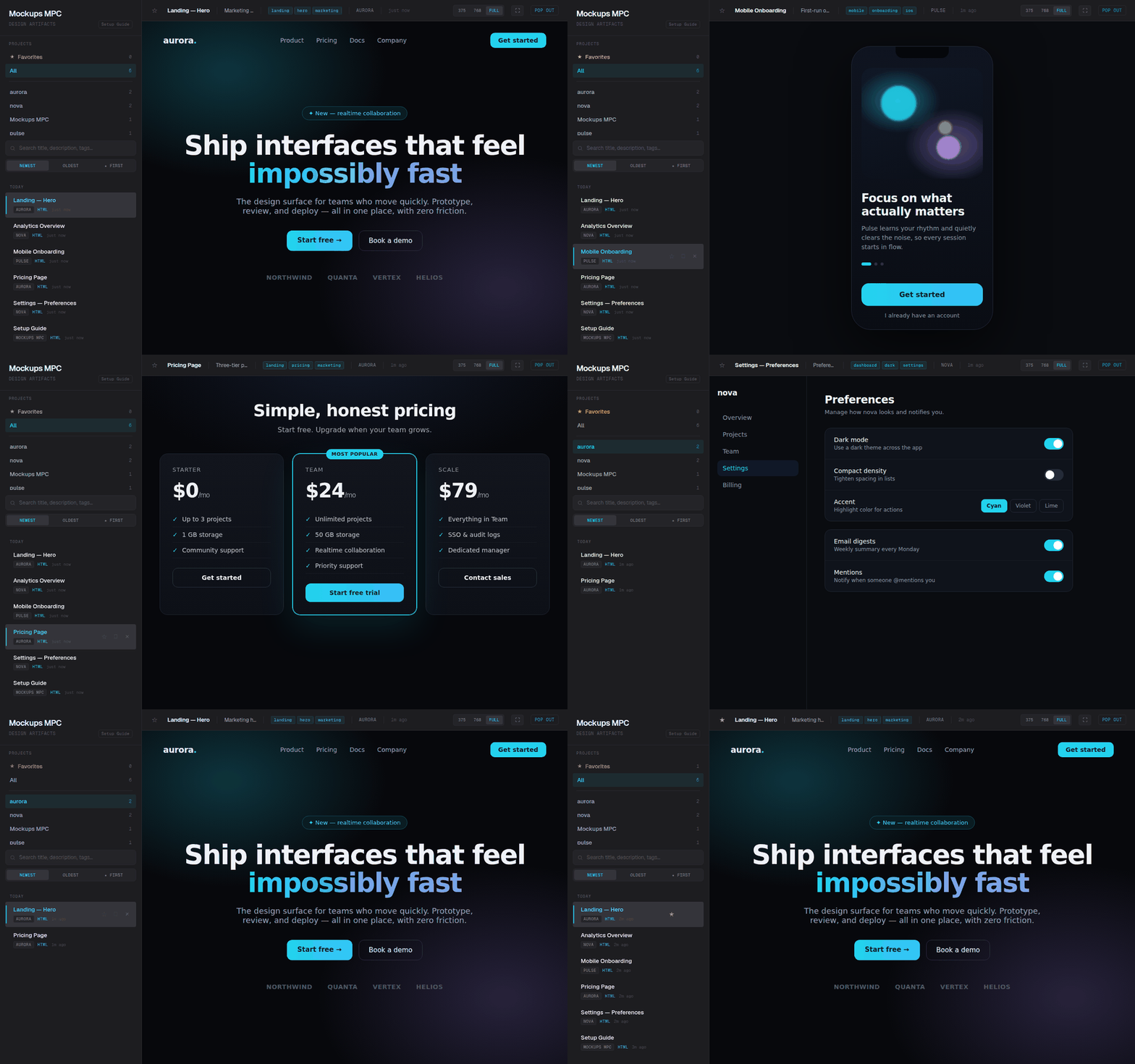
Layout: Sidebar (project list + chronological feed with title filter + infinite scroll) + main viewer (iframe for HTML, img for images/SVG) + metadata bar + pop-out link.
Theme: Techno Chic Minimalist — Space Grotesk, cyan accents, zinc/neutral dark backgrounds.
Project Structure
app/
├── main.py          # FastAPI app, lifespan, MCP mount, router includes
├── config.py        # Settings (DATA_DIR, DB_PATH, BASE_URL from env)
├── db.py            # SQLite init + CRUD (WAL mode, aiosqlite)
├── models.py        # Pydantic models
├── storage.py       # Slug generation, file write/read/delete, 25MB limit
├── mcp_server.py    # FastMCP instance, tool logic, tool wrappers
├── seed.py          # Auto-seed setup guide on empty DB
├── routes/
│   ├── api.py       # JSON API endpoints
│   └── gallery.py   # Gallery page + raw mockup serving
├── templates/
│   └── gallery.html # Jinja2 gallery template
└── static/
    ├── style.css         # Gallery theme
    └── setup-guide.html  # Self-contained setup guide page
Development
python -m venv .venv
source .venv/bin/activate
pip install -r requirements.txt
pytest tests/ -v
uvicorn app.main:app --reload
The test suite covers storage, database, MCP tools, API routes, upload, and gallery.
License
MIT — see LICENSE.
Установка Mockups MPC
У этого сервера нет опубликованного пакета — он собирается из исходников. Открой репозиторий и следуй инструкции в README.
▸ github.com/kgNatx/mockups-mpcFAQ
Mockups MPC MCP бесплатный?
Да, Mockups MPC MCP бесплатный — установка в пару кликов через Unyly без оплаты.
Нужен ли API-ключ для Mockups MPC?
Нет, Mockups MPC работает без API-ключей и переменных окружения.
Mockups MPC — hosted или self-hosted?
Доступен hosted-вариант: Unyly запускает сервер в облаке, локальная установка не обязательна.
Как установить Mockups MPC в Claude Desktop, Claude Code или Cursor?
Открой Mockups MPC на unyly.org, выбери вкладку своего клиента (Claude Desktop, Claude Code, Cursor) и нажми Install — конфиг сгенерируется автоматически, без правки JSON.
Похожие MCP
Fetch
Web content fetching and conversion for efficient LLM usage.
AWS KB Retrieval
Retrieval from AWS Knowledge Base using Bedrock Agent Runtime.
 автор: modelcontextprotocol
Spring AI MCP Server
Provides auto-configuration for setting up an MCP server in Spring Boot applications.
llm-analysis-assistant
A very streamlined mcp client that supports calling and monitoring stdio/sse/streamableHttp, and can also view request responses through the /logs page. It also
 автор: xuzexin-hz
Compare Mockups MPC with
Не уверен что выбрать?
Найди свой стек за 60 секунд
Автор?
Embed-бейдж для README
Похожее
Все в категории ai