
Moss Brain
БесплатноНе проверенMCP server that provides semantic memory with search, related-content traversal, and write-back capabilities, all powered by local embeddings of your notes, doc

Описание
MCP server that provides semantic memory with search, related-content traversal, and write-back capabilities, all powered by local embeddings of your notes, documents, and chat histories.
README
Turn everything you've ever written — or watched, or read — into a connected second brain. No LLM, no cost, no waiting.
Dump in your notes, PDFs, YouTube links, article URLs — and your entire
conversation history from Claude, ChatGPT, and Gemini. moss-brain embeds
all of it locally with Moss, discovers the connections
between your ideas in seconds, writes them into your Obsidian vault as real
[[wikilinks]], and serves one shared memory back to all of those AIs
over MCP at ~2ms per recall — with memory they can write to, not just
read.
This is a real vault — 559 notes, 2,819 connections, built in 27 seconds with zero LLM calls, rendered natively by Obsidian:
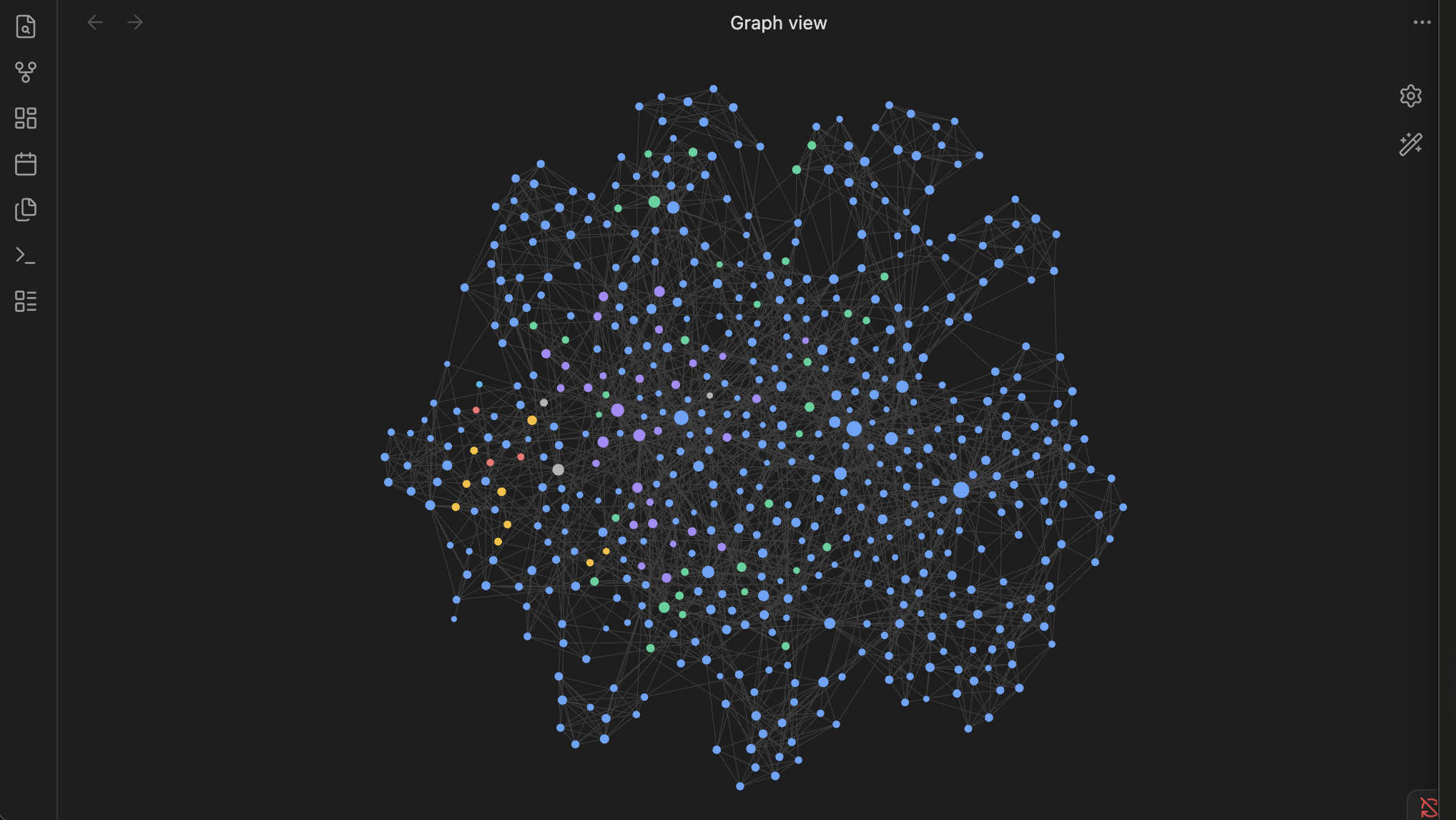
Blue = imported conversation archive · purple = knowledge articles · green = captures · amber/red = active context. Every edge was discovered from embedding similarity — no model ever "read" the notes.
your files & links ──▶ ingest ──▶ searchable brain (local, ~2ms recall)
                         │
                         ├──▶ connect ──▶ knowledge graph + [[wikilinks]] in Obsidian
                         ├──▶ watch ────▶ auto-index as you write
                         ├──▶ remember ─▶ timestamped episodic memory
                         └──▶ serve ────▶ 6 memory tools for Claude / Hermes / Cursor
Quick start
pip install git+https://github.com/Naut1cal5/moss-brain
moss-brain init                    # paste 2 free keys from moss.dev — 30 seconds
moss-brain ingest ~/Documents/notes ~/Downloads/claude-export/ \
    "https://youtube.com/watch?v=..." "https://any-article.com/..."
moss-brain connect --write-links ~/Documents/notes
That's it. Open Obsidian's graph view and watch your notes organize themselves. Then ask it anything:
$ moss-brain ask "what did that lecture say about attention mechanisms"
(2.9 ms)
[0.812] [youtube/stanford-cs25-transformers — Attention] ...
[0.798] [notes/deep-learning.md — Self-Attention] ...
Why this is different
Most second-brain systems today use one of three architectures, each with real strengths. moss-brain explores a fourth trade-off: keep the LLM out of the write path entirely.
| LLM-maintained wiki (Karpathy's design) | Obsidian AI plugins (Smart Connections et al.) | LLM knowledge graphs (Cognee, Graphiti) | moss-brain | |
|---|---|---|---|---|
| How connections form | LLM reads every note, writes backlinks | local embeddings, one note at a time | LLM extracts entities/relations | embeddings are the connections |
| Cost to connect 559 notes | ~$5–15 per full pass, every pass | free | $10+ per ingest | $0 |
| Time to connect 559 notes | tens of minutes | n/a (no batch mode) | minutes–hours | 27 seconds |
Writes real [[wikilinks]] into your vault |
yes | sidebar view | no | yes — --write-links |
| Works outside Obsidian | no | no | yes | yes — CLI, MCP, any folder |
| Agent memory over MCP | no | no | partial | yes — 6 tools, ~2ms |
| Agent can write memories back | no | no | varies | yes — memory_remember |
| Ingests history from Claude, ChatGPT, Gemini, DeepSeek, Kimi, Grok, Qwen, GLM… | no | no | varies | yes — universal parser |
| Ingests YouTube transcripts + articles from a link | no | no | no | yes |
| One brain across Claude Code, Codex, Gemini CLI, OpenCode, Antigravity, ChatGPT… | no | no | no | yes — stdio + HTTP MCP |
The insight: an embedding model already placed every idea in a semantic space when it indexed them, so the relationships are sitting there for free. moss-brain just asks the index "what's nearest to this note?" — a local ~2ms query per note — and the nearest neighbors become weighted edges. Related ideas cluster, recurring themes become hubs, and the entire graph rebuilds in seconds every time you add material.
moss-brain also takes a different storage approach than agent-memory platforms like Mem0 and Letta/MemGPT (both excellent at what they do): here, the memory is your vault — plain markdown you own, browse in Obsidian, and grep like any other file.
Command reference
| Command | What it does |
|---|---|
moss-brain init |
30-second setup — writes your free moss.dev keys to .env |
moss-brain ingest <paths/links...> |
mass-index markdown, txt, PDFs, Claude exports, YouTube links, article URLs |
moss-brain ask "<question>" [-k N] |
instant semantic recall in your terminal |
moss-brain remember "<text>" |
save a timestamped memory, searchable immediately |
moss-brain watch <paths...> |
auto-index files the moment you edit them |
moss-brain connect [--neighbors N] |
build the connection graph, open interactive viz |
moss-brain connect --write-links VAULT |
also write [[wikilinks]] into your Obsidian notes |
moss-brain serve |
run the MCP memory server (stdio — Claude, Cursor, Gemini CLI, Hermes) |
moss-brain serve --http [--port N] |
serve over streamable HTTP (ChatGPT connectors, remote clients) |
moss-brain hermes --install |
wire memory into Hermes Agent automatically |
moss-brain -i work <cmd> |
any command against a separate brain (see Multiple brains) |
moss-brain --local <cmd> / --cloud <cmd> |
persist to disk vs your Moss project (see Local or cloud) |
What can it ingest?
| Input | How |
|---|---|
| Markdown / plain text / anything texty | point at the folder |
| PDFs, Word docs (.docx), HTML files | automatic text extraction, stdlib only |
| Your entire Claude history | claude.ai → Settings → export → point at conversations.json |
| Your entire ChatGPT history | chatgpt.com → Settings → Data controls → Export → same command, format auto-detected |
| Your Gemini history | Google Takeout → My Activity → Gemini Apps (JSON) → point at MyActivity.json |
| Every other AI — DeepSeek, Kimi, Grok, Qwen, Z.ai/GLM, Mistral, Meta AI… | universal chat-export parser — point at any exported .json |
| YouTube videos | paste the link — the full transcript becomes part of your brain |
| Web articles | paste any URL — readable text extracted, no extra dependencies |
Getting your history out of each AI
| AI | How to export |
|---|---|
| Claude | claude.ai → Settings → Privacy → Export data |
| ChatGPT | chatgpt.com → Settings → Data controls → Export data |
| Gemini | Google Takeout → My Activity → Gemini Apps |
| Grok | grok.com → Settings → Data → Export data |
| DeepSeek / Kimi / Qwen / Z.ai (GLM) / Mistral Le Chat / Meta AI | no official bulk export yet — use a chat-export browser extension (LLM Chat Exporter, YourAIScroll) and save as JSON or Markdown |
Then one command, regardless of source:
moss-brain ingest ~/exports/
moss-brain doesn't hardcode each vendor's schema. Claude, ChatGPT, and
Gemini exports are recognized natively; everything else goes through a
universal parser that walks any JSON for role/content message structures
(role/sender/author × content/text/parts, nested or flat,
Unix or ISO timestamps). Tested against DeepSeek, Kimi, and Grok-style
exports — and it'll almost certainly swallow whatever format the next
frontier lab invents. Markdown exports need no parser at all: they're
already the native format.
moss-brain ingest "https://www.youtube.com/watch?v=VIDEO_ID"
#   + fetched — full transcript, titled via oembed, chunked, connected

moss-brain ingest "https://en.wikipedia.org/wiki/Zettelkasten"
#   + fetched — article text extracted and indexed
Everything you feed it joins the same semantic space: a lecture you watched
links itself to the notes you wrote about it. Chat exports are sanitized at
ingest (role-tag patterns like Human: are neutralized) so agent frameworks
can safely read the chunks later.
Your Obsidian vault, self-organizing
connect --write-links appends an idempotent ## Related (moss-brain)
block to each note with its strongest semantic neighbors as [[wikilinks]].
Obsidian's native graph view picks them up instantly — no plugin required.
Re-run any time; blocks are replaced, never duplicated.
Pair it with watch and the brain maintains itself:
moss-brain watch ~/Documents/notes                    # indexes as you write
moss-brain connect --write-links ~/Documents/notes    # re-link whenever
Give your AI agent a real memory
moss-brain serve is an MCP server exposing six tools — read and write:
| Tool | What it does |
|---|---|
memory_search(query, k, recent) |
semantic search over everything, ~2ms; recent=True re-ranks so this week beats last year |
memory_related(note, k) |
traverse the connection graph around any note |
memory_remember(text) |
write a timestamped memory — saved to the vault as markdown, indexed instantly |
memory_reindex() |
pick up new/edited files |
memory_stats() |
index status |
memory_remember is what turns a search index into a brain. When your agent
learns something mid-conversation — a decision you made, a preference, a
deadline — it saves the memory and every future conversation can recall it.
Memories land in remembered/YYYY-MM-DD.md inside your vault: plain
markdown you can read, edit, and see in your Obsidian graph like any other
note.
recent=True solves the classic RAG failure where a question about now
surfaces something from eight months ago: dated chunks get an exponential
recency boost (score × (0.45 + 0.55·e^(−age/45d))), undated evergreen
notes are unaffected.
Hermes Agent — one command
moss-brain hermes --install
It backs up and edits ~/.hermes/config.yaml, prompts for keys if missing,
and enables the MCP toolset. Restart your gateway — done. Your Discord/
Telegram bot now:
- recalls anything you've ever written, mid-conversation (
memory_search) - remembers new facts you tell it, across sessions (
memory_remember) - explores — "what else do I have on this?" (
memory_related)
To make memory automatic rather than on-request, add one rule to your
~/.hermes/SOUL.md:
## Memory Rules (highest priority)
- Before answering anything about the user, call memory_search first.
- When the user states a fact, decision, or preference worth keeping,
  call memory_remember with a one-line summary.
- For "current status" questions, use memory_search with recent=true.
That's the difference between a stateless assistant and an agent with your entire history: "you told me about this three weeks ago" instead of "could you remind me what that is?"
Connect to every AI you use
The brain speaks MCP, which every major AI client now supports — so the same memory follows you across Claude, ChatGPT, Gemini, Cursor, and your agents.
Claude Desktop / Claude Code / Cursor — add to the MCP config
(claude_desktop_config.json, .mcp.json, or Cursor settings):
{
  "mcpServers": {
    "moss-brain": {
      "command": "moss-brain",
      "args": ["serve"],
      "env": {
        "MOSS_PROJECT_ID": "...",
        "MOSS_PROJECT_KEY": "...",
        "BRAIN_VAULT": "/path/to/your/notes"
      }
    }
  }
}
Gemini CLI / Qwen Code — same block in ~/.gemini/settings.json
(or ~/.qwen/settings.json — Qwen Code is a Gemini CLI fork) under
mcpServers. Tools are discovered automatically.
Codex CLI (OpenAI) — TOML instead of JSON, in ~/.codex/config.toml:
[mcp_servers.moss-brain]
command = "moss-brain"
args = ["serve"]
env = { MOSS_PROJECT_ID = "...", MOSS_PROJECT_KEY = "...", BRAIN_VAULT = "/path/to/notes" }
OpenCode — in opencode.json:
{
  "mcp": {
    "moss-brain": {
      "type": "local",
      "command": ["moss-brain", "serve"],
      "environment": { "MOSS_PROJECT_ID": "...", "MOSS_PROJECT_KEY": "...", "BRAIN_VAULT": "/path/to/notes" }
    }
  }
}
Antigravity / Windsurf / VS Code / JetBrains — all take the standard
mcpServers JSON block above in their MCP settings panel (Antigravity:
Settings → MCP Servers → Add; VS Code: mcp.json).
Kimi CLI (Moonshot) — supports MCP via its config; use the same command/args pair. For Kimi K2 running inside Claude Code or OpenCode (the common setup), the brain is already there — MCP servers belong to the client, not the model.
Z.ai GLM / DeepSeek / any Anthropic-compatible model — same story: GLM coding plans and DeepSeek endpoints plug into Claude Code, OpenCode, or Cline as the model, and the client mounts moss-brain. Swap models freely; the memory stays.
ChatGPT — ChatGPT connects to remote MCP servers (Settings → Connectors → Advanced → Developer mode). Run the brain over HTTP and expose it with any tunnel:
moss-brain serve --http --port 8765     # endpoint: http://127.0.0.1:8765/mcp
ngrok http 8765                          # or cloudflared, tailscale funnel...
Paste the public /mcp URL as a new connector — ChatGPT can now search
and write to the same brain as everything else.
Anything else — serve is stdio MCP and serve --http is streamable
HTTP; between the two, any MCP-capable client (open-source agents,
LangChain, custom apps) can mount your brain. One brain, every AI you use,
for code and for life.
How it works (technical)
Chunking. Files are split on markdown headings into heading-bounded
chunks, each prefixed with [source — heading] and capped at 4,000 chars.
Chunk IDs are md5(source#index), so re-ingesting is idempotent — same
content, same ID, no duplicates.
Embedding. Moss embeds every chunk locally — nothing leaves your
machine during indexing, and there is no per-document cost. After ingest
the index persists per your BRAIN_STORAGE choice — a local disk snapshot
(~1s restart) or your private Moss project (~1.6s restart) — instead of
re-embedding for minutes on every start.
Connections. connect takes each note's first chunk as a probe, runs a
local ~2ms nearest-neighbor query, and keeps neighbors above a similarity
floor (default 0.35) as weighted edges. 559 notes → 2,819 edges in 27s,
zero API calls to any LLM.
Recall. Queries embed locally and search locally: 1.7–3.4ms measured. Works offline once the index is loaded.
Sanitization. Role-tag patterns (Human:, <|im_start|>,
[INST], …) are neutralized at ingest so chunks can be safely injected
into any agent framework's context without tripping prompt-injection
filters.
Episodic memory. memory_remember appends to
remembered/YYYY-MM-DD.md in your vault, indexes the entry with its
timestamp, and pushes the index — the memory survives restarts and shows up
in Obsidian. Recency-aware search reads the date straight from the chunk
prefix.
Where your brain lives: local or cloud
Embedding and queries always run locally — the only question is where
the index persists between restarts. moss-brain init asks once; override
any time with --local / --cloud flags or BRAIN_STORAGE in .env.
local |
cloud |
|
|---|---|---|
| Index snapshot | ~/.moss-brain/<index>/ on your disk |
your private Moss project |
| Chunk text + vectors leave your machine | never | on each persist |
| Restart time (559-file vault) | ~1 s | ~1.6 s |
| Resume on a second device | no — copy the folder yourself | yes |
| Back up | it's a folder — Time Machine, git, rsync | automatic |
moss-brain --local ingest ~/notes     # snapshot to disk, nothing uploaded
moss-brain --cloud ingest ~/notes     # push to your Moss project
⚠️ Local-mode caveats (read before relying on it)
- It uses moss-core APIs not yet in the public Python wrapper
(
save_to_disk/load_from_disk). moss-brain probes for them and falls back to a cloud push with a printed warning if a futuremossrelease renames them — your data is never lost, but that fallback push does upload. Pin yourmossversion if this matters to you. - Startup still makes one network round-trip —
MossClientvalidates your keys, and the SDK reports usage telemetry in the background. Local mode means your content stays home, not that the process is air-gapped. - Snapshots are per-machine. Two machines in local mode are two
independent brains; use cloud mode (or sync
~/.moss-brain/yourself) to share one. - Corrupt or partial snapshot (disk full, killed mid-save): the load fails with a warning and moss-brain transparently falls back to cloud resume or re-embedding. Worst case is a one-time indexing wait, never data loss — your source files are always the truth.
Multiple brains
Keep separate brains for separate lives — one flag:
moss-brain -i work ingest ~/work/notes
moss-brain -i work ask "what did the design review decide"
moss-brain -i research ingest "https://arxiv.org/abs/..."
Each -i NAME is an isolated Moss index (BRAIN_INDEX env var works too,
e.g. per-agent in MCP config — give each agent its own brain).
Real numbers (559-file vault, M-series MacBook)
| Operation | Time | Cost |
|---|---|---|
| Ingest 559 files → 3,821 chunks | ~4 min (one-time) | $0 |
| Build 2,819-edge connection graph | 27 s | $0 |
| Semantic query | 1.7–3.4 ms | $0 |
| Save + index a new memory | < 2 s | $0 |
| Restart (local snapshot) | ~1 s | $0 |
| Restart (resume from cloud) | 1.6 s | $0 |
FAQ
Does my data leave my machine? Embedding and queries always run
locally. In local mode the index snapshots to ~/.moss-brain/ and your
content never uploads (see caveats above). In cloud mode the index is
pushed to your private Moss project — vectors + chunk text under your own
account, same trust model as a private repo.
What does it cost? Nothing. Local embedding and queries are free and unlimited; the moss.dev free tier covers the index persistence.
Do I need Obsidian? No — any folder of markdown works. Obsidian is just
the nicest way to see the brain (--write-links + graph view).
Can multiple agents share one brain? Yes — point them at the same
BRAIN_INDEX. Or isolate them with one index each.
Something failed mid-ingest? Unreadable files are skipped with a warning, everything else continues. Re-run safely — chunk IDs are deterministic, so nothing duplicates.
License
MIT
Установка Moss Brain
У этого сервера нет опубликованного пакета — он собирается из исходников. Открой репозиторий и следуй инструкции в README.
▸ github.com/Naut1cal5/moss-brainFAQ
Moss Brain MCP бесплатный?
Да, Moss Brain MCP бесплатный — установка в пару кликов через Unyly без оплаты.
Нужен ли API-ключ для Moss Brain?
Нет, Moss Brain работает без API-ключей и переменных окружения.
Moss Brain — hosted или self-hosted?
Self-hosted: сервер запускается локально на твоей машине командой из раздела установки.
Как установить Moss Brain в Claude Desktop, Claude Code или Cursor?
Открой Moss Brain на unyly.org, выбери вкладку своего клиента (Claude Desktop, Claude Code, Cursor) и нажми Install — конфиг сгенерируется автоматически, без правки JSON.
Похожие MCP
Gmail
Read, send and search emails from Claude
 автор: Google
Slack
Send, search and summarize Slack messages
 автор: Slack
Runbear
No-code MCP client for team chat platforms, such as Slack, Microsoft Teams, and Discord.
Discord Server
A community discord server dedicated to MCP by [Frank Fiegel](https://github.com/punkpeye)
Compare Moss Brain with
Не уверен что выбрать?
Найди свой стек за 60 секунд
Автор?
Embed-бейдж для README
Похожее
Все в категории communication