
MoySklad Server
БесплатноНе проверенMCP server for MoySklad (МойСклад) warehouse and CRM management API. 21 tools covering the full order lifecycle: products, stock, counterparties, customer order

Описание
MCP server for MoySklad (МойСклад) warehouse and CRM management API. 21 tools covering the full order lifecycle: products, stock, counterparties, customer orders, shipments, supplies, warehouses, organizations, reports, and webhooks.
README
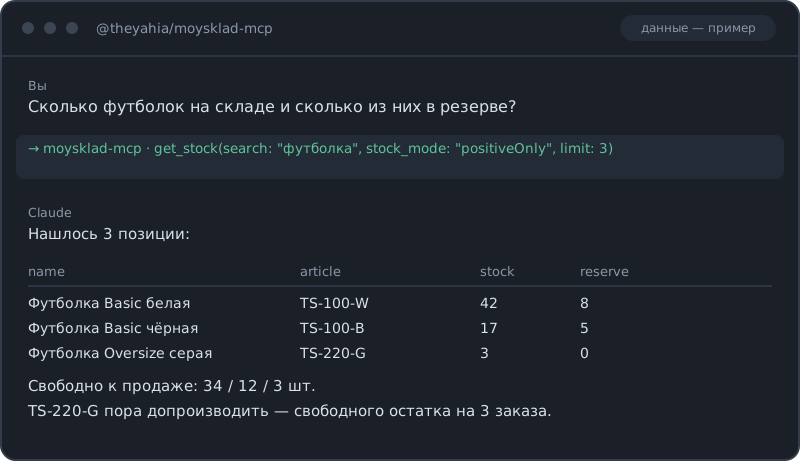
Если вы искали, как подключить МойСклад к Claude или другому ИИ-агенту, — этот сервер закрывает весь торгово-складской цикл через JSON API 1.2: каталог и цены, остатки по складам, контрагенты, заказы покупателей и поставщикам, отгрузки, приёмки, перемещения, инвентаризации, списания, возвраты, счета, платежи и касса, отчёты по прибыли и оборотам, аудит и вебхуки. Спрашиваете «сколько футболок свободно к продаже» или «какая маржа по каждому товару за август» — получаете таблицу с цифрами, а не выгрузку в Excel. Цены во всех инструментах в рублях (перевод в копейки, которых требует API МойСклад, сервер делает сам), лимит запросов соблюдается автоматически.
Часть WWmcp — набора MCP-серверов для развивающихся рынков.
Быстрый старт
Claude Desktop
Добавьте в claude_desktop_config.json:
{
  "mcpServers": {
    "moysklad": {
      "command": "npx",
      "args": ["-y", "@theyahia/moysklad-mcp"],
      "env": {
        "MOYSKLAD_TOKEN": "your-bearer-token"
      }
    }
  }
}
Чтобы использовать логин и пароль вместо токена, замените блок env на:
"env": { "MOYSKLAD_LOGIN": "[email protected]", "MOYSKLAD_PASSWORD": "your-password" }
Claude Code
claude mcp add moysklad --env MOYSKLAD_TOKEN=your-bearer-token -- npx -y @theyahia/moysklad-mcp
Cursor / Windsurf
Добавьте в настройки MCP:
{
  "moysklad": {
    "command": "npx",
    "args": ["-y", "@theyahia/moysklad-mcp"],
    "env": { "MOYSKLAD_TOKEN": "your-bearer-token" }
  }
}
Авторизация
| Переменная | Описание |
|---|---|
MOYSKLAD_TOKEN |
Bearer-токен (предпочтительно) |
MOYSKLAD_LOGIN + MOYSKLAD_PASSWORD |
HTTP Basic-авторизация |
Токен выдаётся в МоёмСкладе: Настройки → Пользователи → Токены доступа (также работает POST /security/token с Basic-авторизацией). Генерация нового токена отзывает предыдущий.
Нужные права: у пользователя или токена должен быть доступ к тем сущностям, с которыми вы работаете. Читающим инструментам нужны права просмотра, создающим и изменяющим — права редактирования соответствующего типа документов. Вебхуки и часть отчётов требуют платного тарифа МойСклад.
Цены
API МойСклад хранит деньги в копейках (1 рубль = 100 копеек). Сервер конвертирует автоматически:
- На вход: передавайте цены и суммы в рублях (например,
1500.50) - На выход: цены и суммы возвращаются в рублях
- (Отчёт
get_dashboardпроксируется как есть, поэтому денежные значения в нём остаются в копейках.)
Если у товара есть цена продажи, МойСклад требует тип цены. Сервер сам подставляет тип цены по умолчанию из вашего аккаунта (берёт из list_price_types); чтобы выбрать конкретный, передайте price_type_href.
Инструменты (60)
Товары и каталог
| Инструмент | Описание |
|---|---|
search_products |
Поиск товаров по названию или артикулу |
get_product |
Товар по UUID (raw — полный объект) |
create_product |
Создать товар (тип цены подставляется автоматически) |
update_prices |
Обновить цены продажи, закупки и минимальную |
search_assortment |
Сквозной поиск по товарам, модификациям, услугам и комплектам |
list_price_types |
Типы цен (первый — по умолчанию) |
search_variants / search_bundles / search_services |
Поиск модификаций / комплектов / услуг |
create_service |
Создать услугу |
Остатки
| Инструмент | Описание |
|---|---|
get_stock |
Текущие остатки (количество, резерв, в пути) |
get_stock_by_store |
Остатки в разрезе складов |
get_stock_current |
Быстрый срез текущих остатков |
Контрагенты
| Инструмент | Описание |
|---|---|
get_counterparties |
Поиск по названию, ИНН или телефону |
get_counterparty |
Полная карточка (raw — полный объект) |
create_counterparty |
Создать покупателя или поставщика |
Заказы и отгрузки
| Инструмент | Описание |
|---|---|
create_customer_order / get_orders / get_customer_order / update_customer_order_status |
Жизненный цикл заказа покупателя |
create_purchase_order / get_purchase_orders |
Заказы поставщикам |
create_demand |
Отгрузка, привязанная к заказу и складу |
create_supply |
Приёмка (поступление от поставщика) |
create_sales_return / create_purchase_return |
Возвраты от покупателей и поставщикам |
Складские документы
| Инструмент | Описание |
|---|---|
create_move / get_moves |
Перемещение между складами |
create_enter / get_enters |
Оприходование |
create_loss / get_losses |
Списание |
create_inventory / get_inventories |
Инвентаризация |
Финансы
| Инструмент | Описание |
|---|---|
create_payment_in / create_payment_out |
Входящие и исходящие банковские платежи |
create_cash_in / create_cash_out |
Приходные и расходные кассовые ордера |
create_invoice_out / create_invoice_in / get_invoices_out |
Счета покупателям и от поставщиков |
Отчёты
| Инструмент | Описание |
|---|---|
get_profit_report |
Прибыль по товарам (выручка, себестоимость, маржа) |
get_sales_report |
Продажи по товарам (количество, выручка) |
get_dashboard |
Показатели дашборда за день, неделю, месяц |
get_turnover |
Оборачиваемость товаров за период |
get_money_report |
Текущие остатки денег по счетам и кассам |
Справочники и аудит
| Инструмент | Описание |
|---|---|
list_stores / list_organizations |
Склады и юрлица |
list_employees / list_currencies / list_product_folders |
Справочные данные |
get_metadata |
Метаданные сущностей (статусы, атрибуты) — здесь берутся href статусов заказа |
get_audit / get_entity_audit |
Журнал событий аккаунта и история одной сущности |
Вебхуки и универсальные инструменты
| Инструмент | Описание |
|---|---|
list_webhooks / create_webhook / update_webhook / delete_webhook |
Управление вебхуками (CREATE/UPDATE/DELETE/PROCESSED) |
get_documents / get_document |
Универсальные список и получение для любого типа сущностей, не покрытого выше |
HTTP-транспорт
HTTP_PORT=3000 npx @theyahia/moysklad-mcp
# или
npx @theyahia/moysklad-mcp --http 3000
Эндпоинты: POST /mcp (JSON-RPC), GET /health (статус). CORS выключен по умолчанию — HTTP-эндпоинт действует от имени вашего токена МойСклад, поэтому задавайте MOYSKLAD_HTTP_CORS_ORIGIN только если доверенному браузерному origin это действительно нужно.
Конфигурация (переменные окружения)
| Переменная | По умолчанию | Описание |
|---|---|---|
MOYSKLAD_TOKEN |
— | Bearer-токен |
MOYSKLAD_LOGIN / MOYSKLAD_PASSWORD |
— | Basic-авторизация |
MOYSKLAD_RATE_BUCKET |
20 |
Сколько запросов разрешено в трёхсекундном окне |
MOYSKLAD_MAX_CONCURRENT |
5 |
Максимум параллельных запросов (МойСклад допускает 5 на пользователя) |
MOYSKLAD_HTTP_CORS_ORIGIN |
— | Разрешённый CORS-origin для HTTP-транспорта |
HTTP_PORT |
— | Запустить транспорт Streamable HTTP на этом порту |
Ограничение частоты запросов
МойСклад считает «вес за 3 секунды» (≈45 единиц для токена решения, меньше для логина с паролем; отчёты get_stock и get_stock_by_store стоят по 5 единиц каждый). Встроенный лимитер — token bucket, который списывается по весу запроса, и по умолчанию он консервативен (MOYSKLAD_RATE_BUCKET=20), потому что API может временно отключить доступ после серии 429. Повторы на 429/5xx идут с задержкой и учитывают заголовок X-Lognex-Retry-After. С токеном решения корзину можно поднять ближе к 45.
Решение проблем
| Симптом | Причина и что делать |
|---|---|
Auth not configured |
Задайте MOYSKLAD_TOKEN (или MOYSKLAD_LOGIN + MOYSKLAD_PASSWORD). |
auth error 401/403 |
Токен недействителен или истёк, либо у пользователя нет прав на сущность. Новый токен отзывает старые. |
MoySklad HTTP 412 … |
Не хватает обязательного поля (например, исходящему платежу может требоваться статья расходов — передайте expense_item_href). Параметр указан в тексте ошибки. |
Много 429 / медленно |
Снизьте объём запросов или положитесь на встроенный лимитер; поднимайте MOYSKLAD_RATE_BUCKET только с токеном решения. |
HTTP 415 |
Среда выполнения не отправляет gzip — используйте Node ≥18 (его fetch делает gzip автоматически). |
| Вебхуки и часть отчётов не работают | Требуют платного тарифа МойСклад. |
E-commerce-стек
| Сервис | MCP-сервер | Что делает |
|---|---|---|
| МойСклад | @theyahia/moysklad-mcp |
Склад, товары, заказы |
| СДЭК | @theyahia/cdek-mcp |
Доставка, трекинг |
| DaData | @theyahia/dadata-mcp |
Проверка адресов |
| ЮKassa | @theyahia/yookassa-mcp |
Платежи |
Демо-промпты
«Покажи все товары с низким остатком (меньше 10 штук) и их текущие цены»
«Создай заказ покупателя для контрагента „ООО Рога и Копыта“ на 50 штук „Widget Pro“ по 1500 рублей, потом сделай отгрузку с основного склада»
«Перемести 20 штук SKU LP15 с основного склада в магазин, затем подними отчёт по прибыли за этот месяц»
Разработка
npm install        # зависимости + git-хуки (husky)
npm run build      # tsc -> dist/
npm run lint       # eslint
npm run typecheck  # tsc --noEmit
npm test           # vitest (требуется Node >=20)
npm run coverage   # vitest с покрытием
Опубликованный рантайм поддерживает Node ≥18; тестовая оснастка требует Node ≥20.
Справочник API
Основан на JSON API 1.2 МойСклад.
Лицензия
MIT
Установка MoySklad Server
У этого сервера нет опубликованного пакета — он собирается из исходников. Открой репозиторий и следуй инструкции в README.
▸ github.com/theYahia/moysklad-mcpFAQ
MoySklad Server MCP бесплатный?
Да, MoySklad Server MCP бесплатный — установка в пару кликов через Unyly без оплаты.
Нужен ли API-ключ для MoySklad Server?
Нет, MoySklad Server работает без API-ключей и переменных окружения.
MoySklad Server — hosted или self-hosted?
Доступен hosted-вариант: Unyly запускает сервер в облаке, локальная установка не обязательна.
Как установить MoySklad Server в Claude Desktop, Claude Code или Cursor?
Открой MoySklad Server на unyly.org, выбери вкладку своего клиента (Claude Desktop, Claude Code, Cursor) и нажми Install — конфиг сгенерируется автоматически, без правки JSON.
Похожие MCP
GitHub
PRs, issues, code search, CI status
 автор: GitHub
Filesystem
Secure file operations with configurable access controls.
Memory
Knowledge graph-based persistent memory system.
Template MCP Server
A CLI tool to create a new Model Context Protocol server project with TypeScript support, dual transport options, and an extensible structure
 автор: mcpdotdirect
Amap Maps Mcp Server
MCP server for using the AMap Maps API
 автор: duxiaohui
Supabase
Database, auth and storage
 автор: Supabase
Everything
Reference / test server with prompts, resources, and tools.
Git
Tools to read, search, and manipulate Git repositories.
Sequential Thinking
Dynamic and reflective problem-solving through thought sequences.
Time
Time and timezone conversion capabilities.
Compare MoySklad Server with
Не уверен что выбрать?
Найди свой стек за 60 секунд
Автор?
Embed-бейдж для README
Похожее
Все в категории development