
Multi-Agent A2A MCP Server
БесплатноНе проверенMCP server gateway providing a unified interface for calling REST APIs, local Python functions, and Ollama LLMs from multi-agent systems.

Описание
MCP server gateway providing a unified interface for calling REST APIs, local Python functions, and Ollama LLMs from multi-agent systems.
README
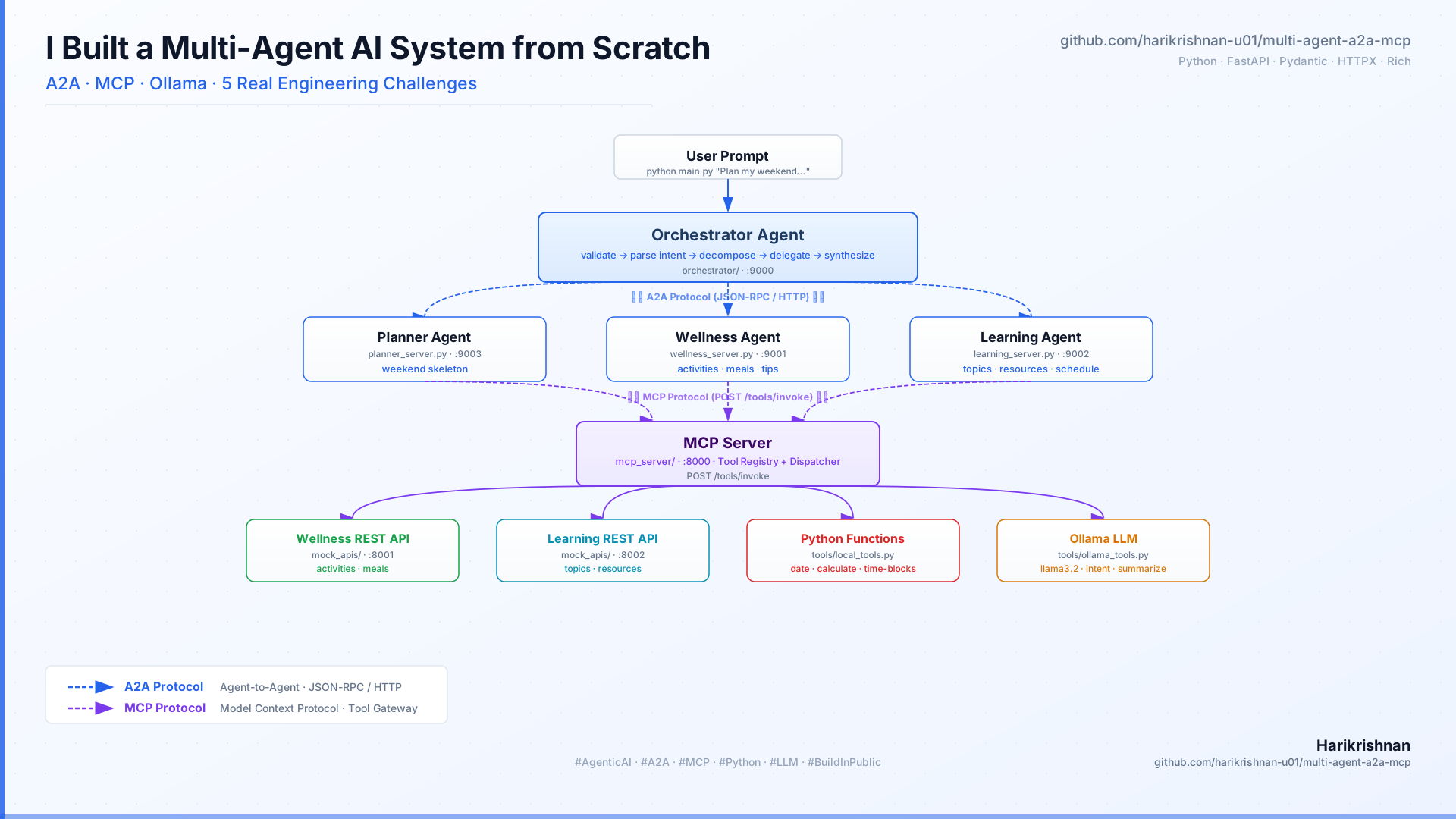
A learning project demonstrating Agentic AI using two real protocols — A2A (Agent-to-Agent) for orchestration and MCP (Model Context Protocol) for tool execution — with local LLMs via Ollama.
One goal → Orchestrator → Domain Agents (A2A) → MCP Server → Tools → Structured weekend plan.
Architecture
User (CLI)
    │
    ▼
Orchestrator Agent
    │
    │  A2A protocol (JSON-RPC / HTTP)
    ├──────────────┬──────────────┐
    ▼              ▼              ▼
Planner Agent  Wellness Agent  Learning Agent
  :9003          :9001           :9002
    │              │              │
    └──────────────┼──────────────┘
                   │  MCP protocol (POST /tools/invoke)
                   ▼
            MCP Server :8000
                   │
       ┌───────────┼──────────────┐
       ▼           ▼              ▼
 Wellness API  Learning API    Ollama
   :8001         :8002        llama3.2
6 services, 2 protocols, 3 layers:
| Layer | Services | Protocol |
|---|---|---|
| REST APIs (mock backends) | :8001 :8002 |
HTTP |
| MCP Server (tool gateway) | :8000 |
MCP — POST /tools/invoke |
| Domain Agents | :9001 :9002 :9003 |
A2A — JSON-RPC over HTTP |
Why Two Protocols?
A2A (Orchestrator → Domain Agents) makes each agent an independent, self-describing HTTP service. The orchestrator only needs a URL — not imported Python classes. Any A2A-compatible agent can plug in, regardless of language.
MCP (Domain Agents → Tools) gives agents a single interface to call REST APIs, local Python functions, and Ollama LLM — without knowing which one runs underneath. Add a new tool by editing config/settings.yaml, no code changes.
See docs/ARCHITECTURE.md for full protocol details, data flow trace, and JSON examples.
Class Relationships
The diagram above shows the service layer. The agents/ directory holds the Python classes behind those services:
BaseAgent  (agents/base_agent.py)
  │  provides: discover_tools(), mcp_call()
  │
  ├── OrchestratorAgent    ◄── called directly by main.py
  │         │
  │         │  A2AClient.send_task()  (JSON-RPC over HTTP)
  │         ├──────────────────────► planner_server.py  :9003
  │         │                              └── instantiates PlannerAgent
  │         ├──────────────────────► wellness_server.py :9001
  │         │                              └── instantiates WellnessAgent
  │         └──────────────────────► learning_server.py :9002
  │                                        └── instantiates LearningAgent
  │
  ├── PlannerAgent         (wrapped by domain_agents/planner_server.py)
  ├── WellnessAgent        (wrapped by domain_agents/wellness_server.py)
  ├── LearningAgent        (wrapped by domain_agents/learning_server.py)
  └── ExecutionAgent       ◄── called directly by OrchestratorAgent._synthesize()
                                (no A2A server — only assembles results the orchestrator already holds)
Three agents are wrapped in A2A HTTP servers (domain_agents/); two are called in-process:
| Class | Called by | A2A server? |
|---|---|---|
OrchestratorAgent |
main.py |
No |
PlannerAgent |
planner_server.py via A2A |
Yes — :9003 |
WellnessAgent |
wellness_server.py via A2A |
Yes — :9001 |
LearningAgent |
learning_server.py via A2A |
Yes — :9002 |
ExecutionAgent |
OrchestratorAgent._synthesize() |
No |
Quick Start
# 1. Install dependencies
python3 -m venv .venv && source .venv/bin/activate
pip install -r requirements.txt

# 2. Start Ollama (separate terminal)
ollama pull llama3.2
ollama serve

# 3. Run the full pipeline
python3 main.py

# 4. Or use the interactive REPL (test multiple prompts without restarting)
python3 scripts/chat.py
Full prerequisites and troubleshooting: docs/SETUP.md
Project Structure
agent-mcp/
├── main.py                         ← starts 6 services + runs pipeline + renders output
├── requirements.txt
├── config/
│   └── settings.yaml               ← all ports, model names, 12 tool definitions, agent URLs
├── a2a/                            ← A2A protocol implementation
│   ├── types.py                    ← Pydantic models: AgentCard, Task, Message, Part
│   ├── server.py                   ← A2AServer base class (FastAPI + JSON-RPC routing)
│   └── client.py                   ← A2AClient — discover() + send_task()
├── domain_agents/                  ← domain agents as A2A HTTP servers
│   ├── wellness_server.py          ← Wellness Agent  :9001
│   ├── learning_server.py          ← Learning Agent  :9002
│   └── planner_server.py           ← Planner Agent   :9003
├── agents/                         ← agent logic (domain classes used by A2A servers)
│   ├── base_agent.py               ← BaseAgent ABC: discover_tools(), mcp_call()
│   ├── orchestrator.py             ← validate → parse_intent → A2A delegate → synthesize
│   ├── planner_agent.py            ← weekend skeleton via local MCP tools
│   ├── wellness_agent.py           ← activities/meals/tips via REST + Ollama MCP tools
│   ├── learning_agent.py           ← topics/resources/schedule via REST + Ollama MCP tools
│   └── execution_agent.py          ← final plan assembly + LLM summary
├── mcp_server/                     ← MCP tool gateway :8000
│   ├── server.py                   ← FastAPI: GET /tools, POST /tools/invoke
│   ├── registry.py                 ← ToolRegistry: register + dispatch by category
│   ├── tool_types.py               ← Pydantic wire models
│   └── tools/
│       ├── local_tools.py          ← date, math, time-blocking (pure Python)
│       ├── rest_tools.py           ← httpx calls to :8001 / :8002
│       └── ollama_tools.py         ← sync Ollama LLM invocation
├── mock_apis/                      ← simulated backends
│   ├── wellness_api.py             ← FastAPI :8001 — activities, meals, sleep-tips
│   └── learning_api.py             ← FastAPI :8002 — topics, resources, schedule
├── core/
│   ├── config_loader.py            ← typed AppConfig from settings.yaml + .env
│   ├── ollama_client.py            ← async Ollama HTTP client with JSON extraction
│   └── logger.py                   ← Rich colored panel logger per agent layer
├── scripts/
│   ├── chat.py                     ← interactive REPL (services start once)
│   └── test_mcp.py                 ← automated smoke test for all 12 MCP tools
└── docs/
    ├── ARCHITECTURE.md             ← A2A + MCP protocols, data flow, design decisions
    ├── SETUP.md                    ← prerequisites, installation, running, troubleshooting
    └── TESTING.md                  ← layer-by-layer tests including A2A curl examples
Documentation
| Document | Contents |
|---|---|
| docs/ARCHITECTURE.md | A2A and MCP protocol details, full request trace, design decisions, how to extend |
| docs/SETUP.md | Prerequisites, installation, running services, troubleshooting |
| docs/TESTING.md | Layer-by-layer tests — REST APIs, MCP tools, A2A agent cards, full pipeline |
| docs/TRADEOFFS.md | Pros and cons of A2A, MCP, and the 6-server design — when to use each and when to skip |
| LIBRARIES.md | Every library used, why it was chosen, and a code example |
Установка Multi-Agent A2A MCP Server
У этого сервера нет опубликованного пакета — он собирается из исходников. Открой репозиторий и следуй инструкции в README.
▸ github.com/harikrishnan-u01/multi-agent-a2a-mcpFAQ
Multi-Agent A2A MCP Server MCP бесплатный?
Да, Multi-Agent A2A MCP Server MCP бесплатный — установка в пару кликов через Unyly без оплаты.
Нужен ли API-ключ для Multi-Agent A2A MCP Server?
Нет, Multi-Agent A2A MCP Server работает без API-ключей и переменных окружения.
Multi-Agent A2A MCP Server — hosted или self-hosted?
Self-hosted: сервер запускается локально на твоей машине командой из раздела установки.
Как установить Multi-Agent A2A MCP Server в Claude Desktop, Claude Code или Cursor?
Открой Multi-Agent A2A MCP Server на unyly.org, выбери вкладку своего клиента (Claude Desktop, Claude Code, Cursor) и нажми Install — конфиг сгенерируется автоматически, без правки JSON.
Похожие MCP
Fetch
Web content fetching and conversion for efficient LLM usage.
AWS KB Retrieval
Retrieval from AWS Knowledge Base using Bedrock Agent Runtime.
 автор: modelcontextprotocol
Spring AI MCP Server
Provides auto-configuration for setting up an MCP server in Spring Boot applications.
llm-analysis-assistant
A very streamlined mcp client that supports calling and monitoring stdio/sse/streamableHttp, and can also view request responses through the /logs page. It also
 автор: xuzexin-hz
Compare Multi-Agent A2A MCP Server with
Не уверен что выбрать?
Найди свой стек за 60 секунд
Автор?
Embed-бейдж для README
Похожее
Все в категории ai