

Описание
myCobot MCP(Model Context Protocol) server
README
Overview
This project is a MCP server for myCobot.
This MCP can send simple pick-and-place instructions to myCobot.
[!NOTE] This MCP server requires image feedback. Please connect an MCP client that can handle image feedback.
Chat example
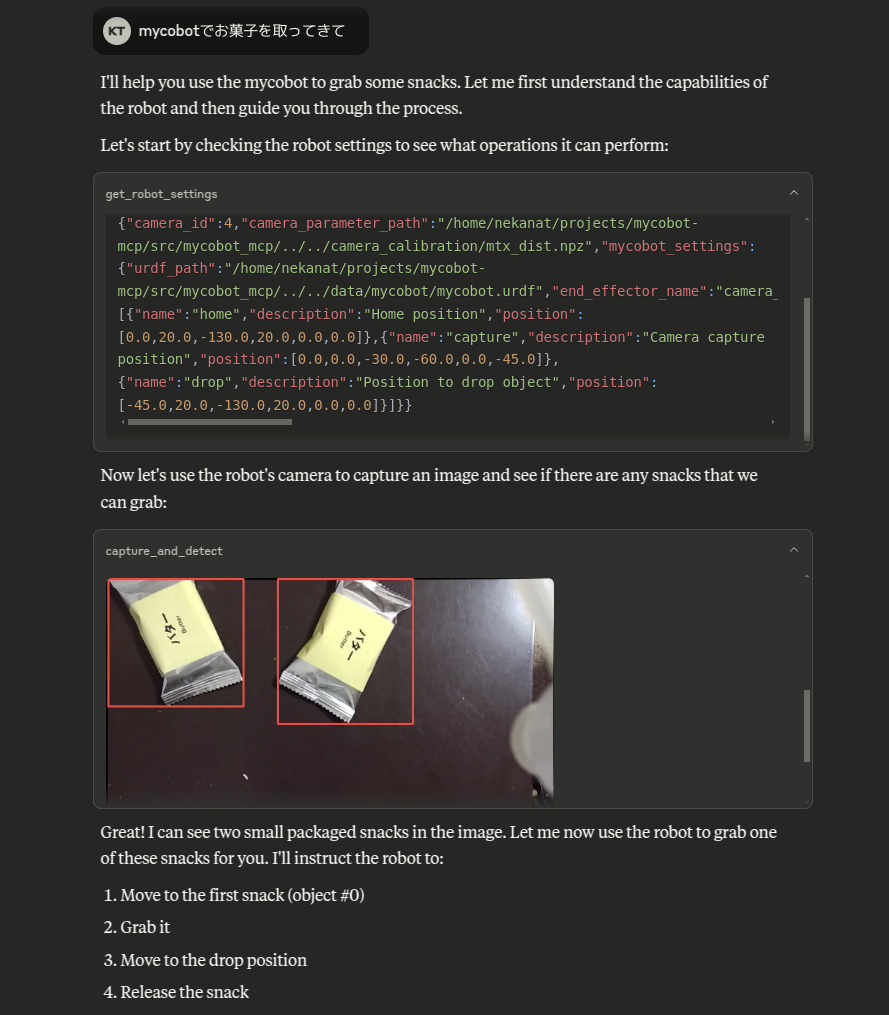
https://github.com/user-attachments/assets/e2c222b8-1ce2-4fb1-8b59-11ec5e973432
Setup
DDS API Token
This project uses the DDS API for object detection. Please register and issue an API key for DDS.
https://cloud.deepdataspace.com/
Claude-Desktop
If you want to run this project on Ubuntu, you can install Claude-Desktop from the following instructions.
https://github.com/aaddrick/claude-desktop-debian
Edit the claude_desktop_config.json file to add the following:
{
  "mcpServers": {
    "mycobot": {
      "command": "uvx",
      "args": [
        "mycobot-mcp",
        "--settings-path",
        "/path/to/settings.json"
      ],
      "env": {
        "DDS_API_TOKEN": "your-api-token"
      }
    }
  }
}
Or you can clone this repository and run the following command.
git clone https://github.com/neka-nat/mycobot-mcp.git
{
  "mcpServers": {
    "mycobot": {
      "command": "uv",
      "args": [
        "--directory",
        "/path/to/mycobot-mcp/",
        "run",
        "mycobot-mcp",
        "--settings-path",
        "/path/to/settings.json"
      ],
      "env": {
        "DDS_API_TOKEN": "your-api-token"
      }
    }
  }
}
Hardware
This software assumes the following hardware configuration.
Parameters
Create a settings.json file to configure the myCobot hardware and the camera.
The sample is here.
{
    "camera_id": 0,
    "camera_parameter_path": "/path/to/camera_calibration/mtx_dist.npy",
    "mycobot_settings": {
        "urdf_path": "/path/to/mycobot.urdf",
        "end_effector_name": "camera_flange",
        "port": "/dev/ttyACM0",
        "baud": 115200,
        "default_speed": 40,
        "default_z_speed": 20,
        "suction_pin": 5,
        "command_timeout": 5,
        "use_gravity_compensation": false,
        "end_effector_height": 0.065,
        "object_height": 0.01,
        "release_height": 0.05,
        "places": [
            {
                "name": "home",
                "description": "Home position",
                "position": [0, 20, -130, 20, 0, 0]
            },
            {
                "name": "capture",
                "description": "Camera capture position",
                "position": [0, 0, -30, -60, 0, -45]
            },
            {
                "name": "drop",
                "description": "Position to drop object",
                "position": [-45, 20, -130, 20, 0, 0]
            }
        ]
    }
}
Change port permission
When you connect mycobot, you need to change the permission.
sudo chmod 666 /dev/ttyACM0
Установка Mycobot
У этого сервера нет опубликованного пакета — он собирается из исходников. Открой репозиторий и следуй инструкции в README.
▸ github.com/neka-nat/mycobot-mcpFAQ
Mycobot MCP бесплатный?
Да, Mycobot MCP бесплатный — установка в пару кликов через Unyly без оплаты.
Нужен ли API-ключ для Mycobot?
Нет, Mycobot работает без API-ключей и переменных окружения.
Mycobot — hosted или self-hosted?
Self-hosted: сервер запускается локально на твоей машине командой из раздела установки.
Как установить Mycobot в Claude Desktop, Claude Code или Cursor?
Открой Mycobot на unyly.org, выбери вкладку своего клиента (Claude Desktop, Claude Code, Cursor) и нажми Install — конфиг сгенерируется автоматически, без правки JSON.
Похожие MCP
Fetch
Web content fetching and conversion for efficient LLM usage.
AWS KB Retrieval
Retrieval from AWS Knowledge Base using Bedrock Agent Runtime.
 автор: modelcontextprotocol
Spring AI MCP Server
Provides auto-configuration for setting up an MCP server in Spring Boot applications.
llm-analysis-assistant
A very streamlined mcp client that supports calling and monitoring stdio/sse/streamableHttp, and can also view request responses through the /logs page. It also
 автор: xuzexin-hz
Compare Mycobot with
Не уверен что выбрать?
Найди свой стек за 60 секунд
Автор?
Embed-бейдж для README
Похожее
Все в категории ai