
Neuralmemory
БесплатноНе проверенPersistent Knowledge Graph Memory for AI Coding Agents. Adds long-term context (goals, strategies, preferences) to Cursor, Windsurf, & VS Code via MCP.

Описание
Persistent Knowledge Graph Memory for AI Coding Agents. Adds long-term context (goals, strategies, preferences) to Cursor, Windsurf, & VS Code via MCP.
README





The Long-Term Memory Layer for AI Coding Agents
Give your AI Assistant a brain that persists context, learns from past mistakes, and understands your project's goals.
Quick Start • Features • Installation • Configuration • License
📖 Overview
MCP-KG-Memory is a production-grade Model Context Protocol (MCP) Server designed to solve the "context amnesia" problem in AI coding assistants (Cursor, Windsurf, VS Code, Antigravity).
Instead of starting from zero every session, this system maintains a persistent Knowledge Graph of your project. It acts as an active memory layer that tracks:
- 🎯 Goals & Status: What are we building? What is done?
- 🛑 Constraints & Rules: Architectural decisions, forbidden patterns.
- 💡 Strategies & Outcomes: What worked? What failed? (Automatic learning)
- ❤️ User Preferences: How do you like your code written?
- 🔗 Code Relationships: Semantic links between goals and specific files.
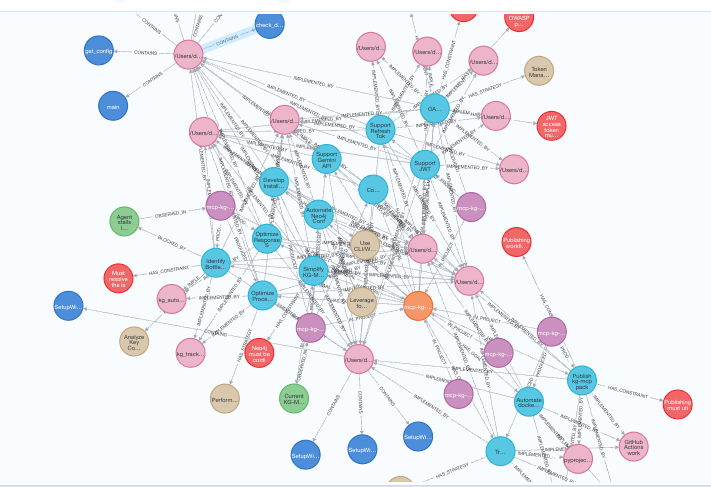
📸 Visualization
Real-time visualization of the Knowledge Graph memory structure.
✨ Features
🧠 Active Context Injection (kg_autopilot)
Every time you start a task, the agent consults the memory. It automatically retrieves:
- Active goals relevant to your current work.
- Past failed attempts (to avoid repeating them) and successful strategies.
- Your specific coding preferences (SOLID, Clean Arch, etc.).
🔍 Semantic & Graph Search
Don't just grep strings. The system traverses the graph (k-hops) to find connected context. "I'm working on Auth" → Retrieval includes User model, JWT utility, and the relevant security constraints defined 2 weeks ago.
📝 Strategic Learning
The system isn't static. It learns:
- Implicit Learning: Infers strategies and patterns from your conversations.
- Outcome Tracking: Remembers if a strategy "Success" or "Failure" to guide future decisions.
⚡ Technology Stack
- Core: Python 3.11+
- Database: Neo4j (Graph Database)
- LLM: Google Gemini 2.5 (via Direct API or LiteLLM Gateway)
- Protocol: Model Context Protocol (MCP)
🚀 Installation
You can install kg-mcp globally using pipx (recommended) or in a local virtual environment.
Prerequisites
- Python 3.11+
- Docker (for running Neo4j locally)
- Gemini API Key (Get Key from Google AI Studio)
Option 1: One-Line Install (Recommended)
# Install the package
pipx install kg-mcp

# Run the interactive Setup Wizard
kg-mcp-setup
The wizard will:
- Check for Docker and Neo4j.
- Ask for your Gemini API Key.
- Configure the LLM Mode (Direct vs LiteLLM).
- Generate a secure
.envfile.
❓ Don't have pipx? Click here to install it
macOS:
brew install pipx
pipx ensurepath
Windows:
winget install pipx
pipx ensurepath
Linux (Debian/Ubuntu):
sudo apt install pipx
pipx ensurepath
Restart your terminal after installing pipx.
Alternative: Standard Pip
If you prefer not to use pipx:
pip install kg-mcp
kg-mcp-setup
Option 2: Manual Development Setup
# Clone the repository
git clone https://github.com/Hexecu/mcp-neuralmemory.git
cd mcp-neuralmemory

# Set up environment
cp .env.example .env
# (Edit .env with your credentials)

# Install dependencies
cd server
pip install -e .

# Start Neo4j
docker compose up -d

# Initialize Schema
python -m kg_mcp.kg.apply_schema
⚙️ Configuration
To use this memory server with your AI Editor, add the following configuration to your MCP config file.
🩺 Verify Installation ("Doctor Mode")
Before configuring your editor, run the verification script to ensure everything is Green:
python3 verify_setup.py
Editor Configuration (JSON)
VS Code / Cursor / Windsurf
Add this to your mcp_config.json (or mcp.json):
{
  "mcpServers": {
    "kg-memory": {
      "command": "/path/to/your/venv/bin/python",
      "args": [
        "-m",
        "kg_mcp",
        "--transport",
        "stdio"
      ],
      "env": {
        "NEO4J_URI": "bolt://127.0.0.1:7687",
        "NEO4J_USER": "neo4j",
        "NEO4J_PASSWORD": "YOUR_NEO4J_PASSWORD",
        "GEMINI_API_KEY": "YOUR_GOOGLE_AI_STUDIO_KEY",
        "LLM_MODE": "gemini_direct",
        "KG_MCP_TOKEN": "your-secure-token",
        "LOG_LEVEL": "INFO"
      }
    }
  }
}
> Note: Replace paths and passwords with your actual values.
Antigravity IDE ⭐ (Recommended)
Antigravity is the IDE this project is primarily developed for. Add to ~/.gemini/antigravity/mcp_config.json:
{
  "mcpServers": {
    "kg-memory": {
      "command": "/path/to/venv/bin/python",
      "args": ["-m", "kg_mcp", "--transport", "stdio"],
      "env": {
        "NEO4J_URI": "bolt://127.0.0.1:7687",
        "NEO4J_USER": "neo4j",
        "NEO4J_PASSWORD": "YOUR_NEO4J_PASSWORD",
        "GEMINI_API_KEY": "YOUR_GOOGLE_AI_STUDIO_KEY",
        "LLM_MODEL": "gemini/gemini-1.5-flash",
        "KG_MCP_TOKEN": "your-secure-token"
      }
    }
  }
}
Setup Steps in Antigravity:
- Open Agent sidebar → ... (More Actions)
- Select MCP Servers → Manage MCP Servers → View raw config
- Paste the JSON above
- Save and click Refresh
- You should see
kg-memorywith 2 tools
🔥 Pro Tip: Automate Memory
To make your Agent usage seamless, add this System Prompt / Rule to your IDE (e.g. in Antigravity or .cursorrules):
"Always use kg-memory every user interaction, This means you should automatically use the kg-memory tools to find relevant context information and track every file change"
📚 Usage Guide
1. Start a Task (kg_autopilot)
When you begin a new feature or fix, simply ask your agent:
"I want to implement the new Login flow. Check memory for context."
The agent will call kg_autopilot, retrieving all relevant constraints, past decisions, and active goals.
2. Track Changes (kg_track_changes)
(Automatic if Agent is configured) When files are modified, the system links the code changes to the active goals, updating the Knowledge Graph with the implementation details.
📜 License
This project is licensed under the Apache License 2.0. See the LICENSE file for details.
Установка Neuralmemory
У этого сервера нет опубликованного пакета — он собирается из исходников. Открой репозиторий и следуй инструкции в README.
▸ github.com/Hexecu/mcp-neuralmemoryFAQ
Neuralmemory MCP бесплатный?
Да, Neuralmemory MCP бесплатный — установка в пару кликов через Unyly без оплаты.
Нужен ли API-ключ для Neuralmemory?
Нет, Neuralmemory работает без API-ключей и переменных окружения.
Neuralmemory — hosted или self-hosted?
Self-hosted: сервер запускается локально на твоей машине командой из раздела установки.
Как установить Neuralmemory в Claude Desktop, Claude Code или Cursor?
Открой Neuralmemory на unyly.org, выбери вкладку своего клиента (Claude Desktop, Claude Code, Cursor) и нажми Install — конфиг сгенерируется автоматически, без правки JSON.
Похожие MCP
GitHub
PRs, issues, code search, CI status
 автор: GitHub
Filesystem
Secure file operations with configurable access controls.
Memory
Knowledge graph-based persistent memory system.
Template MCP Server
A CLI tool to create a new Model Context Protocol server project with TypeScript support, dual transport options, and an extensible structure
 автор: mcpdotdirect
Compare Neuralmemory with
Не уверен что выбрать?
Найди свой стек за 60 секунд
Автор?
Embed-бейдж для README
Похожее
Все в категории development