
Nextjs Blog Cms
БесплатноНе проверенA full-stack Blog CMS built with Next.js (App Router), Supabase, TailwindCSS, and shadcn/ui. Features Supabase Auth with role-based access control, a WYSIWYG ed

Описание
A full-stack Blog CMS built with Next.js (App Router), Supabase, TailwindCSS, and shadcn/ui. Features Supabase Auth with role-based access control, a WYSIWYG editor, draft/publish workflow, an AI writing assistant, a headless REST API, and MCP-powered development workflows.
README
A full-stack Blog CMS built with Next.js (App Router), Supabase, TailwindCSS, and shadcn/ui. Features Supabase Auth with role-based access control, a WYSIWYG editor, draft/publish workflow, newsletter subscriptions, an AI writing assistant, a headless REST API, and MCP-powered development workflows.
Features
- Authentication via Supabase Auth
- Role-Based Access Control — Admin and Author roles enforced through Supabase RLS
- WYSIWYG editor powered by TipTap with rich text, images, and formatting
- Draft and publish workflow
- Tags and categories
- Comments — authenticated, thread-style, with admin management
- SEO-friendly public blog pages with meta title and description support
- Developer API — generate API keys in the dashboard to create posts from external tools (n8n, Postman, scripts)
- AI Writing Assistant — chat with uploaded books (PDF) using Claude, Gemini, or OpenAI; generate full blog post drafts from conversation context
- LLM provider key management — store encrypted API keys (AES-256-GCM) for Claude, Gemini, and OpenAI per user
- Headless AI post generation via
POST /api/ai-assistant/generate - Newsletter subscriptions — readers subscribe from a widget on every post; email sent automatically on publish via Resend after a configurable delay; one-click unsubscribe via token
- REST API for posts — list, create, read, update, delete via authenticated endpoints
- In-memory rate limiting on API routes
- Favicon support
- Fast Vercel deployment
Tech Stack
- Frontend: Next.js (App Router)
- Backend: Supabase (Postgres + Auth + Storage)
- Styling: TailwindCSS + shadcn/ui
- Editor: TipTap
- AI Providers: Anthropic (Claude), Google (Gemini), OpenAI
- Deployment: Vercel
- AI Dev Layer: Claude Code + MCP Servers
MCP Servers
This project is optimized for AI-assisted development using MCP servers:
github-mcp— repo management, PRs, commitssupabase-mcp— database schema, queries, RLSvercel-mcp— deployments and env managementfilesystem-mcp— file editing and refactoringbrowser-mcp— UI testing and debuggingpostgres-mcp(optional) — query optimization
Project Structure
app/
  (public)/        → public blog pages
  (dashboard)/     → admin & author dashboard
  (ai)/            → AI assistant (full-screen layout)
  api/             → backend routes

components/
  ui/              → reusable UI (shadcn/ui)
  editor/          → TipTap WYSIWYG editor
  blog/            → blog components

features/
  posts/
  users/
  auth/
  comments/

lib/
  supabase/
  permissions/
  utils/

database/
  schema.sql
  migrations/
  policies/

agents/
  frontend.agent.md
  backend.agent.md
  database.agent.md
Getting Started
1. Clone the repo
git clone https://github.com/frank-mendez/nextjs-blog-cms.git
cd nextjs-blog-cms
2. Install dependencies
npm install
3. Set up environment variables
Create a .env.local file:
NEXT_PUBLIC_SUPABASE_URL=
NEXT_PUBLIC_SUPABASE_ANON_KEY=
SUPABASE_SERVICE_ROLE_KEY=
LLM_KEY_ENCRYPTION_SECRET=   # 32-character secret for AES-256-GCM key encryption

# Newsletter
RESEND_API_KEY=
RESEND_FROM_EMAIL=            # verified sender address, e.g. [email protected]
NEWSLETTER_DELAY_MINUTES=60   # delay between publish and send (default: 60)
WEBHOOK_SECRET=               # shared secret used to authenticate the /api/newsletter/send cron call
4. Set up the database
- Run
database/schema.sqlin the Supabase SQL editor - Apply RLS policies from
database/policies/ - Optionally seed with
database/seed.sql
5. Run the app
npm run dev
Roles and Permissions
| Role | Access |
|---|---|
| Admin | Full control (users, posts, roles, comments, developer settings) |
| Author | Create and manage own posts, delete own comments |
Enforced using Supabase Row Level Security (RLS).
AI Writing Assistant
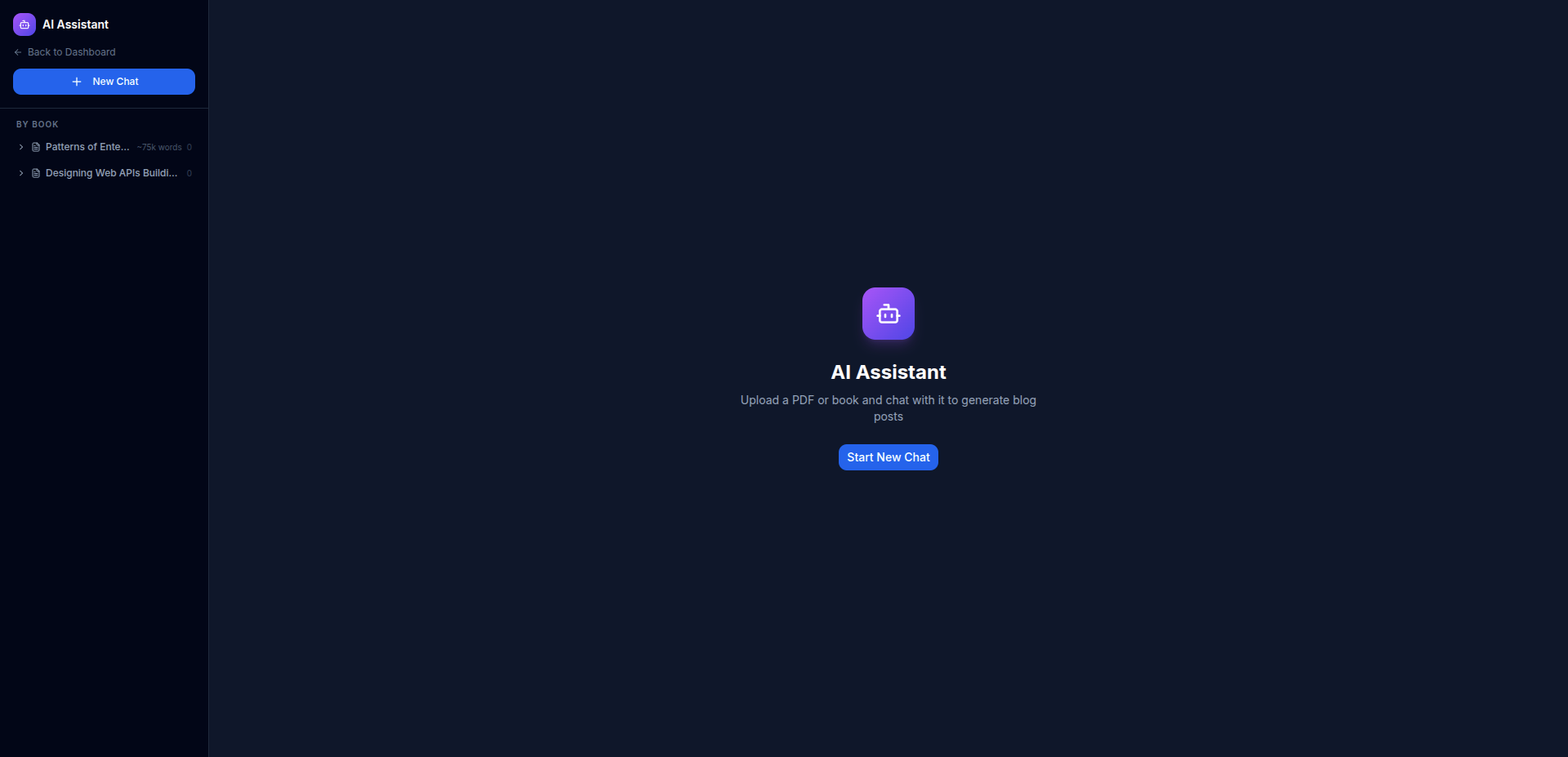
The AI assistant allows authors to upload a PDF book, chat with it using their preferred LLM, and generate a full blog post draft from the conversation.
Supported providers: Claude (Anthropic), Gemini (Google), OpenAI
How it works:
- Navigate to Dashboard → AI Assistant
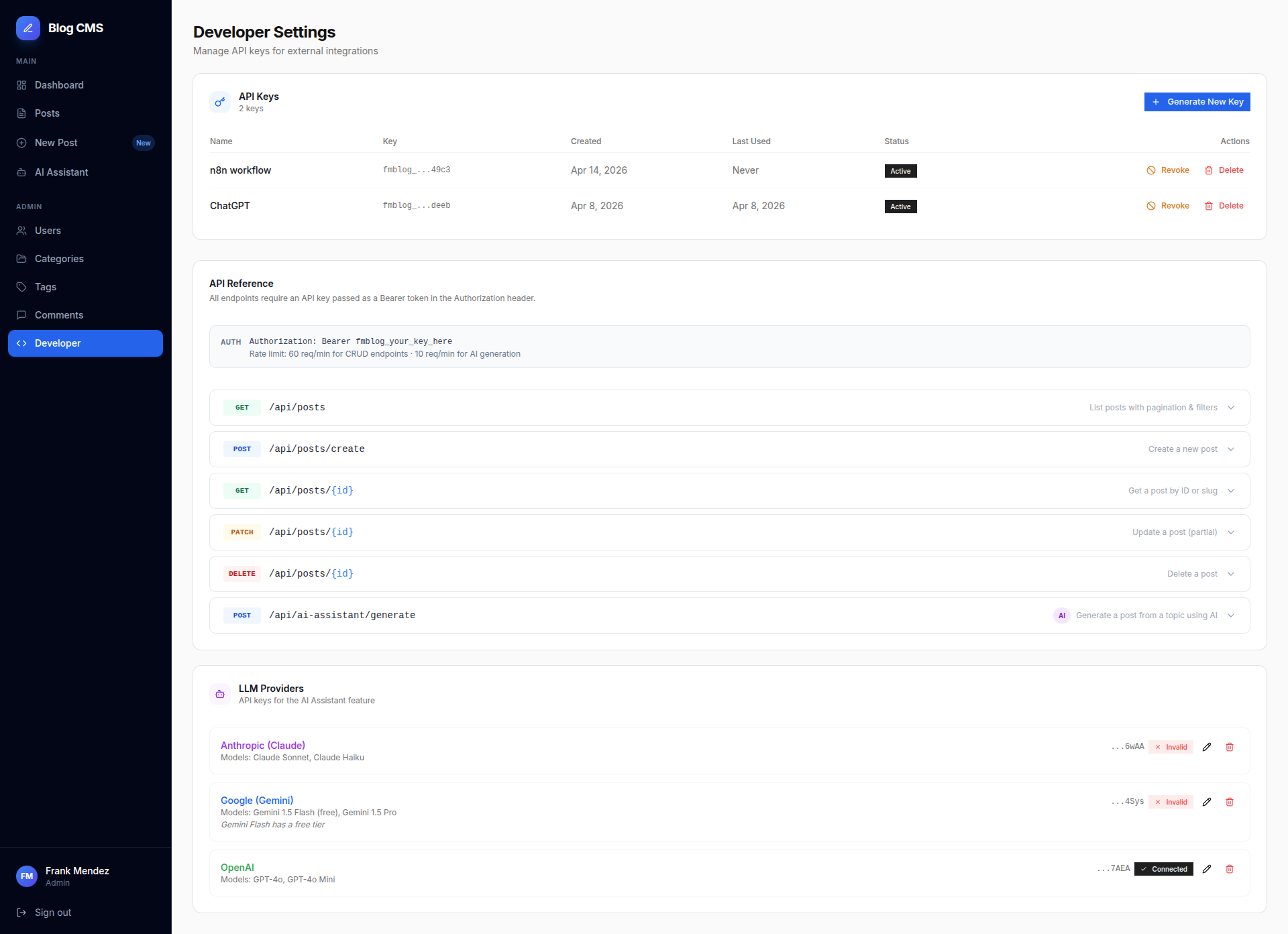
- Add your LLM API key under Dashboard → Developer → LLM Providers
- Start a new chat — upload a PDF and select a model
- Chat with the book, then click Generate Post to create a draft
PDF text is extracted on upload and stored as plain text. The LLM receives the extracted text as context. API keys are encrypted with AES-256-GCM and never stored in plaintext.
Developer API
Admins can generate API keys to allow external tools to create posts without a browser session.
Access Developer Settings
- Log in as Admin
- Go to Dashboard → Developer
- Click Generate New Key, name it, and copy the key — shown only once
API Key Format
Keys are prefixed with fmblog_ followed by 64 hex characters. Only a SHA-256 hash is stored in the database.
Endpoints
POST /api/posts/create
Create a new post from any HTTP client.
Headers:
Authorization: Bearer fmblog_your_key_here
Content-Type: application/json
Body:
| Field | Type | Required | Description |
|---|---|---|---|
title |
string | Yes | Post title |
content |
string | Yes | HTML content (TipTap-compatible) |
slug |
string | No | URL slug — auto-generated from title if omitted |
status |
draft | published |
No | Defaults to draft |
excerpt |
string | No | Plain-text summary |
meta_title |
string | No | SEO title — defaults to title |
meta_description |
string | No | SEO description — defaults to excerpt |
tags |
string[] | No | Tag names — created automatically if they don't exist |
category |
string | No | Category name — matched by name or slug |
image_url |
string | No | Featured image URL |
Example:
curl -X POST https://your-domain.com/api/posts/create \
  -H "Authorization: Bearer fmblog_your_key_here" \
  -H "Content-Type: application/json" \
  -d '{
    "title": "Hello from n8n",
    "content": "<p>This post was created via the API.</p>",
    "status": "draft",
    "tags": ["automation", "n8n"],
    "category": "Technology"
  }'
Response (201):
{
  "success": true,
  "data": {
    "id": "uuid",
    "title": "Hello from n8n",
    "slug": "hello-from-n8n",
    "status": "draft"
  }
}
POST /api/ai-assistant/generate
Generate a blog post headlessly using the AI assistant.
Headers:
Authorization: Bearer fmblog_your_key_here
Content-Type: application/json
GET /api/posts
List posts with pagination and filters.
GET /api/posts/[id]
Retrieve a single post by ID.
PATCH /api/posts/[id]
Update a post by ID.
DELETE /api/posts/[id]
Delete a post by ID.
Security Notes
- Raw API keys are never stored — only SHA-256 hashes
- The key is shown exactly once after generation
- Keys can be revoked or deleted at any time from Developer Settings
author_idis always set to the user who owns the API key- API routes are rate-limited in-memory
Newsletter
Readers subscribe via a widget at the bottom of every blog post. When a post is published, a send is queued in the newsletter_sends table and dispatched after a configurable delay.
How it works
- Reader submits their email on any blog post — stored in
newsletter_subscriptions - When a post is published, a row is inserted into
newsletter_sendswithscheduled_at = now() + NEWSLETTER_DELAY_MINUTES - A Vercel Cron Job (or any HTTP scheduler) calls
POST /api/newsletter/sendevery minute - The endpoint claims pending sends past their
scheduled_at, emails all active subscribers via Resend, and marks the send assent
Unsubscribe
Every email contains a unique unsubscribe link: GET /api/newsletter/unsubscribe?token=<token>. Clicking it sets unsubscribed_at and redirects to /newsletter/unsubscribed.
Admin dashboard
Go to Dashboard → Admin → Newsletter (admin only) to see:
- Active subscribers, sends dispatched, and unsubscribed counts
- Pending and in-progress scheduled sends
- Recent subscriber list with status badges
- CSV export of all subscribers
Vercel Cron setup
A vercel.json is included at the repo root that configures the cron to fire every minute. The endpoint requires a x-webhook-secret header matching WEBHOOK_SECRET — add this to your Vercel project environment variables. Vercel Cron sends the header automatically when the secret is configured in the project settings.
Testing
Unit Tests (Vitest)
Covers lib utilities, API routes, services, and UI components with 80%+ thresholds across lines, branches, functions, and statements.
npm test                  # watch mode
npm run test:run          # single run
npm run test:coverage     # coverage report
API End-to-End Tests (Playwright)
Tests the five posts REST API routes (GET, POST, PATCH, DELETE) against a real Next.js dev server and a dedicated Supabase test project. No browser — pure HTTP via APIRequestContext.
Prerequisites:
.env.localmust point to a separate Supabase test project (not production)- The test project must have the full schema applied (
database/schema.sql)
npm run test:e2e          # run the full suite (19 tests)
npm run test:e2e:report   # open the HTML report
Global setup seeds a test user, API key, and three posts before the suite runs. Global teardown deletes all seeded data by user_id after the suite finishes.
Deployment
- Import repo to Vercel
- Add environment variables
- Assign a domain (e.g.
blog.yourdomain.com)
AI Development Workflow
This project is designed to work seamlessly with Claude Code:
- Modular, feature-based architecture for safe refactoring
- Dedicated
agents/instruction files - MCP servers for full-stack automation
Screenshots
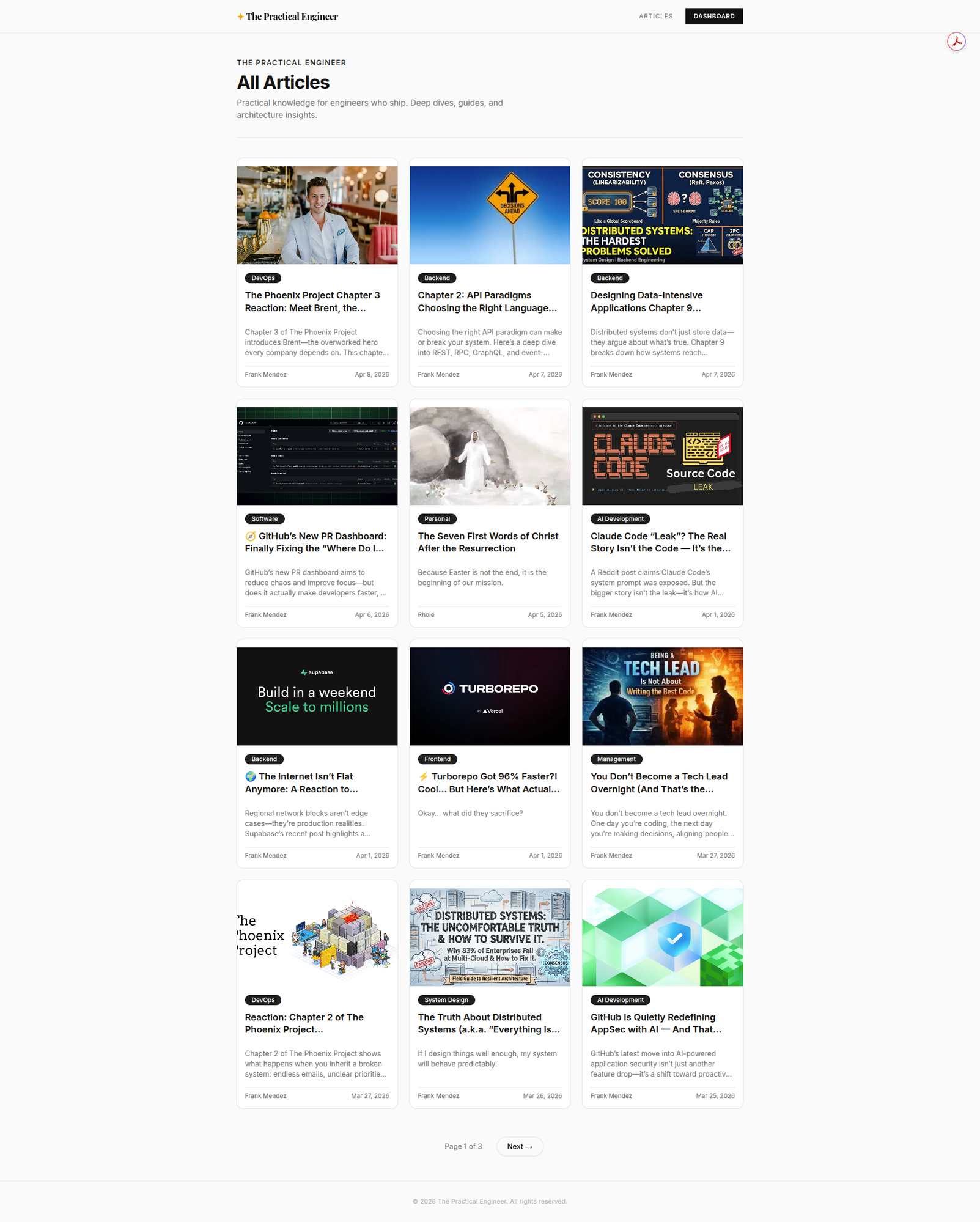
Public Blog — SEO-friendly article listing
AI Assistant — Chat with books and generate blog posts
Developer Settings — API Key Management and LLM Providers
Roadmap
- Comments system
- Developer API with API key management
- AI Writing Assistant (Claude, Gemini, OpenAI)
- PDF text extraction and LLM context
- REST API for posts
- Newsletter subscriptions with auto-send on publish
- Analytics dashboard
- Scheduled posts
- Multi-author collaboration
- Headless CMS API
Contributing
Contributions are welcome. To contribute:
- Fork the repository
- Create a feature branch (
git checkout -b feature/your-feature) - Commit your changes with clear messages
- Open a Pull Request — describe what changed and why
For significant changes, open an issue first to discuss the approach.
Code of Conduct
This project follows the Contributor Covenant Code of Conduct. By participating, you agree to uphold a respectful and inclusive environment. Report unacceptable behavior to the project maintainer.
License
Author
Frank Mendez
Установка Nextjs Blog Cms
У этого сервера нет опубликованного пакета — он собирается из исходников. Открой репозиторий и следуй инструкции в README.
▸ github.com/frank-mendez/nextjs-blog-cmsFAQ
Nextjs Blog Cms MCP бесплатный?
Да, Nextjs Blog Cms MCP бесплатный — установка в пару кликов через Unyly без оплаты.
Нужен ли API-ключ для Nextjs Blog Cms?
Нет, Nextjs Blog Cms работает без API-ключей и переменных окружения.
Nextjs Blog Cms — hosted или self-hosted?
Self-hosted: сервер запускается локально на твоей машине командой из раздела установки.
Как установить Nextjs Blog Cms в Claude Desktop, Claude Code или Cursor?
Открой Nextjs Blog Cms на unyly.org, выбери вкладку своего клиента (Claude Desktop, Claude Code, Cursor) и нажми Install — конфиг сгенерируется автоматически, без правки JSON.
Похожие MCP
GitHub
PRs, issues, code search, CI status
 автор: GitHub
Filesystem
Secure file operations with configurable access controls.
Memory
Knowledge graph-based persistent memory system.
Template MCP Server
A CLI tool to create a new Model Context Protocol server project with TypeScript support, dual transport options, and an extensible structure
 автор: mcpdotdirect
Compare Nextjs Blog Cms with
Не уверен что выбрать?
Найди свой стек за 60 секунд
Автор?
Embed-бейдж для README
Похожее
Все в категории development