
Notes
БесплатноНе проверенA personal notes MCP server that allows AI assistants to create, search, edit, and manage notes stored in a local SQLite database.

Описание
A personal notes MCP server that allows AI assistants to create, search, edit, and manage notes stored in a local SQLite database.
README
A personal knowledge/notes MCP server in Python. It gives Claude (Desktop, Code, or any MCP-compatible client) a set of tools to create, search, edit, and manage a collection of notes stored in a local SQLite database.
Built with the official MCP Python SDK (FastMCP), fully typed, with structured input/output schemas on every tool and a two-layer test suite.




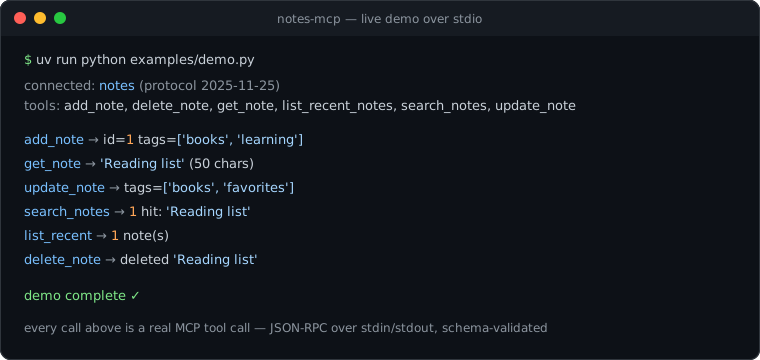
Real output of examples/demo.py — a genuine MCP client session against the server over stdio, the same path Claude Desktop uses. Reproduce it with uv run python examples/demo.py.
What is MCP?
The Model Context Protocol is an open standard (originally by Anthropic) that lets AI applications talk to external systems in a uniform way. Instead of every AI app writing custom integrations for every data source, MCP defines one protocol:
- A host (Claude Desktop, Claude Code, an IDE…) runs one or more clients.
- Each client holds a 1:1 connection to a server — a small program that exposes capabilities.
- Servers expose three primitive types: tools (actions the model can invoke), resources (data the host can read), and prompts (reusable templates).
The wire format is JSON-RPC 2.0. For local servers like this one, the transport is stdio: the host launches the server as a subprocess, writes requests to its stdin, and reads responses from its stdout. That's why an MCP stdio server must never print() — stdout belongs to the protocol; diagnostics go to stderr.
A minimal MCP server needs exactly three things:
- A server instance with a name (identifies it during the initialization handshake).
- Registered capabilities — here, six tools, each with a JSON Schema for its inputs and outputs.
- A transport loop — the SDK's
mcp.run(transport="stdio")handles the handshake, request dispatch, validation, and serialization.
This project exposes tools only, which is the right primitive for note CRUD: the model decides when to call them, and each call is validated against a schema.
Tools
| Tool | What it does | Key inputs → output |
|---|---|---|
add_note |
Create a note | title, body, tags? → full Note |
get_note |
Fetch one note in full | note_id or title → full Note |
search_notes |
Keyword and/or tag search | query?, tag?, limit? → SearchResult (summaries) |
update_note |
Edit any subset of fields | note_id, title?, body?, tags? → updated Note |
delete_note |
Permanently remove a note | note_id → DeleteResult |
list_recent_notes |
Newest-updated notes first | limit? → RecentNotes (summaries) |
Every tool declares a full input schema (generated from type hints + pydantic.Field constraints, e.g. limit is 1–100) and an output schema (generated from the Pydantic return models in models.py). Tools carry honest MCP annotations: readOnlyHint on get/search/list, destructiveHint on delete_note and update_note (an overwrite destroys prior content — the MCP spec reserves destructiveHint: false for purely additive updates), and openWorldHint: false everywhere since nothing leaves the local database. Hosts can use these to gate confirmation UX.
Failure cases (missing note, no search criteria, invalid arguments) come back as proper MCP tool errors with readable messages, so the model can recover — e.g. by searching before retrying a get_note.
Architecture
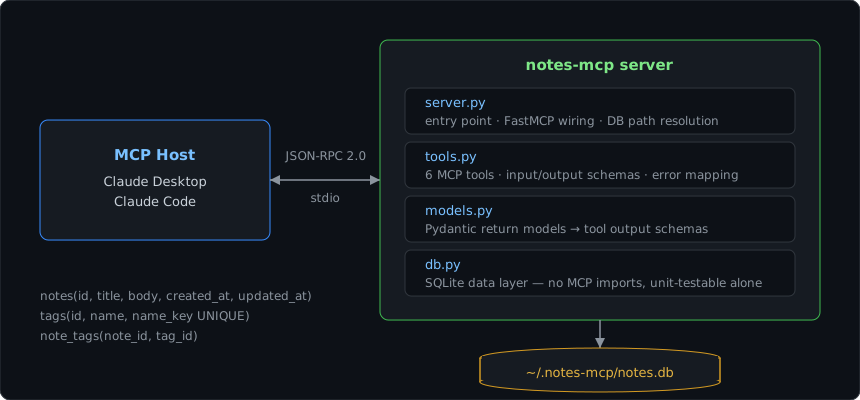
db.pyis pure Python + SQLite — it has no idea MCP exists. Normalized schema (notes,tags,note_tags) withON DELETE CASCADEand orphan-tag pruning. Testable with plain pytest.tools.pyis the protocol surface: thin wrappers that translate between MCP tool calls and the data layer, and own all the schema/description metadata the model sees.server.pywires them together and picks the database location.
Quickstart
Requires Python ≥ 3.12 and uv.
git clone <this repo> && cd notes-mcp
uv sync          # install dependencies into .venv
uv run pytest    # 38 tests: data layer + full MCP integration
uv run notes-mcp # runs the server on stdio (Ctrl-C to exit)
Connect to Claude Desktop
Add to claude_desktop_config.json (Settings → Developer → Edit Config):
{
  "mcpServers": {
    "notes": {
      "command": "uv",
      "args": ["run", "--directory", "/ABSOLUTE/PATH/TO/notes-mcp", "notes-mcp"]
    }
  }
}
Restart Claude Desktop; the six tools appear under the notes server. Try: “Add a note titled ‘Reading list’ with the books I mention, tagged reading.”
Connect to Claude Code
claude mcp add notes -- uv run --directory /ABSOLUTE/PATH/TO/notes-mcp notes-mcp
Inspect interactively
The MCP Inspector gives you a debugging UI over any server:
npx @modelcontextprotocol/inspector uv run --directory /ABSOLUTE/PATH/TO/notes-mcp notes-mcp
Data storage
Notes live in a single SQLite file, ~/.notes-mcp/notes.db by default. Override with the NOTES_MCP_DB environment variable — in claude_desktop_config.json, add an env key inside the server entry, next to command and args:
{
  "mcpServers": {
    "notes": {
      "command": "uv",
      "args": ["run", "--directory", "/ABSOLUTE/PATH/TO/notes-mcp", "notes-mcp"],
      "env": { "NOTES_MCP_DB": "/path/to/work-notes.db" }
    }
  }
}
For Claude Code, pass it with -e:
claude mcp add notes -e NOTES_MCP_DB=/path/to/work-notes.db -- \
  uv run --directory /ABSOLUTE/PATH/TO/notes-mcp notes-mcp
The default is an absolute path on purpose: MCP hosts launch servers with an arbitrary working directory, so a relative path would silently create a new database per launch location.
Testing
Two layers, mirroring the architecture:
- tests/test_db.py — unit tests for the storage layer: CRUD, tag dedup/pruning, Unicode case-insensitivity, literal wildcard handling, duplicate-title resolution, persistence across connections.
- tests/test_tools.py — integration tests that connect a real MCP client session to the server over the SDK's in-memory transport and exercise every tool through the full protocol stack: handshake, discovery, schema validation, structured output, and error paths.
- tests/test_server.py — database-path resolution (
NOTES_MCP_DBoverride, home expansion, absolute default).
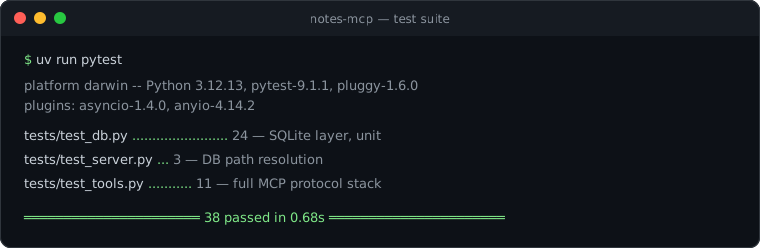
uv run pytest
Project structure
notes-mcp/
├── pyproject.toml          # uv project; console script: notes-mcp
├── README.md
├── DEVLOG.md               # build log: decisions and why
├── src/notes_mcp/
│   ├── server.py           # entry point + FastMCP wiring
│   ├── tools.py            # the 6 MCP tool definitions
│   ├── models.py           # Pydantic output models (→ output schemas)
│   └── db.py               # SQLite data layer (MCP-free)
├── tests/
│   ├── test_db.py          # data-layer unit tests
│   ├── test_tools.py       # end-to-end MCP integration tests
│   └── test_server.py      # DB-path resolution tests
├── examples/demo.py        # runnable stdio demo (source of the image above)
└── docs/                   # README images
Design decisions (short version — full rationale in DEVLOG.md)
- Official
mcpSDK, FastMCP API — schemas derive from type hints, so the code and the contract can't drift apart. - Normalized tag schema instead of a JSON column — real tag queries, dedup, and orphan cleanup in SQL. Each tag stores a display name plus a
casefold()edname_key, so one equality rule governs dedup and lookup. - Literal substring search with Unicode-correct case folding — SQLite's built-in
NOCASE/LIKEonly fold ASCII, so search uses a registeredcasefoldSQL function; no wildcard syntax surprises for the model. FTS5 is the documented upgrade path. - Microsecond UTC timestamps — recency ordering must distinguish writes within the same second (a bug the test suite caught).
Roadmap
- Full-text search via SQLite FTS5 (ranked results, prefix queries)
- MCP resources exposing notes as
notes://{id}for direct context inclusion - Note export (Markdown folder sync)
Установка Notes
У этого сервера нет опубликованного пакета — он собирается из исходников. Открой репозиторий и следуй инструкции в README.
▸ github.com/gabed5303-ops/notes-mcpFAQ
Notes MCP бесплатный?
Да, Notes MCP бесплатный — установка в пару кликов через Unyly без оплаты.
Нужен ли API-ключ для Notes?
Нет, Notes работает без API-ключей и переменных окружения.
Notes — hosted или self-hosted?
Self-hosted: сервер запускается локально на твоей машине командой из раздела установки.
Как установить Notes в Claude Desktop, Claude Code или Cursor?
Открой Notes на unyly.org, выбери вкладку своего клиента (Claude Desktop, Claude Code, Cursor) и нажми Install — конфиг сгенерируется автоматически, без правки JSON.
Похожие MCP
wenb1n-dev/SmartDB_MCP
A universal database MCP server supporting simultaneous connections to multiple databases. It provides tools for database operations, health analysis, SQL optim
 автор: wenb1n-dev
Postgres Server
This server enables interaction with PostgreSQL databases through the Model Context Protocol, optimized for the AWS Bedrock AgentCore Runtime. It provides tools
 автор: madhurprash
Postgres
Query your database in natural language
 автор: Anthropic
PostgreSQL
Read-only database access with schema inspection.
автор: modelcontextprotocolCompare Notes with
Не уверен что выбрать?
Найди свой стек за 60 секунд
Автор?
Embed-бейдж для README
Похожее
Все в категории data