
Obsidian Tools
БесплатноНе проверенEnables natural language interaction with Obsidian vaults through an MCP server, providing hybrid search, file management, and AI-powered analysis.

Описание
Enables natural language interaction with Obsidian vaults through an MCP server, providing hybrid search, file management, and AI-powered analysis.
README
An agentic Obsidian vault manager. Ask questions in natural language, search across notes semantically, explore wikilinks, transcribe meeting recordings, manipulate and organize files and metadata, all conversationally. Works as an Obsidian sidebar plugin, a CLI chat agent, or an HTTP API.
What It Does
Your vault gets indexed into a vector database. An LLM agent then uses MCP tools to search, read, and modify your notes — combining semantic understanding with keyword matching to find what you need.
Search & Discovery — Hybrid semantic + keyword search with BM25 scoring, Reciprocal Rank Fusion, HyDE (Hypothetical Document Embeddings) for question-type queries, cross-encoder reranking, and per-source diversity limits. Link graph traversal (backlinks, outlinks), frontmatter queries, date range filtering, folder browsing.
Vault Management — Read, create, move, merge files; edit specific markdown sections by heading; update frontmatter fields. Batch operations (create, move, merge, frontmatter update) with a built-in confirmation flow — the agent previews affected files and waits for approval before executing.
File Readers — Audio transcription via Whisper, image description via vision model, Office document extraction (.docx, .xlsx, .pptx), PDF text extraction, all auto-dispatched through read_file
AI-Powered Analysis — Summarize notes via LLM. Research pipeline: extract topics from a note or research an ad-hoc subject, gather findings from web search + vault search + page extraction, synthesize into a ## Research section or a new note.
Integrations — Web search via DuckDuckGo, interaction logging to daily notes, persistent user preferences
How It Works
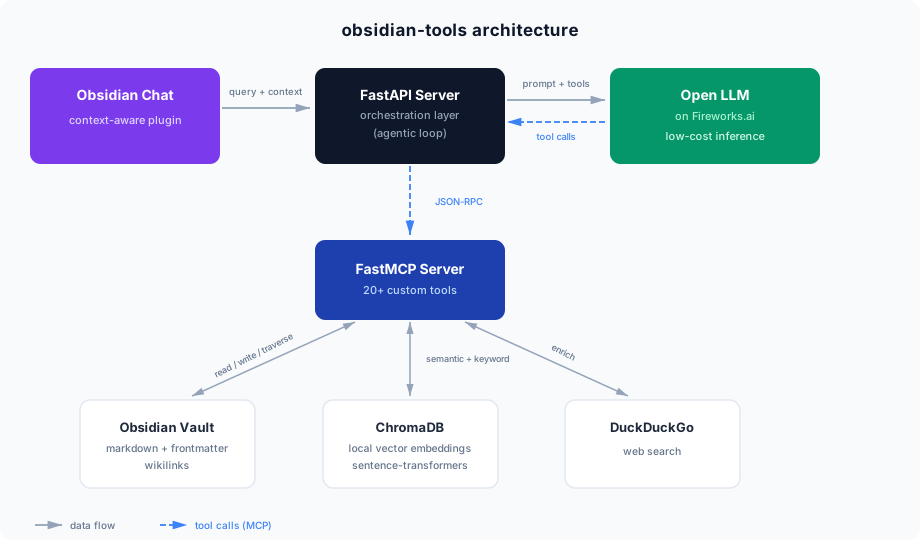
- Indexer scans your vault and creates embeddings in ChromaDB (using nomic-embed-text-v1.5), splitting notes by headings, paragraphs, and sentences with heading hierarchy prefixes (
[Note > Section > Subsection]) and cross-section overlap for continuity - Search pipeline combines semantic search (ChromaDB) with BM25 keyword scoring via Reciprocal Rank Fusion. Question-type queries get HyDE augmentation (LLM generates a hypothetical answer, which is embedded alongside the original query). Results are reranked by a cross-encoder model and deduplicated per source.
- MCP Server exposes 20 tools for searching, reading, and modifying vault content
- LLM Agent (powered by Fireworks AI) orchestrates the tools to answer your questions
- Interfaces — chat in Obsidian via the sidebar plugin, from the terminal via the CLI agent, or programmatically via the HTTP API
Requirements
- Python 3.11, 3.12, or 3.13 (not 3.14 —
onnxruntimedoesn't have wheels yet) - Fireworks AI API key — required for the chat agent and audio transcription
Quick Start
git clone https://github.com/glibalien/obsidian-tools.git
cd obsidian-tools

# macOS / Linux
./install.sh

# Windows (PowerShell)
.\install.ps1
The installer will:
- Find or help you install a compatible Python (resolves the real binary, not pyenv shims)
- Create a virtual environment and install dependencies
- Walk you through
.envconfiguration (vault path, API key, etc.) - Optionally install background services (API server + vault indexer)
- Optionally run the initial vault index
That's it — once installed, open Obsidian and start chatting, or run the CLI agent with python src/agent.py.
Manual installation
macOS Users (Homebrew)
If Homebrew has upgraded you to Python 3.14, use pyenv to install a compatible version:
brew install pyenv

# Add pyenv to your shell (add these to ~/.zshrc or ~/.bashrc)
echo 'export PYENV_ROOT="$HOME/.pyenv"' >> ~/.zshrc
echo 'command -v pyenv >/dev/null || export PATH="$PYENV_ROOT/bin:$PATH"' >> ~/.zshrc
echo 'eval "$(pyenv init -)"' >> ~/.zshrc
source ~/.zshrc

pyenv install 3.12.8
Clone and Set Up
git clone https://github.com/glibalien/obsidian-tools.git
cd obsidian-tools

# If using pyenv, create the venv with the real binary (not the shim):
$(pyenv which python3.12) -m venv .venv
# Otherwise:
python -m venv .venv

source .venv/bin/activate
pip install -r requirements.txt
Configure .env
cp .env.example .env
Edit .env:
VAULT_PATH=~/Documents/your-vault-name
CHROMA_PATH=./.chroma_db
FIREWORKS_API_KEY=your-api-key-here
FIREWORKS_MODEL=accounts/fireworks/models/gpt-oss-120b
API_PORT=8000
INDEX_INTERVAL=60
| Variable | Description |
|---|---|
VAULT_PATH |
Path to your Obsidian vault |
CHROMA_PATH |
Where to store the ChromaDB database (relative or absolute) |
FIREWORKS_API_KEY |
API key from Fireworks AI |
FIREWORKS_MODEL |
Fireworks model ID (default: gpt-oss-120b) |
API_PORT |
Port for the HTTP API server (default: 8000) |
INDEX_INTERVAL |
How often the vault indexer runs, in minutes (default: 60) |
INDEX_WORKERS |
Thread pool size for parallel file indexing (default: 4) |
See .env.example for additional optional variables (logging, session limits, Whisper/vision models, etc.).
Usage
1. Index your vault
Before searching, build the vector index:
python src/index_vault.py
The indexer is incremental — subsequent runs only process files modified since the last run and prune deleted files. Use --full for a complete reindex.
To keep the index up to date automatically, see Running as a Service.
2. Choose your interface
Obsidian Plugin (recommended for daily use)
The plugin/ directory contains a chat sidebar that connects to the API server. It includes a built-in batch operation confirmation system — when the agent wants to modify many files at once, the plugin renders a preview of affected files with Confirm/Cancel buttons so you stay in control.
cd plugin && npm install && npm run build

# Copy to your vault (adjust path)
mkdir -p ~/Documents/your-vault/.obsidian/plugins/vault-agent
cp manifest.json main.js styles.css ~/Documents/your-vault/.obsidian/plugins/vault-agent/
Enable "Vault Agent" in Obsidian Settings > Community Plugins. The API server must be running (see below).
CLI Agent (for terminal users)
python src/agent.py
HTTP API (for programmatic access)
python src/api_server.py
The server binds to 127.0.0.1:8000 (localhost only):
curl -X POST http://127.0.0.1:8000/chat \
  -H "Content-Type: application/json" \
  -d '{"message": "Summarize this note", "active_file": "Projects/Marketing.md"}'
Sessions are keyed by active_file — same file continues the conversation, different file starts a new one.
MCP Client (Claude Code, etc.)
Copy .mcp.json.example to .mcp.json and update the paths:
{
  "mcpServers": {
    "obsidian-tools": {
      "command": "/path/to/obsidian-tools/.venv/bin/python",
      "args": ["/path/to/obsidian-tools/src/mcp_server.py"]
    }
  }
}
Customizing for Your Vault
The agent's system prompt describes your vault's folder layout and frontmatter conventions. The default is tuned to the author's vault and almost certainly doesn't match yours. An uncustomized prompt wastes tokens on failed lookups and gives worse results.
The installer copies system_prompt.txt.example to system_prompt.txt (gitignored). Edit it:
- Update the Vault Structure section with your actual folder layout and frontmatter conventions
- Adjust the Interaction Logging section if you don't use daily notes
- Keep the Choosing the Right Tool and Available Tools sections as-is — they apply universally
Available Tools
| Tool | Description |
|---|---|
find_notes |
Unified discovery — hybrid/semantic/keyword search, frontmatter filters, date ranges, folder browsing |
read_file |
Read any vault file — markdown (with embed expansion), audio (Whisper), images (vision), Office docs, PDFs |
transcribe_to_file |
Transcribe audio to a new vault note with diarized speaker segments |
get_note_info |
Lightweight metadata — frontmatter, headings, size, timestamps, link counts |
create_file |
Create a new note with optional YAML frontmatter |
batch_create_files |
Create multiple files in one operation |
edit_file |
Edit file content — prepend, append, or target a specific section by heading |
move_file |
Move a file within the vault |
batch_move_files |
Move multiple files — explicit list or query-based targeting by frontmatter/folder |
merge_files |
Merge source into destination — smart (content-aware dedup) or concat |
batch_merge_files |
Batch merge matching files across two folders |
update_frontmatter |
Set, remove, append, or rename frontmatter fields |
batch_update_frontmatter |
Bulk frontmatter update — by path list, frontmatter query, or folder |
find_links |
Find backlinks, outlinks, or both for a note |
compare_folders |
Compare two folders by filename — find duplicates and unique files |
log_interaction |
Log interactions to daily notes |
summarize_file |
LLM-powered summarization — appends a ## Summary section to the note |
research |
Research topics in a note or an ad-hoc subject — web + vault search, page extraction, LLM synthesis |
manage_preferences |
List, add, or remove persistent user preferences |
web_search |
Search the web via DuckDuckGo |
Running as a Service
The installer can set up background services automatically. If you prefer manual setup:
Linux (systemd)
mkdir -p ~/.config/systemd/user

for f in services/systemd/*.service services/systemd/*.timer; do
    sed -e "s|__PROJECT_DIR__|$PWD|g" \
        -e "s|__VENV_PYTHON__|$PWD/.venv/bin/python|g" \
        -e "s|__INDEX_INTERVAL__|60|g" \
        "$f" > ~/.config/systemd/user/$(basename "$f")
done

systemctl --user daemon-reload
systemctl --user enable --now obsidian-tools-api
systemctl --user enable --now obsidian-tools-indexer-scheduler.timer
# Check status
systemctl --user status obsidian-tools-api

# View logs
journalctl --user -u obsidian-tools-api -f

# Restart
systemctl --user restart obsidian-tools-api
Note: To run services without being logged in: sudo loginctl enable-linger $USER
macOS (launchd)
for f in services/launchd/*.plist; do
    sed -e "s|__VENV_PYTHON__|$PWD/.venv/bin/python|g" \
        -e "s|__PROJECT_DIR__|$PWD|g" \
        -e "s|__USERNAME__|$(whoami)|g" \
        -e "s|__INDEX_INTERVAL_SEC__|3600|g" \
        "$f" > ~/Library/LaunchAgents/$(basename "$f")
done

launchctl load ~/Library/LaunchAgents/com.obsidian-tools.api.plist
launchctl load ~/Library/LaunchAgents/com.obsidian-tools.indexer.plist
# Check status
launchctl list | grep obsidian-tools

# View logs
tail -f ~/Library/Logs/obsidian-tools-api.log
Windows (Task Scheduler)
$xml = (Get-Content services\taskscheduler\obsidian-tools-api.xml -Raw) `
    -replace '__VENV_PYTHON__', "$PWD\.venv\Scripts\python.exe" `
    -replace '__PROJECT_DIR__', "$PWD"
Register-ScheduledTask -TaskName "ObsidianToolsAPI" -Xml $xml

$xml = (Get-Content services\taskscheduler\obsidian-tools-indexer.xml -Raw) `
    -replace '__VENV_PYTHON__', "$PWD\.venv\Scripts\python.exe" `
    -replace '__PROJECT_DIR__', "$PWD" `
    -replace '__INDEX_INTERVAL__', '60'
Register-ScheduledTask -TaskName "ObsidianToolsIndexer" -Xml $xml
# Check status
Get-ScheduledTask | Where-Object TaskName -like 'ObsidianTools*'
Uninstall
./uninstall.sh        # macOS / Linux
.\uninstall.ps1       # Windows
Your .env and .chroma_db/ are preserved.
Project structure
src/
├── mcp_server.py        # FastMCP server — registers tools from submodules
├── api_server.py        # FastAPI HTTP wrapper with session management
├── agent.py             # CLI chat agent with tool result continuation
├── config.py            # Shared configuration
├── chunking.py          # Structure-aware markdown chunking (headings, paragraphs, sentences)
├── bm25_index.py        # In-memory BM25 keyword index (lazy singleton from ChromaDB docs)
├── hybrid_search.py     # Semantic + BM25 search with RRF, HyDE, reranking, source diversity
├── search_vault.py      # Search interface
├── index_vault.py       # Vault indexer (incremental, parallel chunking, batched upserts)
├── log_chat.py          # Daily note logging
├── services/
│   ├── chroma.py        # ChromaDB connection, embedding helpers, cross-encoder reranker
│   ├── compaction.py    # Tool message compaction for token management
│   └── vault.py         # Path resolution, response helpers, utilities
└── tools/
    ├── files.py         # File operations (read, create, move, merge, batch)
    ├── frontmatter.py   # Frontmatter queries and updates
    ├── links.py         # Backlinks, outlinks, folder comparison
    ├── preferences.py   # User preferences
    ├── search.py        # Vault search, web search
    ├── editing.py       # Section and position-based editing
    ├── utility.py       # Interaction logging
    ├── readers.py       # File type handlers (audio, image, Office docs, PDF)
    ├── summary.py       # LLM-powered file summarization
    └── research.py      # Agentic research pipeline (extract → search → synthesize)

plugin/                  # Obsidian chat sidebar (optional)
services/                # Service templates (systemd, launchd, Task Scheduler)
License
MIT
Установка Obsidian Tools
У этого сервера нет опубликованного пакета — он собирается из исходников. Открой репозиторий и следуй инструкции в README.
▸ github.com/glibalien/obsidian-toolsFAQ
Obsidian Tools MCP бесплатный?
Да, Obsidian Tools MCP бесплатный — установка в пару кликов через Unyly без оплаты.
Нужен ли API-ключ для Obsidian Tools?
Нет, Obsidian Tools работает без API-ключей и переменных окружения.
Obsidian Tools — hosted или self-hosted?
Self-hosted: сервер запускается локально на твоей машине командой из раздела установки.
Как установить Obsidian Tools в Claude Desktop, Claude Code или Cursor?
Открой Obsidian Tools на unyly.org, выбери вкладку своего клиента (Claude Desktop, Claude Code, Cursor) и нажми Install — конфиг сгенерируется автоматически, без правки JSON.
Похожие MCP
Fetch
Web content fetching and conversion for efficient LLM usage.
AWS KB Retrieval
Retrieval from AWS Knowledge Base using Bedrock Agent Runtime.
 автор: modelcontextprotocol
Spring AI MCP Server
Provides auto-configuration for setting up an MCP server in Spring Boot applications.
llm-analysis-assistant
A very streamlined mcp client that supports calling and monitoring stdio/sse/streamableHttp, and can also view request responses through the /logs page. It also
 автор: xuzexin-hz
Compare Obsidian Tools with
Не уверен что выбрать?
Найди свой стек за 60 секунд
Автор?
Embed-бейдж для README
Похожее
Все в категории ai