
Ocean Conditions Agent
БесплатноНе проверенEnables checking live tide, swell, and wind data for La Jolla surf spots, with an AI agent that makes judgment calls like a local surfer.

Описание
Enables checking live tide, swell, and wind data for La Jolla surf spots, with an AI agent that makes judgment calls like a local surfer.
README
A multi-agent system that checks live tide, swell, and wind data for any US
coastal surf spot and makes the same kind of judgment call a local surfer
would — instead of applying fixed thresholds to noisy, sometimes-conflicting
public data. La Jolla, CA is the bundled demo location, not a hardcoded limit:
point it at any lat/lon and named spots (see examples/) and it works the
same way, because the agent discovers which data stations apply to that
location at runtime rather than reading them from a config file.
Built for the Kaggle "AI Agents: Intensive Vibe Coding" capstone — Freestyle track.
The problem
Surf forecast sites either dump raw numbers on you (swell height, period, direction, tide, wind — good luck synthesizing that per spot) or hide the reasoning behind a black-box "star rating." Neither approach transfers: what makes one spot good is different from what makes the next one over good, and a threshold that works for one is wrong for another — even within the same mile of coastline. That's a genuine reasoning task, not a lookup, which is exactly where an agent earns its keep over a script.
Why agents (not a script)
An earlier prototype (a different project) did most of its decision-making with hardcoded string/keyword matching and only called an LLM at fixed checkpoints to double-check an already-made decision. It was also hardcoded to a handful of specific sites it had been written to know about. This project inverts both problems: the LLM is the decision-maker at every step, including which data sources even apply to the request, and it can choose to take an action (sending an alert) rather than always following a fixed pipeline step. Concretely:
- Agent 1 (Conditions Analyst) first discovers the nearest NOAA tide station and NDBC buoy for whatever location it's given — no hardcoded station IDs — then decides how to weigh those live, disagreeing feeds against each spot's specific local conditions. No if/else thresholds.
- Agent 2 (Surf Recommender) decides whether the analyst's assessment is strong enough, combined with what the user says they want, to be worth paging someone about — and it calls the alert tool itself if so.
Architecture
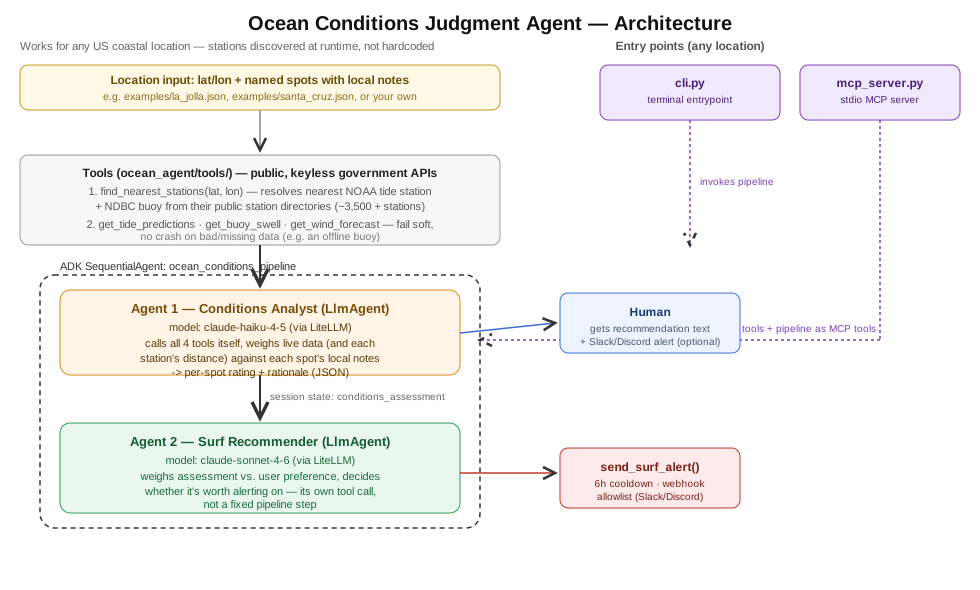
ocean_agent/tools/stations.py—find_nearest_stations(lat, lon)queries NOAA's and NDBC's own public station directories (~3,500 tide stations, thousands of buoys) and picks the closest by great-circle distance. This is what makes the agent location-agnostic instead of hardcoded to one place.ocean_agent/tools/(tide.py, buoy.py, wind.py) — plain Python functions hitting three free, public, no-key-required government APIs: NOAA CO-OPS (tides), NDBC (buoy swell), NWS (wind) — all parameterized by station ID / lat-lon, not a fixed constant. Each fails soft ({"error": ...}) instead of raising, so a bad or missing upstream reading becomes something the model can reason about rather than a crash. (In testing, a Santa Cruz buoy came back 404 — the analyst correctly flagged the missing swell data and lowered its confidence instead of guessing.)ocean_agent/agents.py— twoLlmAgents built with Google ADK, composed withSequentialAgent, wired to Claude models via theLiteLlmmodel wrapper (so the ADK framework and its session/state machinery are real, while the actual model calls go to Anthropic).ocean_agent/orchestrator.py— builds the location + spots + preference prompt and runs the pipeline through ADK'sInMemoryRunner.ocean_agent/mcp_server.py— an MCP server (stdio transport) exposing the raw data tools and the full pipeline as MCP tools, so any MCP client (Claude Desktop, Claude Code, another agent) can call this system directly, for any location, instead of only being usable via the CLI.ocean_agent/tools/alerts.py— the one tool that can take a real-world action. See Security below.
Security features
- No secrets in code. The only credential needed (
ANTHROPIC_API_KEY) is read from the environment (.env, gitignored);.env.exampledocuments the variable without a value. Everything else is a public, keyless API. - Webhook allowlist.
send_surf_alertrefuses to POST to anyALERT_WEBHOOK_URLthat isn't ahooks.slack.comordiscord.com/api/webhooksURL — so even if that env var were ever attacker-influenced, it can't be used to exfiltrate data to an arbitrary host. - Alert cooldown / anti-spam. A 6-hour per-spot cooldown (
alert_state.json) prevents a model mistake or repeated runs from spamming the same alert. - Fail-soft data tools. Network/parsing failures on any of the data feeds return a structured error instead of raising, so a flaky government API can't crash the agent or silently corrupt its reasoning.
Setup
Requires Python 3.10+ (the mcp package requires it).
python3 -m venv venv        # use a Python 3.10+ interpreter
source venv/bin/activate
pip install -r requirements.txt
cp .env.example .env    # add your ANTHROPIC_API_KEY (console.anthropic.com)
Sanity check station discovery + data feeds (no LLM, no API key needed):
python cli.py --test-tools --location-file examples/la_jolla.json
Run the full agent pipeline for a bundled location:
python cli.py --location-file examples/la_jolla.json "I'm a longboarder, low crowd tolerance"
python cli.py --location-file examples/santa_cruz.json "Advanced, want the most powerful wave available"
Add your own location — copy examples/la_jolla.json, change the name,
lat/lon, and spot notes, no code changes needed:
python cli.py --location-file examples/your_spot.json "your preference"
Run as an MCP server (for Claude Desktop / Claude Code / another MCP client):
python -m ocean_agent.mcp_server
Point your MCP client config at this command with cwd set to this repo and
ANTHROPIC_API_KEY in its environment.
Deployability
The included Dockerfile builds a runnable image with no baked-in secrets:
docker build -t ocean-conditions-agent .
docker run --rm -e ANTHROPIC_API_KEY=sk-... ocean-conditions-agent "any preference"
This is deployable as-is to Cloud Run, Fly.io, or any container host that lets
you inject ANTHROPIC_API_KEY as a runtime secret/env var — no code changes
needed, since the app never assumes a specific host environment or location.
Project structure
ocean_agent/
  config.py             # just a request-timeout constant now
  agents.py              # the 2 LlmAgents + SequentialAgent (Google ADK)
  orchestrator.py          # builds the location/spots/preference prompt, runs via ADK
  mcp_server.py             # MCP server exposing tools + pipeline
  tools/
    stations.py              # lat/lon -> nearest NOAA tide station + NDBC buoy
    tide.py, buoy.py, wind.py  # public data fetchers (parameterized, not hardcoded)
    alerts.py                   # rate-limited, allowlisted alert delivery
examples/
  la_jolla.json, santa_cruz.json   # bundled location + spot definitions
cli.py                # terminal entrypoint
Dockerfile
requirements.txt
Known limitations
- Station discovery picks the closest public station, not necessarily one with perfect data — some buoys are weather-only (no wave sensor) or occasionally offline; the analyst is instructed to flag this rather than guess, but a truly remote spot may get a low-confidence assessment.
- Per-spot notes are still human-written text (in the location's JSON file, not hardcoded in Python anymore) — a natural next step is an "onboarding" agent that drafts those notes itself from a plain-language description of a new spot, rather than a human writing them.
Установка Ocean Conditions Agent
У этого сервера нет опубликованного пакета — он собирается из исходников. Открой репозиторий и следуй инструкции в README.
▸ github.com/etavacoli/ocean-conditions-agentFAQ
Ocean Conditions Agent MCP бесплатный?
Да, Ocean Conditions Agent MCP бесплатный — установка в пару кликов через Unyly без оплаты.
Нужен ли API-ключ для Ocean Conditions Agent?
Нет, Ocean Conditions Agent работает без API-ключей и переменных окружения.
Ocean Conditions Agent — hosted или self-hosted?
Self-hosted: сервер запускается локально на твоей машине командой из раздела установки.
Как установить Ocean Conditions Agent в Claude Desktop, Claude Code или Cursor?
Открой Ocean Conditions Agent на unyly.org, выбери вкладку своего клиента (Claude Desktop, Claude Code, Cursor) и нажми Install — конфиг сгенерируется автоматически, без правки JSON.
Похожие MCP
Fetch
Web content fetching and conversion for efficient LLM usage.
AWS KB Retrieval
Retrieval from AWS Knowledge Base using Bedrock Agent Runtime.
 автор: modelcontextprotocol
Spring AI MCP Server
Provides auto-configuration for setting up an MCP server in Spring Boot applications.
llm-analysis-assistant
A very streamlined mcp client that supports calling and monitoring stdio/sse/streamableHttp, and can also view request responses through the /logs page. It also
 автор: xuzexin-hz
Compare Ocean Conditions Agent with
Не уверен что выбрать?
Найди свой стек за 60 секунд
Автор?
Embed-бейдж для README
Похожее
Все в категории ai