
Opencode Export
БесплатноНе проверенEnables AI agents to list, inspect, and export OpenCode AI coding sessions as HTML/JSON archives with secret redaction and token statistics.

Описание
Enables AI agents to list, inspect, and export OpenCode AI coding sessions as HTML/JSON archives with secret redaction and token statistics.
README
Export your opencode AI coding sessions to beautiful, self-contained HTML + JSON archives — with secret redaction, subagent inlining, token backfill, and an MCP server for agents.
Features
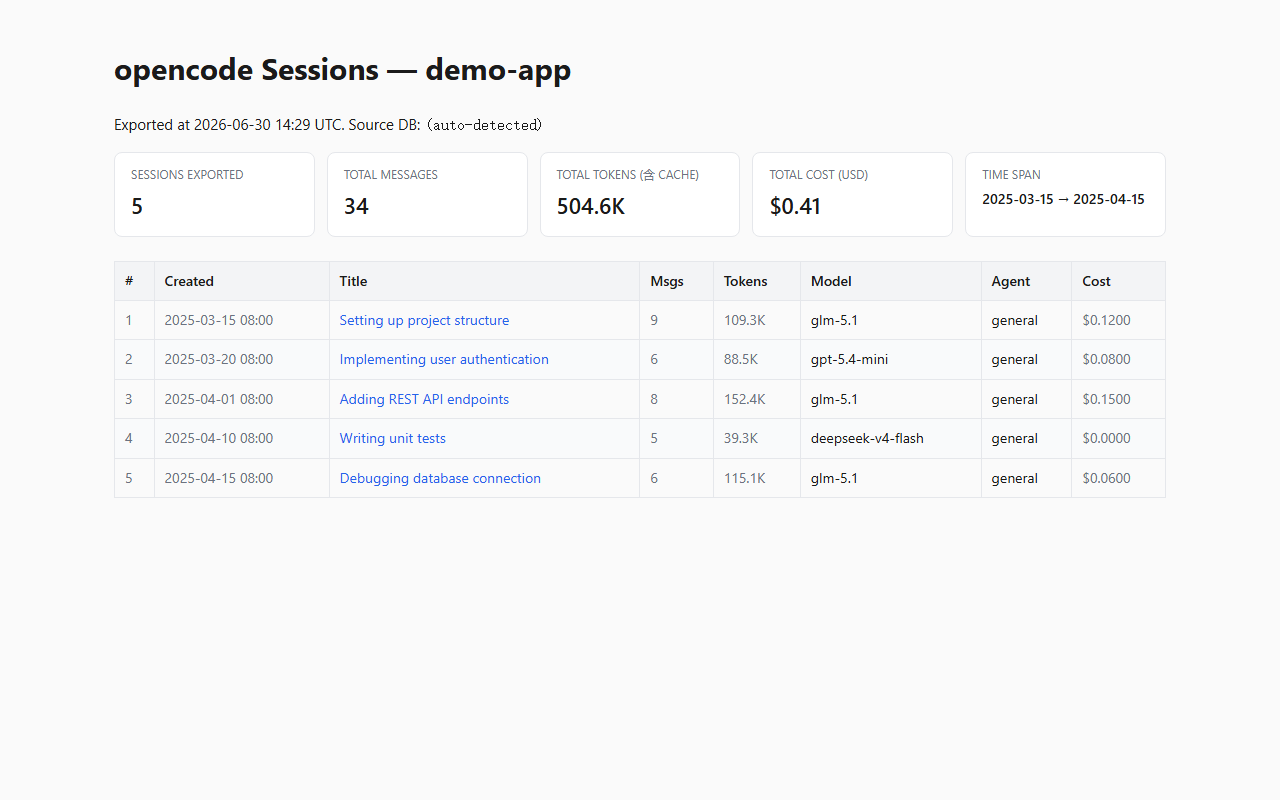
- Beautiful HTML output — Sticky headers with session metadata, collapsible tool-call and reasoning blocks, a slide-in TOC of user prompts, lazy syntax highlighting, KaTeX math rendering, and Mermaid diagram support.
- Secret redaction built-in — 18 patterns (OpenRouter, OpenAI, Anthropic, GitHub, AWS, Slack, GitLab, Google, Stripe, SendGrid, and more) are auto-masked. Add your own exact strings or regex patterns via config.
- Subagent inlining — When your session dispatched sub-agents (explore, general, code-reviewer), their full conversation is rendered inline at the dispatch point inside the parent session.
- 5-field token statistics — Input, output, reasoning, cache-read, and cache-write tokens are tracked per session. Older sessions with zero token data are backfilled by summing per-step usage from
step-finishparts. - Fully offline — Vendor assets (highlight.js, Mermaid, KaTeX, Marked) are downloaded once and bundled into the export. No CDN, no internet required to view.
- MCP server included — AI agents can call
list_sessions,show_session, andexport_sessionsas native tools via the Model Context Protocol. - Structured JSON archive — Alongside HTML, a
data/sessions.jsonfile preserves full, untruncated content (tool inputs/outputs, reasoning text) for programmatic analysis.
Quick Start
Prerequisites: Python 3.11+ and an existing opencode installation (the session database is auto-detected at
%LOCALAPPDATA%\opencode\opencode.dbon Windows,~/Library/Application Support/opencode/opencode.dbon macOS, or$XDG_DATA_HOME/opencode/opencode.dbon Linux).
# Install
pip install git+https://github.com/ZelinZhou-THU/opencode-export.git

# See what projects and sessions exist in your opencode database
opencode-export list

# Export a project's sessions to a browsable HTML + JSON archive
opencode-export export --project my-project --out ./export

# Preview a single session's metadata
opencode-export show ses_xxxx
Open ./export/index.html in your browser. That's it — no server, no internet needed.
How it differs
Several tools exist for exporting opencode or Claude Code sessions, typically producing Markdown transcripts or basic HTML pages. opencode-export was built to address a few gaps encountered when archiving a full semester of AI-assisted development:
- Visual fidelity — Tool calls, reasoning blocks, code patches, and sub-agent threads are preserved in their original structure, not flattened to plain text.
- Safety by default — Secrets are masked before any HTML or JSON is written, using both built-in patterns and user-configured rules. The redaction engine is recursive (handles nested tool state) and idempotent (safe to run twice).
- Token reconstruction — opencode's database schema evolved over time; many older sessions have zero token data.
opencode-exportreconstructs usage by summing per-step token counts fromstep-finishmessage parts, and independently backfills cache fields. - Agent-callable — Rather than only a human-facing CLI, the MCP server lets your AI agent discover, inspect, and export sessions on its own.
CLI Reference
| Command | Purpose | Key flags |
|---|---|---|
list |
List projects or sessions in the database | --project DIR, --json |
show <session-id> |
Preview a session's metadata (title, model, token usage, etc.) | — |
export |
Generate HTML + JSON archive | --project DIR, --out DIR, --config FILE |
Both HTML and JSON are generated by default. Use --no-html or --no-json to skip a format.
Configuration
All options can be set via YAML/JSON config file or CLI flags. See examples/config.example.yaml for the full schema:
db: auto                    # auto-detect, or explicit path
project:
  directory: "my-project"   # substring match on session.directory
select:
  min_messages: 30          # skip tiny sessions
  min_text_bytes: 10240     # skip near-empty sessions
  exclude: []               # session IDs to skip
output:
  dir: ./opencode_export
  formats: [html, json]
  vendor: download          # download | skip | copy-from
  timezone: Asia/Shanghai
redact:
  builtin: true             # 18 built-in secret patterns
  exact: []                 # your own [secret, replacement] pairs
  patterns: []             # your own [regex, replacement] pairs
MCP Server
Install with the [mcp] extra to let AI agents call the export tools directly:
git clone https://github.com/ZelinZhou-THU/opencode-export.git
cd opencode-export
pip install -e ".[mcp]"
Add to your opencode.json (or ~/.config/opencode/opencode.json):
{
  "mcp": {
    "opencode-export": {
      "type": "local",
      "command": ["opencode-export-mcp"]
    }
  }
}
Three tools become available to the agent:
| Tool | Purpose | Key params |
|---|---|---|
list_sessions |
List root sessions (by project) | project_directory, limit |
show_session |
Preview metadata + recent messages | session_id, message_limit |
export_sessions |
Generate HTML + JSON archive to disk | output_dir, session_ids, formats |
See skill/SKILL.md for the agent-facing usage guide, or examples/opencode.json.example for a ready-to-use config.
Output Structure
opencode_export/
├── index.html            # Session index (stats grid + sortable table)
├── sessions/
│   ├── 01_2026-04-02_session-title.html
│   └── ...
├── data/
│   └── sessions.json     # Full archive (untruncated, structured)
└── assets/
    ├── style.css
    ├── renderer.js        # KaTeX / Mermaid / lazy highlight.js
    └── vendor/            # Offline JS libraries
Token Statistics
Each session and the index page display five token fields:
| Field | Meaning |
|---|---|
in |
Input tokens (new prompt consumption) |
out |
Output tokens (model generation) |
reasoning |
Reasoning tokens (o1 / DeepSeek-R1 style thinking) |
cache.read |
Prompt cache hit reads |
cache.write |
Prompt cache writes |
Total = sum of all five fields. This matches the billing granularity of OpenRouter, Anthropic, Google AI, and other providers where cache reads are billed as input tokens.
For older sessions where the database has zero token values, usage is reconstructed by summing per-step d["tokens"] across all step-finish parts.
Development
# Install in dev mode (CLI only)
pip install -e .

# Install with MCP server support
pip install -e ".[mcp]"

# Run tests
pytest tests/ -v
License
Установка Opencode Export
У этого сервера нет опубликованного пакета — он собирается из исходников. Открой репозиторий и следуй инструкции в README.
▸ github.com/ZelinZhou-THU/opencode-exportFAQ
Opencode Export MCP бесплатный?
Да, Opencode Export MCP бесплатный — установка в пару кликов через Unyly без оплаты.
Нужен ли API-ключ для Opencode Export?
Нет, Opencode Export работает без API-ключей и переменных окружения.
Opencode Export — hosted или self-hosted?
Self-hosted: сервер запускается локально на твоей машине командой из раздела установки.
Как установить Opencode Export в Claude Desktop, Claude Code или Cursor?
Открой Opencode Export на unyly.org, выбери вкладку своего клиента (Claude Desktop, Claude Code, Cursor) и нажми Install — конфиг сгенерируется автоматически, без правки JSON.
Похожие MCP
Fetch
Web content fetching and conversion for efficient LLM usage.
AWS KB Retrieval
Retrieval from AWS Knowledge Base using Bedrock Agent Runtime.
 автор: modelcontextprotocol
Spring AI MCP Server
Provides auto-configuration for setting up an MCP server in Spring Boot applications.
llm-analysis-assistant
A very streamlined mcp client that supports calling and monitoring stdio/sse/streamableHttp, and can also view request responses through the /logs page. It also
 автор: xuzexin-hz
Compare Opencode Export with
Не уверен что выбрать?
Найди свой стек за 60 секунд
Автор?
Embed-бейдж для README
Похожее
Все в категории ai