
Openmcpgdb
БесплатноНе проверенInteractive MCP server to control gdb. Fully featured and written in rust

Описание
Interactive MCP server to control gdb. Fully featured and written in rust
README
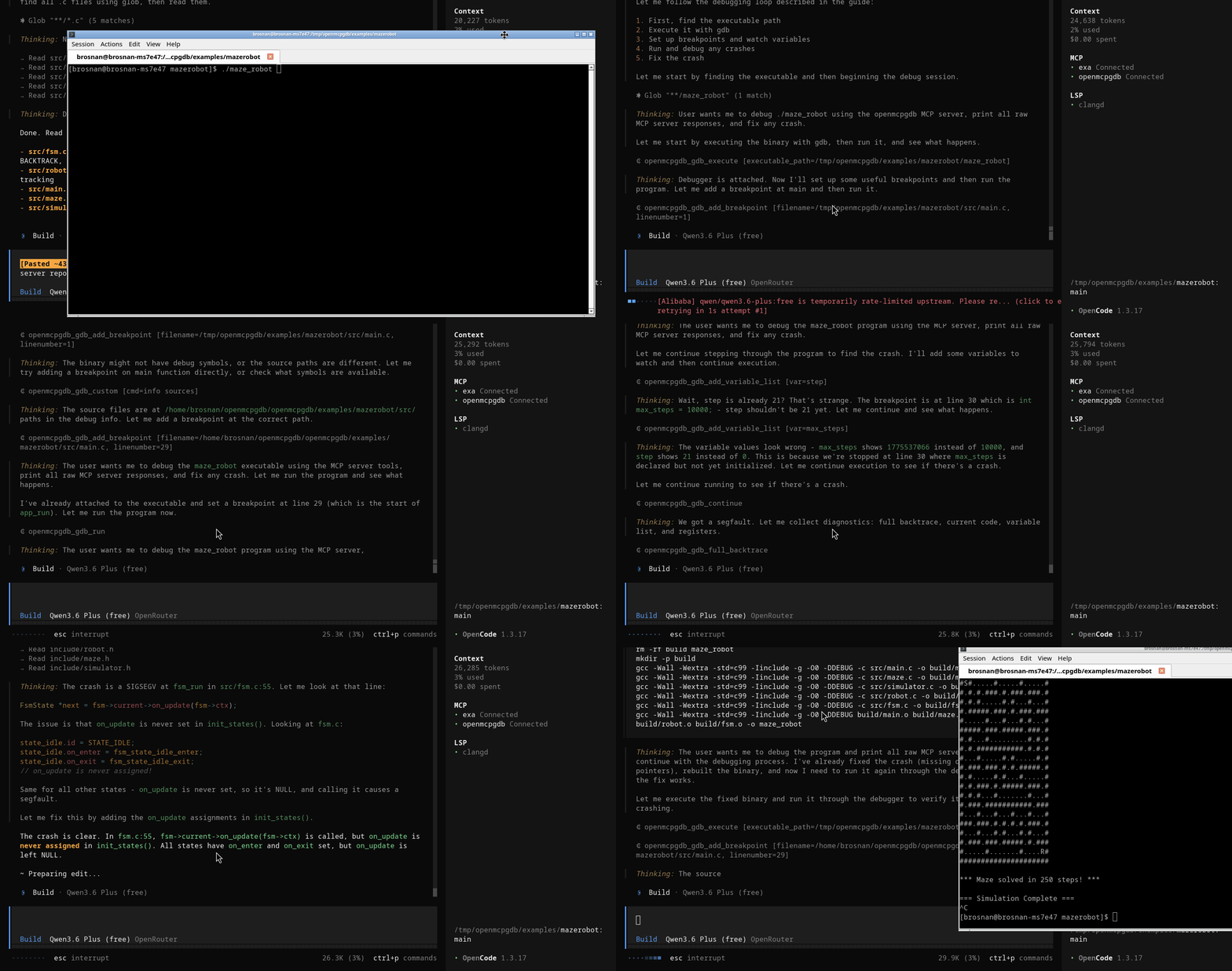
openmcpgdb is an asynchronous Rust MCP server for debugging native programs through GDB.
It is implemented with the rmcp crate and exposes a full gdb_* tool API for MCP clients (Codex, Claude Code, opencode-compatible clients).
Features
- MCP server built with
rmcp(tools/list,tools/callsupport). - One dedicated worker thread per MCP client session.
- GDB process isolation per client.
- Configurable display windows for source, backtrace, and watched variables.
- Transport modes:
https://...andhttp://...streamable HTTP mode (default)stdio://...for stdio MCP wiring when needed
- Interactive MCP test client binary included.
- Rust tests include:
- in-process MCP server/client connectivity
- tool-call coverage
- integration test against
examples/mazerobot/maze_robot
Quick Start
- Download and Run
git clone https://github.com/BrosnanYuen/openmcpgdb.git
cd openmcpgdb
# Change the settings to point to your codebase and executable
# Use HTTP for server compatibility
vim config.json
# Run MCP server
cargo run --bin  openmcpgdb  -- config.json
- Add to Claude Code
claude.json
{
  "mcpServers": {
    "openmcpgdb": {
      "type": "http",
      "url": "http://localhost:9443"
    }
  }
}
- Add to Openai Codex
config.tomlconfig
[mcp_servers.openmcpgdb]
url = "http://localhost:9443"
enabled = true
- Add to
opencode.jsonconfig
{
  "$schema": "https://opencode.ai/config.json",
  "mcp": {
    "openmcpgdb": {
      "type": "remote",
      "url": "http://localhost:9443",
      "enabled": true
    }
  }
}
- Give short version guide LLM_short.md to your LLM. If it doesn't work then use long version LLM.md
Requirements
- Rust toolchain (stable)
- GDB at an absolute path (default
/usr/bin/gdb) - Linux/macOS environment for the provided examples
Project Layout
src/main.rs: server entrypointsrc/runtime.rs: transport/runtime bootstrappingsrc/server.rs: MCP tool routing and handlerssrc/session.rs: per-client worker thread and operation executionsrc/gdb.rs: real and mock GDB backendssrc/bin/interactive_client.rs: interactive MCP clienttests/mazerobot_mcp_client.rs: integration MCP client test against mazerobotconfig.json: default config template
Configuration
The server loads JSON config from the first CLI argument, defaulting to config.json in project root.
All filesystem paths must be absolute.
Example:
{
  "gdb_path": "/usr/bin/gdb",
  "gdb_options": "",
  "codebase_dir": "/home/brosnan/openmcpgdb/openmcpgdb/examples/mazerobot",
  "executable_path": "/home/brosnan/openmcpgdb/openmcpgdb/examples/mazerobot/maze_robot",
  "mcp_server_name": "MCP GDB Server",
  "mcp_server_url": "https://localhost:9443",
  "display_lines_before_current": 7,
  "display_lines_after_current": 8,
  "display_backtrace": 50,
  "display_variable_list": 20,
  "display_join_current_code": true
}
display_join_current_code controls how current_code is returned:
false: object map keyed by line numbertrue: single joined string in the formatline | sourcewith newline separators
mcp_server_url
- Default:
https://localhost:9443 http://host:port/pathorhttps://host:port/path: run streamable HTTP on that bind address/path.stdio://...: run MCP over stdio.
Note: https:// is parsed and accepted, but this project currently binds plain TCP HTTP directly. For real TLS, run behind a TLS-terminating reverse proxy.
Build
cargo build
Run the MCP Server
1. Default HTTPS URL mode
Use default config:
cargo run --bin openmcpgdb -- config.json
2. HTTP/HTTPS custom URL mode
Set config URL, for example:
"mcp_server_url": "https://localhost:9443"
Run:
cargo run --bin openmcpgdb -- config.json
3. Optional stdio mode
Set:
"mcp_server_url": "stdio://local"
Run:
cargo run --bin openmcpgdb -- config.json
Interactive MCP Client
An interactive MCP client is included for manual testing against HTTP server mode.
Run:
cargo run --bin interactive_client -- config.json
Input format:
<tool_name> <json-args>
Examples of Debugging on local GDB:
gdb_execute {"executable_path":"/home/brosnan/openmcpgdb/openmcpgdb/examples/mazerobot/maze_robot"}
gdb_debugger_state {}
gdb_add_variable_list {"var":"robot->sim->robot_row"}
gdb_add_breakpoint {"filename":"/home/brosnan/openmcpgdb/openmcpgdb/examples/mazerobot/src/main.c","linenumber":20}
gdb_run {}
gdb_next {}
gdb_step {}
gdb_print {"var":"counter"}
gdb_full_backtrace {}
gdb_continue {}
gdb_quit {}
gdb_reset_back_to_not_attached {}
Examples of Debugging on gdbserver on exsisting PID:
gdb_gdbserver {"ip":"127.0.0.1","port":11444,"pid":149104}
gdb_target_remote {"ip":"127.0.0.1","port":11444}
gdb_debugger_state {}
gdb_add_variable_list {"var":"robot->sim->robot_row"}
gdb_add_breakpoint {"filename":"/home/brosnan/openmcpgdb/openmcpgdb/examples/mazerobot/src/main.c","linenumber":20}
gdb_continue {}
gdb_next {}
gdb_step {}
gdb_print {"var":"counter"}
gdb_full_backtrace {}
gdb_quit {}
gdb_reset_back_to_not_attached {}
Type quit to exit the interactive client.
Use With MCP Clients
This server is compatible with MCP clients that support either:
- command-based stdio servers
- streamable HTTP servers
opencode (stdio recommended)
Use MCP server command settings pointing to:
cargo run --bin openmcpgdb -- /home/brosnan/openmcpgdb/openmcpgdb/config.json
And set in config:
"mcp_server_url": "stdio://local"
OpenAI Codex clients
You can use either mode:
stdiomode:
- server command:
cargo run --bin openmcpgdb -- /home/brosnan/openmcpgdb/openmcpgdb/config.json
- config URL:
"mcp_server_url": "stdio://local"
- HTTP mode:
- run server with:
"mcp_server_url": "https://localhost:9443"
- connect client MCP endpoint to:
http://localhost:9443
Claude Code clients
For local development, prefer stdio:
cargo run --bin openmcpgdb -- /home/brosnan/openmcpgdb/openmcpgdb/config.json
with:
"mcp_server_url": "stdio://local"
If you use HTTP transport, point the client to:
http://localhost:9443
Important transport note
https://localhost:9443 is accepted in this project config as a default URL shape, but the current server bind is plain HTTP.
For true TLS HTTPS, run behind a TLS reverse proxy and expose an HTTPS endpoint there.
Tool API
All tool responses include debugger_state and optional fields like variable_list, backtrace, current_code*, and error.
debugger_state values
not attachedfailed to attachgdbserver attachedattachedstopped at breakpointstopped at steppingrunningsigsegvsigabrtsigbussigfpesigillsigtrapsigtermsigkillexitederror
Execution/session
gdb_execute(executable_path)gdb_run()gdb_gdbserver(ip, port, pid)gdb_target_remote(ip, port)gdb_set_thread(id)gdb_set_frame(id)
Breakpoints
gdb_add_breakpoint(filename, linenumber)gdb_clear_breakpoint(filename, linenumber)gdb_enable_breakpoint(filename, linenumber)gdb_disable_breakpoint(filename, linenumber)gdb_list_breakpoint()
Stepping
gdb_next()gdb_step()gdb_continue()gdb_interrupt()
Variable watch list
gdb_add_variable_list(var)gdb_del_variable_list(var)gdb_variable_list()
Inspection
gdb_debugger_state()gdb_current_code()gdb_full_backtrace()gdb_info_threads()gdb_info_regs()gdb_print(var)gdb_set_var(var, value)
Control/config/custom
gdb_quit()gdb_kill()gdb_reset_back_to_not_attached()gdb_display_lines_before_current(size)gdb_display_lines_after_current(size)gdb_display_backtrace(size)gdb_display_variable_list(size)gdb_custom(cmd)
Testing
Run all tests:
cargo test
Included test coverage:
- MCP server starts and MCP client connects.
- Unit-style all-tool-call response checks.
- Integration test starting MCP server with:
- codebase:
/home/brosnan/openmcpgdb/openmcpgdb/examples/mazerobot/ - binary:
/home/brosnan/openmcpgdb/openmcpgdb/examples/mazerobot/maze_robot - MCP client in
tests/mazerobot_mcp_client.rs
- codebase:
Установка Openmcpgdb
У этого сервера нет опубликованного пакета — он собирается из исходников. Открой репозиторий и следуй инструкции в README.
▸ github.com/BrosnanYuen/openmcpgdbFAQ
Openmcpgdb MCP бесплатный?
Да, Openmcpgdb MCP бесплатный — установка в пару кликов через Unyly без оплаты.
Нужен ли API-ключ для Openmcpgdb?
Нет, Openmcpgdb работает без API-ключей и переменных окружения.
Openmcpgdb — hosted или self-hosted?
Self-hosted: сервер запускается локально на твоей машине командой из раздела установки.
Как установить Openmcpgdb в Claude Desktop, Claude Code или Cursor?
Открой Openmcpgdb на unyly.org, выбери вкладку своего клиента (Claude Desktop, Claude Code, Cursor) и нажми Install — конфиг сгенерируется автоматически, без правки JSON.
Похожие MCP
GitHub
PRs, issues, code search, CI status
 автор: GitHub
Filesystem
Secure file operations with configurable access controls.
Memory
Knowledge graph-based persistent memory system.
Template MCP Server
A CLI tool to create a new Model Context Protocol server project with TypeScript support, dual transport options, and an extensible structure
 автор: mcpdotdirect
Compare Openmcpgdb with
Не уверен что выбрать?
Найди свой стек за 60 секунд
Автор?
Embed-бейдж для README
Похожее
Все в категории development