
operative_sh/web-eval-agent
БесплатноНе проверенAn MCP Server that autonomously debugs web applications with browser-use browser agents

Описание
An MCP Server that autonomously debugs web applications with browser-use browser agents
README
This project has been discontinued. We're building something new at withrefresh.com
🚀 operative.sh web-eval-agent MCP Server
Let the coding agent debug itself, you've got better things to do.
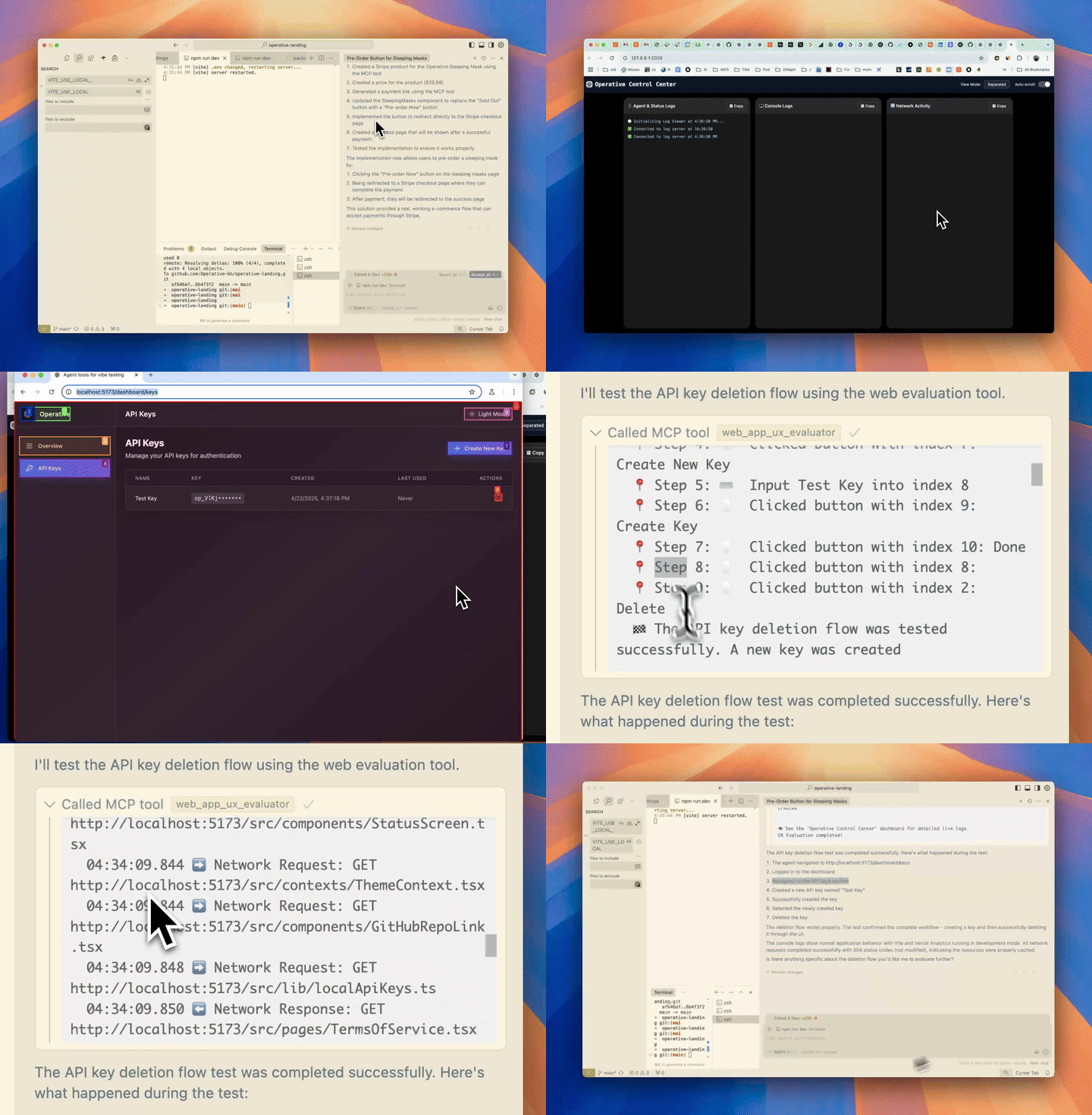
🔥 Supercharge Your Debugging
operative.sh's MCP Server launches a browser-use powered agent to autonomously execute and debug web apps directly in your code editor.
⚡ Features
- 🌐 Navigate your webapp using BrowserUse (2x faster with operative backend)
- 📊 Capture network traffic - requests are intelligently filtered and returned into the context window
- 🚨 Collect console errors - captures logs & errors
- 🤖 Autonomous debugging - the Cursor agent calls the web QA agent mcp server to test if the code it wrote works as epected end-to-end.
🧰 MCP Tool Reference
| Tool | Purpose |
|---|---|
web_eval_agent |
🤖 Automated UX evaluator that drives the browser, captures screenshots, console & network logs, and returns a rich UX report. |
setup_browser_state |
🔒 Opens an interactive (non-headless) browser so you can sign in once; the saved cookies/local-storage are reused by subsequent web_eval_agent runs. |
Key arguments
web_eval_agenturl(required) – address of the running app (e.g.http://localhost:3000)task(required) – natural-language description of what to test ("run through the signup flow and note any UX issues")headless_browser(optional, defaultfalse) – set totrueto hide the browser window
setup_browser_stateurl(optional) – page to open first (handy to land directly on a login screen)
You can trigger these tools straight from your IDE chat, for example:
Evaluate my app at http://localhost:3000 – run web_eval_agent with the task "Try the full signup flow and report UX issues".
🏁 Quick Start
Easy Setup with One-Click Integration
- Get your API key (free) - when you create your API key, you'll see:
- "Add to Cursor" button with a deeplink for instant Cursor installation
- Prefilled Claude Code command with your API key automatically included
Manual Setup (macOS/Linux)
- Pre-requisites (typically not needed):
- brew:
/bin/bash -c "$(curl -fsSL https://raw.githubusercontent.com/Homebrew/install/HEAD/install.sh)" - npm: (
brew install npm) - jq:
brew install jq
- Run the installer after getting an api key (free)
- Installs playwright
- Installs uv
- Inserts JSON into your code editor (Cursor/Cline/Windsurf) for you!
curl -LSf https://operative.sh/install.sh -o install.sh && bash install.sh && rm install.sh
- Visit your favorite IDE and restart to apply the changes
- Send a prompt in chat mode to call the web eval agent tool! e.g.
Test my app on http://localhost:3000. Use web-eval-agent.
🛠️ Manual Installation
- Get your API key at operative.sh/mcp
- Install uv
curl -LsSf https://astral.sh/uv/install.sh | sh
- Source environment variables after installing UV
Mac
source ~/.zshrc
Linux
source ~/.bashrc
- Install playwright:
npm install -g chromium playwright && uvx --with playwright playwright install --with-deps
- Add below JSON to your relevant code editor with api key
- Restart your code editor
🔃 Updating
uv cache clean- refresh MCP server
    "web-eval-agent": {
      "command": "uvx",
      "args": [
        "--refresh-package",
        "webEvalAgent",
        "--from",
        "git+https://github.com/Operative-Sh/web-eval-agent.git",
        "webEvalAgent"
      ],
      "env": {
        "OPERATIVE_API_KEY": "<YOUR_KEY>"
      }
    }
Operative Discord Server
🛠️ Manual Installation (Mac + Cursor/Cline/Windsurf)
- Get your API key at operative.sh/mcp
- Install uv
curl -LsSf https://astral.sh/uv/install.sh | sh)
- Install playwright:
npm install -g chromium playwright && uvx --with playwright playwright install --with-deps
- Add below JSON to your relevant code editor with api key
- Restart your code editor
Manual Installation (Windows + Cursor/Cline/Windsurf)
We're refining this, please open an issue if you have any issues!
- Do all this in your code editor terminal
curl -LSf https://operative.sh/install.sh -o install.sh && bash install.sh && rm install.sh- Get your API key at operative.sh/mcp
- Install uv
(curl -LsSf https://astral.sh/uv/install.sh | sh) uvx --from git+https://github.com/Operative-Sh/web-eval-agent.git playwright install- Restart code editor
🚨 Issues
- Updates aren't being received in code editors, update or reinstall for latest version: Run
uv cache cleanfor latest - Any issues feel free to open an Issue on this repo or in the discord!
- 5/5 - static apps without changes weren't screencasting, fixed!
uv clean+ restart to get fix
Changelog
- 4/29 - Agent overlay update - pause/play/stop agent run in the browser
📋 Example MCP Server Output Report
📊 Web Evaluation Report for http://localhost:5173 complete!
📝 Task: Test the API-key deletion flow by navigating to the API Keys section, deleting a key, and judging the UX.

🔍 Agent Steps
  📍 1. Navigate → http://localhost:5173
  📍 2. Click     "Login"        (button index 2)
  📍 3. Click     "API Keys"     (button index 4)
  📍 4. Click     "Create Key"   (button index 9)
  📍 5. Type      "Test API Key" (input index 2)
  📍 6. Click     "Done"         (button index 3)
  📍 7. Click     "Delete"       (button index 10)
  📍 8. Click     "Delete"       (confirm index 3)
🏁 Flow tested successfully – UX felt smooth and intuitive.

🖥️ Console Logs (10)
  1. [debug] [vite] connecting…
  2. [debug] [vite] connected.
  3. [info]  Download the React DevTools …
     …

🌐 Network Requests (10)
  1. GET /src/pages/SleepingMasks.tsx                   304
  2. GET /src/pages/MCPRegistryRegistry.tsx             304
     …

⏱️ Chronological Timeline
  01:16:23.293 🖥️ Console [debug] [vite] connecting…
  01:16:23.303 🖥️ Console [debug] [vite] connected.
  01:16:23.312 ➡️ GET /src/pages/SleepingMasks.tsx
  01:16:23.318 ⬅️ 304 /src/pages/SleepingMasks.tsx
     …
  01:17:45.038 🤖 🏁 Flow finished – deletion verified
  01:17:47.038 🤖 📋 Conclusion repeated above
👁️  See the "Operative Control Center" dashboard for live logs.
Star History
Built with <3 @ operative.sh
Установка operative_sh/web-eval-agent
У этого сервера нет опубликованного пакета — он собирается из исходников. Открой репозиторий и следуй инструкции в README.
▸ github.com/Operative-Sh/web-eval-agentFAQ
operative_sh/web-eval-agent MCP бесплатный?
Да, operative_sh/web-eval-agent MCP бесплатный — установка в пару кликов через Unyly без оплаты.
Нужен ли API-ключ для operative_sh/web-eval-agent?
Нет, operative_sh/web-eval-agent работает без API-ключей и переменных окружения.
operative_sh/web-eval-agent — hosted или self-hosted?
Self-hosted: сервер запускается локально на твоей машине командой из раздела установки.
Как установить operative_sh/web-eval-agent в Claude Desktop, Claude Code или Cursor?
Открой operative_sh/web-eval-agent на unyly.org, выбери вкладку своего клиента (Claude Desktop, Claude Code, Cursor) и нажми Install — конфиг сгенерируется автоматически, без правки JSON.
Похожие MCP
Playwright
Browser automation, scraping, screenshots
 автор: Microsoft
Puppeteer
Browser automation and web scraping.
 автор: modelcontextprotocol
Garmin Connect
An MCP server for Garmin Connect that provides access to fitness activities, health statistics, and sleep data by routing requests through a headless browser to
 автор: etweisberg
Higgsfield Unlimited
MCP server for Higgsfield AI that enables unlimited-mode image, video, audio generation, uploads, and job management via multiple parallel accounts, using brows
 автор: nukIeer
opentabs-dev/opentabs
Plugin-based server and Chrome extension that gives AI agents access to web apps through your authenticated browser session, with a plugin SDK.
 автор: opentabs-dev
hlydecker/ucsc-genome-mcp
Interact with the UCSC Genome Browser API to find genomes, chromosomes and more.
 автор: hlydecker
34892002/bilibili-mcp-js
Search Bilibili content, with LangChain integration examples.
 автор: 34892002
achiya-automation/safari-mcp
Native Safari browser automation without a Chrome dependency.
 автор: achiya-automation
agent-infra/mcp-server-browser
Browser automation using Puppeteer, supporting local and remote browser connections.
 автор: bytedance
aparajithn/agent-scraper-mcp
Web scraping: clean content extraction, CSS-selector scraping, Playwright screenshots, link and metadata extraction, and Google search.
 автор: aparajithn
Compare operative_sh/web-eval-agent with
Не уверен что выбрать?
Найди свой стек за 60 секунд
Автор?
Embed-бейдж для README
Похожее
Все в категории browse