
Pbi Docs
БесплатноНе проверенAI context engine for Power BI models — turns .pbit/.pbip (TMDL) into indexed, queryable context for LLM agents (MCP server, CLI, docs). Zero dependencies.

Описание
AI context engine for Power BI models — turns .pbit/.pbip (TMDL) into indexed, queryable context for LLM agents (MCP server, CLI, docs). Zero dependencies.
README
pbi-docs — AI Context Engine for Power BI Models
Tests Python Version License Platform
Turns a Power BI model (.pbit or the new .pbip/TMDL format) into documentation and
context an AI agent can actually use — human-readable Markdown, indexed JSON for LLMs/RAG, a
query CLI, and a read-only MCP server. Zero external dependencies.
Who it's for: data engineers documenting dashboards, consultants auditing models they didn't build, and anyone connecting an AI agent (Claude, GPT, Copilot) to a Power BI model's structure.
Demo
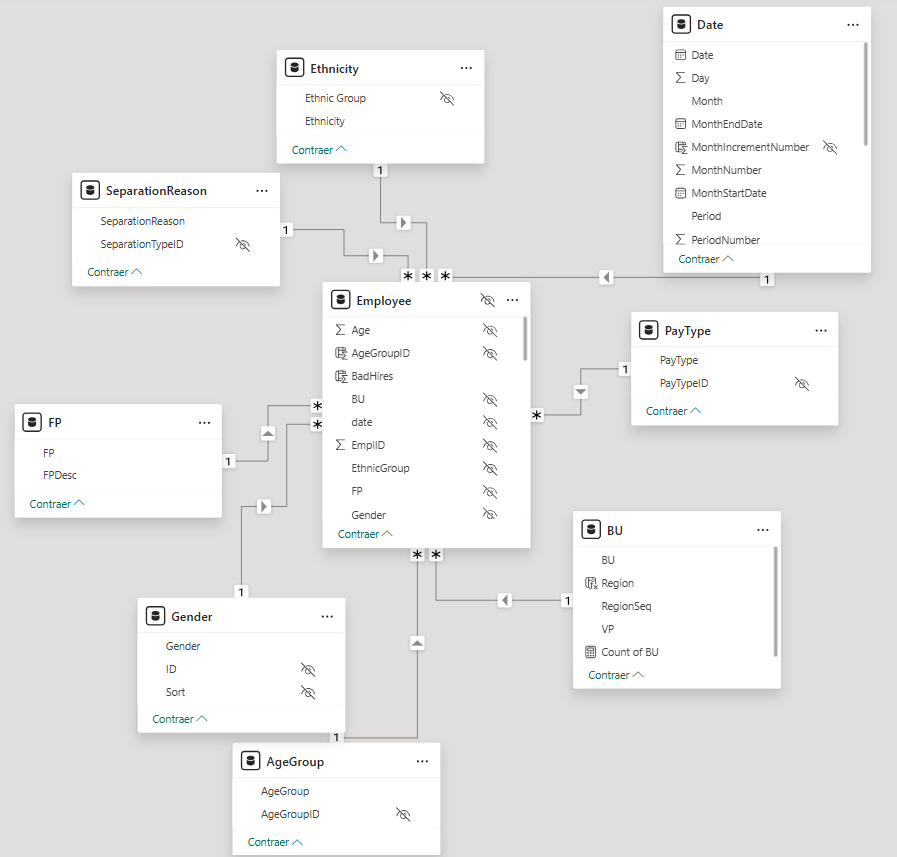
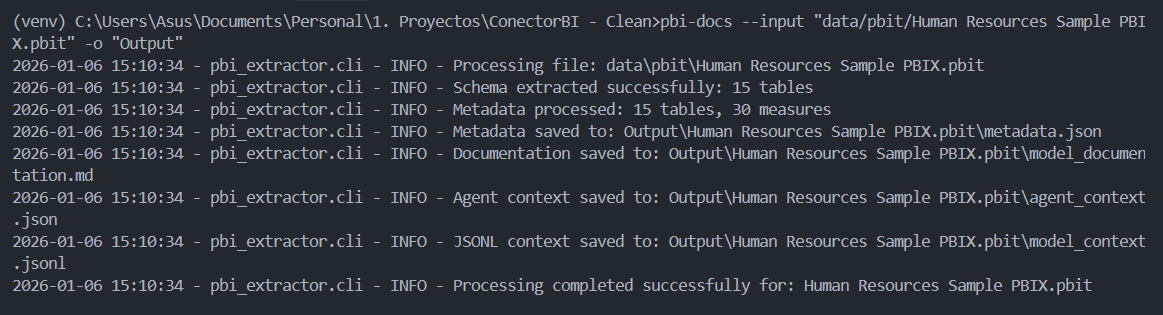
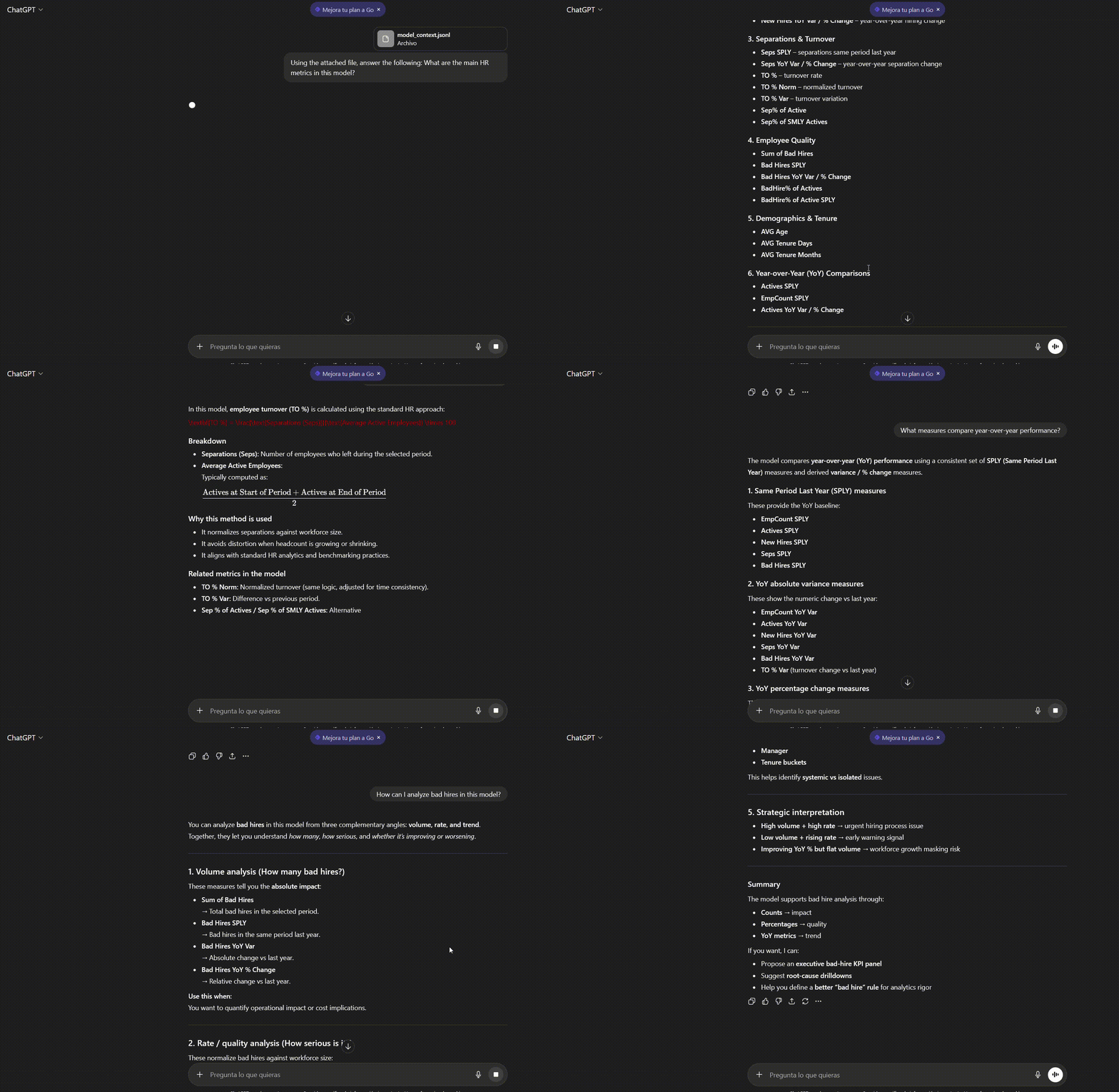
Quick Start
git clone https://github.com/Osc2405/pbi-docs.git
cd pbi-docs
pip install -e .

# From a .pbit file...
pbi-docs --input "data/pbit/my-model.pbit"
# ...or a PBIP project (folder, .pbip marker, or .SemanticModel/ — auto-detected)
pbi-docs --input "data/pbip/my-model/"

Get-Content "output/my-model.pbit/model_documentation.md"
Result: 7 files in output/<model-name>/ in seconds — human-readable Markdown, JSON/JSONL
context for AI agents, and an indexed, queryable version for large models.
Full walkthrough — folder structure, expected output, and using the context in Python
The command generates a folder in output/ with all documentation files:
output/my-model.pbit/          (or output/my-model/ for PBIP)
├── metadata.json              # Structured model metadata
├── model_documentation.md     # Human-readable documentation
├── agent_context.json         # LLM-optimized context (top-20 measures)
├── model_context.jsonl        # JSONL format for embeddings/RAG
├── index.json                 # Lightweight index + pointers
├── relationships.json         # All relationships
└── tables/
    ├── Sales.json             # Full detail per table
    └── ...
Get-Content "output/my-model.pbit/model_documentation.md" | Select-Object -First 15
# my-model - Power BI Data Model

**Generated:** 2025-12-22 14:23:29

## Model Summary

- **Business Tables:** 9
- **Total Columns:** 23
- **Total Measures:** 44
- **Relationships:** 9
Use the JSON context directly in Python (or point an AI agent at it via --query or
--mcp-serve — see Use Cases below):
import json

with open("output/my-model.pbit/agent_context.json", "r", encoding="utf-8") as f:
    context = json.load(f)

print(f"Model: {context['model_name']}")
print(f"Key measures: {len(context['key_measures'])}")
print(f"First measure: {context['key_measures'][0]['name']}")
Model: my-model
Key measures: 20
First measure: Revenue Budget
Why pbi-docs?
| Your Need | pbi-docs Solution |
|---|---|
| Document 10+ dashboards fast | Batch processing with --batch |
| Support the new PBIP format | Full TMDL parser, auto-detected from .pbip or folder |
| Train AI agents on your models | Indexed JSON/JSONL context, a query CLI, and an MCP server |
| Let an AI agent query the model live | Read-only MCP server (--mcp-serve) — validated against a test harness, not yet a live MCP client, see MCP server |
| Use it from your AI coding assistant | Chat-invocable Skill for Claude Code + prompt file for GitHub Copilot |
| Actually readable DAX | Hierarchical indentation (4x better than raw) |
| Compare model versions | Content-aware --diff, with impact analysis (--diff-impact) |
| Zero-cost, zero-install | Python-only, no .NET dependencies |
Perfect for: Data engineers onboarding teams, consultants auditing models, organizations building AI copilots for BI.
Project Status
The read/context layer — PBIP/TMDL support, indexed output, query resolver, MCP server — is
implemented and tested (222 tests). Every claim above is backed by a dated, reproducible report,
not just asserted: see Validation below. Writing/editing TMDL models and PBIR/report-
layer parsing are deliberately out of scope for now (see CHANGELOG.md and the
Roadmap for why).
Requirements
- Python 3.10+ (3.12 recommended)
- Windows PowerShell (instructions include Windows commands)
Optional: virtual environment (venv). No external libraries required.
Installation (Windows/PowerShell)
# 1) Clone or download the repository
# 2) (Optional) Create and activate virtual environment
python -m venv venv
./venv/Scripts/Activate.ps1

# 3) Editable installation (development)
pip install -e .

# Verify Python version
python --version
If PowerShell blocks activation, run as Administrator:
Set-ExecutionPolicy -ExecutionPolicy RemoteSigned -Scope CurrentUser
Quick Usage
Basic Commands
Process a .pbit file:
pbi-docs --input "data/pbit/my-model.pbit"
Process a PBIP project (new in v1.0):
# From the .pbip marker file
pbi-docs --input "data/pbip/my-model.pbip"

# From the .SemanticModel folder directly
pbi-docs --input "data/pbip/my-model.SemanticModel"

# From the project root folder (auto-detected)
pbi-docs --input "data/pbip/my-model/"
Specify custom output directory:
pbi-docs -i "data/pbit/my-model.pbit" -o "my-results"
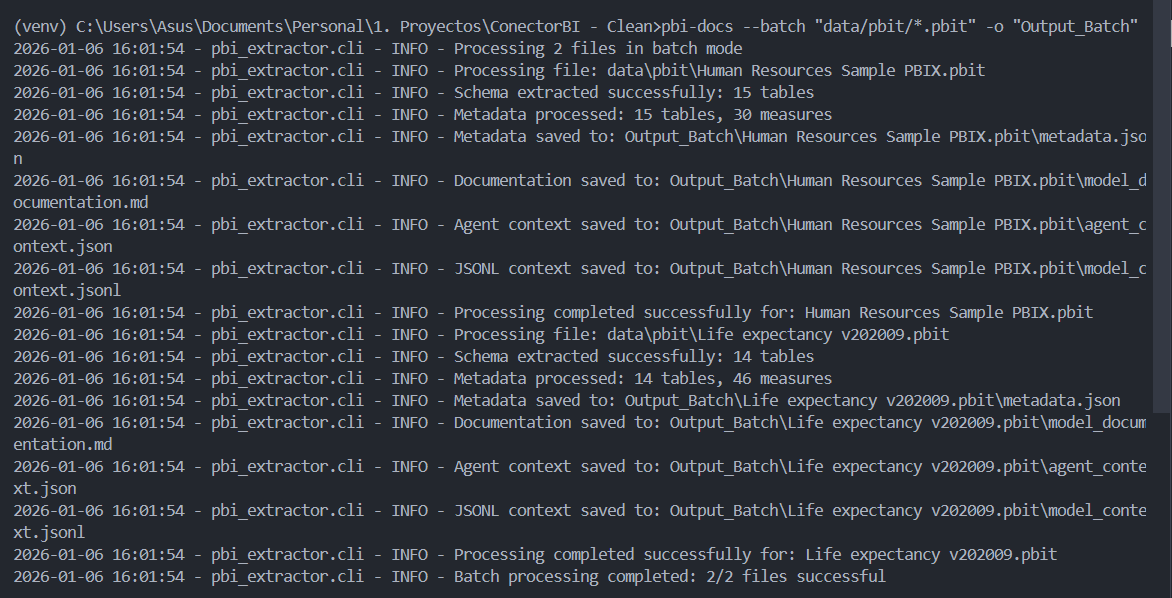
Process multiple files (batch mode — mixed formats supported):
pbi-docs --batch "data/pbit/*.pbit"
Compare two versions of a model (mixed .pbit/.pbip supported):
pbi-docs --diff "data/pbit/model_v1.pbit" "data/pbip/model_v2/"
Verbose mode (more debugging information):
pbi-docs --input "data/pbit/my-model.pbit" --verbose
Human-readable indexed output (indented JSON, for debugging — compact by default):
pbi-docs --input "data/pbit/my-model.pbit" --pretty
Generate documentation in Spanish:
pbi-docs --input "data/pbit/my-model.pbit" --lang es
Generate documentation in English (default):
pbi-docs --input "data/pbit/my-model.pbit" --lang en
# Or simply omit --lang (English is the default)
pbi-docs --input "data/pbit/my-model.pbit"
Expected Output
When running the command, you'll see messages like:
Processing file: data/pbit/my-model.pbit
Schema extracted successfully: 11 tables
Metadata processed: 11 tables, 44 measures
Metadata saved to: output/my-model.pbit/metadata.json
Documentation saved to: output/my-model.pbit/model_documentation.md
Agent context saved to: output/my-model.pbit/agent_context.json
JSONL context saved to: output/my-model.pbit/model_context.jsonl
Processing completed successfully for: my-model.pbit
Important Notes
- Supported formats:
.pbitfiles (ZIP + JSON TMSL) and.pbipprojects (TMDL folder structure)..pbixfiles must be exported to.pbitfrom Power BI Desktop (File > Export > Power BI Template). - PBIP entry points: The
--inputflag accepts a.pbipmarker file, a.SemanticModel/folder, or a project root folder. Format is auto-detected. - Language selection: Use
--lang enfor English (default) or--lang esfor Spanish. The language affects the generatedmodel_documentation.mdandagent_context.jsonfiles. - Paths with spaces: Use quotes around paths that contain spaces.
- Recommended paths: Place your files in
data/ordata/pbit/to keep the project organized.
Project Structure
pbi-docs/
├── pbi_extractor/           # Main package
│   ├── __init__.py
│   ├── cli.py              # CLI with argparse (auto-detection, --index-format)
│   ├── extractor.py        # .pbit (ZIP+JSON TMSL) extractor
│   ├── pbip_extractor.py   # .pbip / TMDL extractor (new in v1.0)
│   ├── processor.py        # Metadata processing (format-agnostic)
│   ├── indexed_output.py   # index.json + tables/*.json writer (new in v1.0)
│   ├── formatters.py       # Advanced hierarchical DAX formatting
│   ├── categorizer.py      # Table/measure categorization
│   ├── documentation.py    # Markdown generation
│   ├── diff.py             # Model comparison
│   ├── jsonl_generator.py  # JSONL generator for LLMs
│   └── i18n.py             # Translations (en/es)
├── tests/
│   ├── fixtures/
│   │   └── minimal_pbip/   # TMDL test fixtures (new in v1.0)
│   ├── test_pbip_extractor.py
│   ├── test_cli_detection.py
│   ├── test_indexed_output.py
│   ├── test_categorizer.py
│   ├── test_i18n.py
│   └── test_processor_and_context.py
├── githooks/                # Reference pre-commit hook (docs/pre_commit_hook.md)
├── data/                   # Input model files
├── output/                 # Generated results
├── pyproject.toml          # Package configuration
├── README.md
├── CHANGELOG.md
└── LICENSE
Generated Outputs
After running the command, a folder is created in output/ with the model name. Inside you'll find:
metadata.jsonsummary: totals of tables, visible columns, visible measures and relationships.tables: each table withcolumns(type, visibility, category) andmeasures(clean expression, format, display folder, category).relationships: from/to, cardinality, direction and active status.
model_documentation.md- Model summary (language depends on
--langflag, default: English). - List of tables (hidden or business), visible columns and measures grouped by category: revenue, cost, margin, percentage, ratio, temporal, etc.
- Sections with DAX expressions formatted with hierarchical indentation.
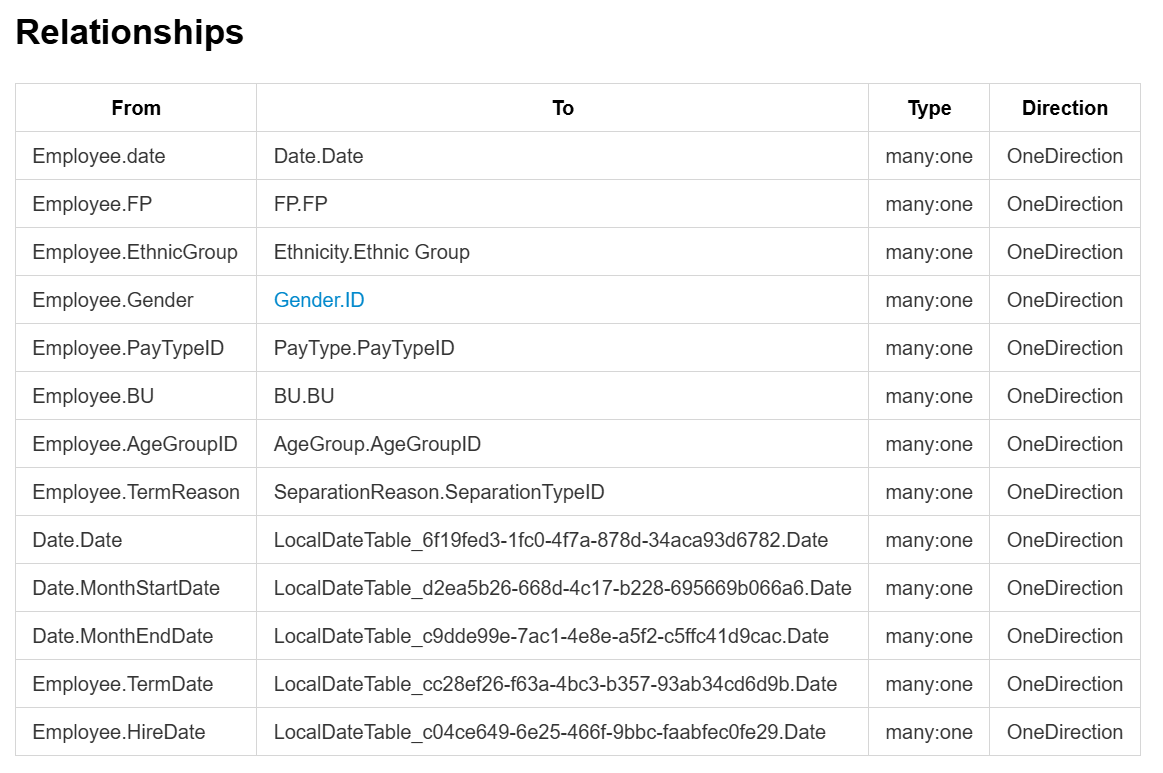
- Relationships table with visual representation of table connections.
- AI Agent Usage Guide with sample questions (translated based on selected language).
- Model summary (language depends on
agent_context.json- Model name, totals, available tables, key measures (up to 20), temporal columns and sample questions (language depends on
--langflag, default: English).
- Model name, totals, available tables, key measures (up to 20), temporal columns and sample questions (language depends on
model_context.jsonl- Line-delimited JSON format optimized for embeddings and RAG.
- Each line is an independent object (table, measure or relationship).
- Includes formatted DAX and sample prompts.
index.json(new in v1.0)- Lightweight model summary with per-table metadata (column/measure counts, categories) and relative paths to all other output files.
- Allows LLM agents to navigate large models without loading the full
metadata.json.
relationships.json(new in v1.0)- All model relationships in a single focused file.
tables/<TableName>.json(new in v1.0)- Full detail for one table (columns + measures including DAX).
- One file per table, addressable via
index.json.
index.json — open format specification
index.json is a small, stable contract meant to be consumed directly by any tool — not just
pbi-docs' own CLI/resolver/MCP server: a lightweight per-table summary (name, column/measure
counts, categories, format, and a relative path to that table's detail file) plus pointers to
every other output file, so an agent can navigate a large model without loading metadata.json.
By default it's written compact (no indentation); pass --pretty for indented JSON.
Full field-by-field contract — top-level shape, per-table entry, the tables/<Name>.json JSON vs.
TOON shapes, and the versioning policy — is documented in
docs/index-json-spec.md.
Use Cases
1. Automatic Dashboard Documentation
Problem: Your company has multiple undocumented Power BI dashboards. Analysts waste time searching for which measures to use and how tables are related.
Solution:
# Process all dashboards in a folder (English documentation)
pbi-docs --batch "data/dashboards/*.pbit"

# Or generate Spanish documentation for all dashboards
pbi-docs --batch "data/dashboards/*.pbit" --lang es
Result:
- Each dashboard generates its own documentation in
output/[dashboard-name].pbit/ - Documentation ready to share with the team
- Automatic identification of measures by category (revenue, cost, margin, etc.)
Output example:
output/
├── Sales Dashboard.pbit/
│   ├── model_documentation.md  # 23 documented measures
│   └── metadata.json
├── Finance Dashboard.pbit/
│   ├── model_documentation.md  # 31 documented measures
│   └── metadata.json
└── Operations Dashboard.pbit/
    ├── model_documentation.md  # 18 documented measures
    └── metadata.json
2. New Analyst Onboarding
Problem: New employees need weeks to understand Power BI model structure and which measures to use for each analysis.
Solution:
- Generate the model documentation (in your preferred language):
# English documentation (default)
pbi-docs --input "data/pbit/my-model.pbit"

# Spanish documentation
pbi-docs --input "data/pbit/my-model.pbit" --lang es
Upload the
model_documentation.mdfile to your favorite AI agent (Claude, GPT-4, etc.)The agent can answer questions like:
- "What revenue measures are available?"
- "How is Gross Margin calculated?"
- "What tables are related to Customer?"
Interaction example:
User: What revenue measures does this model have?

Agent: The "my-model" model has 11 revenue measures:
- Total Revenue (simple): SUM([Revenue])
- YTD Revenue (simple): TOTALYTD(SUM([Revenue]),'Date'[Date])
- Revenue SPLY (medium): CALCULATE([Total Revenue],SAMEPERIODLASTYEAR('Date'[Date]))
- Revenue Budget (medium): CALCULATE([Total Revenue], FILTER(Scenario, Scenario[Scenario]="Budget"))
...
Benefit: Significant reduction in onboarding time by having immediate answers about the model structure.
3. Model Auditing
Problem: You need to compare two versions of the same dashboard to identify which measures or relationships changed between releases.
Solution:
# Compare two versions of the model
pbi-docs --diff "data/pbit/dashboard_v1.pbit" "data/pbit/dashboard_v2.pbit"
Result: A diff_dashboard_v1_vs_dashboard_v2.json file is generated, content-aware — not just
which measures/columns/relationships were added or removed, but which existing ones changed
content (DAX expression, format string, display folder, hidden flag, category, data type,
cardinality, cross-filtering, active flag).
Identity for matching an object across both models:
- Measures and columns:
(table, name). - Relationships:
(from_table, from_column, to_table, to_column)— a relationship that keeps the same connected columns but changes cardinality/cross-filtering/active flag shows up inrelationships_modified, not as a remove+add.
DAX changes are flagged "semantic" or "cosmetic" via a whitespace-insensitive comparison of
formatted_expression — this is a text heuristic (DAX has no whitespace-sensitive syntax, so a
pure reindent compares equal), not a DAX parser; a change to a comment or to non-functional
casing would still register as semantic.
Output example (diff_*.json):
{
  "a_model": "dashboard_v1",
  "b_model": "dashboard_v2",
  "measures_added": [["Fact", "New Revenue Measure"]],
  "measures_removed": [["Fact", "Deprecated Measure"]],
  "measures_modified": [
    {
      "table": "Fact",
      "name": "Total Sales",
      "changes": {
        "formatted_expression": {"old": "SUM(Fact[Amount])", "new": "SUM(Fact[NetAmount])", "dax_change": "semantic"},
        "display_folder": {"old": "", "new": "Sales"}
      }
    }
  ],
  "columns_added": [],
  "columns_removed": [],
  "columns_modified": [
    {"table": "Fact", "name": "Amount", "changes": {"data_type": {"old": "int64", "new": "decimal"}}}
  ],
  "relationships_added": [],
  "relationships_removed": [],
  "relationships_modified": [
    {
      "from_table": "Fact", "from_column": "DateKey", "to_table": "Date", "to_column": "Date",
      "changes": {"cardinality": {"old": "many:one", "new": "one:one"}}
    }
  ]
}
Impact analysis (--diff-impact): add --diff-impact (optionally with --transitive) to
also report which measures reference each removed/modified measure — "what changed, and what
might break" in one call, connecting this diff to the resolver's find_measure_usages():
pbi-docs --diff "data/pbit/dashboard_v1.pbit" "data/pbit/dashboard_v2.pbit" --diff-impact --transitive
{
  "measures_removed_impact": [
    {"table": "Fact", "name": "Deprecated Measure", "used_by": [{"table": "Fact", "name": "Margin %"}]}
  ],
  "measures_modified_impact": [
    {"table": "Fact", "name": "Total Sales", "used_by": [{"table": "Fact", "name": "YTD Sales"}]}
  ]
}
Removed measures are checked for usages in the old model (those references just broke);
modified measures are checked in the new model (those callers may now behave differently). The
same capability is exposed to AI agents as the diff_impact MCP tool (see
MCP server in docs/use-cases.md).
Want this enforced automatically before a commit lands? See
docs/pre_commit_hook.md — a reference git pre-commit hook
(under githooks/) for repos that version .pbip/.pbit models, built on exactly
the command above.
More use cases — integrating with AI agents/RAG, chat-invocable Skills for Claude Code and
GitHub Copilot, the --query CLI, and the --mcp-serve MCP server — are in
docs/use-cases.md.
Validation
Every efficiency/correctness claim in this README is backed by a dated, reproducible report
against the real Supply Chain Sample.pbip fixture (not a synthetic toy model) — read these
before taking "AI-ready" or "token-optimized" at face value:
- docs/pbip_validation_report.md — end-to-end validation of PBIP/TMDL extraction and both output formats against a real (non-synthetic) export; documents 5 bugs found and fixed in the process.
- docs/token_optimization_report.md — measured token cost of raw TMDL vs pbi-docs JSON vs TOON across 3 usage scenarios, plus a table-by-table breakdown showing TOON is not a uniform win (loses on small tables).
- docs/precision_validation_report.md — automated
proxy for the "does scoped context sacrifice accuracy?" question: 3 isolated agents answer 18
objectively-gradable questions using only raw TMDL / only JSON / only
--query. JSON and--queryboth scored 18/18; raw TMDL scored 16/18 (the 2 misses were honestNOT_FOUNDon a field TMDL doesn't contain at all, not agent error). Includes an honest caveat about total conversation token overhead vs. raw context-source bytes. - docs/scale_validation_report.md — behavior at 60
tables/288 measures (synthetic, since no public enterprise-scale PBIP model exists): confirms
--index-format autoand the resolver still hold up, and is transparent about where a fixed per-model cost (index.json) stops paying for itself at scale. - docs/human_validation_protocol.md (protocol — not yet executed) — the planned human-subject experiment for validating that scoped context doesn't cost real users time or accuracy versus raw file dumps.
DAX Formatting Example
The formatter now generates hierarchical indentation that reflects the logical structure of expressions:
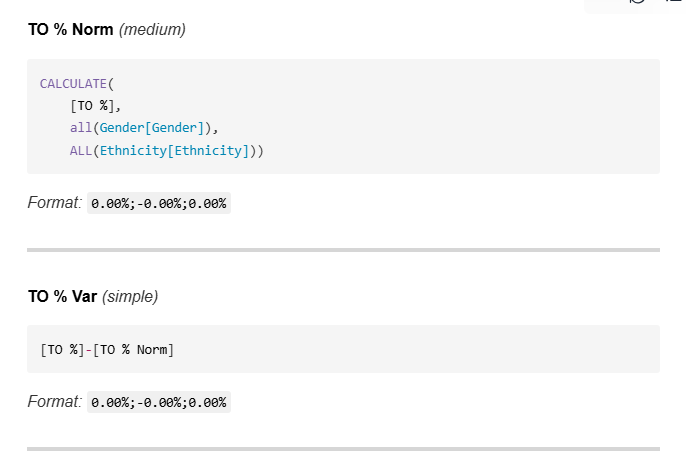
Before (unformatted):
CALCULATE([YTD Gross Margin],SAMEPERIODLASTYEAR(DATESYTD('Date'[Date])))
After (hierarchical formatting):
CALCULATE(
    [YTD Gross Margin],
    SAMEPERIODLASTYEAR(
        DATESYTD(
            'Date'[Date]
        )
    )
)
Formatting features:
- Each nesting level increases indentation (+4 spaces)
- Closing parentheses aligned with the start of their function
- Arguments on separate lines for clarity
- Preservation of all original arguments
- Complexity indicators (Simple / Medium / Complex)
Troubleshooting
Common Errors
Error decoding DataModelSchema:
- The script tries
utf-8,utf-16andlatin-1, plus removes comments/trailing commas. - If it fails,
schema_snippet.txtis saved in the output folder for diagnosis.
Paths with spaces/special characters:
- Use quotes in the CLI:
pbi-docs -i "data/My File.pbit" - Prefer paths within
data/.
No documentation generated:
- Verify that the file contains
DataModelSchema. - If you're using
.pbix, export to.pbitfrom Power BI Desktop (File > Export > Power BI Template).
PowerShell blocks venv activation:
- Adjust the
ExecutionPolicyas indicated in installation.
Verify Installation
Run a quick test with your .pbit file:
pbi-docs --input "data/pbit/my-model.pbit"
Expected output:
Processing file: data/pbit/my-model.pbit
Schema extracted successfully: 11 tables
Metadata processed: 11 tables, 44 measures
Metadata saved to: output/my-model.pbit/metadata.json
Documentation saved to: output/my-model.pbit/model_documentation.md
Agent context saved to: output/my-model.pbit/agent_context.json
JSONL context saved to: output/my-model.pbit/model_context.jsonl
Processing completed successfully for: my-model.pbit
Then verify that the files were generated correctly:
# List generated files
Get-ChildItem "output/my-model.pbit/"

# View a summary of the documentation
Get-Content "output/my-model.pbit/model_documentation.md" | Select-Object -First 10
Common Installation Issues
Error: "Python not recognized"
# Add Python to PATH or use full path
C:\Python312\python.exe -m pip install -e .
Error: "No module named..." This project requires no dependencies. If you see this error, verify your Python version:
python --version # Must be 3.10+
Error: "pbi-docs not recognized"
# Reinstall the package
pip install -e .
# Or use python -m
python -m pbi_extractor.cli --input file.pbit
Comparison with Alternatives
| Feature | pbi-docs | Power BI Helper | Dataedo | Manual (DAX Studio) |
|---|---|---|---|---|
| Free & Open Source | Yes | No (Paid) | No (Paid) | Yes |
| Batch Processing | Yes - Multiple files | No - One at a time | Yes | No |
| Multi-language Support | Yes - English & Spanish | No | No | No |
| AI-Ready Outputs | Yes - JSON + JSONL | No | Limited | No |
| Hierarchical DAX | Yes | Basic | Basic | No - Raw only |
| No Installation | Yes - pip install | Limited - Desktop app | Limited - Platform | Yes |
| Categorization | Yes - Auto (revenue, cost...) | No - Manual | Yes | No |
| Version Diff | Yes - Built-in | No | Yes | No - Manual |
| MCP Server / On-demand Query | Yes - Built-in, zero deps | No | No | No |
pbi-docs is a read/context-compilation layer, a different category from Microsoft's own Power BI MCP servers (Modeling MCP for writes, Remote MCP for DAX execution) — complementary rather than competing.
Generated Documentation Example
View complete example of model_documentation.md (my-model)
# my-model - Power BI Data Model

**Generated:** 2025-12-22 14:23:29

## Tables and Measures

### Fact *(Hidden Table - Measures Only)*

**Measures:**

##### Revenue Measures

**Total Revenue** *(simple)*

```dax
SUM([Revenue])
Format: $#,0;($#,0);$#,0
YTD Revenue (simple)
TOTALYTD(
    SUM([Revenue]),
    'Date'[Date])
Format: $#,0;($#,0);$#,0
Revenue SPLY (medium)
CALCULATE(
    [Total Revenue],
    SAMEPERIODLASTYEAR(
    'Date'[Date]))
Format: $#,0;($#,0);$#,0
Margin Measures
Gross Margin (simple)
[Total Revenue]-[Total COGS]
Format: $#,0;($#,0);$#,0
Percentage Measures
GM% (simple)
DIVIDE(
    [Gross Margin],
    [Total Revenue])
Format: 0.0 %;-0.0 %;0.0 %
Date
Columns:
| Column | Type | Category |
|---|---|---|
Date |
dateTime | temporal |
Year |
int64 | numeric |
Month |
string | categorical |
Customer
Columns:
| Column | Type | Category |
|---|---|---|
Name |
string | descriptive |
City |
string | categorical |
State |
string | categorical |
Country/Region |
string | categorical |
Relationships
| From | To | Type | Direction |
|---|---|---|---|
| Fact.BU Key | BU.BU Key | many:one | OneDirection |
| Fact.YearPeriod | Date.YearPeriod | many:one | OneDirection |
| Fact.Customer Key | Customer.Customer | many:one | OneDirection |
</details>

---

## Contributing

Contributions are welcome! See [CONTRIBUTING.md](CONTRIBUTING.md) for the workflow, or use
[GitHub Issues](https://github.com/Osc2405/pbi-docs/issues) for bug reports and feature requests.

---

## Roadmap

The read/context layer (PBIP/TMDL support, indexed output, query resolver, MCP server) is done.
Writing TMDL models and PBIR/report parsing are deliberately deferred — bigger undertakings, and
(for writing) Microsoft's own Modeling MCP already covers that space.

---

## Sample Files

The example files referenced in this documentation are official sample files provided by Microsoft. You can find these and other Power BI sample files in the [Microsoft Power BI Desktop Samples repository](https://github.com/microsoft/powerbi-desktop-samples).

These sample files are excellent for:
- Testing pbi-docs functionality
- Learning Power BI data modeling
- Exploring different DAX patterns and measure types
- Understanding relationship structures

To use these samples:
1. Clone or download the repository: `git clone https://github.com/microsoft/powerbi-desktop-samples.git`
2. Open the `.pbix` files in Power BI Desktop
3. Export them as `.pbit` files (File > Export > Power BI Template)
4. Use them with pbi-docs to generate documentation

---

## Author

**Oscar Rosero** - Data Engineer | BI Developer

-  [LinkedIn](https://www.linkedin.com/in/oscrosero24/)
-  [GitHub](https://github.com/Osc2405)
-  [email protected]

Built with ❤️ for the Power BI community.

---

## Star History

If this tool saves you time, please consider giving it a ⭐ on GitHub!
Установка Pbi Docs
У этого сервера нет опубликованного пакета — он собирается из исходников. Открой репозиторий и следуй инструкции в README.
▸ github.com/Osc2405/pbi-docsFAQ
Pbi Docs MCP бесплатный?
Да, Pbi Docs MCP бесплатный — установка в пару кликов через Unyly без оплаты.
Нужен ли API-ключ для Pbi Docs?
Нет, Pbi Docs работает без API-ключей и переменных окружения.
Pbi Docs — hosted или self-hosted?
Self-hosted: сервер запускается локально на твоей машине командой из раздела установки.
Как установить Pbi Docs в Claude Desktop, Claude Code или Cursor?
Открой Pbi Docs на unyly.org, выбери вкладку своего клиента (Claude Desktop, Claude Code, Cursor) и нажми Install — конфиг сгенерируется автоматически, без правки JSON.
Похожие MCP
Notion
Read and write pages in your workspace
 автор: Notion
Linear
Issues, cycles, triage — from Claude
 автор: Linear
Google Drive
Search and read your Drive files
 автор: Google
mindsdb/mindsdb
Connect and unify data across various platforms and databases with [MindsDB as a single MCP server](https://docs.mindsdb.com/mcp/overview).
 автор: mindsdb
Compare Pbi Docs with
Не уверен что выбрать?
Найди свой стек за 60 секунд
Автор?
Embed-бейдж для README
Похожее
Все в категории productivity