
Pdf Reader Mcp
БесплатноПоддерживаетсяCitra — PDF evidence for agents (Sylphx). Local-first structured text, tables, OCR, visual evidence, citations via MCP/CLI/SDK. Package id transitional: @sylphx

Описание
Citra — PDF evidence for agents (Sylphx). Local-first structured text, tables, OCR, visual evidence, citations via MCP/CLI/SDK. Package id transitional: @sylphx/pdf-reader-mcp.
README
Citra
Give your AI agent eyes for PDFs — with proof.
Local-first PDF evidence for agents. Structured text, tables, OCR, visual crops, and page-level citations your agent can defend — not invent.
Canonical package @sylphx/citra · bin citra · MCP io.github.SylphxAI/citra · live 5.0.0
Zero-config in one line
npx -y @sylphx/citra
No Docker. No API key. No global install. Spawns a stdio MCP server agents can use immediately.
| Client | Setup |
|---|---|
| Any agent / CLI | npx -y @sylphx/citra |
| Claude Code | claude mcp add citra -- npx -y @sylphx/citra |
| Claude Desktop / Cursor / VS Code / Codex | "command": "npx", "args": ["-y", "@sylphx/citra"] |
| Global CLI | npm i -g @sylphx/citra → citra |
Why Citra feels unfairly good
Plain-text PDF tools make agents guess. Citra returns an Agent Document Twin they can cite.
| Pain today | With Citra |
|---|---|
| Page numbers invented or missing | Page + geometry + provenance |
| Tables flattened into soup | Rows · columns · cells · bounding boxes |
| Scanned PDFs become noise | OCR path linked to evidence |
| Install / config / “hope it works” | npx -y — done |
| Silent engine fallbacks | Fail closed if the native binary is missing |
Five reasons teams pick Citra
- Zero-config — real
npxMCP, not a 20-step bootstrap. - Evidence, not vibes — citations agents can show a human.
- Local-first — PDFs stay on the machine; no required cloud vision API.
- Brand-sole — one package, one bin, one story (
@sylphx/citra/citra). - Instrument family — compose with Iris (image), Cue (video), Spine, Lookout, Locus.
See the difference
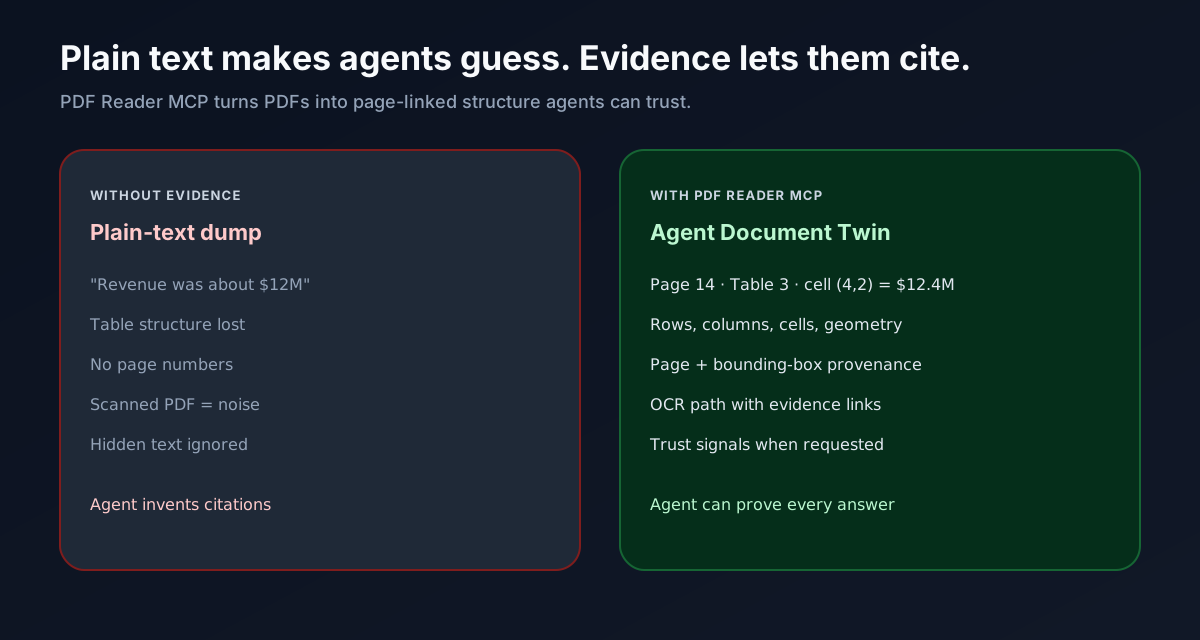
| Without evidence | With Citra |
|---|---|
| “Revenue was about $12M” | “Page 14, Table 3, cell (row 4, col 2) = $12.4M” |
| Lost table structure | Rows, columns, cells, bounding boxes |
| Scanned PDF = garbage text | OCR with page-linked evidence |
| Hidden / adversarial text ignored | Trust signals when requested |
What you get
Three tools. One product surface.
| Tool | What agents use it for |
|---|---|
read_pdf |
Smart default: markdown, tables, structure, OCR, citations |
search_pdf |
Find page + snippet matches before deep reading |
pdf_evidence |
Crops, renders, inspect, focused evidence ops |
Minimal call:
{
  "sources": [{ "path": "/absolute/path/to/report.pdf" }]
}
Flagship use cases
- Financial reports — extract table cells agents can cite by page and geometry
- Research papers — headings, reading order, page-level quotes
- Scanned documents — OCR path with evidence, not a text soup
Platforms
One optional native package is selected for your host only:
| Platform | Native package |
|---|---|
| macOS arm64 | @sylphx/citra-darwin-arm64 |
| macOS x64 | @sylphx/citra-darwin-x64 |
| Linux x64 | @sylphx/citra-linux-x64-gnu |
| Linux arm64 | @sylphx/citra-linux-arm64-gnu |
| Windows x64 | @sylphx/citra-win32-x64-msvc |
Missing native → fail closed (no silent TypeScript PDF engine).
Product docs
| Doc | Purpose |
|---|---|
| docs/POSITIONING.md | Strategic positioning |
| docs/COMPETITIVE.md | Peer anchors and wedge |
| docs/EVIDENCE_CONTRACT.md | Evidence = result contract |
| docs/TOOL_SURFACE.md | Few clear tools policy |
| docs/PRODUCT_INDEPENDENCE.md | This repo is SSOT |
| docs/IPPB.md | Independent public product bar |
| docs/PUBLISH.md | npm / git publish status |
| docs/guide/installation.md | Install & host config |
| skills/citra/SKILL.md | Agent skill surface |
Surfaces (MCP · CLI · SDK)
MCP (default agent path)
npx -y @sylphx/citra
Claude Desktop / Cursor / VS Code / Codex
{
  "mcpServers": {
    "citra": {
      "command": "npx",
      "args": ["-y", "@sylphx/citra"]
    }
  }
}
Dual-era hosts that send server/discover before initialize (e.g. Gemini Antigravity CLI) are supported on stdio.
CLI
npx -y @sylphx/citra --help
SDK
@sylphx/citra/sdk→Citra(read/search/evidence)@sylphx/citra/pure-rust→ low-level client helpers- Same tools as MCP:
read_pdf·search_pdf·pdf_evidence - Requires the platform optional native package (same as MCP)
Install footprint (honest)
Compare full clean installs, not “JS wrapper tarball vs native executable”:
| Metric (measured clean install, linux-x64) | Historical TS 3.0.14 |
Sole-Rust 4.1.0 lineage |
|---|---|---|
| Main package on disk | ~403 KB | ~77 KB |
Full node_modules |
~82.3 MiB | ~24.4 MiB (~3.4× smaller) |
| Installed files | 4,101 | 20 (~205× fewer) |
| Production npm deps | PDF.js + MCP TS SDK + more | {} + one platform native |
The native binary is multi-megabyte because it is the PDF engine. That is expected — and still a cleaner install than shipping PDF.js + a large JS tree.
Details: installed footprint comparison
Performance (method-bounded)
Controlled same-host linux-x64 dual-mode A/B vs historical @sylphx/[email protected], using registry-installed sole-Rust natives (measured on the 4.1.x lineage; method applies to current sole-Rust packages):
| Mode | What it measures | Result |
|---|---|---|
persistent_warm |
long-lived server, repeated identical local read_pdf after warm-up |
≥ ~10× median latency improvement on all 8 required fixture classes |
startup_inclusive |
spawn + initialize + one task | large advantage on the same fixtures |
persistent_warm includes a process-local cache for identical local path+options. First request in a process still pays full parse cost.
Not a multi-host guarantee. Details: 4.1.0 report · claims policy
Engine note
Current production is a native Rust engine on supported platforms via a thin Node launcher.
Local-first. Five platform packages. One clean install. Fail closed without the matching native.
Unusually formed or broken ToUnicode CMaps are handled without crashing; the release binary is panic-unwind so a worker-thread panic fails the request instead of aborting the process (#608).
Engineering history and recovery pins: docs/migration.md — not the product pitch.
Product proof & links
Stop PDF hallucinations. Give agents proof.
npx -y @sylphx/citra
Установить Pdf Reader Mcp в Claude Desktop, Claude Code, Cursor
unyly install pdf-reader-mcpСтавит в Claude Desktop, Claude Code, Cursor и VS Code — сам разбирается с npx, uvx и сборкой из исходников.
Впервые? Поставь CLI: curl -fsSL https://unyly.org/install | sh
Или настроить вручную
Выполни в терминале:
claude mcp add pdf-reader-mcp --env MCP_PDF_ALLOWED_DIRS="" --env MCP_PDF_ALLOWED_HOSTS="" --env MCP_PDF_ALLOW_HTTP="" --env MCP_TRANSPORT="" -- npx -y @sylphx/pdf-reader-mcpПошаговые гайды: как установить Pdf Reader Mcp
FAQ
Pdf Reader Mcp MCP бесплатный?
Да, Pdf Reader Mcp MCP бесплатный — установка в пару кликов через Unyly без оплаты.
Нужен ли API-ключ для Pdf Reader Mcp?
Да, требуются переменные окружения: MCP_PDF_ALLOWED_DIRS, MCP_PDF_ALLOWED_HOSTS, MCP_PDF_ALLOW_HTTP, MCP_TRANSPORT. Unyly подставит их в конфиг при установке.
Pdf Reader Mcp — hosted или self-hosted?
Self-hosted: сервер запускается локально на твоей машине командой из раздела установки.
Как установить Pdf Reader Mcp в Claude Desktop, Claude Code или Cursor?
Открой Pdf Reader Mcp на unyly.org, выбери вкладку своего клиента (Claude Desktop, Claude Code, Cursor) и нажми Install — конфиг сгенерируется автоматически, без правки JSON.
Изменения
Версии и запрашиваемые доступы со временем.
- Новая версия опубликована
- Новая версия опубликована
Похожие MCP
Fetch
Web content fetching and conversion for efficient LLM usage.
AWS KB Retrieval
Retrieval from AWS Knowledge Base using Bedrock Agent Runtime.
 автор: modelcontextprotocol
Spring AI MCP Server
Provides auto-configuration for setting up an MCP server in Spring Boot applications.
llm-analysis-assistant
A very streamlined mcp client that supports calling and monitoring stdio/sse/streamableHttp, and can also view request responses through the /logs page. It also
 автор: xuzexin-hz
MCP-Agent
A simple, composable framework to build agents using Model Context Protocol by [LastMile AI](https://www.lastmileai.dev)
 автор: lastmile-ai
Spring AI MCP Client
Provides auto-configuration for MCP client functionality in Spring Boot applications.
mcp.natoma.ai
A Hosted MCP Platform to discover, install, manage and deploy MCP servers by [Natoma Labs](https://www.natoma.ai)
MCPHub
Website to list high quality MCP servers and reviews by real users. Also provide online chatbot for popular LLM models with MCP server support.
MCP Servers Rating and User Reviews
Website to rate MCP servers, write authentic user reviews, and [search engine for agent & mcp](http://www.deepnlp.org/search/agent)
mkinf
An Open Source registry of hosted MCP Servers to accelerate AI agent workflows.
Compare Pdf Reader Mcp with
Не уверен что выбрать?
Найди свой стек за 60 секунд
Автор?
Embed-бейдж для README
Похожее
Все в категории ai