
Plane Gateway
БесплатноНе проверенMulti-tenant MCP gateway bridging AI clients with Plane project management workspaces, exposing ~109 tools for work items, cycles, modules, epics, and more.

Описание
Multi-tenant MCP gateway bridging AI clients with Plane project management workspaces, exposing ~109 tools for work items, cycles, modules, epics, and more.
README
A multi-tenant Model Context Protocol gateway for Plane. Each authenticated user can register multiple Plane workspaces / projects through a web UI and expose each one as its own MCP endpoint at /mcp/<slug>. MCP clients authenticate via OAuth 2.1 (Clerk as the upstream identity provider) and get a per-config tool surface backed by the user's Plane API key.
Built on Cloudflare Workers (Durable Objects + KV) with TanStack Start for the UI, @cloudflare/workers-oauth-provider for OAuth, and @clerk/backend for identity.
Features
- Multi-tenant by URL slug — one account, many configs.
/mcp/work,/mcp/personal, etc. each carry their own Plane workspace, API key, and tool set. - ~109 Plane tools ported from the official plane-mcp-server: work items, cycles, modules, epics, milestones, intake, labels, states, pages, comments, links, work logs, properties, types, members, features, and more.
- Project pinning — optionally lock a config to a single Plane project. When pinned, the
project_idparameter is automatically removed from every tool schema and project-management tools (list_projects,create_project,delete_project) are hidden. This makes LLM interactions noticeably faster because the model never has to discover or pass a project id. - Live tool refresh — change a config in the UI and connected MCP sessions see
notifications/tools/list_changedwithin seconds. No reconnect needed. If a config is deleted mid-session the next request returns410 Gone. - OAuth 2.1 for MCP clients — Clerk handles user auth; the gateway mints MCP-side tokens that encrypt the user's Clerk identity. Compatible with
mcp-remote, MCP Inspector, Claude Desktop, Cursor, Windsurf, etc. - Test-from-UI — every config gets a "Test connection" button that pings the Plane API end-to-end (workspace + api key) and surfaces the actual error message on failure.
- Per-user isolation — KV keys are namespaced by Clerk user id (
plane:cfg:<userId>:<slug>); a config is only visible to its owner.
Architecture
                                   ┌───────────────────┐
                                   │ TanStack Start UI │  /app/configs
   browser  ──────cookie auth───── │  + Hono /api/*    │  /api/configs/...
                                   └─────────┬─────────┘
                                             │ KV: plane:cfg:<userId>:<slug>
                                             ▼
┌──────────────┐         ┌─────────────────────────────────┐
│ MCP client   │ ──OAuth─▶ @cloudflare/workers-oauth-provider │
│ (Claude etc) │         └─────────────┬───────────────────┘
└──────────────┘                       │
                                       ▼
                            ┌──────────────────────┐
            /mcp/<slug> ───▶│ MyMCP Durable Object │ ──▶ Plane API
                            │ (per session)        │     (per-config key)
                            └──────────────────────┘
Top-level dispatch in src/server.ts:
| Path pattern | Handler |
|---|---|
/(mcp|sse)/<slug>(/...) |
strip slug, set X-Plane-Config-Slug, forward to OAuthProvider |
/authorize, /callback, /register, /token, /.well-known/* |
OAuthProvider |
/api/... |
Hono app (src/api/index.ts), Clerk session auth |
| anything else | TanStack Start (UI) |
On each MCP request the Durable Object reloads the config from 2, compares updatedAt to the last-registered version, and tears down / re-registers Plane tools if it has changed. The MCP SDK emits notifications/tools/list_changed automatically. KV is eventually consistent across colos, so changes typically propagate within seconds (up to ~60 s worst case).
Getting started
Prerequisites
Local development
Install dependencies
bun installSet up Clerk — see Configuring Clerk below. For local dev use
http://localhost:8788/callbackas the redirect URL.Configure environment
cp .env.example .envFill in:
CLERK_CLIENT_ID=...
CLERK_CLIENT_SECRET=...
CLERK_SECRET_KEY=sk_test_...
CLERK_PUBLISHABLE_KEY=pk_test_...
CLERK_FRONTEND_API=https://your-subdomain.clerk.accounts.dev
COOKIE_ENCRYPTION_KEY=<openssl rand -hex 32>
Run the dev server
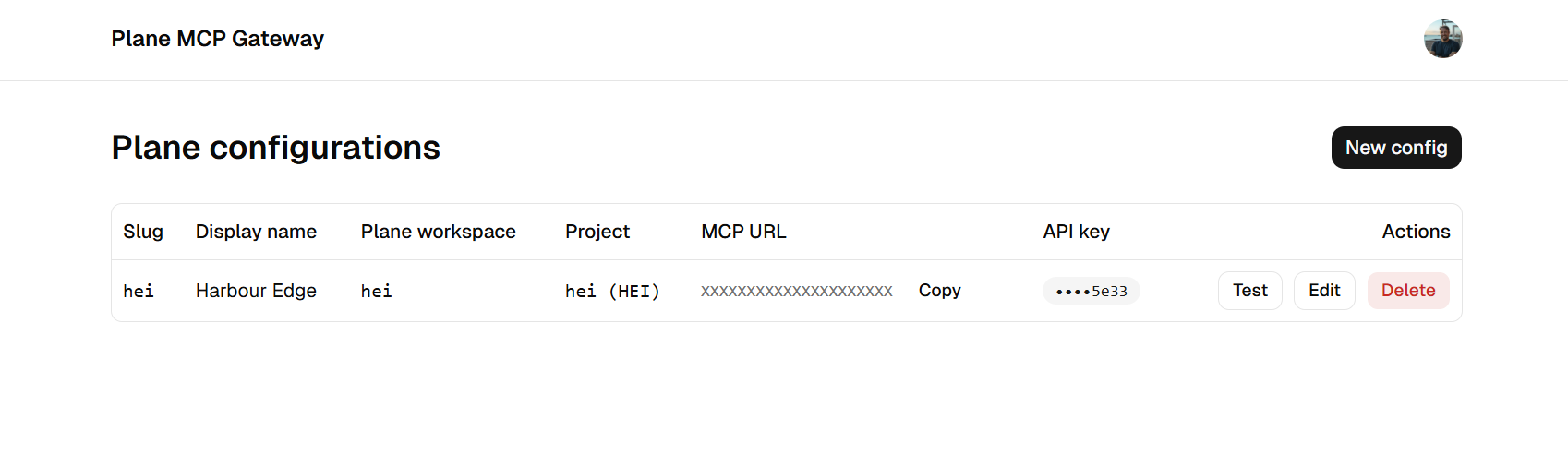
bun run devOpen http://localhost:8788. Sign in, go to Plane configurations, click New config, and fill in:
- Slug — URL identifier (lowercase, hyphens; 2–63 chars). Your MCP endpoint becomes
/mcp/<slug>. - Display name — friendly label.
- Plane workspace slug — from your Plane workspace URL.
- Plane API key — from Plane → Settings → API tokens.
- Base URL (optional) — defaults to
https://api.plane.so. Set this for self-hosted Plane. - Pinned project (optional) — click Load projects, pick one to lock the config to a single project.
- Slug — URL identifier (lowercase, hyphens; 2–63 chars). Your MCP endpoint becomes
Test with MCP Inspector
bunx @modelcontextprotocol/inspector@latestConnect to
http://localhost:8788/mcp/<your-slug>and complete the OAuth flow.
Configuring Clerk
The gateway acts as an OAuth client to Clerk (Clerk is the upstream identity provider) and as an OAuth server to MCP clients. You only need to set up the upstream side — the MCP-facing OAuth server is handled by @cloudflare/workers-oauth-provider automatically.
Sign up / log in at the Clerk Dashboard and create an application.
In your application, go to Configure → OAuth applications and click Add OAuth application. Pick any name — this is internal.
Redirect URL — add the gateway's callback. The path is always
/callback:- Local dev:
http://localhost:8788/callback - Production:
https://<your-host>/callback
You can add multiple URLs to one OAuth application if you want a single Clerk app to serve both environments.
- Local dev:
Scopes — the gateway requires all of:
openidprofileemailoffline_access— needed so MCP clients can refresh tokens without re-prompting the user
Copy these values, you'll need them as worker secrets:
- Client ID and Client secret from the OAuth application you just created →
CLERK_CLIENT_ID,CLERK_CLIENT_SECRET - Secret key (
sk_…) and Publishable key (pk_…) from API keys →CLERK_SECRET_KEY,CLERK_PUBLISHABLE_KEY - Frontend API URL (e.g.
https://your-subdomain.clerk.accounts.dev) →CLERK_FRONTEND_API
- Client ID and Client secret from the OAuth application you just created →
Production deployment
- Add
https://<your-host>/callbackto the Clerk OAuth application's redirect URLs (see Configuring Clerk). - Create the KV namespace and copy the id into
wrangler.jsonc:wrangler kv namespace create OAUTH_KV - Set secrets:
wrangler secret put CLERK_CLIENT_ID wrangler secret put CLERK_CLIENT_SECRET wrangler secret put CLERK_SECRET_KEY wrangler secret put CLERK_PUBLISHABLE_KEY wrangler secret put CLERK_FRONTEND_API wrangler secret put COOKIE_ENCRYPTION_KEY - Deploy:
bun run deploy
Connecting MCP clients
Each config exposes both transports:
https://<host>/mcp/<slug>— Streamable HTTP (preferred)https://<host>/sse/<slug>— SSE (deprecated, still supported)
Claude Desktop / Cursor / Windsurf
Use mcp-remote as a stdio adapter, since most desktop clients don't yet ship OAuth-capable remote transports:
{
  "mcpServers": {
    "plane-work": {
      "command": "npx",
      "args": ["mcp-remote", "https://<your-host>/mcp/work"]
    }
  }
}
The first connection opens a browser for the Clerk OAuth flow; tokens are cached locally afterward.
Native HTTP clients
Clients that speak OAuth 2.1 + Streamable HTTP can connect directly to https://<host>/mcp/<slug>. Discovery is published at /.well-known/oauth-authorization-server and /.well-known/oauth-protected-resource per RFC 9728.
Project pinning
A config is in one of two modes:
| Mode | project_id parameter |
list_projects / create_project / delete_project |
|---|---|---|
| All projects (default) | required on every tool that touches a project | available |
| Pinned to one project | removed from every tool schema | hidden |
Pinning is the right choice when an MCP session is scoped to one project — it eliminates a tool round-trip the LLM otherwise has to make to resolve the project id, and keeps the visible tool list focused.
You can toggle pinning at any time from the config's edit page. Existing MCP sessions pick up the change automatically on their next request.
Adding tools
Two kinds of tools:
Top-level tools — available to every authenticated user regardless of config. Register in
MyMCP.init()insrc/mcp/mcp-app.ts.Plane tools — per-config, registered per request. Add to
src/plane/tools/<resource>.ts:server.tool( "snake_case_name", "human-readable description", { ...projectIdField(ctx), other_param: z.string() }, async (input) => toolResult(() => resource.method(ctx.config, ctx.workspaceSlug, { project_id: requireProjectId(ctx, input), other_param: input.other_param, }), ), );The HTTP call lives in
src/plane/resources/<resource>.ts. Wire new resources intosrc/plane/tools/index.ts.
See CLAUDE.md for the full architecture reference (Plane URL conventions, helper functions, common gotchas).
Tech stack
- Cloudflare Workers + Durable Objects + KV
- @cloudflare/workers-oauth-provider — OAuth 2.1 server
- @clerk/backend + @clerk/tanstack-react-start — identity
- @modelcontextprotocol/sdk + agents — Durable MCP
- TanStack Start + TanStack Router — UI
- Hono —
/api/* - shadcn/ui + Tailwind v4 — components
- Zod — schema validation
- Bun — package manager / runtime
Security notes
- Each config's Plane API key is stored in KV under a user-scoped key. The plaintext key is never returned over the HTTP API — list/get/patch responses always show
••••<last4>. - OAuth state cookies are
__Host--prefixed, HTTP-only, one-time-use, and bound to a 10-minute KV-side TTL. - The OAuth metadata response is rewritten to
https://on non-local hosts to support tunneled deployments. WWW-Authenticateheaders on 401s includeresource_metadata=per RFC 9728.- Envelope-encrypting Plane API keys with
COOKIE_ENCRYPTION_KEYis a planned follow-up; for now treat the KV namespace as sensitive.
License
Установка Plane Gateway
У этого сервера нет опубликованного пакета — он собирается из исходников. Открой репозиторий и следуй инструкции в README.
▸ github.com/codewithpassion/plane-mcp-gatewayFAQ
Plane Gateway MCP бесплатный?
Да, Plane Gateway MCP бесплатный — установка в пару кликов через Unyly без оплаты.
Нужен ли API-ключ для Plane Gateway?
Нет, Plane Gateway работает без API-ключей и переменных окружения.
Plane Gateway — hosted или self-hosted?
Self-hosted: сервер запускается локально на твоей машине командой из раздела установки.
Как установить Plane Gateway в Claude Desktop, Claude Code или Cursor?
Открой Plane Gateway на unyly.org, выбери вкладку своего клиента (Claude Desktop, Claude Code, Cursor) и нажми Install — конфиг сгенерируется автоматически, без правки JSON.
Похожие MCP
Fetch
Web content fetching and conversion for efficient LLM usage.
AWS KB Retrieval
Retrieval from AWS Knowledge Base using Bedrock Agent Runtime.
 автор: modelcontextprotocol
Spring AI MCP Server
Provides auto-configuration for setting up an MCP server in Spring Boot applications.
llm-analysis-assistant
A very streamlined mcp client that supports calling and monitoring stdio/sse/streamableHttp, and can also view request responses through the /logs page. It also
 автор: xuzexin-hz
Compare Plane Gateway with
Не уверен что выбрать?
Найди свой стек за 60 секунд
Автор?
Embed-бейдж для README
Похожее
Все в категории ai