
PolyDesk
БесплатноНе проверенEnables automated research and trading on Polymarket prediction markets through a Notion dashboard, with AI-powered analysis and human-in-the-loop trade approva

Описание
Enables automated research and trading on Polymarket prediction markets through a Notion dashboard, with AI-powered analysis and human-in-the-loop trade approval.
README
An MCP server that turns Polymarket prediction markets into a structured research and trading workflow — powered by Notion as the dashboard and knowledge base. Zero-interaction automation: check a box in Notion, AI research appears automatically.
Inspired by Karpathy's autoresearch: the AI agent runs iterative research loops on prediction markets, scores them, and writes structured findings to Notion for human review and trade execution.
Screenshots
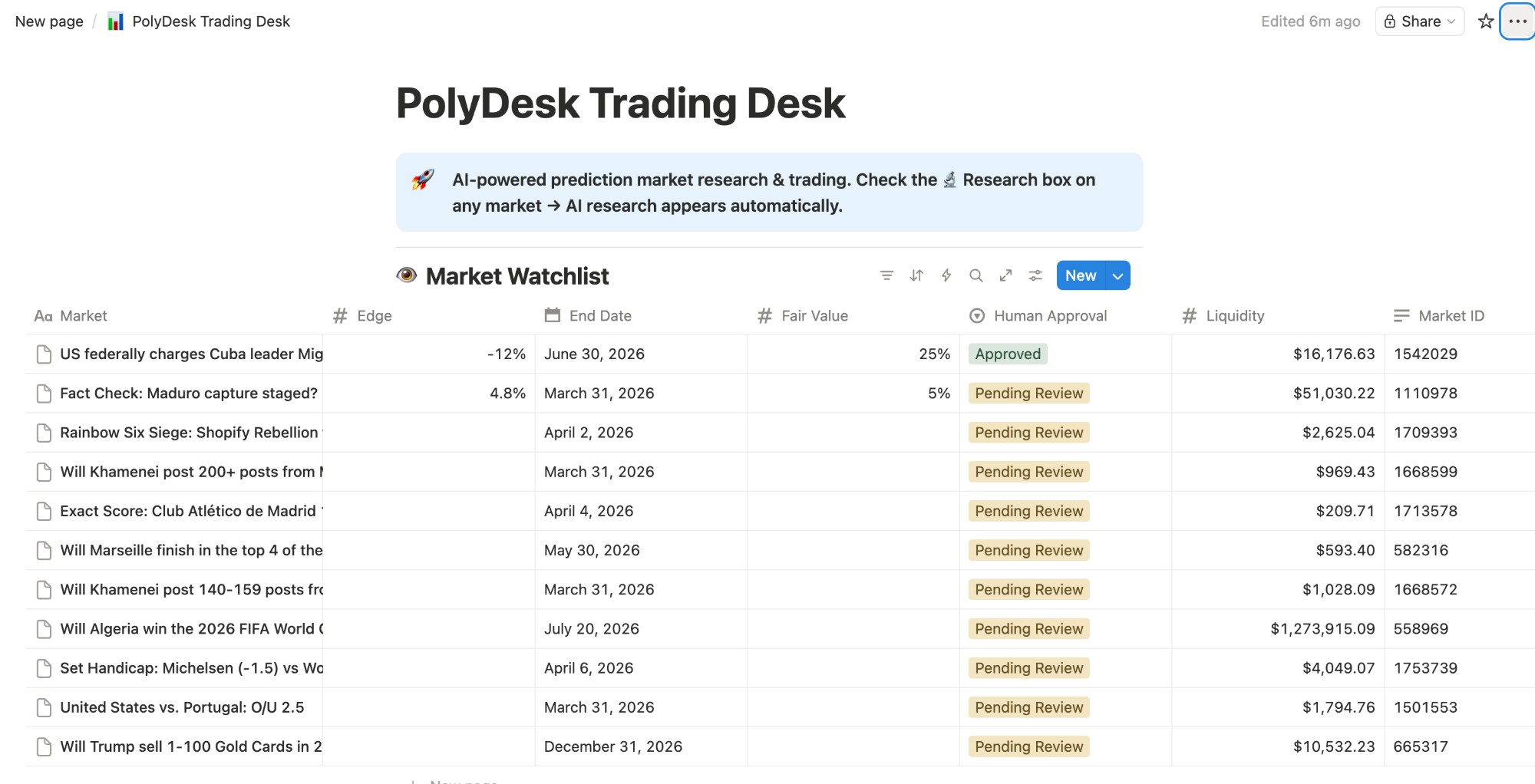
Market Watchlist (left columns)
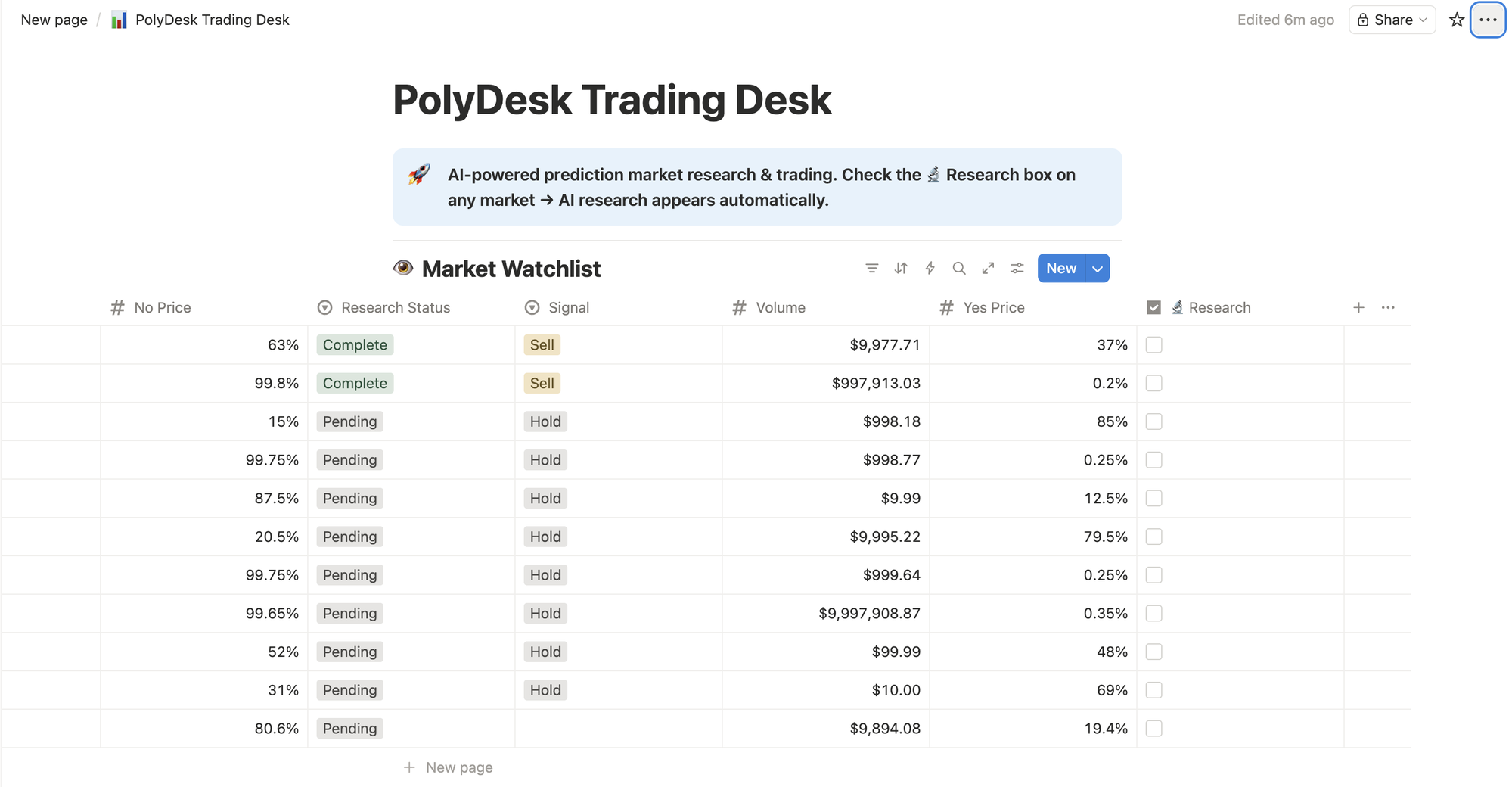
Market Watchlist (right columns) — Research checkbox triggers AI analysis
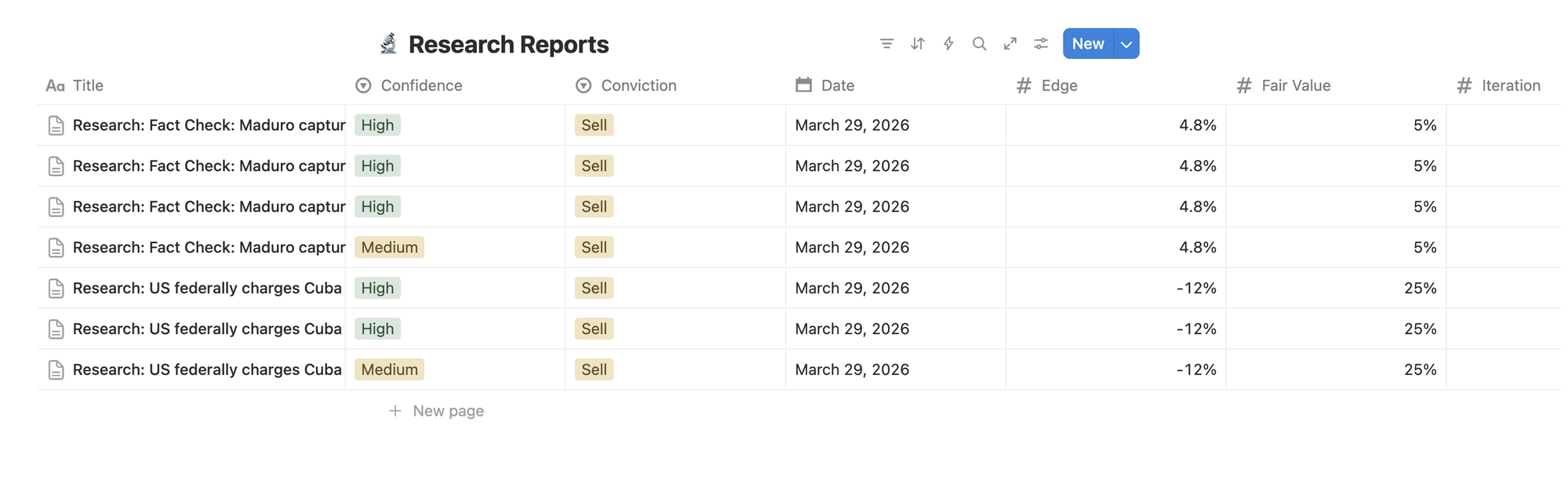
Research Reports Database
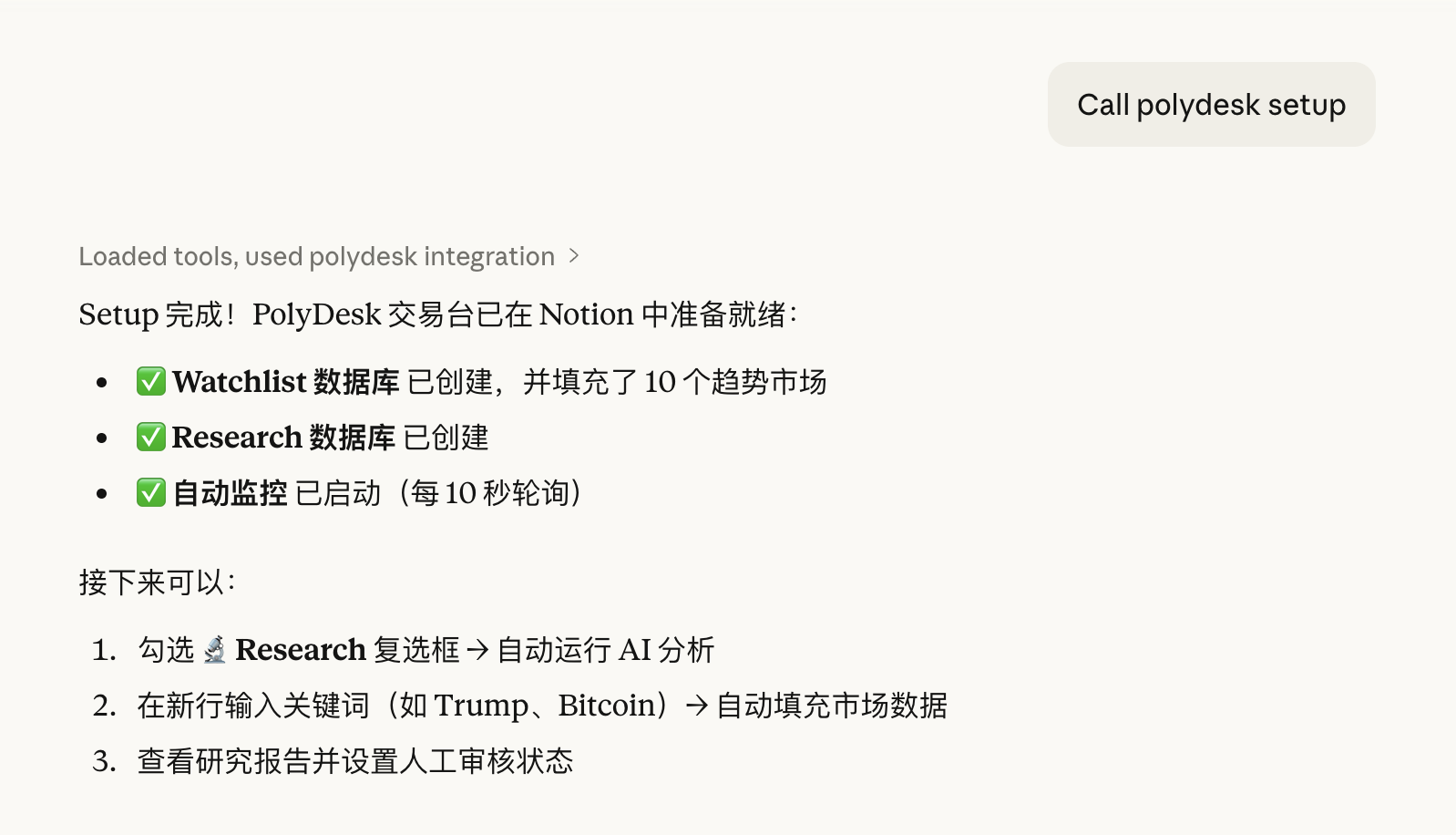
One-Command Setup via Claude Desktop
MCP Server Integration
Architecture
┌──────────────┐     ┌──────────────────┐     ┌──────────────┐
│  Polymarket  │────→│   PolyDesk MCP   │────→│   AI Agent   │
│  Gamma API   │     │  (this server)   │     │ (Claude, etc)│
└──────────────┘     └──────────────────┘     └──────┬───────┘
                                                     │
                                                     ▼
                                              ┌──────────────┐
                                              │  Notion MCP  │
                                              │  (official)  │
                                              └──────┬───────┘
                                                     │
                                                     ▼
                                              ┌──────────────┐
                                              │   Notion     │
                                              │  Workspace   │
                                              │  (Dashboard) │
                                              └──────────────┘
PolyDesk MCP provides Polymarket data, AI research (via local Ollama), and direct Notion integration. Notion MCP (official) provides additional Notion read/write capabilities. Together they create a zero-interaction trading control plane — all from Notion.
Key Features
- One-command setup —
call polydesk setupcreates the full Notion workspace with databases and trending markets - Zero-interaction research — Check the 🔬 Research box in Notion, AI analysis appears automatically (10s polling)
- Keyword search — Type a keyword (e.g. "Trump") in a new row, the system finds the matching Polymarket market
- Local AI — Research powered by Ollama (qwen2.5:14b) running locally, no cloud API needed
- Human-in-the-loop — AI generates signals, humans approve trades via Notion
Tools (22 total)
| Tool | Description |
|---|---|
setup |
Create Notion workspace with databases and trending markets |
scan_trending_markets |
Discover hottest markets by volume |
search_markets |
Search markets by keyword |
get_market |
Full details for a specific market |
get_events |
Browse top events (grouped markets) |
get_event |
Details for a specific event |
get_prices |
Bulk price feed for multiple markets |
auto_research_market |
Structured research prompt (autoresearch pattern) |
research_with_ollama |
Run local AI research on a market |
batch_research |
Research multiple markets in one loop |
calculate_trade |
Position sizing, R:R, Kelly criterion |
check_positions |
Live P&L for open positions |
compare_markets |
Side-by-side odds comparison |
edge_scanner |
Heuristic mispricing detector |
format_research_for_notion |
Generate rich Notion blocks from research |
format_watchlist_entry |
Format market data for Notion watchlist |
sync_notion_watchlist |
Sync watchlist with Polymarket prices |
watch |
Start background polling for Notion changes |
unwatch |
Stop background polling |
validate_human_overrides |
Check for human trade approvals |
generate_execution_plan |
Create trade execution plan |
Resources
| Resource | Description |
|---|---|
polydesk://schemas/notion-databases |
Notion database schemas for Watchlist and Research |
Prompts
| Prompt | Description |
|---|---|
setup-trading-desk |
Bootstrap the full Notion workspace |
daily-research-loop |
Run a complete research cycle on trending markets |
trade-review |
Sync positions and generate P&L summary |
How It Works
- Setup —
call polydesk setupcreates a Notion page with Watchlist and Research Reports databases, populated with live trending markets - Auto-watch — Background polling starts automatically, checking Notion every 10 seconds
- Research trigger — Check the 🔬 Research box on any market row → status changes to "Researching" → Ollama runs analysis → research report appears in the Research Reports database
- Keyword search — Add a new row with just a keyword → system searches Polymarket and fills in market data
- Human review — Review AI signals and set Human Approval to "Approved" → system generates execution plan
- Iterate — Re-check the research box to run deeper analysis iterations (ratchet mechanism)
Setup
Prerequisites
- Ollama with
qwen2.5:14bmodel (ollama pull qwen2.5:14b) - A Notion integration token
1. Install
npm install
npm run build
2. Configure Claude Desktop
Add both MCP servers to your claude_desktop_config.json:
{
  "mcpServers": {
    "polydesk": {
      "command": "node",
      "args": ["/path/to/polydesk-mcp/dist/index.js"],
      "env": {
        "NOTION_TOKEN": "ntn_YOUR_TOKEN"
      }
    },
    "notion": {
      "command": "npx",
      "args": ["-y", "@notionhq/notion-mcp-server"],
      "env": {
        "OPENAPI_MCP_HEADERS": "{\"Authorization\": \"Bearer ntn_YOUR_TOKEN\", \"Notion-Version\": \"2022-06-28\"}"
      }
    }
  }
}
3. Bootstrap Your Workspace
In Claude Desktop, say: "Call polydesk setup"
This creates the full Notion workspace and starts auto-watching.
4. Start Researching
Just check the 🔬 Research box on any market in Notion. No commands needed — research appears automatically.
You can also use Claude Desktop directly:
"Scan trending markets and research the top 5"
"Find markets about bitcoin and analyze the best opportunity"
"Run the daily research loop"
No Polymarket API Key Required
PolyDesk uses the public Polymarket Gamma API — no authentication needed for market data.
Development
npm run dev    # Run with tsx (hot reload)
npm run check  # Type-check
npm run build  # Compile to dist/
License
MIT
Установка PolyDesk
У этого сервера нет опубликованного пакета — он собирается из исходников. Открой репозиторий и следуй инструкции в README.
▸ github.com/yangfei077-cyber/notion-challenge-mcpFAQ
PolyDesk MCP бесплатный?
Да, PolyDesk MCP бесплатный — установка в пару кликов через Unyly без оплаты.
Нужен ли API-ключ для PolyDesk?
Нет, PolyDesk работает без API-ключей и переменных окружения.
PolyDesk — hosted или self-hosted?
Доступен hosted-вариант: Unyly запускает сервер в облаке, локальная установка не обязательна.
Как установить PolyDesk в Claude Desktop, Claude Code или Cursor?
Открой PolyDesk на unyly.org, выбери вкладку своего клиента (Claude Desktop, Claude Code, Cursor) и нажми Install — конфиг сгенерируется автоматически, без правки JSON.
Похожие MCP
Notion
Read and write pages in your workspace
 автор: Notion
Linear
Issues, cycles, triage — from Claude
 автор: Linear
Google Drive
Search and read your Drive files
 автор: Google
mindsdb/mindsdb
Connect and unify data across various platforms and databases with [MindsDB as a single MCP server](https://docs.mindsdb.com/mcp/overview).
 автор: mindsdb
Compare PolyDesk with
Не уверен что выбрать?
Найди свой стек за 60 секунд
Автор?
Embed-бейдж для README
Похожее
Все в категории productivity