
ProdPad Server
БесплатноНе проверенAn MCP server that connects Claude to ProdPad, giving Claude direct access to your product management data including ideas, feedback, roadmaps, OKRs, and initia

Описание
An MCP server that connects Claude to ProdPad, giving Claude direct access to your product management data including ideas, feedback, roadmaps, OKRs, and initiatives.
README
An MCP (Model Context Protocol) server that connects Claude to ProdPad, giving Claude direct access to your product management data — ideas, feedback, roadmaps, OKRs, initiatives, and more.
Built with TypeScript, the MCP SDK, and designed for use with Claude Desktop.
What Can It Do?
Once connected, you can ask Claude things like:
- "What products do I have in ProdPad?"
- "Show me our current objectives and key results"
- "List all ideas tagged with 'mobile'"
- "What's on the Now/Next/Later roadmap?"
- "Search ProdPad for anything related to onboarding"
- "Create a new idea for a dashboard redesign"
- "Create an initiative on our product roadmap"
Available Tools (24 total)
| Category | Tools |
|---|---|
| Products | List products, get product details |
| Objectives & Key Results | List objectives, get objective, list key results, get key result, get KRs by objective, get KRs by product |
| Roadmaps | List roadmaps, get roadmap (with columns and cards), get roadmaps by product |
| Ideas | List ideas (with filters), get idea details |
| Initiatives | List initiatives, get initiative, get ideas for initiative |
| Feedback | List feedback (with filters), get feedback, get ideas linked to feedback |
| Create | Create new ideas, create new initiatives |
| Utility | Cross-entity search, list statuses, list tags |
Setup Guide
Step 1: Get Your ProdPad API Key
- Log in to ProdPad
- Click the Settings gear icon (bottom-left sidebar)
- Click Profile settings
- Click the API Keys tab
- Copy your API key using the copy button next to it
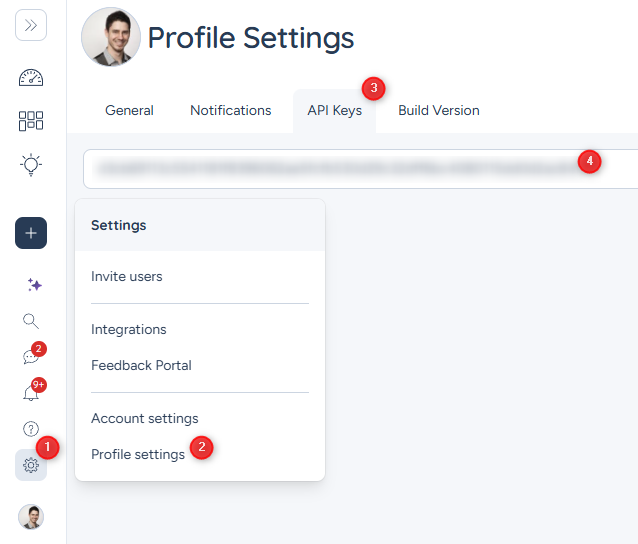
If you need to regenerate your key, click "Regenerate". This will invalidate the previous key.
For more details, see ProdPad's API key docs.
Step 2: Install Prerequisites
You need Node.js version 18 or later installed on your machine.
To check if you have it:
node --version
If you don't have it, download and install from nodejs.org.
Step 3: Download and Build the Server
Download this project — click the green "Code" button on GitHub, then "Download ZIP". Unzip it somewhere you'll remember (e.g.,
C:\MCP\prodpad-mcp-server\).Or if you're comfortable with git:
git clone https://github.com/JTreadwell1/prodpad-mcp-server.gitOpen a terminal in the project folder and run:
npm install
npm run build
You should see no errors. This creates a
dist/folder with the compiled server.
Step 4: Configure Claude Desktop
- Open Claude Desktop
- Go to Settings (gear icon) > Developer > Edit Config
- This opens a JSON file. Add the
prodpadentry inside the"mcpServers"section:
{
  "mcpServers": {
    "prodpad": {
      "command": "node",
      "args": [
        "C:\\path\\to\\prodpad-mcp-server\\dist\\index.js"
      ],
      "env": {
        "PRODPAD_API_KEY": "your-api-key-here"
      }
    }
  }
}
Important: Replace
C:\\path\\to\\prodpad-mcp-serverwith the actual path where you put the project. Use double backslashes (\\) on Windows.Replace
your-api-key-herewith the API key you copied in Step 1.
- Save the file and restart Claude Desktop
Step 5: Verify It Works
Start a new conversation in Claude Desktop and ask:
"What products do I have in ProdPad?"
If Claude returns your product list, you're all set!
Troubleshooting
"PRODPAD_API_KEY environment variable is required"
Your API key isn't configured. Double-check the env section in your Claude Desktop config.
"Authentication failed" Your API key is invalid or expired. Generate a new one from ProdPad Profile Settings > API Key.
"Resource not found"
The ID you're looking for doesn't exist. Try listing resources first (e.g., prodpad_list_ideas) to find valid IDs.
Claude doesn't show ProdPad tools Make sure you restarted Claude Desktop after editing the config. Check the config file is valid JSON (no trailing commas, matching brackets).
Using with Claude Code (CLI)
If you use Claude Code (the CLI tool), add the same config to your ~/.claude.json file under mcpServers.
License
MIT
Установка ProdPad Server
У этого сервера нет опубликованного пакета — он собирается из исходников. Открой репозиторий и следуй инструкции в README.
▸ github.com/JTreadwell1/prodpad-mcp-serverFAQ
ProdPad Server MCP бесплатный?
Да, ProdPad Server MCP бесплатный — установка в пару кликов через Unyly без оплаты.
Нужен ли API-ключ для ProdPad Server?
Нет, ProdPad Server работает без API-ключей и переменных окружения.
ProdPad Server — hosted или self-hosted?
Доступен hosted-вариант: Unyly запускает сервер в облаке, локальная установка не обязательна.
Как установить ProdPad Server в Claude Desktop, Claude Code или Cursor?
Открой ProdPad Server на unyly.org, выбери вкладку своего клиента (Claude Desktop, Claude Code, Cursor) и нажми Install — конфиг сгенерируется автоматически, без правки JSON.
Похожие MCP
Fetch
Web content fetching and conversion for efficient LLM usage.
AWS KB Retrieval
Retrieval from AWS Knowledge Base using Bedrock Agent Runtime.
 автор: modelcontextprotocol
Spring AI MCP Server
Provides auto-configuration for setting up an MCP server in Spring Boot applications.
llm-analysis-assistant
A very streamlined mcp client that supports calling and monitoring stdio/sse/streamableHttp, and can also view request responses through the /logs page. It also
 автор: xuzexin-hz
Compare ProdPad Server with
Не уверен что выбрать?
Найди свой стек за 60 секунд
Автор?
Embed-бейдж для README
Похожее
Все в категории ai