loading…
/ru
Весь каталог
transform-batch payloads (
style-batch payloads (
write batch formula-pattern payloads (
structure-batch payloads (
column-size-batch payloads (
sheet-layout-batch payloads (
rules-batch payloads (
Formula write-path provenance (
PSU3D0/spreadsheet-mcp
БесплатноНе проверенHigh-performance, token-efficient spreadsheet analysis/editing (xlsx/xlsm) with region detection, structured reads, formula/style inspection, forking mechanics,

Описание
High-performance, token-efficient spreadsheet analysis/editing (xlsx/xlsm) with region detection, structured reads, formula/style inspection, forking mechanics, and recalculation. Cross-platform.
README
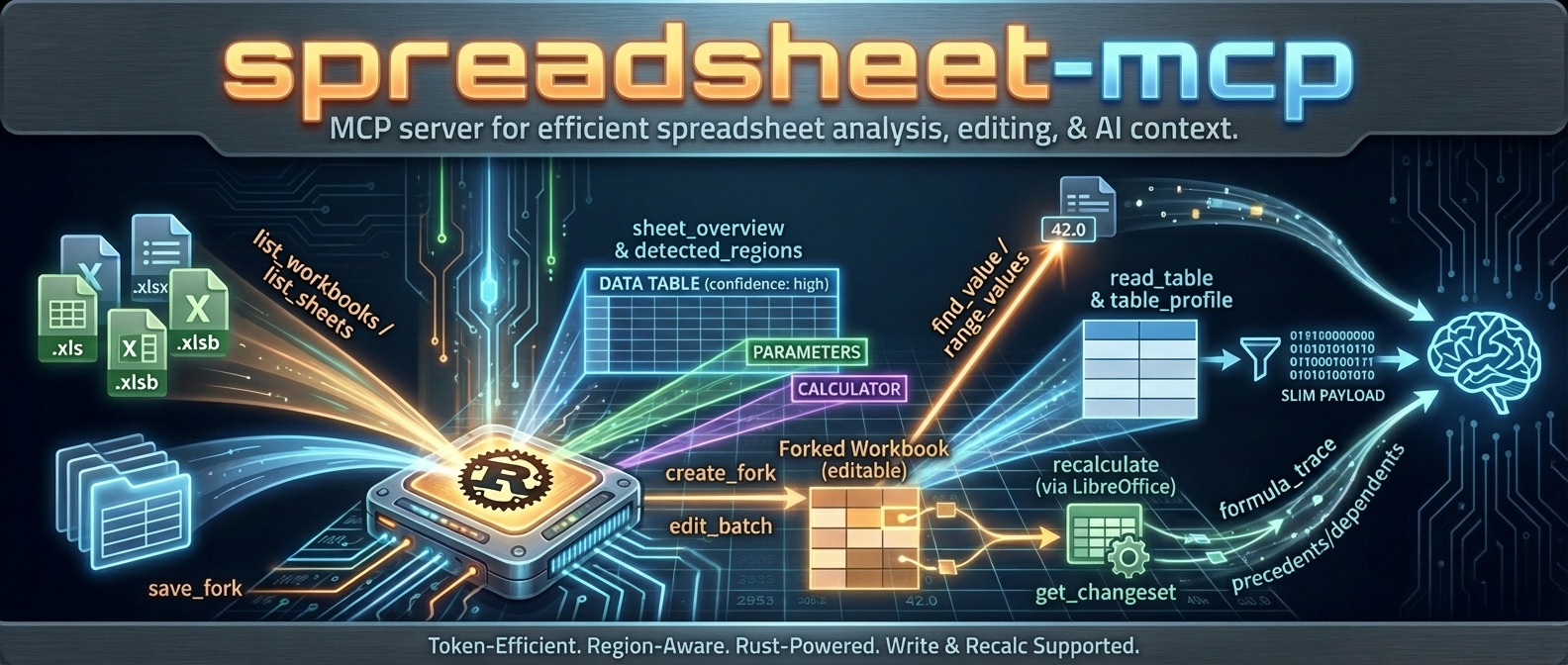
spreadsheet-kit is the tool interaction service for agent-based spreadsheet usage.
It gives agents a safe, inspectable, token-efficient way to read, analyze, mutate, verify, and operationalize Excel workbooks without falling back to brittle UI automation.
If you want an agent to work with spreadsheets like a real system instead of a screenshot puppet, this is the stack.
What this project is
spreadsheet-kit ships a unified spreadsheet interaction layer across four surfaces:
| Surface | Binary / Package | Mode | Best for |
|---|---|---|---|
| CLI | asp / agent-spreadsheet |
Stateless | One-shot reads, safe edits, pipelines, CI, agent tool calls |
| MCP server | spreadsheet-mcp |
Stateful | Multi-turn agent sessions, workbook caching, fork/recalc workflows |
| JS SDK | spreadsheet-kit-sdk |
Backend-agnostic | App integrations that can target MCP today and WASM/session backends over time |
| WASM runtime | spreadsheet-kit-wasm |
In-process | Experimental byte/session embedding for local runtimes |
Supported workbook modes:
.xlsx/.xlsm— read + write.xls/.xlsb— discovery/read-oriented workflows only
Why agents use spreadsheet-kit
Built for tool use, not just humans
- deterministic JSON contracts
- schema and example discovery from the CLI itself
- explicit pagination and compact output modes
- machine-readable warnings and error envelopes
Safe mutation, not blind mutation
- dry-run first workflows
- stateless output modes and overwrite safety
- event-sourced session editing
- verification surfaces for proving downstream outcomes
- structural impact analysis before risky workbook changes
Spreadsheet-aware, not generic file editing
- region detection
- table and footer-aware append helpers
- template row / row band cloning
- formula-specific replace and diagnostics
- named range CRUD
- recalculation + diff + proof flows
Good agent ergonomics
- nested command groups with legacy alias compatibility
- token-efficient reads
- exact-cell inspection and layout inspection
- workflow helpers for the repetitive parts agents usually get wrong
What is new / what makes this stack different
The current surface is much stronger than a plain “read some cells” tool. Major capabilities now include:
aspas the primary CLI withagent-spreadsheetpreserved as a compatibility alias- grouped verification via
asp verify proofandasp verify diff - preview-first workflow helpers for:
write appendwrite clone-template-rowwrite clone-row-band
- formula-safe batch workflows with parse-policy diagnostics
- cell/layout/export/import inspection surfaces
- named range management (
write name define|update|delete) - formula-only replacement (
write formulas replace) - event-sourced session editing with log, branch, undo/redo, fork, apply, and materialize
- SheetPort manifest lifecycle + execution for contract-driven spreadsheet automation
Install
npm (recommended for CLI)
npm i -g agent-spreadsheet
asp --help
Installs both:
asp— primary commandagent-spreadsheet— compatibility alias
Downloads a prebuilt native binary for your platform. No Rust toolchain required.
Cargo
# CLI
cargo install spreadsheet-kit --features recalc --bin asp --bin agent-spreadsheet

# MCP server
cargo install spreadsheet-mcp
Formualizer (the native Rust recalc engine) is included by default.
Docker
# Read-only / slim
docker pull ghcr.io/psu3d0/spreadsheet-mcp:latest

# Write + recalc + screenshots
docker pull ghcr.io/psu3d0/spreadsheet-mcp:full
JavaScript SDK
npm i spreadsheet-kit-sdk
Prebuilt binaries
Download from GitHub Releases.
Published native assets include:
- Linux x86_64
- macOS x86_64
- macOS arm64
- Windows x86_64
Start here: the core workflows
1) Orient the workbook before reading cells
# What sheets are here?
asp read sheets data.xlsx

# What regions/tables/parameter blocks does this sheet contain?
asp read overview data.xlsx "Model"

# What named items are available?
asp read names data.xlsx

# Read a structured region as a table
asp read table data.xlsx --sheet "Model"
2) Inspect exactly what an agent needs
# Raw values for exact ranges
asp read values data.xlsx Model A1:C20

# Detail-view for targeted cells (value / formula / cached / style triage)
asp read cells data.xlsx Model B2 D10:F12

# Layout-aware rendering for a bounded range
asp read layout data.xlsx Model --range A1:H30 --render both

# Export a bounded range to csv or grid json
asp read export data.xlsx Model A1:H30 --format csv --output model.csv
3) Do a safe stateless edit → recalc → proof → diff loop
asp workbook copy data.xlsx /tmp/draft.xlsx
asp write cells /tmp/draft.xlsx Inputs "B2=500" "C2==B2*1.1"
asp workbook recalculate /tmp/draft.xlsx
asp verify proof data.xlsx /tmp/draft.xlsx --targets Summary!B2,Summary!B3 --named-ranges
asp verify diff data.xlsx /tmp/draft.xlsx --details --limit 50
A representative label-mode lookup:
asp analyze find-value data.xlsx "Net Income" --mode label --label-direction below
4) Preview structural risk before mutating the workbook
asp analyze ref-impact data.xlsx --ops @structure_ops.json --show-formula-delta
This is intentionally read-only. It surfaces shifted spans, absolute-reference warnings, token counts, and optional before/after formula samples.
5) Use workflow helpers instead of reinventing row logic
# Stateless batch writes
asp write batch transform data.xlsx --ops @ops.json --dry-run
asp write batch style data.xlsx --ops @style_ops.json --dry-run

# Append rows into a detected region or table, respecting footer rows when present
asp write append data.xlsx --sheet Revenue --table-name RevenueTable --from-csv rows.csv --header --dry-run

# Clone one template row with preview-first planning
asp write clone-template-row data.xlsx --sheet Inputs --source-row 8 --after 8 --count 3 --dry-run

# Clone a contiguous row band repeatedly
asp write clone-row-band data.xlsx --sheet Forecast --source-rows 12:16 --after 16 --repeat 4 --dry-run
6) Use a stateful session when the edit story gets complex
asp session start --base data.xlsx --workspace .
asp session op --session <id> --ops @edit.json --workspace .
asp session apply --session <id> <staged_id> --workspace .
asp session materialize --session <id> --output result.xlsx --workspace .
And when you need proper history and branching:
asp session log --session <id> --workspace .
asp session fork --session <id> scenario-a --workspace .
asp session undo --session <id> --workspace .
asp session redo --session <id> --workspace .
asp session checkout --session <id> <op_id> --workspace .
7) Turn workbook interfaces into contracts with SheetPort
# Discover candidate ports from workbook structure
asp sheetport manifest candidates model.xlsx

# Validate or normalize a manifest
asp sheetport manifest validate manifest.yaml
asp sheetport manifest normalize manifest.yaml

# Bind-check a workbook against a manifest
asp sheetport bind-check model.xlsx manifest.yaml

# Execute the manifest with JSON inputs
asp sheetport run model.xlsx manifest.yaml --inputs @inputs.json
CLI overview
The primary CLI is asp.
agent-spreadsheet remains available as a compatibility alias, so both of these are valid:
asp read sheets data.xlsx
agent-spreadsheet read sheets data.xlsx
Preferred command groups
asp read ...asp analyze ...asp write ...asp workbook ...asp verify ...asp session ...asp sheetport ...
Legacy aliases
Legacy flat commands are still normalized to the new nested surface where practical. That makes migration easier for older prompts, docs, and automation.
Discoverability built into the CLI
When an agent is unsure of payload shape, it can ask the tool directly:
asp schema write batch transform
asp example write batch transform
asp schema session op transform.write_matrix
asp example session op transform.write_matrix
This is a core design principle: the surface should explain itself to the agent.
Command families
read — extraction and inspection
| Command | Purpose |
|---|---|
asp read sheets <file> |
List sheets with summary metadata |
asp read overview <file> <sheet> |
Detect regions, headers, and orientation |
asp read values <file> <sheet> <range> [range...] |
Pull raw values for exact A1 ranges |
asp read export <file> <sheet> <range> |
Export a bounded range to csv or grid json |
asp read cells <file> <sheet> <target> [target...] |
Inspect exact cells/ranges with value/formula/cached/style snapshots |
asp read page <file> <sheet> ... |
Deterministic sheet paging with next_start_row |
asp read table <file> ... |
Structured table/region read with deterministic next_offset |
asp read names <file> |
Named ranges, named formulas, and table items |
asp read workbook <file> |
Workbook-level metadata |
asp read layout <file> <sheet> |
Layout-aware rendering with widths, merges, borders, and optional ascii output |
Why these matter for agents
Agents rarely need “the whole spreadsheet.” They need:
- the right region
- the right page
- the right cells
- just enough layout to understand intent
That is why the read surface combines region detection, structured reads, detail inspection, and explicit continuation.
analyze — search, diagnostics, and impact understanding
| Command | Purpose |
|---|---|
asp analyze find-value <file> <query> |
Search by value or by label semantics |
asp analyze find-formula <file> <query> |
Text search within formulas |
asp analyze formula-map <file> <sheet> |
Summarize formulas by complexity/frequency |
asp analyze formula-trace <file> <sheet> <cell> <precedents|dependents> |
Dependency tracing with continuation |
asp analyze scan-volatiles <file> |
Find volatile formulas |
asp analyze sheet-statistics <file> <sheet> |
Density and type statistics |
asp analyze table-profile <file> |
Header/type/cardinality profiling |
asp analyze ref-impact <file> --ops @structure_ops.json |
Preflight structural edit impact without mutation |
Why this matters
Headless spreadsheet automation wins when it can explain consequences, not just execute mutations. ref-impact, formula-trace, and grouped diagnostics are all part of that story.
write — safe mutations and workflow helpers
| Command | Purpose |
|---|---|
asp write cells <file> <sheet> ... |
Direct shorthand cell edits |
asp write import <file> <sheet> ... |
Import grid json or csv into a workbook range |
asp write append ... |
Footer-aware row append into a region or table |
asp write clone-template-row ... |
Clone one template row with preview-first planning |
asp write clone-row-band ... |
Clone a multi-row template band repeatedly |
asp write formulas replace ... |
Formula-only find/replace on a sheet/range |
| `asp write name define | update |
asp write batch transform ... |
Stateless transform pipeline |
asp write batch style ... |
Stateless style edits |
asp write batch formula-pattern ... |
Autofill-like formula application |
asp write batch structure ... |
Rows/cols/sheets/copy/move style mutations |
asp write batch column-size ... |
Column width operations |
asp write batch sheet-layout ... |
Freeze panes, zoom, page setup, print area |
asp write batch rules ... |
Data validation + conditional formatting |
Safety model
Most mutating commands support a strict mode matrix:
--dry-run--in-place--output <PATH>
This matters for agents because it allows:
- dry-run planning
- non-destructive execution
- explicit overwrite control
Formula maintenance
Formula mutation is now a first-class surface:
asp write formulas replace data.xlsx Sheet1 --find '$64' --replace '$65' --dry-run
asp write formulas replace data.xlsx Sheet1 --find 'Sheet1!' --replace 'Sheet2!' --range A1:Z100 --output fixed.xlsx
Named range maintenance
asp write name define data.xlsx RevenueInput 'Inputs!$B$2'
asp write name update data.xlsx RevenueInput 'Inputs!$B$2:$B$4' --in-place
asp write name delete data.xlsx RevenueInput --in-place
workbook — file-level flows
| Command | Purpose |
|---|---|
asp workbook create <path> |
Create a new workbook |
asp workbook copy <source> <dest> |
Safe copy for edit workflows |
asp workbook recalculate <file> |
Recalculate formulas via the configured backend |
verify — proof, not vibes
| Command | Purpose |
|---|---|
asp verify proof <baseline> <current> |
Prove target deltas and isolate new/resolved/preexisting errors |
asp verify diff <original> <modified> |
Summary-first grouped workbook diff with optional paged details |
Why verification matters
Most spreadsheet automation tools stop at “the edit applied.”
spreadsheet-kit goes further:
- did the target cells change the way we expected?
- did the workbook introduce new errors?
- which changes were direct edits vs recalculation fallout?
- what changed overall, grouped in a way an agent can reason about?
This verification layer is a big part of why this project is a serious agent substrate rather than a utility script.
session — event-sourced stateful editing
The session surface is for workflows that are too complex for a single stateless write.
What sessions give you
- persistent editing state
- staged dry-run operations
- compare-and-swap apply semantics
- logs and replayability
- branch/switch/fork flows
- undo / redo / checkout
- explicit materialization back to a workbook file
Canonical loop
asp session start --base model.xlsx --workspace .
asp session op --session <id> --ops @ops.json --workspace .
asp session apply --session <id> <staged_id> --workspace .
asp session materialize --session <id> --output result.xlsx --workspace .
History and branching
asp session log --session <id> --workspace .
asp session branches --session <id> --workspace .
asp session fork --session <id> experiment-b --workspace .
asp session switch --session <id> experiment-b --workspace .
asp session undo --session <id> --workspace .
asp session redo --session <id> --workspace .
asp session checkout --session <id> <op_id> --workspace .
Use sessions when you want repeatability, auditability, and multi-step safety.
sheetport — spreadsheet interfaces as executable contracts
SheetPort is the workflow surface for turning workbook inputs/outputs into explicit machine contracts.
Manifest lifecycle
asp sheetport manifest candidates model.xlsx
asp sheetport manifest schema
asp sheetport manifest validate manifest.yaml
asp sheetport manifest normalize manifest.yaml
Bind-check + run
asp sheetport bind-check model.xlsx manifest.yaml
asp sheetport run model.xlsx manifest.yaml --inputs @inputs.json --freeze-volatile
Use this when you want a workbook to behave less like an opaque file and more like a declared service interface.
Output contracts for agents
Canonical vs compact shapes
All commands default to JSON. Many also support:
--shape canonical
--shape compact
Policy:
- canonical keeps the full stable schema
- compact removes wrapper noise where the contract allows it while preserving continuation fields and command-specific semantics
Shape policy:
- Canonical (default): preserve the full response schema.
- range-values: returns a stable
values: [...]envelope in both canonical and compact modes. - range-values default encoding: dense JSON (
dense.encoding = "dense_v1") withdictionary+ run-lengthrow_runs. - range-values
--include-formulas: includes sparse formula coordinates in dense mode (dense.formulas), or a matrix in explicitjsonformat. - read-table and sheet-page: compact preserves the active branch and continuation fields (
next_offset,next_start_row). - formula-trace compact: omits per-layer
highlightswhile preservinglayersandnext_cursor.
Deterministic pagination loops
# sheet-page continuation
asp read page data.xlsx Sheet1 --format compact --page-size 200
asp read page data.xlsx Sheet1 --format compact --page-size 200 --start-row 201

# read-table continuation
asp read table data.xlsx --sheet "Sheet1" --table-format values --limit 200 --offset 0
asp read table data.xlsx --sheet "Sheet1" --table-format values --limit 200 --offset 200
sheet-page machine contract
- Inspect top-level
formatbefore reading payload fields. format=full: read top-levelrowsplus optionalheader_rowandnext_start_row.format=compact: readcompact.headers,compact.header_row,compact.rowsplus optionalnext_start_row.format=values_only: readvalues_only.rowsplus optionalnext_start_row.- Continuation is always driven by top-level
next_start_rowwhen present. - Global
--shape compactpreserves the activesheet-pagebranch; it does not flattensheet-pagepayloads.
Machine continuation example:
- Request page 1 without
--start-row. - If
next_start_rowis present, callsheet-pageagain with--start-row <next_start_row>. - Stop when
next_start_rowis omitted.
Self-describing payloads
When the agent is unsure what to send, ask for a schema or example:
asp schema write batch rules
asp example write batch rules
asp schema session op structure.insert_rows
asp example session op structure.insert_rows
Batch payload examples
All batch payloads use a top-level envelope object. Most commands require {"ops":[...]}; column-size-batch prefers {"sheet_name":"...","ops":[...]} and also accepts per-op sheet_name inside {"ops":[...]}.
transform-batch payloads (@transform_ops.json)
- Minimal:
{"ops":[{"kind":"fill_range","sheet_name":"Sheet1","target":{"kind":"range","range":"B2:B4"},"value":"0"}]} - Advanced:
{"ops":[{"kind":"replace_in_range","sheet_name":"Sheet1","target":{"kind":"region","region_id":1},"find":"N/A","replace":"","match_mode":"contains","case_sensitive":false,"include_formulas":true}]}
style-batch payloads (@style_ops.json)
- Minimal:
{"ops":[{"sheet_name":"Sheet1","target":{"kind":"range","range":"B2:B2"},"patch":{"font":{"bold":true}}}]} - Advanced:
{"ops":[{"sheet_name":"Sheet1","target":{"kind":"cells","cells":["B2","B3"]},"patch":{"number_format":"$#,##0.00","alignment":{"horizontal":"right"}},"op_mode":"merge"}]}
write batch formula-pattern payloads (@formula_ops.json)
- Minimal:
{"ops":[{"sheet_name":"Sheet1","target_range":"C2:C4","anchor_cell":"C2","base_formula":"B2*2"}]} - Advanced:
{"ops":[{"sheet_name":"Sheet1","target_range":"C2:E4","anchor_cell":"C2","base_formula":"B2*2","fill_direction":"both","relative_mode":"excel"}]} relative_modevalid values:excel,abs_cols,abs_rows
structure-batch payloads (@structure_ops.json)
- Minimal:
{"ops":[{"kind":"rename_sheet","old_name":"Summary","new_name":"Dashboard"}]} - Advanced:
{"ops":[{"kind":"copy_range","sheet_name":"Sheet1","dest_sheet_name":"Summary","src_range":"A1:C4","dest_anchor":"A1","include_styles":true,"include_formulas":true}]}
column-size-batch payloads (@column_size_ops.json)
- Minimal (preferred):
{"sheet_name":"Sheet1","ops":[{"range":"A:A","size":{"kind":"width","width_chars":12.0}}]} - Advanced (preferred):
{"sheet_name":"Sheet1","ops":[{"target":{"kind":"columns","range":"A:C"},"size":{"kind":"auto","min_width_chars":8.0,"max_width_chars":24.0}}]} - Also accepted (harmonized shape):
{"ops":[{"sheet_name":"Sheet1","range":"A:A","size":{"kind":"width","width_chars":12.0}}]}
sheet-layout-batch payloads (@layout_ops.json)
- Minimal:
{"ops":[{"kind":"freeze_panes","sheet_name":"Sheet1","freeze_rows":1,"freeze_cols":1}]} - Advanced:
{"ops":[{"kind":"set_page_setup","sheet_name":"Sheet1","orientation":"landscape","fit_to_width":1,"fit_to_height":1}]}
rules-batch payloads (@rules_ops.json)
- Minimal:
{"ops":[{"kind":"set_data_validation","sheet_name":"Sheet1","target_range":"B2:B4","validation":{"kind":"list","formula1":"\"A,B,C\""}}]} - Advanced:
{"ops":[{"kind":"set_conditional_format","sheet_name":"Sheet1","target_range":"C2:C10","rule":{"kind":"expression","formula":"C2>100"},"style":{"fill_color":"#FFF2CC","bold":true}}]}
write batch formula-pattern clears cached results for touched formula cells; run workbook recalculate to refresh computed values.
Formula parse policy
Formula-aware commands support:
--formula-parse-policy fail|warn|off
fail— abortwarn— continue and attach grouped diagnosticsoff— skip silently
This lets agents choose between strictness and progress depending on the workflow.
CLI reference excerpts
read values <file> <sheet> <range> [range...] [--format dense\|json\|values\|csv] [--include-formulas]read cells <file> <sheet> <target> [target...] [--include-empty]read page <file> <sheet> --format <full|compact|values_only> [--start-row ROW] [--page-size N]workbook create <path> [--sheets Inputs,Calc,...] [--overwrite]analyze find-value <file> <query> [--sheet S] [--mode value\|label] [--label-direction right\|below\|any]write batch transform <file> --ops @ops.json (--dry-run\|--in-place\|--output PATH)
Formula write-path provenance (write_path_provenance)
Formula-writing commands emit optional provenance metadata for troubleshooting:
written_via: write path (edit,transform_batch,apply_formula_pattern)formula_targets: sheet/cell or sheet/range targets touched by formula writes
Debug compare workflow:
- Apply the same formula target via two paths.
- Compare
write_path_provenance.written_viaandformula_targetsin responses. - Use
inspect-cellsplusrecalculateto compare resulting behavior.
Financial presentation starter defaults
- Keep label columns (often column A) explicitly sized (roughly
24–36chars) to prevent clipping. - Apply consistent number formats by semantic type:
- Currency:
"$"#,##0.00_);[Red]("$"#,##0.00) - Percent:
0.0% - Integer/count:
#,##0
- Currency:
- Apply
sheet-layout-batchfreeze panes after header layout stabilizes.
JSON output is compact by default; use --quiet to suppress warnings.
Global --output-format csv is currently unsupported; use command-specific CSV options like read table --table-format csv.
MCP server quickstart
The MCP surface is the stateful server version of spreadsheet-kit.
Use it when you want:
- workbook caching across calls
- fork lifecycle instead of stateless file replacement
- multi-turn agent workflows
- screenshots and richer server-side orchestration
Claude Code / Claude Desktop
Add to ~/.claude.json or project .mcp.json:
{
  "mcpServers": {
    "spreadsheet": {
      "command": "spreadsheet-mcp",
      "args": ["--workspace-root", "/path/to/workbooks", "--transport", "stdio"]
    }
  }
}
Docker
{
  "mcpServers": {
    "spreadsheet": {
      "command": "docker",
      "args": [
        "run", "-i", "--rm",
        "-v", "/path/to/workbooks:/data",
        "ghcr.io/psu3d0/spreadsheet-mcp:latest",
        "--transport", "stdio"
      ]
    }
  }
}
HTTP mode
spreadsheet-mcp --workspace-root /path/to/workbooks
# -> http://127.0.0.1:8079  (POST /mcp)
MCP tool surface
Read and discovery
list_workbooksdescribe_workbooklist_sheetsworkbook_summarysheet_overviewsheet_pageread_tablerange_valuesnamed_rangessheet_stylesworkbook_style_summary
Search and analysis
find_valuefind_formulasheet_formula_mapformula_tracescan_volatilestable_profilesheet_statisticsget_manifest_stub
Stateful write and recalc
- fork lifecycle
- checkpoints
edit_batchtransform_batchstyle_batchapply_formula_patternstructure_batchcolumn_size_batchsheet_layout_batchrules_batchrecalculateget_changesetsave_fork- staged-change management
screenshot_sheet
VBA inspection
vba_project_summaryvba_module_source
JS SDK and WASM status
spreadsheet-kit-sdk
The JS SDK is the app-facing integration layer.
It normalizes:
- method names
- input aliases
- output shapes
- typed capability errors
It is designed so an integration can target:
- MCP backends now
- WASM/session backends as they mature in embedded runtimes
Install:
npm i spreadsheet-kit-sdk
spreadsheet-kit-wasm
The Rust crate exists in this repository and provides a WASM-facing byte/session wrapper around the shared engine.
Current status:
- the crate exists and is tested in-repo
- it is not yet published as a general-purpose public package
- the npm
spreadsheet-kit-wasmdistribution remains planned
So the right framing today is:
- WASM is real inside the repo
- public distribution and broader packaging are still evolving
Recalc backends
Formula recalculation is pluggable.
| Backend | How | Default | Best for |
|---|---|---|---|
| Formualizer | Native Rust engine | Yes | Fast default recalc with no external dependency |
| LibreOffice | Headless soffice |
Docker :full / explicit builds |
Maximum compatibility and screenshot flows |
Feature notes:
recalc-formualizeris enabled by defaultrecalc-libreofficeis available for LibreOffice-backed builds- read and many write flows still work without recalc; only recalculate itself requires a backend
Docker images
Published at ghcr.io/psu3d0/spreadsheet-mcp:
| Image | Size | Recalc | Best for |
|---|---|---|---|
latest |
~15 MB | No | Read-only analysis and lightweight agent deployments |
full |
~800 MB | Yes | Write + recalc + screenshots |
Examples:
# Read-only
docker run -v /path/to/workbooks:/data -p 8079:8079 ghcr.io/psu3d0/spreadsheet-mcp:latest

# Write + recalc
docker run -v /path/to/workbooks:/data -p 8079:8079 ghcr.io/psu3d0/spreadsheet-mcp:full
Workspace layout
spreadsheet-kit/
├── crates/
│   ├── spreadsheet-kit/        # shared engine + asp / agent-spreadsheet CLI
│   ├── spreadsheet-mcp/        # MCP server adapter
│   └── spreadsheet-kit-wasm/   # experimental WASM-facing wrapper
├── npm/
│   ├── agent-spreadsheet/      # npm CLI wrapper
│   └── spreadsheet-kit-sdk/    # JS SDK
├── docs/                       # architecture and design docs
├── benchmarks/                 # scenario budget regression harnesses
└── .github/workflows/          # CI, release, docker builds
Package roles
| Package | Role |
|---|---|
spreadsheet-kit |
shared engine and CLI binaries |
spreadsheet-mcp |
stateful MCP transport + server surface |
spreadsheet-kit-wasm |
WASM-facing byte/session wrapper |
agent-spreadsheet |
npm wrapper for the CLI binary |
spreadsheet-kit-sdk |
JS SDK for MCP/WASM-style integrations |
Architecture notes
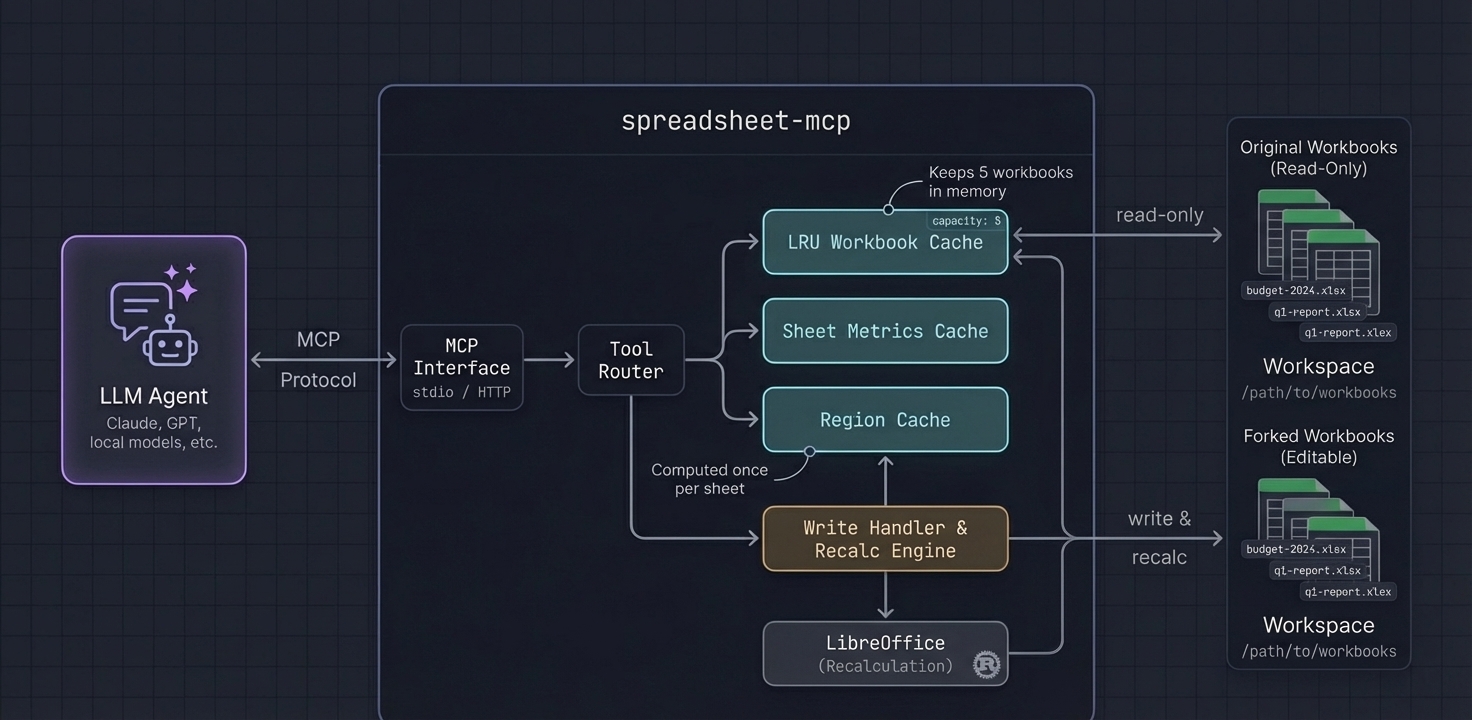
Core ideas:
- one semantic core shared across CLI, MCP, session, and WASM-facing work
- region detection for structural awareness
- token-efficient defaults so agents do not over-read spreadsheets
- verification as a first-class feature rather than an afterthought
- workflow helpers for the common mutations that spreadsheet agents repeatedly struggle with
Token-efficient workflow reference:
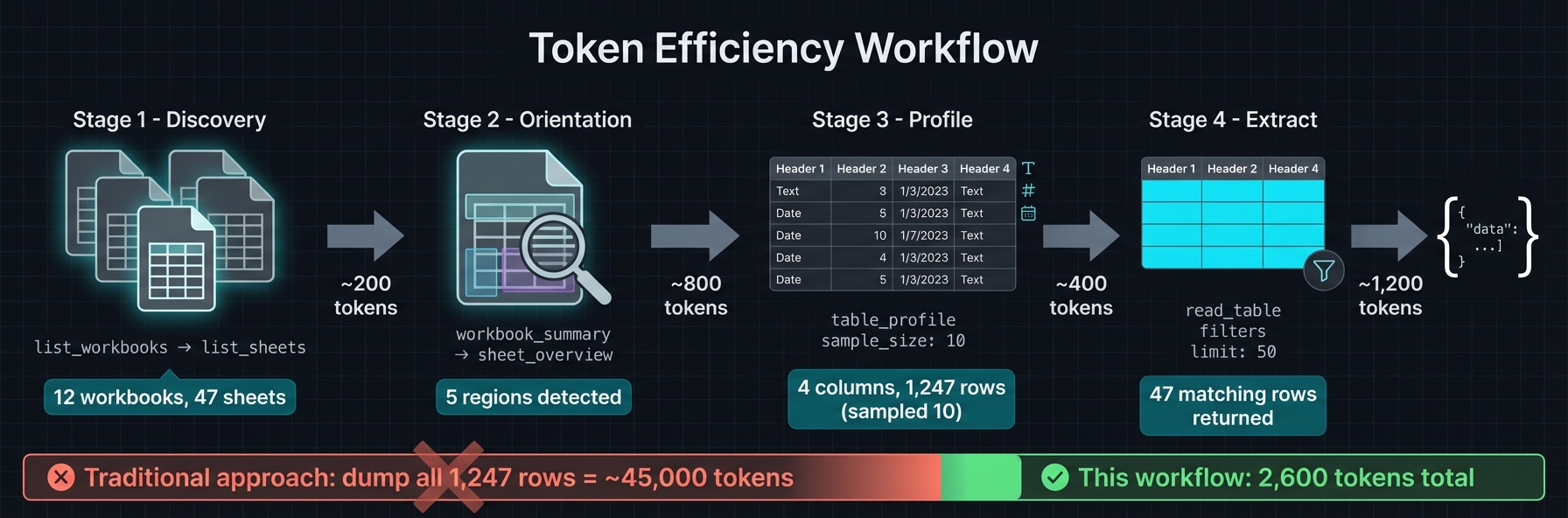
Recommended progression:
- discover workbook + sheets
- detect regions / table-like structures
- inspect only the exact region or cells needed
- mutate with dry-run or session staging
- recalculate if needed
- verify proof and review grouped diffs
Development
# Build everything
cargo build --release

# Run formatting, lint, and tests
cargo fmt --all -- --check
cargo clippy --workspace --all-targets -- -D warnings
cargo test --workspace
Local MCP iteration:
WORKSPACE_ROOT=/path/to/workbooks ./scripts/local-docker-mcp.sh
Or point your MCP client directly at the local binary:
{
  "mcpServers": {
    "spreadsheet": {
      "command": "./target/release/spreadsheet-mcp",
      "args": ["--workspace-root", "/path/to/workbooks", "--transport", "stdio"]
    }
  }
}
Read more
- CLI package README: npm/agent-spreadsheet
- Core crate README: crates/spreadsheet-kit
- MCP crate README: crates/spreadsheet-mcp
- JS SDK README: npm/spreadsheet-kit-sdk
- WASM wrapper README: crates/spreadsheet-kit-wasm
- Packaging/versioning notes: docs/PACKAGING.md
- Heuristics and region detection: docs/HEURISTICS.md
- Recalc architecture: docs/RECALC.md
License
Apache-2.0
Как установить
Выполни в терминале:
claude mcp add psu3d0-spreadsheet-mcp -- npx 
