
Pubmed Evidence
БесплатноНе проверенEnables PubMed literature search, metadata retrieval, BibTeX export, and evidence table generation for biomedical research agents.

Описание
Enables PubMed literature search, metadata retrieval, BibTeX export, and evidence table generation for biomedical research agents.
README
MCP server for reliable PubMed literature retrieval, BibTeX export, and evidence table generation for biomedical research agents.
This project exposes PubMed as structured MCP tools so AI assistants can retrieve biomedical literature with source URLs, PMID/DOI metadata, article types, and citation-ready outputs instead of relying on model memory.
Status
Active early-stage project. Current releases integrate PubMed, ClinicalTrials.gov, unified evidence tables, citation metadata quality checks, and safety-oriented MCP tool guardrails.
Features
- Search PubMed with optional year and publication type filters
- Search ClinicalTrials.gov by query, condition, intervention, status, and result limit
- Report result-limit metadata, including requested limits, effective limits, returned counts, and truncation flags
- Summarize source provenance at the response level so agents can see which databases contributed results
- Validate biomedical research queries and reject obvious personal medical advice requests
- Optionally write local JSONL audit logs for MCP tool calls without storing full query text or abstracts
- Normalize DOI metadata, add citation-quality warnings, and use Crossref as a fallback for missing DOI metadata on single-article retrieval
- Enrich unified evidence tables with normalized study design, harmonized status, evidence-level labels, Markdown export, sorting, and filtering
- Enrich single-article citation metadata with OpenAlex DOI lookup, citation counts, open access metadata, venue normalization, and reconciliation warnings
- Fetch normalized metadata for a PubMed article by PMID
- Export PubMed records as BibTeX entries
- Build compact evidence tables for agent workflows
- Return structured PubMed fields such as PMID, title, authors, journal, year, normalized DOI, abstract, article types, PubMed URL, and citation warnings
- Return structured trial fields such as NCT ID, condition, intervention, phase, status, enrollment, outcomes, locations, sponsors, and linked publication references
Why MCP for Biomedical Evidence
Biomedical research agents need reliable access to current, source-backed evidence. A plain chatbot can answer from model memory, but it may miss recent papers, blur study types, or provide weak citations. This MCP server gives agents a controlled tool layer for PubMed retrieval, ClinicalTrials.gov trial registry retrieval, structured metadata, citation export, and evidence-table generation.
The goal is not to make medical decisions. The goal is to help agents retrieve and organize biomedical literature with provenance, stable schemas, and clear source URLs.
Safety scope
This server is intended for biomedical research support, literature discovery, citation management, and evidence organization. It is not intended for diagnosis, treatment recommendations, or medical advice.
Tools reject obvious personal medical advice prompts such as requests to diagnose the user, prescribe medication, or decide whether the user should take or stop a treatment. Research-oriented terms such as diagnosis, treatment, and therapy remain valid when used for literature or trial retrieval.
Installation
git clone https://github.com/Tianyu-Qu/mcp-pubmed-evidence.git
cd mcp-pubmed-evidence
python -m venv .venv
.\.venv\Scripts\Activate.ps1
pip install -e .[dev]
For macOS/Linux, activate the virtual environment with:
source .venv/bin/activate
MCP Configuration
This server uses MCP stdio transport and can be used by any MCP-compatible client.
Generic stdio configuration:
{
  "command": "python",
  "args": ["-m", "mcp_pubmed_evidence.server"],
  "env": {
    "PYTHONPATH": "/path/to/mcp-pubmed-evidence/src"
  }
}
Claude Desktop example:
{
  "mcpServers": {
    "pubmed-evidence": {
      "command": "python",
      "args": ["-m", "mcp_pubmed_evidence.server"],
      "env": {
        "PYTHONPATH": "/path/to/mcp-pubmed-evidence/src"
      }
    }
  }
}
Replace /path/to/mcp-pubmed-evidence/src with the absolute path to your local src directory. On Windows, it may look like C:\\path\\to\\mcp-pubmed-evidence\\src.
If you install the project into the same Python environment used by your MCP client, you can omit PYTHONPATH.
If your network requires a proxy, add HTTP_PROXY and HTTPS_PROXY to env:
"HTTP_PROXY": "http://127.0.0.1:7890",
"HTTPS_PROXY": "http://127.0.0.1:7890"
Local Demo
You can test PubMed retrieval without an MCP client:
python examples/search_pubmed.py "Alzheimer disease machine learning" --max-results 3
With a year filter:
python examples/search_pubmed.py "Alzheimer disease machine learning" --max-results 5 --year-from 2022 --year-to 2026
Search ClinicalTrials.gov without an MCP client:
python examples/search_trials.py --condition "Alzheimer disease" --intervention "GLP-1" --max-results 5
Build a unified PubMed + ClinicalTrials.gov evidence table without an MCP client:
python examples/build_biomedical_evidence_table.py --query "Alzheimer disease machine learning" --condition "Alzheimer disease" --max-pubmed-results 2 --max-trial-results 2
To print the same rows as JSON:
python examples/build_biomedical_evidence_table.py --query "Alzheimer disease machine learning" --condition "Alzheimer disease" --max-pubmed-results 2 --max-trial-results 2 --json
Example outputs are available in examples/sample_search_output.json, examples/sample_trial_output.json, and examples/sample_biomedical_evidence_table.json.
You can also verify the MCP stdio server locally by listing its tools:
python examples/mcp_list_tools.py
Expected tools:
search_pubmed
get_pubmed_article
get_abstract
export_bibtex
build_evidence_table
search_trials
get_trial_summary
map_trial_to_publications
build_biomedical_evidence_table
Demo
Verified with Cursor as an MCP client. Cursor connected to the pubmed-evidence server and called the search_pubmed tool for the query Alzheimer disease machine learning with max_results=3.
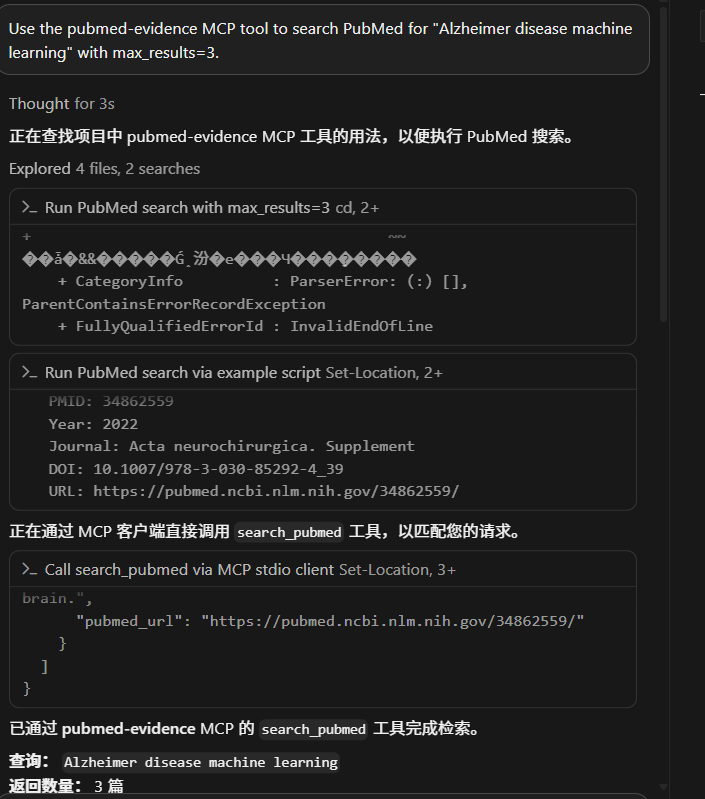
Additional result screenshots:


Tools
search_pubmed
Search PubMed and return normalized article metadata.
Search responses include metadata with source_name, source_url, query_summary, requested_max_results, effective_max_results, max_allowed_results, returned_count, total_available when available, and truncated.
Inputs:
query: PubMed search querymax_results: maximum number of articles to return, capped at 50year_from: optional publication year lower boundyear_to: optional publication year upper boundarticle_types: optional publication type filters, such asRevieworRandomized Controlled Trial
get_pubmed_article
Fetch one PubMed article by PMID. If PubMed does not provide a DOI, the server attempts a conservative Crossref title-match fallback before returning the article.
When a DOI is available, this tool also attempts OpenAlex enrichment by DOI. The returned article may include citation_count, is_open_access, open_access_url, venue, normalized_venue, metadata_sources, and metadata_warnings.
export_bibtex
Fetch PubMed articles by PMID and export BibTeX entries.
DOIs are normalized before BibTeX export. Entries with incomplete citation metadata include a BibTeX comment such as Citation warnings for PMID ....
build_evidence_table
Fetch PubMed articles by PMID and return compact evidence table rows.
search_trials
Search ClinicalTrials.gov and return compact trial records.
Search responses include metadata with source provenance, query summary, result-limit, and truncation information.
Inputs:
query: optional general trial querycondition: optional condition or disease filterintervention: optional intervention, drug, or device filterstatus: optional recruitment status filtermax_results: maximum number of trials to return, capped at 50
get_trial_summary
Fetch one ClinicalTrials.gov trial by NCT ID and return detailed structured metadata including arms, outcomes, eligibility, locations, sponsors, collaborators, references, and result references.
map_trial_to_publications
Map one ClinicalTrials.gov NCT ID to linked PubMed publications when PMIDs are available in ClinicalTrials.gov references.
build_biomedical_evidence_table
Build a unified biomedical evidence table from PubMed articles and ClinicalTrials.gov trial records.
Inputs:
query: optional PubMed query and optional trial querycondition: optional condition or disease filter for ClinicalTrials.govintervention: optional intervention, drug, or device filter for ClinicalTrials.govmax_pubmed_results: maximum PubMed records to includemax_trial_results: maximum ClinicalTrials.gov records to includesource_types: optional filter, such as["pubmed"]or["clinical_trial"]study_designs: optional filter, such as["review"],["randomized_trial"], or["interventional_trial"]statuses: optional filter, such as["published"],["active"], or["completed"]sort_by: optional sort mode:year_desc,year_asc,title_asc,evidence_level,source_type_asc, orsource_type_desc
Returns metadata, display_markdown, and integrated evidence rows. Rows include source type, source ID, title, date/year, raw study type, normalized study design, raw status, normalized status, evidence level, phase, conditions, interventions, outcomes, DOI, URL, provenance, and citation warnings.
The metadata includes query summary, sources used, source counts, requested/effective PubMed and ClinicalTrials.gov result limits, maximum allowed limits, returned row count, and whether a requested limit was truncated.
Development
Install development dependencies:
pip install -e .[dev]
Run tests:
pytest
Run linting:
ruff check .
Check the package version:
python tools/check_version.py
Bump the package version before a release:
python tools/bump_version.py 0.5.1
CI runs ruff check . and pytest on Python 3.10, 3.11, and 3.12 for pushes and pull requests.
Audit Logging
Audit logging is disabled by default. To enable local JSONL audit logs for MCP tool calls, set MCP_PUBMED_EVIDENCE_AUDIT_LOG to a file path before starting the MCP server:
$env:MCP_PUBMED_EVIDENCE_AUDIT_LOG = "F:\Healthcare\mcp-pubmed-evidence\audit.jsonl"
Audit events include timestamp, tool name, status, sanitized argument summaries, result counts, truncation flags, and source counts when available. They intentionally do not store full query text, abstracts, eligibility criteria, or other long biomedical text fields.
Limitations
- PubMed and ClinicalTrials.gov metadata can be incomplete; DOI, abstract, author, journal, publication date, outcomes, locations, or linked PMIDs may be missing.
- Crossref DOI fallback uses conservative title matching and may leave DOI blank rather than risk adding a wrong DOI.
- Evidence tables are metadata-oriented in the first version and do not extract PICO elements or judge study quality.
- Result limits are capped to keep MCP responses manageable; tools report truncation metadata when a request exceeds the configured limit or when a source reports more available records than returned.
- Query validation is a lightweight safety guardrail, not a complete medical-intent classifier.
- Audit logging is local and opt-in; users are responsible for choosing an appropriate log path and retention policy.
- The server does not provide diagnosis, treatment recommendations, or medical advice.
- Network access to PubMed may require a proxy depending on the user's environment.
- Tool outputs should be reviewed by a human before being used in manuscripts, clinical documents, or systematic reviews.
Release Notes
See CHANGELOG.md for release notes and docs/RELEASE_CHECKLIST.md for the release checklist.
v0.3.0 Development
The next milestone, v0.3.0 Evidence Table 2.0, introduces a unified biomedical evidence row schema for combining PubMed articles and ClinicalTrials.gov trial records. The build_biomedical_evidence_table MCP tool now returns integrated evidence rows with source provenance.
v0.4.0 Development
The v0.4.0 Evidence Quality & Safety milestone adds guardrails for agent-facing biomedical tools. Current improvements add explicit result-limit, truncation, query-summary, source-provenance metadata, lightweight biomedical query validation, and opt-in local audit logging so MCP clients can tell where evidence came from, whether a response was capped, and whether a request falls outside the research-support scope.
v0.5.0 Development
The v0.5.0 Citation & Metadata Quality milestone improves citation reliability with DOI normalization, conservative Crossref fallback for missing DOI metadata, BibTeX quality warnings, and citation provenance warnings for incomplete records.
v0.6.0 Development
The v0.6.0 Evidence Table Enrichment milestone improves unified evidence tables with study design normalization, publication type and trial status harmonization, Markdown display export, and sorting/filtering options.
v0.7.0 Development
The v0.7.0 Scholarly Metadata Enrichment milestone adds OpenAlex DOI lookup, citation count and open access metadata, venue normalization, and source reconciliation warnings.
Roadmap
- Expand ClinicalTrials.gov result fields and examples
- Add OpenAlex/Crossref DOI resolution
- Add richer evidence table extraction
- Add example MCP client configurations
- Add local PDF library support
Установка Pubmed Evidence
У этого сервера нет опубликованного пакета — он собирается из исходников. Открой репозиторий и следуй инструкции в README.
▸ github.com/Tianyu-Qu/mcp-pubmed-evidenceFAQ
Pubmed Evidence MCP бесплатный?
Да, Pubmed Evidence MCP бесплатный — установка в пару кликов через Unyly без оплаты.
Нужен ли API-ключ для Pubmed Evidence?
Нет, Pubmed Evidence работает без API-ключей и переменных окружения.
Pubmed Evidence — hosted или self-hosted?
Доступен hosted-вариант: Unyly запускает сервер в облаке, локальная установка не обязательна.
Как установить Pubmed Evidence в Claude Desktop, Claude Code или Cursor?
Открой Pubmed Evidence на unyly.org, выбери вкладку своего клиента (Claude Desktop, Claude Code, Cursor) и нажми Install — конфиг сгенерируется автоматически, без правки JSON.
Похожие MCP
GitHub
PRs, issues, code search, CI status
 автор: GitHub
Filesystem
Secure file operations with configurable access controls.
Memory
Knowledge graph-based persistent memory system.
Template MCP Server
A CLI tool to create a new Model Context Protocol server project with TypeScript support, dual transport options, and an extensible structure
 автор: mcpdotdirect
Compare Pubmed Evidence with
Не уверен что выбрать?
Найди свой стек за 60 секунд
Автор?
Embed-бейдж для README
Похожее
Все в категории development