
Pyautogui Server
БесплатноНе проверенEnables GUI automation by executing Python code with instrumented pyautogui, providing MCP-friendly output and inline screenshot delivery.

Описание
Enables GUI automation by executing Python code with instrumented pyautogui, providing MCP-friendly output and inline screenshot delivery.
README
pyautogui_mcp_server packages a Streamable HTTP MCP server for running Python code with pyautogui instrumentation.
It is designed for GUI automation workflows where plain pyautogui execution is not enough. The package adds MCP-friendly output handling, and richer screenshots.
✨ What this package adds
Compared with running raw pyautogui calls directly, this library adds extra effort in the following areas:
- Shared Python globals across tool calls.
- Captured
stdout,stderr, and final expression results in one MCP response stream. - Inline screenshot delivery as MCP image content instead of requiring manual file handling.
- Annotated mouse-operation previews that show the target point or path before the action runs.
- Screenshot normalization so captured images line up better with logical screen coordinates.
🛠️ Tool response example
<stdout>
Cut the right rope by dragging left to right through it.
</stdout>
<pyautogui-mcp.dragTo x=860 y=430 duration=0.2 button='left'
    time_offset="T+1.1s" pyautogui.size=(1440, 900)>
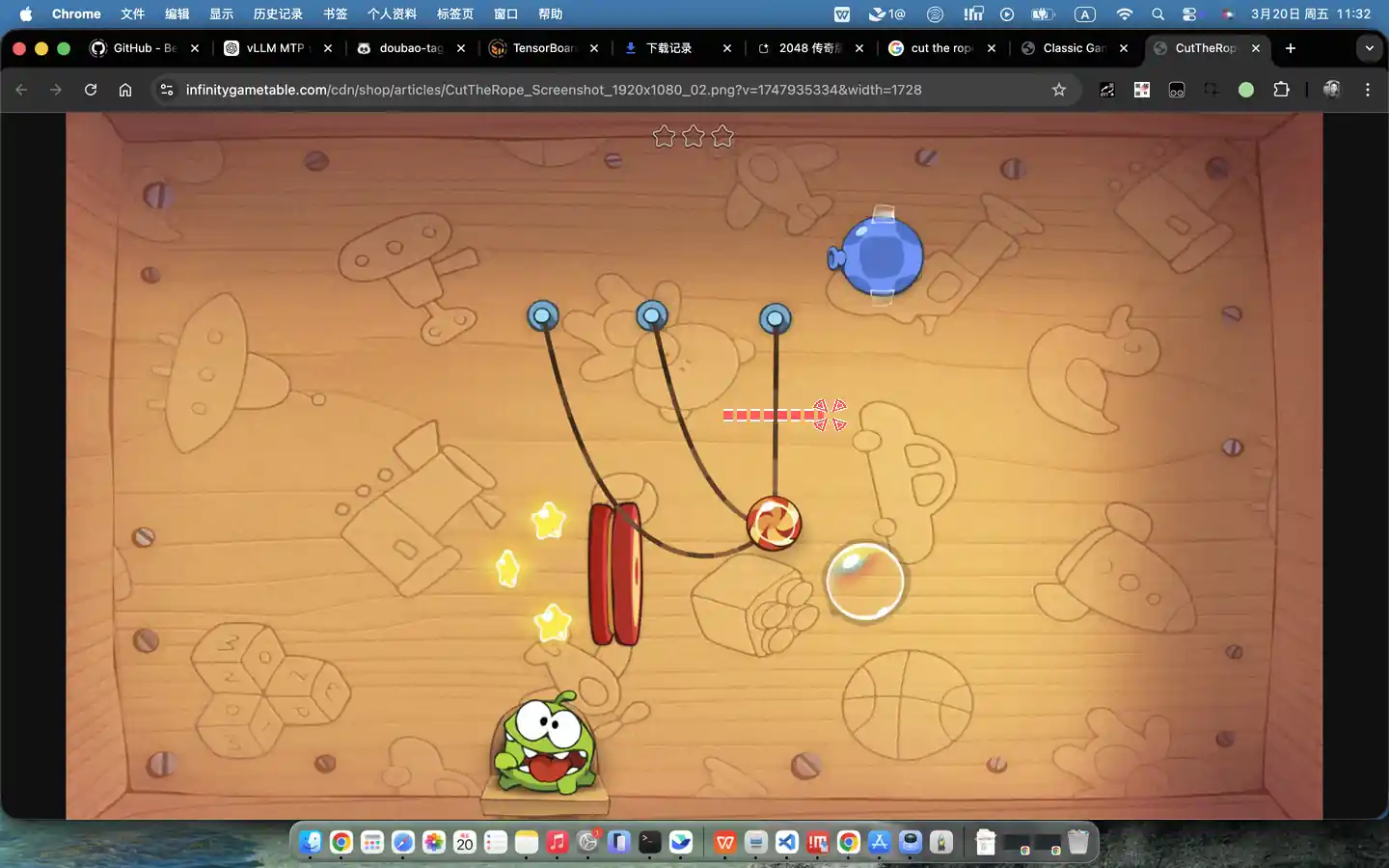
</pyautogui-mcp.dragTo>
📦 Installation
pip install pyautogui_mcp_server
For local development:
pip install -e .[dev]
🚀 Run the MCP server
Use the module entrypoint:
python -m pyautogui_mcp_server --host 127.0.0.1 --port 9300
Or use the installed console script:
pyautogui-mcp-server --port 9300
Show CLI help:
python -m pyautogui_mcp_server --help
The server exposes a run_python_with_pyautogui MCP tool that executes Python with instrumented pyautogui behavior.
📄 License
MIT
Установка Pyautogui Server
У этого сервера нет опубликованного пакета — он собирается из исходников. Открой репозиторий и следуй инструкции в README.
▸ github.com/on-panda/pyautogui_mcp_serverFAQ
Pyautogui Server MCP бесплатный?
Да, Pyautogui Server MCP бесплатный — установка в пару кликов через Unyly без оплаты.
Нужен ли API-ключ для Pyautogui Server?
Нет, Pyautogui Server работает без API-ключей и переменных окружения.
Pyautogui Server — hosted или self-hosted?
Self-hosted: сервер запускается локально на твоей машине командой из раздела установки.
Как установить Pyautogui Server в Claude Desktop, Claude Code или Cursor?
Открой Pyautogui Server на unyly.org, выбери вкладку своего клиента (Claude Desktop, Claude Code, Cursor) и нажми Install — конфиг сгенерируется автоматически, без правки JSON.
Похожие MCP
GitHub
PRs, issues, code search, CI status
 автор: GitHub
Filesystem
Secure file operations with configurable access controls.
Memory
Knowledge graph-based persistent memory system.
Template MCP Server
A CLI tool to create a new Model Context Protocol server project with TypeScript support, dual transport options, and an extensible structure
 автор: mcpdotdirect
Compare Pyautogui Server with
Не уверен что выбрать?
Найди свой стек за 60 секунд
Автор?
Embed-бейдж для README
Похожее
Все в категории development