
Rachet
БесплатноПоддерживаетсяCLI for Rachet, the open-source journey engine for agents

Описание
CLI for Rachet, the open-source journey engine for agents
README


Customer journeys, built with your agent.
Open-source workflow software for AI agents.
Create a workflow, test it, and run it.

MCP native · Architecture · Self-hostable





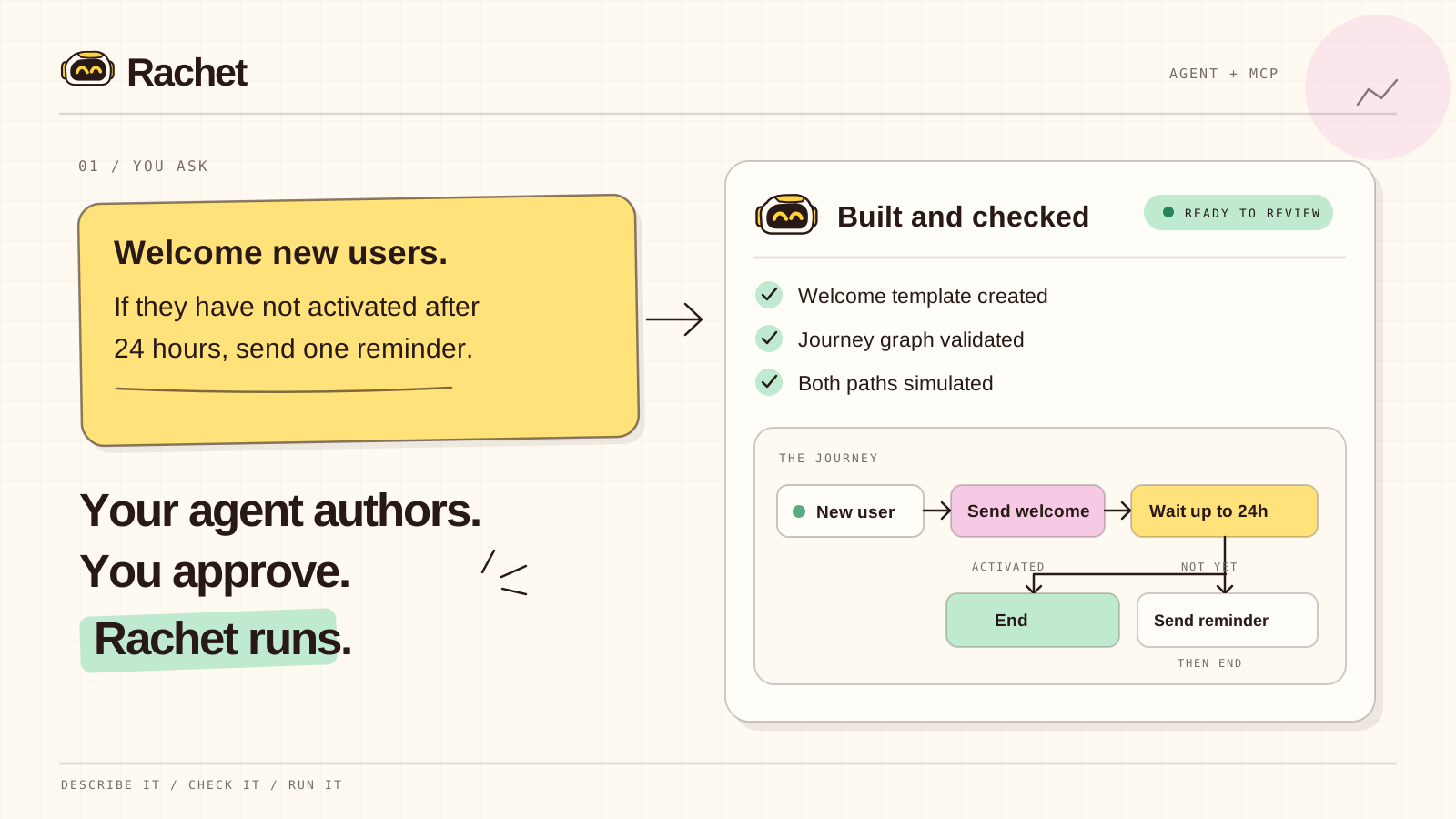
Your agent authors and validates. You decide what goes live.
From prompt to production
Tell your agent what the journey should do. It can inspect templates and workflows, create the graph, and simulate each path before you publish.
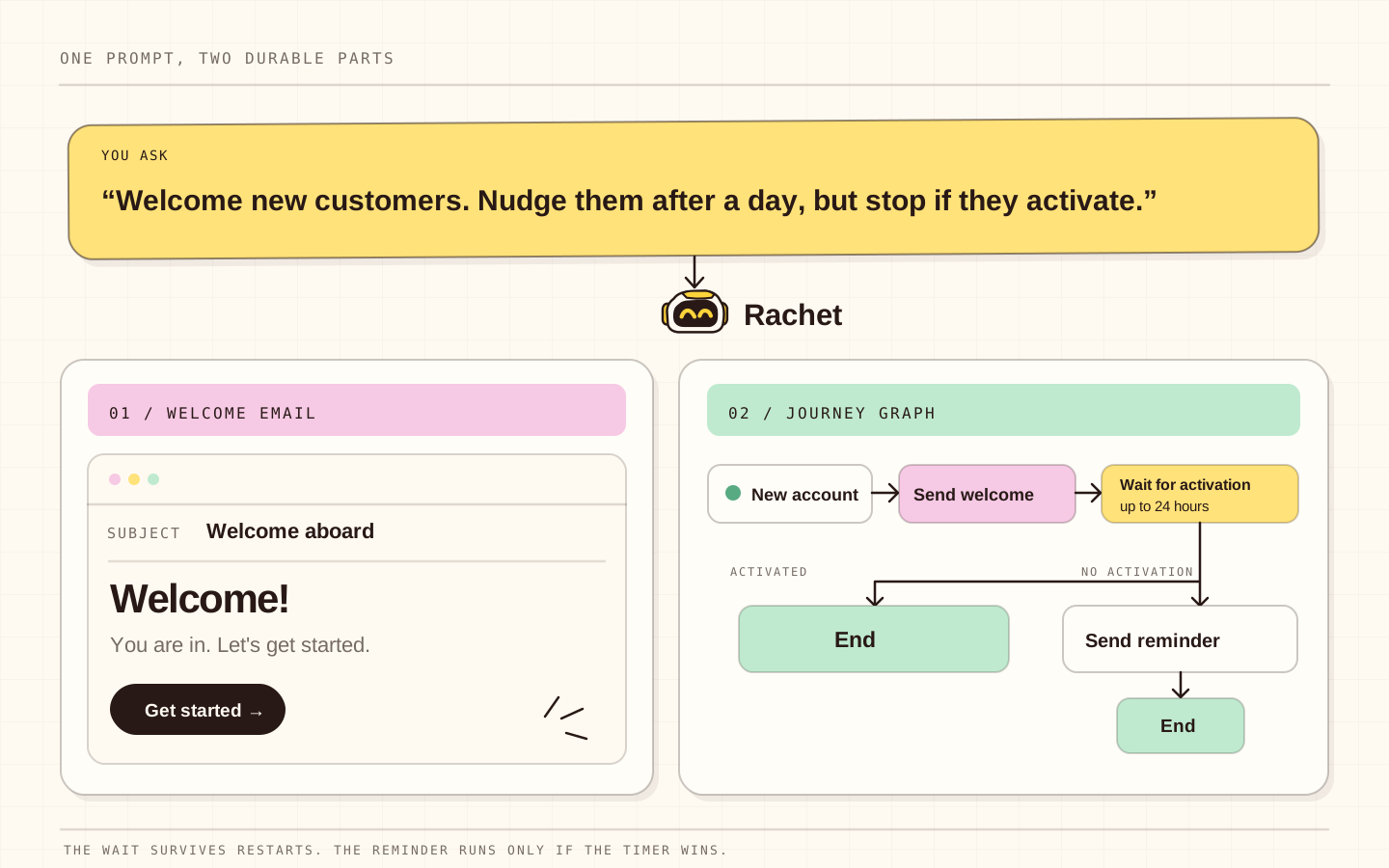
| Agent authored | Built to keep running | You stay in control |
|---|---|---|
| Create and edit journeys through MCP or the CLI. | Wait and resume after deploys or restarts. | Review journeys and decide what to publish. |
Quick Start
Prerequisites
- Node.js 22 or newer
- pnpm 11+ and Docker Compose (local server only)
1. Install the CLI
npm install --global @socialrobot-io/rachet
rachet --version
The CLI connects to a Rachet server; it does not install the server.
2. Sign in
Open rachet.dev/login, or use the CLI:
rachet auth login
rachet call auth.whoami
The CLI uses https://rachet.dev by default. For your own server, pass --url https://your-domain to rachet auth login. It stores short-lived access and rotating refresh credentials in a protected local file, never your password or browser cookie.
3. Connect an MCP client
Copy the checked-in examples/mcp/cursor.json to .cursor/mcp.json:
{
  "mcpServers": {
    "rachet": {
      "url": "https://rachet.dev/mcp"
    }
  }
}
For your own server, replace https://rachet.dev with its URL. Do not add a static Authorization header. Rachet publishes OAuth discovery metadata; compatible clients register with PKCE, show the requested scopes, and save their own grant. Operators can revoke the grant from Connected apps. Redirect allowlists are described in Authentication.
The dashboard's Connect your tools section also has setup instructions for Claude Code, ChatGPT, VS Code, Windsurf, Zed, and other remote HTTP MCP clients. Cursor and VS Code have direct install buttons. Step 4 offers a short, copyable welcome journey prompt. Public clients may need their exact OAuth callback origin or scheme added to the deployment allowlist.
Run locally
git clone https://github.com/socialrobot-io/rachet.git
cd rachet
pnpm install
pnpm dev
pnpm dev starts PostgreSQL, Temporal, the API, worker, dispatcher, and dashboard. Open the dashboard URL printed by the launcher. For sign-in, configure either AUTH_RESEND_API_KEY with AUTH_EMAIL_FROM, or GITHUB_CLIENT_ID with GITHUB_CLIENT_SECRET in .env.local. On a fresh database, use the generated RACHET_SETUP_SECRET to create the first administrator. Registration is disabled by default; set ALLOW_REGISTRATION=true in .env.local and restart to test new accounts.
After signing in, connect workflow delivery in Integrations → Email → Resend. Open Enrollments to see people in progress, exits, and the reason a journey ended. To preview sample journeys, run pnpm demo:seed --list and then pnpm demo:seed <workspace-slug>. See Local demo journeys for details. Stop the app with Ctrl+C and its Docker services with pnpm dev:infra:down.
Usage
Create the first journey with MCP
Give your MCP-capable agent this prompt:
Welcome new users with one friendly email, then end the journey.
Rachet's MCP skill guides the agent through discovery, authoring, validation, and simulation. The agent must ask before publishing or enrolling a real contact. For a more involved example with a reminder and activation event, follow the welcome + nudge tutorial.
Send product events
Define the type once for the workspace. Its JSON Schema is immutable; use a new versioned name when the payload changes.
rachet call event_type.define --input '{
  "eventType": "product.activated.v1",
  "schema": {
    "type": "object",
    "required": ["plan"],
    "properties": { "plan": { "type": "string" } },
    "additionalProperties": false
  }
}'
rachet call event.emit --input '{
  "enrollmentId": "ENROLLMENT_ID",
  "eventId": "product-activation:ACTIVITY_ID",
  "eventType": "product.activated.v1",
  "data": { "plan": "pro" }
}'
Keep eventId stable across retries. Production applications call the same event.emit operation over HTTP with a scoped machine credential, and MCP clients use event_emit. Complete CLI, HTTP, and MCP examples are in Sending product events.
When RACHET_API_KEY and RACHET_WORKSPACE_ID are set, Rachet uses @socialrobot-io/rachet-sdk to enroll each new account in the published workflow named Welcome first workflow, and emits workflow.created.v1 when that person creates a workflow.
Trigger a journey from product code
import { RachetSdk } from '@socialrobot-io/rachet-sdk';

const rachet = new RachetSdk({
  url: process.env.RACHET_URL,
  workspaceId: process.env.RACHET_WORKSPACE_ID,
  apiKey: process.env.RACHET_API_KEY, // user-bound key with the send scope
});

await rachet.trigger({
  workflowVersionId: 'WORKFLOW_VERSION_ID',
  contact: { email: '[email protected]' },
  idempotencyKey: 'activation-welcome:[email protected]',
});
The SDK upserts the contact and starts an idempotent enrollment. Contact fields merge with the fields already stored: a key you send replaces that key, null removes it, and keys you leave out are kept. Keep the API key server-side; browser bundles must call your own backend endpoint.
Operate Rachet
rachet workflow show --name "Activation welcome"
rachet call enrollment.list
rachet call message.list
For marketing email, an organization owner or admin sets the marketing sender and unsubscribe details while configuring Integrations → Email → Resend, or with email_policy.update. Record the recipient's new consent on enrollment.create with consent, or with contact.resubscribe and a stable event ID before enrollment. Published marketing sends include an unsubscribe footer and mailbox one-click headers. subscription_event.list shows which email and workflow led to a link opt-out. See Unsubscribe and consent.
The operations console at rachet.dev shows journey graphs, live enrollments, timelines, messages, OAuth consent, and connected apps. Deployment administrators also get a Users page at /admin/users.
Workflow cards show the number of published versions. Open a workflow and use Version to view v1, v2, or a draft. The graph and enrollment counts match the selected version. Enrollment rows show each person's pinned version and link to that graph. Expand IDs for API and support when you need a workflow or version ID.
The public landing page is at / and /welcome. Signed-in users go to /workflows. Run pnpm dev:dashboard to work on the landing page. Sign-in and the operations console need the full development stack.
Architecture
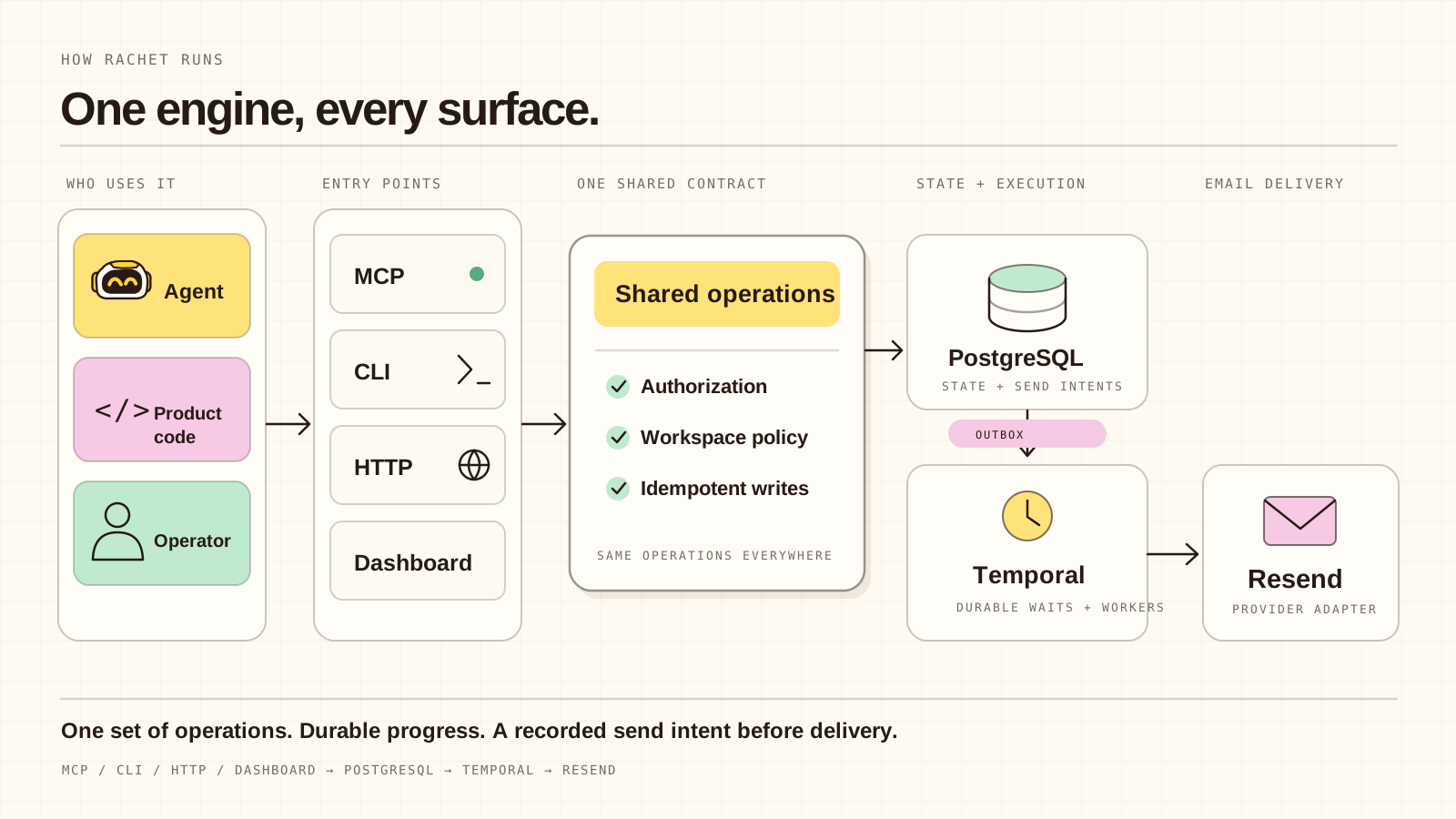
| Concept | Meaning |
|---|---|
| Journey / workflow | A graph of actions, waits, branches, events, and end states |
| Workflow version | Immutable graph used by new enrollments |
| Template version | Immutable rendered content pinned by a send action |
| Enrollment | One durable run for one contact |
| Event | A named product fact that can resume a waiting enrollment |
| Action | A channel or data operation such as email.send or contact.update |
See Architecture for the full design.
Configuration
Server variables, documented in .env.example:
| Variable | Purpose |
|---|---|
RACHET_DOMAIN, PUBLIC_URL |
Public hostname and URL of the deployment |
GOOGLE_ANALYTICS_ID |
Optional Google Analytics measurement ID, for example G-X7CL1NYLSM; unset disables tracking |
DATABASE_URL |
PostgreSQL connection string |
BETTER_AUTH_SECRET |
Auth signing secret, at least 32 random characters |
RACHET_SETUP_SECRET |
High-entropy secret required by the one-time first-admin page |
ALLOW_REGISTRATION |
Public registration, disabled by default |
TRUSTED_ORIGINS |
Origins allowed to call the API |
OAUTH_PUBLIC_REDIRECT_ORIGINS, OAUTH_PUBLIC_REDIRECT_SCHEMES |
Explicit callback allowlists for public MCP clients |
TEMPORAL_ADDRESS, TEMPORAL_NAMESPACE, TEMPORAL_TASK_QUEUE |
Temporal connection and task routing |
INTEGRATION_ENCRYPTION_KEY |
Base64-encoded 32-byte key for encrypting organization integrations; required in production and must be backed up |
UNSUBSCRIBE_SIGNING_KEYS |
Comma-separated base64 32-byte keys; first signs new links, older keys keep sent links valid |
UNSUBSCRIBE_SUPPORT_EMAIL |
Support address shown when a recipient link is invalid or revoked |
AUTH_RESEND_API_KEY, AUTH_EMAIL_FROM |
Separate Resend account/key and explicit verified sender used only for magic links; both are required to enable magic links |
RACHET_API_KEY, RACHET_WORKSPACE_ID |
Optional send-scoped API key and organization for the product welcome. Set both, or neither. |
GITHUB_CLIENT_ID, GITHUB_CLIENT_SECRET |
Optional GitHub sign-in provider |
OAUTH_PROVIDER_ID, OAUTH_DISCOVERY_URL, OAUTH_CLIENT_ID, OAUTH_CLIENT_SECRET |
Optional human OAuth/OIDC provider |
CLI and SDK environments use RACHET_URL plus RACHET_TOKEN or RACHET_API_KEY; the SDK also reads RACHET_WORKSPACE_ID.
Validation and simulation work without Resend. Before a real enrollment can send email, connect the organization's Resend account in the dashboard and confirm a test send. Domain verification and webhook setup are covered in Resend setup.
API
Every operation is defined once and exposed three ways: HTTP POST /v1/operations/<operation>, an MCP tool with dots converted to underscores, and the generic rachet call CLI command.
| Operations | Effect |
|---|---|
system.capabilities, auth.whoami, workspace.list |
Discover runtime, current access, and workspaces |
account.create |
Deployment administrator authorizes a passwordless account registration |
credential.create, credential.list, credential.revoke |
Organization-bound SDK API keys; secrets are returned only at creation |
template.create, template.list, template.revise, template.publish, template.archive, template.render |
Manage, render, and publish HTML or plain templates |
workflow.actions |
List the installed action registry |
workflow.create, workflow.revise, workflow.list, workflow.validate, workflow.simulate, workflow.publish, workflow.delete |
Author, revise, check, trace, version, and delete capability graphs. Workflow deletion requires explicit dangerous confirmation and fails while enrollments are in progress. |
contact.upsert, contact.list |
Manage enrolled contacts |
email_policy.get, email_policy.update, contact.preferences.get, contact.unsubscribe, contact.resubscribe, subscription_event.list |
Configure marketing mail and inspect or change consent |
enrollment.create, enrollment.list, enrollment.pause, enrollment.resume, enrollment.cancel, enrollment.delete |
Start, inspect, control, and delete durable executions |
event_type.define, event_type.list |
Define and inspect immutable JSON Schema contracts for product events |
event.emit |
Durably accept a stable event ID; identical retries are no-ops |
message.list, webhook_event.list |
Inspect the send ledger and verified Resend events |
account.list |
Deployment administrator lists signed-up accounts with workflow and enrollment counts |
MCP also serves rachet://operations, rachet://workflow/schema, and rachet://workflow/actions, plus the design-workflow authoring prompt and the first-party agent skill. The full contract is in Operations and MCP contract.
Project Structure
apps/
├── dashboard/        # React operations console and OAuth UI
└── server/           # Hono API, Better Auth, Temporal workers, Resend adapter
packages/
├── contracts/        # Shared operation and journey schemas
├── cli/              # @socialrobot-io/rachet CLI
├── sdk/              # @socialrobot-io/rachet-sdk for server actions and UI backends
└── mcp-ext-skills/   # MCP skills extension shim
docs/                 # Architecture, authentication, deployment, operations, events guides
examples/             # welcome-nudge tutorial and MCP client configs
migrations/           # PostgreSQL migrations
scripts/              # Dev orchestration, deployment, workflow bundling
skills/               # First-party agent skill
tests/                # Repository validation suite
Tech Stack
| Layer | Technology |
|---|---|
| Runtime | Node.js 22+, TypeScript 5.9, pnpm 11 |
| API | Hono, Better Auth (OAuth provider, API keys), MCP SDK |
| Orchestration | Temporal durable workflows with replay checks |
| Data | PostgreSQL, Drizzle ORM |
| React Email, Resend | |
| Dashboard | React 19, Vite |
| Workspace | Nx 23, Docker Compose, Caddy TLS |
Deployment
Before enabling public signups, review the production readiness assessment.
Point a hostname at a Linux server with Docker and ports 80/443 available, then run:
./scripts/deploy.sh rachet.example.com [email protected]
The script generates deployment secrets, builds the stack, configures Caddy TLS, runs migrations, and performs idempotent admin setup. See Deployment for Coolify, external ingress, backups, and production topology.
CI runs the same make check gate on every push and pull request.
Contributing
Contributions follow the standard fork, branch, commit, pull request workflow. Before opening a PR, run the complete release gate:
make check
It runs validation, linting, typechecks, tests, replay checks, builds, Compose validation, and an npm package dry run. Read CONTRIBUTING.md and follow the writing guide. Update the docs and agent skill when behavior changes. The CLI release process is in Releasing.
Rachet is early. Open an issue with setup problems or missing journey actions.
For project updates, follow @ntorresdev on X.
License
Rachet is licensed under the GNU Affero General Public License v3.0 only (AGPL-3.0-only).
Установить Rachet в Claude Desktop, Claude Code, Cursor
unyly install rachetСтавит в Claude Desktop, Claude Code, Cursor и VS Code — сам разбирается с npx, uvx и сборкой из исходников.
Впервые? Поставь CLI: curl -fsSL https://unyly.org/install | sh
Или настроить вручную
Выполни в терминале:
claude mcp add rachet -- npx -y @socialrobot-io/rachetПошаговые гайды: как установить Rachet
FAQ
Rachet MCP бесплатный?
Да, Rachet MCP бесплатный — установка в пару кликов через Unyly без оплаты.
Нужен ли API-ключ для Rachet?
Нет, Rachet работает без API-ключей и переменных окружения.
Rachet — hosted или self-hosted?
Self-hosted: сервер запускается локально на твоей машине командой из раздела установки.
Как установить Rachet в Claude Desktop, Claude Code или Cursor?
Открой Rachet на unyly.org, выбери вкладку своего клиента (Claude Desktop, Claude Code, Cursor) и нажми Install — конфиг сгенерируется автоматически, без правки JSON.
Похожие MCP
Gmail
Read, send and search emails from Claude
 автор: Google
Slack
Send, search and summarize Slack messages
 автор: Slack
Runbear
No-code MCP client for team chat platforms, such as Slack, Microsoft Teams, and Discord.
Discord Server
A community discord server dedicated to MCP by [Frank Fiegel](https://github.com/punkpeye)
Klavis AI
Open Source MCP Infra. Hosted MCP servers and MCP clients on Slack and Discord.
Work90210/APIFold
Turn any REST API into a hosted MCP server, with ready-made public servers for GitHub, Stripe, Slack, OpenAI, Notion and more.
 автор: Work90210
arikusi/deepseek-mcp-server
DeepSeek AI chat and reasoning with multi-turn sessions, function calling, thinking mode and cost tracking.
 автор: arikusi
hashgraph-online/hashnet-mcp-js
Discover, register and chat with AI agents on the Hashgraph network via the Registry Broker.
 автор: hashgraph-online
profullstack/mcp-server
Developer utilities: SEO optimization, document conversion, domain lookup, email validation, QR codes, weather data, social media posting and security scanning.
 автор: profullstack
WayStation-ai/mcp
Connect MCP hosts to apps such as Notion, Slack, Monday and Airtable.
 автор: waystation-ai
Compare Rachet with
Не уверен что выбрать?
Найди свой стек за 60 секунд
Автор?
Embed-бейдж для README
Похожее
Все в категории communication