
RenForge
БесплатноНе проверенAn MCP server for Ren'Py project tooling that enables AI agents to inspect game state, evaluate expressions, read/write variables, and capture screenshots from

Описание
An MCP server for Ren'Py project tooling that enables AI agents to inspect game state, evaluate expressions, read/write variables, and capture screenshots from running Ren'Py games.
README
RenForge is an MCP (Model Context Protocol) server, CLI, and web dashboard for working with Ren'Py visual-novel projects.
It lets an AI agent — or a human via the dashboard — inspect a project, launch and drive a running game, read/write game state, capture screenshots, generate translations, find orphaned assets, run builds, and search Ren'Py's docs.
Status: alpha, actively developed. The core surfaces (MCP tools, in-game bridge, CLI, dashboard) are functional; APIs may still change.

|

|
| Story map — click a node to warp the running game | Asset audit — orphans, missing files, undefined images |
What it does
- Project inspection — summarize structure, scan scripts/labels/assets, parse lint output.
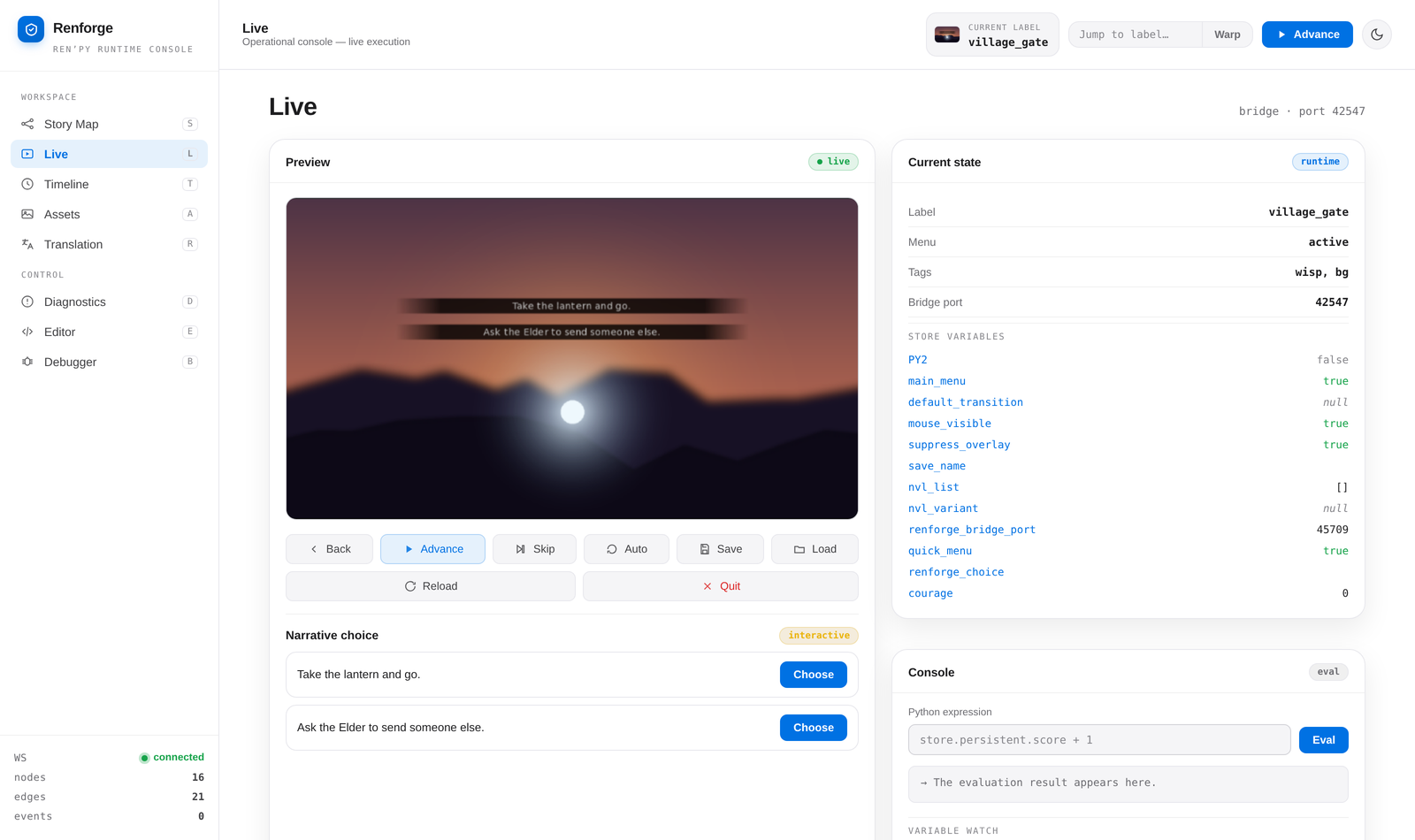
- Live game control — launch a project with an injected in-game bridge, then advance dialogue, list/select choices, evaluate expressions, get/set store variables, send focused text/key/scroll input, poll pushed events, and capture frames the model can literally see.
- Autopilot — auto-play the game across branches and report label coverage and crashes.
- Assets & translations — find orphaned/missing image+audio assets, list
languages, compute translation stats, generate/update
game/tl/<lang>/files, export dialogue as text. - Builds — package desktop distributions and web builds.
- Docs — search and read Ren'Py's offline documentation.
- Web dashboard — Starlette + WebSocket UI with a live story map, activity log, autopilot coverage, lint view, and game-state controls.
Quick start
Requires Python 3.11+. With uv installed, no setup is needed:
# Start the web dashboard
uvx --from "renforge[ui]" renforge ui
Then choose your game in the dashboard's project picker — no path to type. (Or
skip the picker with --project /path/to/your/game.)
Prefer a persistent install? pipx puts renforge on
your PATH in an isolated environment:
pipx install "renforge[ui]"
renforge ui
On managed systems (Debian/Ubuntu), plain pip install is blocked by
PEP 668 — use uvx or pipx instead.
Use with your AI agent
The complete operational reference is available in docs/MCP.md. This README keeps the installation examples below; the guide documents the full tool catalogue, safety guards, visual interaction, and troubleshooting.
The MCP server command is the same everywhere:
uvx renforge@latest serve
The @latest suffix makes uvx fetch the newest published RenForge on each
start instead of silently reusing a cached older build — so new tools land
without a manual uv cache clean. Drop it (uvx renforge serve) if you prefer
to pin whatever is already cached.
Every RenForge tool takes a project_path argument, so the agent passes your
game's path on each call — no path substitution in the configs below. Copy them
as-is. The optional --project flag on renforge serve still sets a default
project for activity logging.
| Client | Where to configure |
|---|---|
| Claude Code | claude mcp add (one command) |
| Claude Desktop | claude_desktop_config.json |
| Cursor | .cursor/mcp.json |
| Windsurf | ~/.codeium/windsurf/mcp_config.json |
| Cline | cline_mcp_settings.json |
| Gemini CLI | ~/.gemini/settings.json |
| VS Code (Copilot) | .vscode/mcp.json |
| Zed | settings.json → context_servers |
| Codex CLI | codex mcp add or ~/.codex/config.toml |
Claude Code
claude mcp add renforge -- uvx renforge@latest serve
Claude Desktop, Cursor, Windsurf, Cline, Gemini CLI
These clients share the same mcpServers JSON shape — add this to the config
file listed in the table above:
{
  "mcpServers": {
    "renforge": {
      "command": "uvx",
      "args": ["renforge@latest", "serve"]
    }
  }
}
VS Code (GitHub Copilot)
.vscode/mcp.json in your workspace:
{
  "servers": {
    "renforge": {
      "command": "uvx",
      "args": ["renforge@latest", "serve"]
    }
  }
}
Zed
In settings.json:
{
  "context_servers": {
    "renforge": {
      "source": "custom",
      "command": "uvx",
      "args": ["renforge@latest", "serve"]
    }
  }
}
Codex CLI
codex mcp add renforge -- uvx renforge@latest serve
Or edit ~/.codex/config.toml (on Windows: %USERPROFILE%\.codex\config.toml):
[mcp_servers.renforge]
command = "uvx"
args = ["renforge@latest", "serve"]
Verify it works
After configuring your client, ask the agent:
Inspect my Ren'Py project at /path/to/game
The agent should call renforge_inspect_project with that path and return a
JSON summary of the project (labels, scripts, assets, and related metadata).
Windows / GUI clients: Desktop apps (Claude Desktop, Cursor, etc.) may not inherit your shell
PATH. Ifuvxis not found, setcommandto the absolute path ofuvx(for exampleC:\Users\you\.local\bin\uvx.exe).
Don't have
uv? Runpipx install renforge, then replaceuvx renforge@latestwithrenforgein your config (andpipx upgrade renforgeto update).
Install (dev)
python -m venv .venv
source .venv/bin/activate
pip install -e .             # MCP runtime (includes fastmcp)
pip install -e ".[fastmcp]"  # alias for the base install
pip install -e ".[ui]"       # dashboard (starlette, uvicorn, watchfiles)
pip install -e ".[test]"     # pytest
The server falls back to a compatibility mode with a clear message if
fastmcp is not installed (for example after a minimal manual install).
Usage
CLI
renforge --version
renforge inspect <project>      # lightweight project summary (JSON)
renforge serve [--project .]    # start the MCP server (stdio transport)
renforge ui [--project <project>] [--port 8765]  # start the web dashboard
MCP server
renforge serve exposes the tools below to any MCP client. A subset:
renforge_inspect_project,renforge_scan_project,renforge_parse_lintrenforge_info,renforge_context(discover the project selected in the dashboard)renforge_find_references,renforge_inspect_imagerenforge_launch,renforge_jump,renforge_new_game,renforge_stoprenforge_game_state,renforge_game_state_compact,renforge_inspect_screen,renforge_advance,renforge_control,renforge_send_input,renforge_saves,renforge_list_choices,renforge_select_choice,renforge_eval,renforge_get_var,renforge_set_var,renforge_poll_events,renforge_get_errors,renforge_wait_until,renforge_screenshotrenforge_list_ui_elements,renforge_click_element,renforge_click_at,renforge_find_image_on_screenrenforge_get_displayable_bounds,renforge_position_element,renforge_diff_screenshotsrenforge_autopilotrenforge_assets,renforge_languages,renforge_translation_stats,renforge_generate_translations,renforge_export_dialoguerenforge_web_build,renforge_distributerenforge_search_docs,renforge_get_doc,renforge_list_docs
Large-project calls are bounded at the tool boundary: renforge_scan_project
accepts sections, file_glob, symbol, offset, and limit, while
renforge_game_state_compact omits the full variable store unless
variable_names or variable_prefix is requested. The original
renforge_game_state remains backward compatible. renforge_screenshot and
renforge_inspect_image accept crop coordinates plus scale for close visual
inspection without a separate image-processing script. For visual interaction,
call renforge_list_ui_elements first: it returns visible controls, bounds,
semantic text, and a frame_id. Pass that id to renforge_click_element or
renforge_click_at so a stale screenshot cannot silently produce a wrong click.
renforge_find_image_on_screen locates a local PNG/template in the current
frame and returns bounds, center, and confidence; its result also includes a
frame_id suitable for the guarded click call. Template bounds are in
coordinate_space: "screenshot"; pass that value to renforge_click_at so
Ren'Py's logical coordinates are derived correctly even when WSLg scales the
captured image.
renforge_game_state keeps its default response unchanged. Pass
include=["metrics", "audio"] to opt into compact render/cache/window metrics
and registered-channel audio state; only those two include values are accepted.
Live control
renforge_launch injects a bridge into <project>/game/ (removed on teardown)
and starts the game. If the matching dashboard is running, MCP delegates launch
to that process so it inherits the dashboard's display environment; otherwise
it launches directly. Fully headless CI should wrap direct launches with
xvfb-run.
The dashboard publishes its selected project in a per-user local runtime
registry. Agents can call renforge_info or renforge_context first instead of
guessing the game path. renforge_jump resolves a label to file:line and
restarts through Ren'Py's supported warp path; renforge_new_game starts a
fresh process at the project's start label through that same path.
GOD-mode edit and branch check
Use real labels and visible choice text from your project in this compact launch-to-diagnostics loop:
project = "/path/to/game"
renforge_launch(project_path=project)
edit game/script.rpy
renforge_control(project_path=project, action="reload_script")
renforge_wait_until(project_path=project, label="edited_label", timeout=30.0)
renforge_screenshot(project_path=project)
renforge_saves(
    project_path=project,
    action="save",
    slot="branch-a",
    extra_info="after hot reload",
)
renforge_list_choices(project_path=project)
renforge_select_choice(project_path=project, text="Branch B")
renforge_wait_until(project_path=project, label="branch_b", timeout=30.0)
renforge_get_errors(project_path=project)
renforge_screenshot returns the current frame as an image. The save call
creates a named checkpoint before selecting Branch B; use
renforge_saves(project_path=project, action="load", slot="branch-a") to return
to it. renforge_wait_until accepts exactly one of label, screen, or
expr, and timeout is capped at 120 seconds.
Web dashboard
renforge ui serves a dashboard (default 127.0.0.1:8765) with a story map,
activity log, autopilot coverage, lint view, and live game controls over
WebSocket. Pick a project from the in-app project picker, or pass
--project <project> to open one directly.
Examples
A small sample project lives in examples/demo_game/.
Architecture
src/renforge/
  cli.py            # argparse entrypoint (inspect / serve / ui)
  server.py         # MCP app bootstrap + fallback + tool registration
  bridge/           # in-game .rpy bridge, launcher, and client
  tools/
    live.py         # running-game control (launch, eval, screenshot, ...)
    project_ops.py  # assets, translations, builds, docs
    static.py       # inspect / scan / parse-lint
  ui/               # Starlette dashboard (server, ws, graph, activity, poller)
  dashboard_client.py # private display-bound delegation to the dashboard
  image_ops.py       # local/live image crop and zoom primitives
  navigation.py      # shared label and file:line warp resolution
  session_registry.py # dashboard-to-MCP active-project discovery
  symbols.py         # Ren'Py-aware token/reference lookup
  util/             # filesystem + subprocess helpers
  sdk.py            # Ren'Py SDK download/cache
  scanner.py        # script/label/asset scanning
  lint.py           # lint runner + parsing
  autopilot.py      # branch auto-play + coverage
  translation.py    # translation generation/stats
Packaging uses hatchling; the console script is
renforge = renforge.cli:main.
License
MIT
Установить RenForge в Claude Desktop, Claude Code, Cursor
unyly install renforge-mcpСтавит в Claude Desktop, Claude Code, Cursor и VS Code — сам разбирается с npx, uvx и сборкой из исходников.
Впервые? Поставь CLI: curl -fsSL https://unyly.org/install | sh
Или настроить вручную
Выполни в терминале:
claude mcp add renforge-mcp -- uvx renforgeFAQ
RenForge MCP бесплатный?
Да, RenForge MCP бесплатный — установка в пару кликов через Unyly без оплаты.
Нужен ли API-ключ для RenForge?
Нет, RenForge работает без API-ключей и переменных окружения.
RenForge — hosted или self-hosted?
Self-hosted: сервер запускается локально на твоей машине командой из раздела установки.
Как установить RenForge в Claude Desktop, Claude Code или Cursor?
Открой RenForge на unyly.org, выбери вкладку своего клиента (Claude Desktop, Claude Code, Cursor) и нажми Install — конфиг сгенерируется автоматически, без правки JSON.
Похожие MCP
Fetch
Web content fetching and conversion for efficient LLM usage.
AWS KB Retrieval
Retrieval from AWS Knowledge Base using Bedrock Agent Runtime.
 автор: modelcontextprotocol
Spring AI MCP Server
Provides auto-configuration for setting up an MCP server in Spring Boot applications.
llm-analysis-assistant
A very streamlined mcp client that supports calling and monitoring stdio/sse/streamableHttp, and can also view request responses through the /logs page. It also
 автор: xuzexin-hz
Compare RenForge with
Не уверен что выбрать?
Найди свой стек за 60 секунд
Автор?
Embed-бейдж для README
Похожее
Все в категории ai