
Reticle
БесплатноНе проверенReticle intercepts, visualizes, and profiles JSON-RPC traffic between your LLM and MCP servers in real-time, with zero latency overhead. Stop debugging blind. S

Описание
Reticle intercepts, visualizes, and profiles JSON-RPC traffic between your LLM and MCP servers in real-time, with zero latency overhead. Stop debugging blind. Start seeing everything.
README

RETICLE
The Wireshark for the Model Context Protocol (MCP)





See what your agent sees.
Reticle intercepts, visualizes, and profiles MCP JSON-RPC traffic in real time — designed for microsecond-level overhead.
Quick start · Install · Docs · Security · Contributing
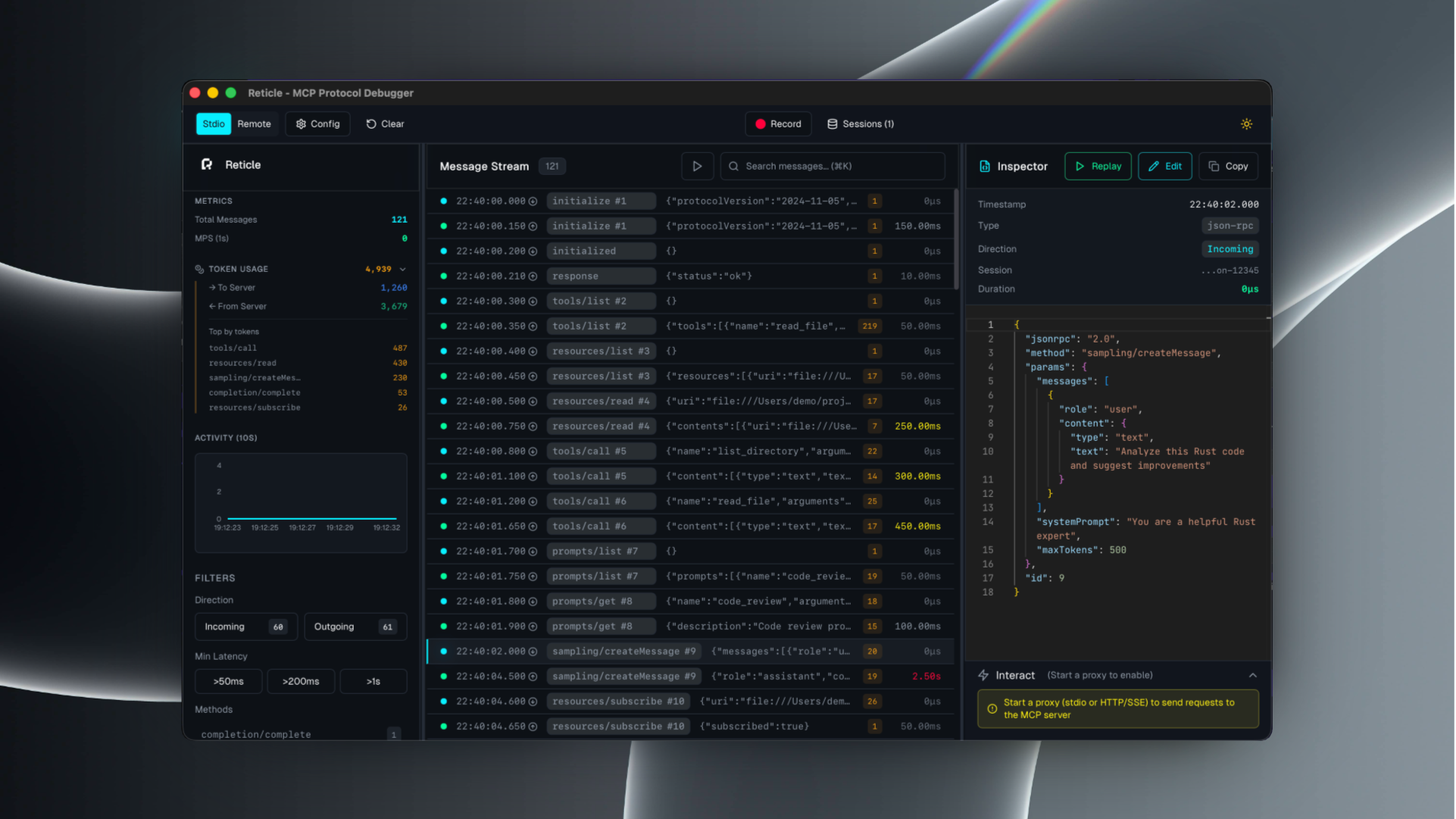
What is Reticle?
Reticle is a proxy + UI for debugging MCP integrations:
- inspect raw JSON-RPC messages (requests / notifications / responses)
- correlate request ↔ response instantly
- profile latency and token estimates
- capture server stderr and crashes
- record sessions and export logs
Supported transports: stdio, Streamable HTTP, WebSocket, HTTP/SSE.
Quick start
1) Install
# npm
npm install -g mcp-reticle

# pip
pip install mcp-reticle

# Homebrew
brew install labterminal/mcp-reticle/mcp-reticle
2) Wrap your MCP server (stdio)
Replace your MCP server command with mcp-reticle run --name <name> -- <command...>.
Example (Claude Desktop-style config):
{
  "mcpServers": {
    "filesystem": {
      "command": "mcp-reticle",
      "args": ["run", "--name", "filesystem", "--", "npx", "-y", "@modelcontextprotocol/server-filesystem", "/Users/me/work"]
    }
  }
}
3) Launch the UI
mcp-reticle ui
Optional: log-only mode (no UI)
mcp-reticle run --log -- npx -y @modelcontextprotocol/server-memory
Optional: proxy an HTTP-based MCP server
mcp-reticle proxy --name api --upstream http://localhost:8080 --listen 3001
Installation
If you prefer building from source:
git clone https://github.com/labterminal/mcp-reticle.git
cd mcp-reticle
just build
Documentation
All guides and deep dives are in the GitHub Wiki:
- Getting started
- CLI reference
- Client configuration
- Troubleshooting
- Architecture
- Security & privacy
- Development
- Exports
CLI overview
| Command | Purpose |
|---|---|
mcp-reticle run |
Wrap stdio MCP servers and inspect traffic |
mcp-reticle proxy |
Reverse proxy HTTP/SSE/WebSocket transports |
mcp-reticle ui |
Launch the desktop UI |
mcp-reticle daemon |
Headless telemetry hub |
Full details: CLI reference
Security & privacy
Reticle can capture tool inputs/outputs and server stderr. Treat recordings and exports as sensitive artifacts.
Recommended reading: Security & privacy
Contributing
- Repo guidelines:
CONTRIBUTING.md - Dev setup and commands: Development guide
License
MIT — see LICENSE.
Установка Reticle
У этого сервера нет опубликованного пакета — он собирается из исходников. Открой репозиторий и следуй инструкции в README.
▸ github.com/soth-ai/mcp-reticleFAQ
Reticle MCP бесплатный?
Да, Reticle MCP бесплатный — установка в пару кликов через Unyly без оплаты.
Нужен ли API-ключ для Reticle?
Нет, Reticle работает без API-ключей и переменных окружения.
Reticle — hosted или self-hosted?
Self-hosted: сервер запускается локально на твоей машине командой из раздела установки.
Как установить Reticle в Claude Desktop, Claude Code или Cursor?
Открой Reticle на unyly.org, выбери вкладку своего клиента (Claude Desktop, Claude Code, Cursor) и нажми Install — конфиг сгенерируется автоматически, без правки JSON.
Похожие MCP
GitHub
PRs, issues, code search, CI status
 автор: GitHub
Filesystem
Secure file operations with configurable access controls.
Memory
Knowledge graph-based persistent memory system.
Template MCP Server
A CLI tool to create a new Model Context Protocol server project with TypeScript support, dual transport options, and an extensible structure
 автор: mcpdotdirect
Compare Reticle with
Не уверен что выбрать?
Найди свой стек за 60 секунд
Автор?
Embed-бейдж для README
Похожее
Все в категории development