
Ros2
БесплатноНе проверенMCP server for AI agents to inspect and control ROS2 graphs, enabling topic listing, node info, service calls, parameter management, and pub/echo without manual

Описание
MCP server for AI agents to inspect and control ROS2 graphs, enabling topic listing, node info, service calls, parameter management, and pub/echo without manual ROS2 CLI usage.
README
Python 3.11+ Version License: MIT MCP MergeOS
ros2-mcp is an MCP (Model Context Protocol) server so AI agents (Grok, Cursor, Claude, …) can inspect and control ROS2 graphs — topics, nodes, services, TF, actions — without hand-writing every ros2 CLI call.
Product: mergeos-bounties/ros2-mcp
Install (one command)
Grok — recommended
pip install "git+https://github.com/mergeos-bounties/ros2-mcp.git" && grok plugin install mergeos-bounties/ros2-mcp --trust
This installs the Python CLI (ros2-mcp) and the Grok plugin (skill + MCP server from .mcp.json).
Check:
ros2-mcp version
ros2-mcp doctor
ros2-mcp demo
grok plugin list
grok mcp list
Local clone:
git clone https://github.com/mergeos-bounties/ros2-mcp.git
cd ros2-mcp
pip install -e ".[dev]"
grok plugin install . --trust
Other agents (stdio MCP)
After pip install "git+https://github.com/mergeos-bounties/ros2-mcp.git", point any MCP host at:
| Field | Value |
|---|---|
| command | ros2-mcp |
| args | ["serve"] |
| env | ROS2_MCP_MODE=mock |
Claude Desktop — merge examples/claude_desktop_config.json into Claude MCP config.
Cursor — merge examples/cursor_mcp.json.
Grok config.toml (manual, without plugin):
[mcp_servers.ros2_mcp]
command = "ros2-mcp"
args = ["serve"]
env = { ROS2_MCP_MODE = "mock" }
enabled = true
One-liner via Grok CLI:
pip install "git+https://github.com/mergeos-bounties/ros2-mcp.git"
grok mcp add ros2-mcp -- ros2-mcp serve
Supported AI agents / hosts
| Host | Support | Install |
|---|---|---|
| Grok (CLI / TUI / Build) | Yes | grok plugin install mergeos-bounties/ros2-mcp --trust then pip install "git+https://github.com/mergeos-bounties/ros2-mcp.git" |
| Claude Desktop | Yes | Copy examples/claude_desktop_config.json into Claude MCP settings |
| Cursor | Yes | Merge examples/cursor_mcp.json into Cursor MCP config |
| Claude Code | Yes | stdio MCP: same command/args as Claude Desktop / Grok |
| VS Code (MCP / Continue / Cline) | Yes | Generic stdio server config pointing at ros2-mcp serve |
| Windsurf / Cascade | Yes | stdio MCP entry with ros2-mcp + serve |
| Codex CLI | Yes (stdio) | Register MCP server command ros2-mcp serve in Codex MCP settings |
| ChatGPT Desktop | Partial | Only if host supports custom MCP stdio servers |
| Gemini CLI | Partial | Only if MCP stdio plugins are enabled |
All packages speak MCP over stdio (ros2-mcp serve). Default mode is mock (offline, no simulator/terminal/GIMP required).
Table of contents
- Modes
- Highlights
- Screenshots
- Quick start
- Tiếng Việt quickstart
- Docker image
- CLI reference
- MCP resources
- Logging
- MCP host config
- Diagrams
- Repository layout
- Development
- MergeOS bounties
- License
Modes
| Mode | When | Behavior |
|---|---|---|
| mock (default) | Windows / CI / no ROS2 install | Seeded turtlesim-like graph: topics, pub, echo, services, TF, actions |
| live | Host has ROS2 + CLI | Real graph via ros2 subprocess bridge (secrets redacted in logs) |
Live parameter listing is redacted by default: ros2_list_params returns
parameter names and value: "<redacted-live-value>" so MCP host transcripts
and CI logs do not accidentally capture runtime configuration. Use
ros2_get_param only when an explicit single live value read is intended.
Highlights
| Capability | Description |
|---|---|
| Offline demo | ros2-mcp demo exercises doctor, topics, pub/echo, spawn, TF, actions |
| MCP stdio serve | Plug into agent hosts as an MCP server |
| One-shot call | ros2-mcp call without a full MCP host |
| Tool list | Discover registered MCP tools |
| Lappa-friendly | Complements Lappa package IDE workflows |
Screenshots
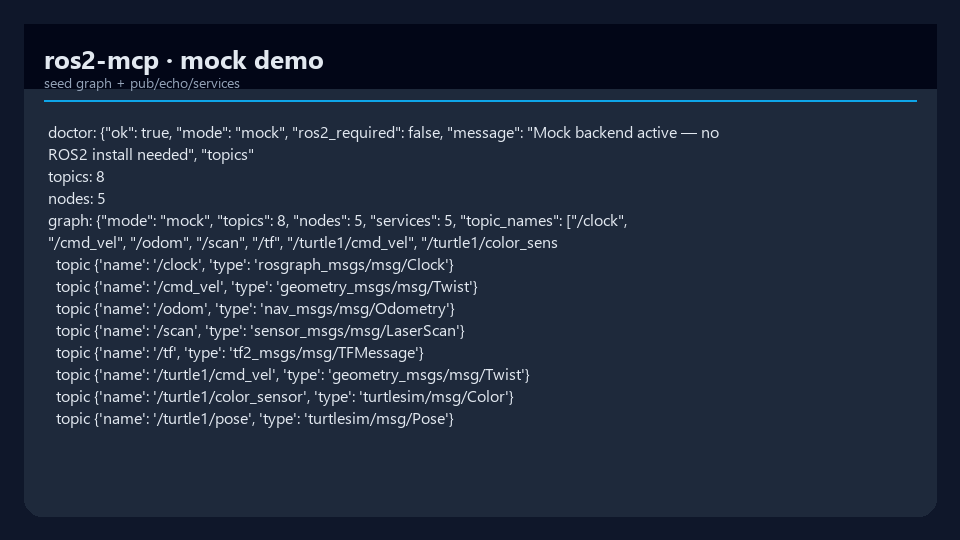
| Mock graph | Pub + echo |
|---|---|
 |
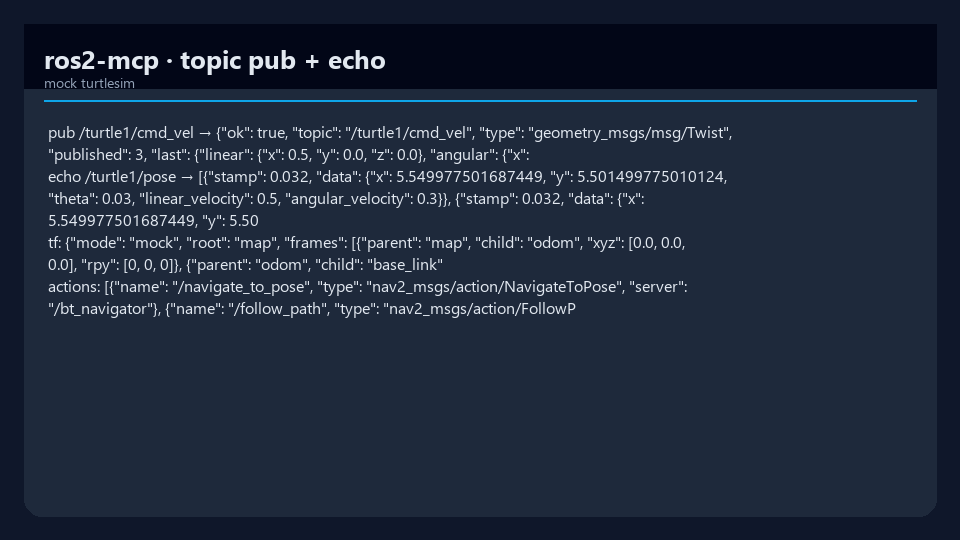 |
| Seeded graph / doctor | cmd_vel pub + pose echo |
Quick start
cd ros2-mcp
python -m venv .venv
.\.venv\Scripts\activate
pip install -e ".[dev]"

ros2-mcp version
ros2-mcp demo
ros2-mcp tools list
Mock mode needs no ROS2 install.
Tiếng Việt quickstart
ros2-mcp mặc định chạy ở mock mode, vì vậy bạn có thể thử ngay cả khi
máy chưa cài ROS2.
cd ros2-mcp
python -m venv .venv
source .venv/bin/activate
pip install -e ".[dev]"

ros2-mcp version
ros2-mcp demo
ros2-mcp tools list
Khi muốn kết nối tới hệ ROS2 thật, hãy cài và source ROS2 trên máy host rồi đặt
mode sang live:
export ROS2_MCP_MODE=live
ros2-mcp doctor
ros2-mcp serve
Nếu chỉ cần kiểm tra nhanh, hãy giữ ROS2_MCP_MODE=mock để dùng đồ thị demo
turtlesim-like có sẵn.
Docker image
Build a ROS2 Humble image with ros2-mcp installed into an isolated Python
3.11 virtual environment:
docker build -t ros2-mcp:humble .
Run the offline mock demo:
docker run --rm ros2-mcp:humble demo
Serve MCP over stdio from the container:
docker run --rm -i ros2-mcp:humble serve
For live ROS2 graphs, run on the host network and switch to live mode:
docker run --rm -i --network host \
  -e ROS2_MCP_MODE=live \
  -e ROS_DOMAIN_ID="${ROS_DOMAIN_ID:-0}" \
  ros2-mcp:humble serve
The entrypoint sources /opt/ros/humble/setup.bash before invoking
ros2-mcp, so ROS2 CLI tools are available to live-mode backend calls.
CLI reference
| Command | Purpose |
|---|---|
ros2-mcp version |
Version + mode |
ros2-mcp demo |
Offline smoke of core backend APIs |
ros2-mcp serve |
MCP server over stdio (for hosts) |
ros2-mcp serve --verbose |
Same, plus structured JSON tool-call logs on stderr |
ros2-mcp call … |
One-shot tool call (mock/live) |
ros2-mcp tools list |
List MCP tools |
# MCP for Cursor / Claude / Grok-compatible hosts
ros2-mcp serve

# With structured tool-call logging (JSON to stderr)
ros2-mcp serve --verbose
MCP resources
In addition to tools, the server exposes an MCP resource template so hosts can read a topic snapshot as addressable content instead of calling a tool.
| URI | Returns |
|---|---|
topic://<topic_name> |
JSON snapshot: type, publishers, subscribers, backend mode, and the last buffered messages (up to 5) for the topic |
The snapshot is served by the active backend (mock or live), so it reflects the
same graph the ros2_* tools operate on. The leading slash is optional and
normalized internally (topic://clock and topic:///clock resolve to /clock).
// read: topic://clock
{
  "ok": true,
  "uri": "topic://clock",
  "topic": "/clock",
  "type": "rosgraph_msgs/msg/Clock",
  "publishers": ["/mock_clock"],
  "subscribers": [],
  "mode": "mock",
  "messages": [{ "stamp": 0.025, "data": { "sec": 0, "nanosec": 0 } }]
}
Note: the MCP SDK's URI-template matcher binds a single path segment, so a namespaced topic containing
/(e.g./turtle1/pose) is fully supported when the resource is invoked directly but cannot be addressed through a literaltopic://URI read. Useros2_topic_echofor namespaced topics via the host.
Logging
ros2-mcp serve emits structured JSON logs to stderr only. This is deliberate: the MCP stdio transport uses stdout for the JSON-RPC protocol stream, so any log written to stdout would corrupt the protocol and break the host connection. All logging goes to stderr, leaving stdout clean for MCP.
| Flag | Level | What you get |
|---|---|---|
ros2-mcp serve |
INFO | Lifecycle only: one serve_start record (transport, mode, tool count, version) |
ros2-mcp serve --verbose (-v) |
DEBUG | Per-tool-call records: tool_call_start, tool_call (with duration_ms, status), and tool_call_error (with traceback) on failure |
Each record is a single JSON line, easy to pipe into a log collector:
{"ts": 1712345678.9, "level": "DEBUG", "logger": "ros2_mcp", "msg": "tool_call", "tool": "ros2_list_topics", "duration_ms": 1.42, "status": "ok"}
Capture logs without touching the protocol stream by redirecting stderr:
ros2-mcp serve --verbose 2> ros2-mcp.log
MCP host config
Example stdio server entry (adjust path to your venv):
{
  "mcpServers": {
    "ros2-mcp": {
      "command": "ros2-mcp",
      "args": ["serve"],
      "env": {
        "ROS2_MCP_MODE": "mock"
      }
    }
  }
}
Set ROS2_MCP_MODE=live only on machines with a working ROS2 environment.
Diagrams
System architecture and workflow — full width. Open the HTML files for dark/light theme and export (PNG/SVG).
Architecture

Workflow

Generated with archify.
Repository layout
AI agent (MCP host)
        │ stdio
        ▼
   ros2-mcp server
        │
   ┌────┴────┐
   │ mock    │  seeded graph (CI / Windows)
   │ live    │  ros2 CLI subprocess bridge
   └─────────┘

src/ros2_mcp/
  cli.py
  backend/     # mock + live backends
  server.py    # FastMCP tools
docs/screenshots/
docs/diagrams/
Development
pytest -q
ruff check src tests
ros2-mcp demo
Live mode tests should mock subprocesses — CI must not require a ROS2 distro.
MergeOS bounties
Tools for actions/TF, live parsers, Lappa HTTP bridge, publish allowlists.
Star → claim → PR master → MRG 25–200. Evidence: CLI logs / MCP host config snippets (redact secrets).
License
MIT · MergeOS / ThanhTrucSolutions
Configuration
See MCP_HOST_CONFIG.md for Claude/Cursor setup.
Установка Ros2
У этого сервера нет опубликованного пакета — он собирается из исходников. Открой репозиторий и следуй инструкции в README.
▸ github.com/mergeos-bounties/ros2-mcpFAQ
Ros2 MCP бесплатный?
Да, Ros2 MCP бесплатный — установка в пару кликов через Unyly без оплаты.
Нужен ли API-ключ для Ros2?
Нет, Ros2 работает без API-ключей и переменных окружения.
Ros2 — hosted или self-hosted?
Self-hosted: сервер запускается локально на твоей машине командой из раздела установки.
Как установить Ros2 в Claude Desktop, Claude Code или Cursor?
Открой Ros2 на unyly.org, выбери вкладку своего клиента (Claude Desktop, Claude Code, Cursor) и нажми Install — конфиг сгенерируется автоматически, без правки JSON.
Похожие MCP
Fetch
Web content fetching and conversion for efficient LLM usage.
AWS KB Retrieval
Retrieval from AWS Knowledge Base using Bedrock Agent Runtime.
 автор: modelcontextprotocol
Spring AI MCP Server
Provides auto-configuration for setting up an MCP server in Spring Boot applications.
llm-analysis-assistant
A very streamlined mcp client that supports calling and monitoring stdio/sse/streamableHttp, and can also view request responses through the /logs page. It also
 автор: xuzexin-hz
Compare Ros2 with
Не уверен что выбрать?
Найди свой стек за 60 секунд
Автор?
Embed-бейдж для README
Похожее
Все в категории ai